Kept

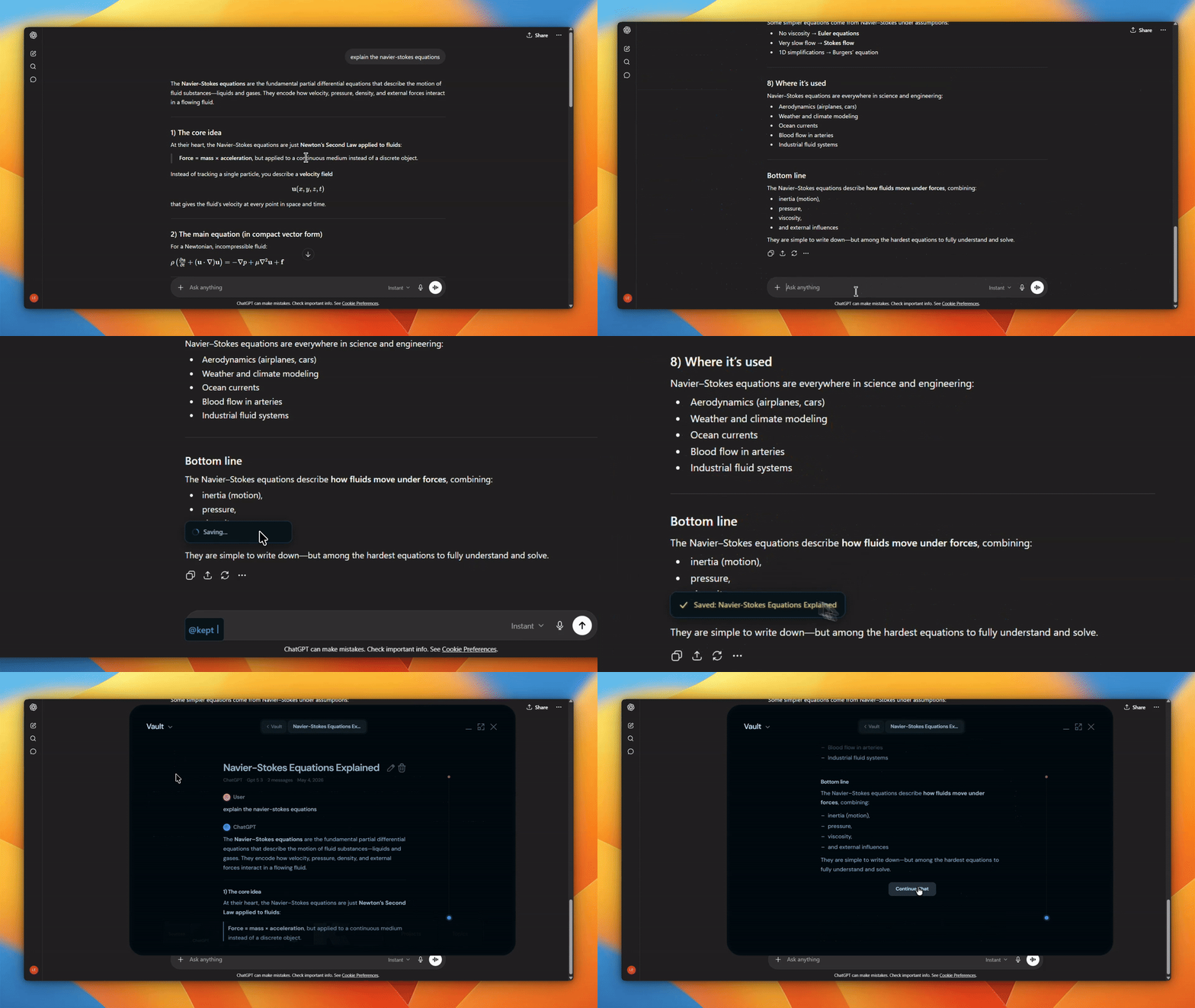
Kept saves your AI conversations as local Markdown files, then gives you a desktop app to search, browse, connect, and reuse them.
It works with ChatGPT, Claude, Gemini, Grok, and Kimi. Your archive lives on your machine under ~/.kept/, with an Obsidian-compatible vault plus local indexes for full-text search, topics, projects, and graph views.
Quick Install | Download | Setup | Build from source | MCP server
Why Kept
AI chats often become working memory: debugging trails, research notes, product decisions, prompts, snippets, and half-finished ideas. Most of that history stays inside vendor UIs.
Kept turns it into files you own.
- Plain Markdown, grouped by provider.
- Fast local search with SQLite FTS5.
- Graph and topic views for finding connections across old conversations.
- Optional chat over your own archive using the model provider you configure.
- An MCP server so coding agents can read, search, and manage the vault.
How It Works
Chromium browser extension
  -> reads conversations from provider API endpoints using your signed-in session
  -> normalizes messages and supported image assets
  -> sends them to the Kept desktop app on http://localhost:18241

Kept desktop app
  -> writes Markdown files to ~/.kept/vault/
  -> indexes content in SQLite
  -> builds a local knowledge graph in CozoDB
  -> exposes search, graph, project, export, and agent tools

MCP server
  -> lets Claude Code, OpenClaw, and other MCP clients work with the vault
Kept does not scrape rendered chat pages. The extension syncs conversation data from provider API responses and hands the normalized payload to the local app.
Supported Providers
| Provider | Sync | Notes |
|---|---|---|
| ChatGPT | Yes | Full conversations, streaming history, branch-aware saves |
| Claude | Yes | Full conversations and streaming history |
| Gemini | Yes | Best effort; Google's API format changes often |
| Grok | Yes | Includes supported image assets |
| Kimi | Yes | Uses the Kimi auth helper included in the extension |
Provider APIs are private and can change without notice. Kept keeps the archive as plain files so your saved conversations stay readable even if an adapter needs an update.
Quick Install
Windows PowerShell:
irm https://kept.work/install.ps1 | iex
macOS and Linux:
curl -fsSL https://kept.work/install.sh | bash
The installer downloads the latest GitHub Release, installs the desktop app, and extracts the Chromium extension to a local folder. Browsers still require you to load the extension manually in Developer Mode.
The same scripts can be run directly from GitHub:
irm https://raw.githubusercontent.com/egroup-labs/kept.work/main/scripts/install.ps1 | iex
curl -fsSL https://raw.githubusercontent.com/egroup-labs/kept.work/main/scripts/install.sh | bash
Download
Desktop builds are published on GitHub Releases.
Current release targets:
- macOS Apple Silicon:
.dmg - Windows x64: NSIS
.exeinstaller - Linux x64:
.deband.AppImage
The release also includes the Chromium extension package. Until the Web Store listing is live, install the extension in developer mode.
Setup
1. Install The Desktop App
Use the Quick Install command above, or download the build for your OS from Releases, install it, and launch Kept.
On first launch, Kept creates:
~/.kept/
  vault/
  index.db
  kg.db/
  config.toml
  token
The app also starts a local server on http://localhost:18241. The browser extension uses this local server to send conversations into the vault.
2. Load The Browser Extension
Kept supports Chromium-based browsers: Chrome, Brave, Edge, Vivaldi, Arc, Opera, and Chromium.
- Extract the extension from the release, or use
extension/from this repo. - Open your browser's extensions page, for example
chrome://extensions. - Enable Developer Mode.
- Click Load unpacked.
- Select the
extension/directory.
3. Connect The Extension
With the Kept app running, open this page in the same browser:
http://localhost:18241/connect
That page gives the extension its per-install token. After that, use the extension popup or Kept onboarding flow to sync your providers.
Vault Layout
Kept writes conversations as Markdown with YAML frontmatter:
~/.kept/vault/
  chatgpt/
    2026-05-02_optimizing-cuda-kernel.md
  claude/
    2026-05-02_kept-readme-draft.md
  gemini/
  grok/
  kimi/
You can open ~/.kept/vault/ directly in Obsidian, VS Code, or any editor. The files are the source of truth; the search and graph databases can be rebuilt from them.
MCP Server
mcp/ is an MCP server named kept-vault-server. It lets agentic clients list, read, write, search, rename, and delete files in your Kept vault.
Inside Claude Code:
/plugin marketplace add egroup-labs/kept.work
/plugin install kept-vault@kept-plugins
One-line installer for Linux and macOS:
bash <(curl -fsSL https://raw.githubusercontent.com/egroup-labs/kept.work/main/scripts/install-kept-mcp.sh)
PowerShell:
& ([scriptblock]::Create((irm https://raw.githubusercontent.com/egroup-labs/kept.work/main/scripts/install-kept-mcp.ps1)))
Set KEPT_VAULT_PATH if your vault is not at ~/.kept/vault.
Tools exposed by the server:
list_vaultlist_directoryread_filewrite_fileupdate_filedelete_filemove_filegrep_vault
Build From Source
Requirements:
- Node.js 20+
- Rust toolchain
- A Chromium-based browser
- Optional: Ollama for local models and embeddings
git clone https://github.com/egroup-labs/kept.git
cd kept/app
npm ci
npm run tauri dev
Linux Dependencies
Ubuntu/Debian:
sudo apt install -y \
  build-essential clang libclang-dev pkg-config \
  libgtk-3-dev libwebkit2gtk-4.1-dev libsoup-3.0-dev \
  libpango1.0-dev libcairo2-dev libgdk-pixbuf-2.0-dev libglib2.0-dev
build-essential, clang, and libclang-dev are required for Rust crates that
use bindgen (e.g. zstd-sys pulled in by CozoDB). The rest are the GTK /
WebKitGTK / GLib stack Tauri 2 links against.
Then run:
npm run tauri:dev:linux
Frontend-Only Mode
You can run the UI against mock data without the Rust app:
cd app
npm ci
npm run dev
Vite serves the UI at http://localhost:1420.
Repository Layout
app/                Tauri 2 desktop app
  src/              React frontend
  src-tauri/        Rust backend, Axum server, vault, search, graph, agent tools
extension/          Chromium extension
  platforms/        Provider sync adapters
mcp/                MCP server for the vault
scripts/            App and MCP install scripts
Privacy And Security
- Core archive and search data stays on your machine in
~/.kept/. - The extension talks to the desktop app over
localhostand must include the bearer token stored at~/.kept/token. - Kept has no hosted account and no cloud sync.
- Optional chat, topic discovery, and graph features call only the model provider you configure, or your local Ollama server.
- The updater checks the configured Kept update endpoint for new desktop releases.
Contributing
Issues and pull requests are welcome. Conventional commits are preferred:
feat(scope): add ...
fix(scope): repair ...
Useful areas to start:
extension/platforms/for provider adaptersapp/src-tauri/src/vault.rsfor vault writesapp/src-tauri/src/db.rsfor search indexingapp/src-tauri/src/kg-gen/for graph generationmcp/src/for MCP vault tools
License
MIT