
KaaS — Knowledge as a Service
English · 中文





Turn scattered notes, documents, and transcripts into a searchable, queryable personal Wiki — powered by LLM-driven knowledge compilation.
Documentation · Quick Start · MCP access
What Makes This Different
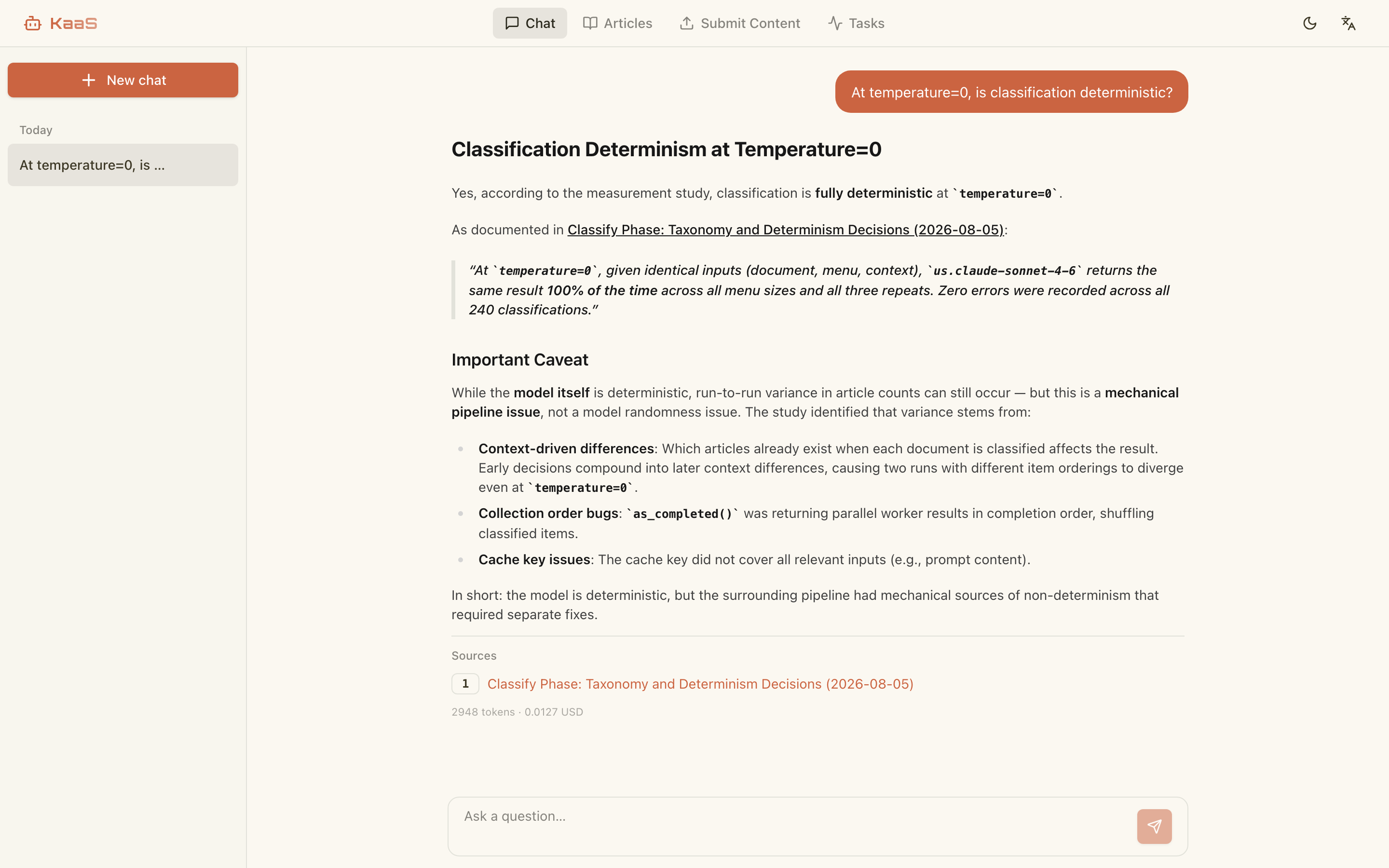
Unlike typical RAG systems that chunk and embed raw text, KaaS compiles your content through a 4-phase LLM pipeline. What comes out is human-readable Markdown articles — not a black-box vector store.
The Compiled Wiki
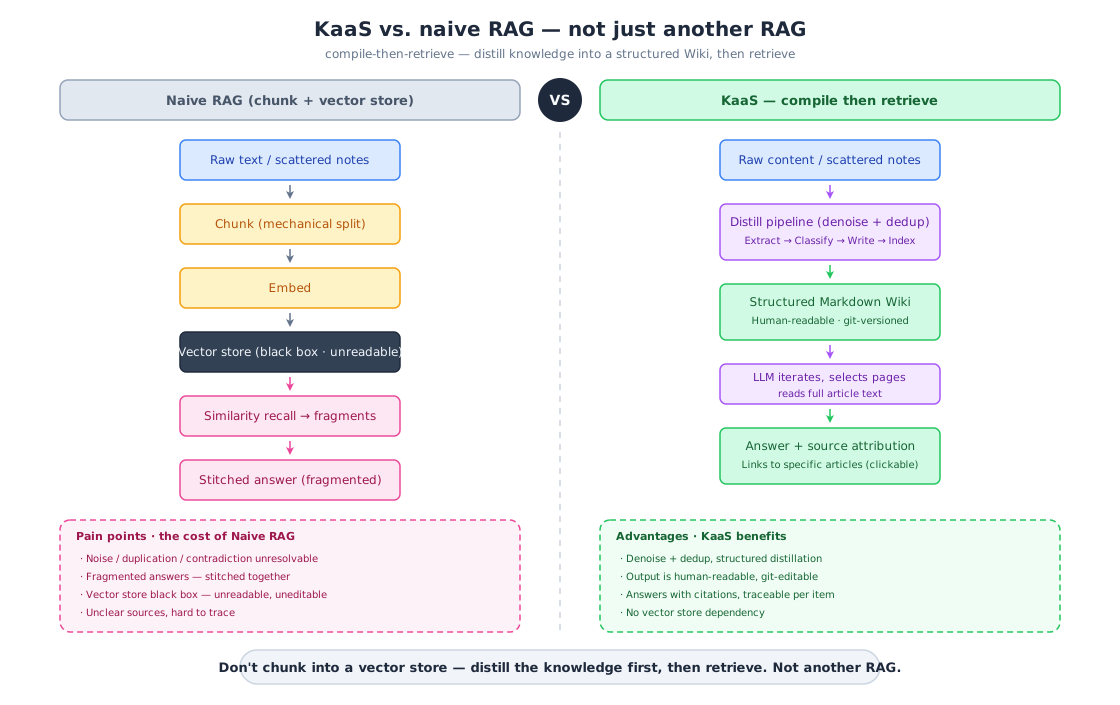
What you get is a tree of Markdown articles: categories on the left, the rendered article in the middle, its headings down the right. Chat answers cite these articles by name, so an answer and the page it came from are one click apart.
How It Works
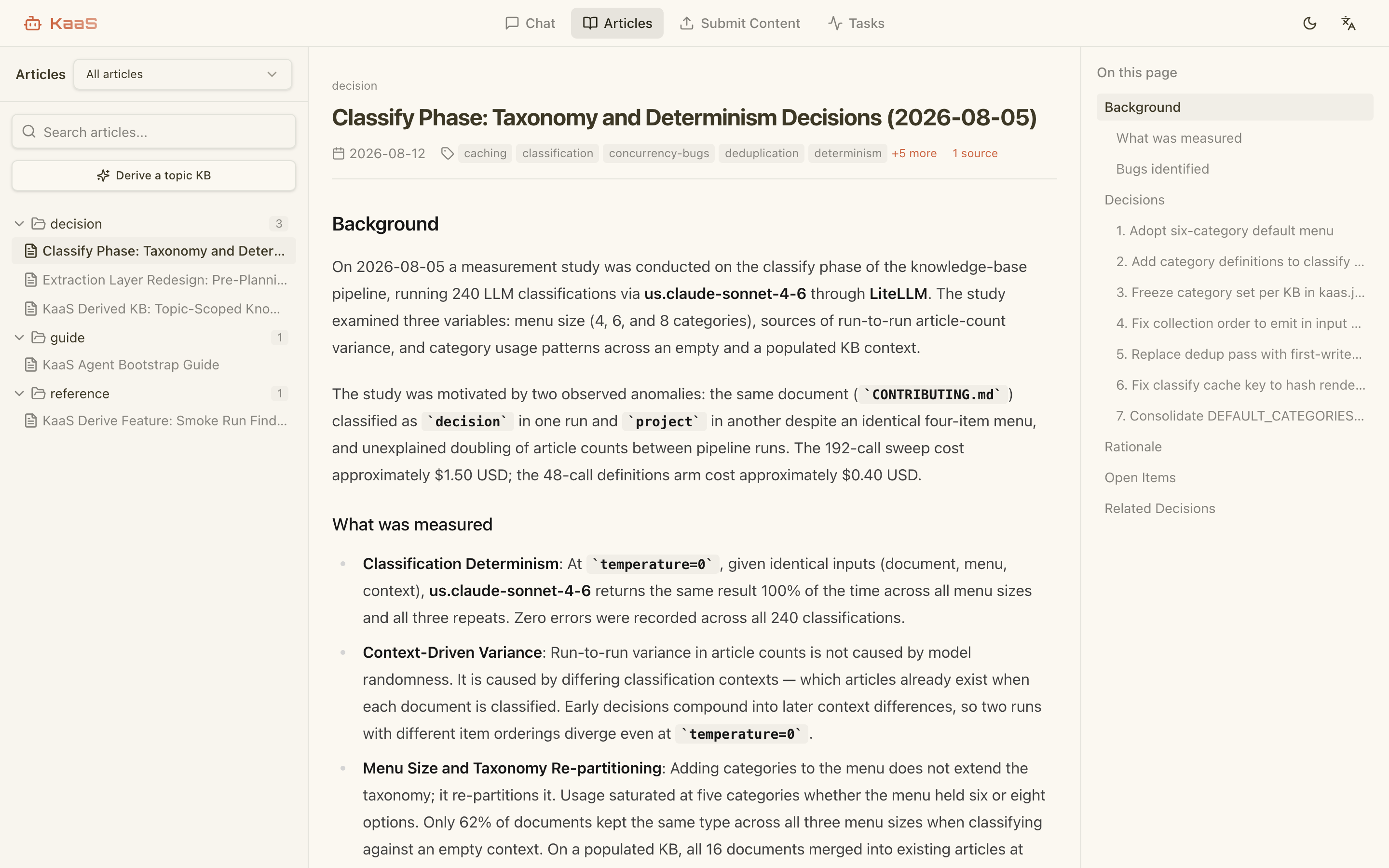
Raw content passes through four LLM phases: extract concepts, entities and decisions; classify them into articles; write or merge the Markdown; update the indexes. Retrieval then reads whole pages rather than embedded fragments — the LLM walks the master index, picks the articles it needs, and answers from their full text.
Why We Built This
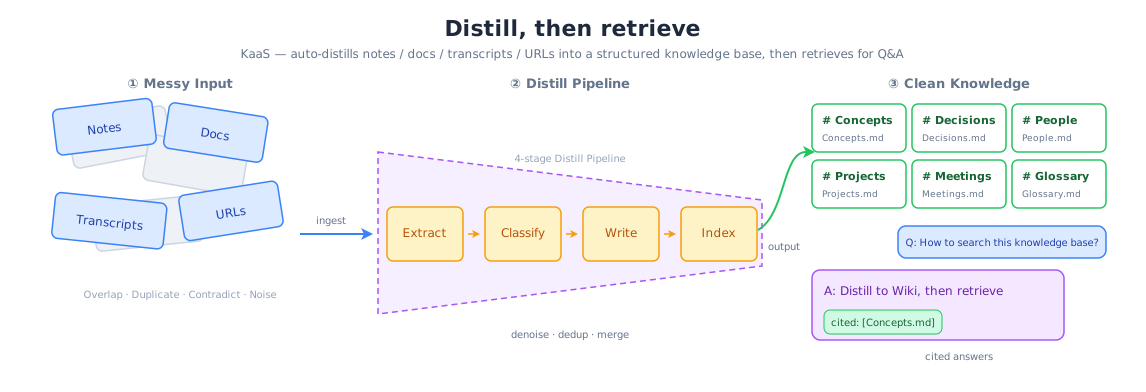
KaaS started as an internal tool. Our knowledge lived scattered across documents, meetings, and email — and every time someone changed roles or left, the context they'd built up walked out with them. New people spent weeks piecing it back together.
A distillation pipeline fixed that. It compiles each person's scattered material into a wiki tied to their role rather than their identity — so when someone moves on, the raw data goes but the distilled judgment stays for whoever fills the seat next.
The payoff is the same either way: the organization stops re-answering the same questions. That's what convinced us it was worth open-sourcing.
Quick Start
KaaS calls LLMs through any OpenAI-compatible API (OpenAI, DeepSeek, Ollama, vLLM, Azure OpenAI, etc.). Pick one of the three paths below.
Option A: Your AI agent
Already living in a coding agent (Claude Code, Codex, openclaw, …)? Give it this repository's URL and ask for what you want — it can do the whole setup. Or paste this to save it a step:
Set up KaaS to build a queryable knowledge base from my files.
Fetch https://raw.githubusercontent.com/bybit-exchange/kaas/main/docs/agent-quickstart.md
and follow it exactly.
If you are an AI agent reading this: fetch
docs/agent-quickstart.mdand follow that instead of the shell snippets below. It routes the three things users ask for — build a wiki from their files, run the full service with the web UI, or point yourasktool at a KaaS that already exists — and marks where to stop and ask them.
That snippet asks for one specific outcome: the AI engine and a queryable wiki, no web UI. Ask your agent for the web UI instead and the runbook sets up the full service — which is the same ground Options B and C cover, written for a human to run by hand.
Option B: Docker
docker run -d --name kaas \
  -p 8080:8080 \
  -v ./data:/app/data \
  -e LLM_API_KEY=sk-xxx \
  -e LLM_BASE_URL=https://api.openai.com/v1 \
  -e LLM_MODEL=gpt-4o-mini \
  ghcr.io/bybit-exchange/kaas:edge
Prebuilt for linux/amd64 and linux/arm64. edge tracks main. From the
first stable release there will also be version tags and latest — pin a
version for anything you actually depend on. To build from source instead:
docker build -t kaas .
Option C: CLI install
# Install (Linux amd64/arm64, macOS arm64)
curl -fsSL https://raw.githubusercontent.com/bybit-exchange/kaas/main/install.sh | sh

# Start the service
export PATH="$HOME/.kaas:$PATH"                     # where the installer put the binary
export LLM_API_KEY="sk-xxx"                         # OpenAI-compatible API key
export LLM_BASE_URL="https://api.openai.com/v1"     # API endpoint
export LLM_MODEL="gpt-4o-mini"                      # Model name
kaas serve                                          # Default: http://localhost:8080
Supported platforms: Linux amd64/arm64 and macOS arm64 (Apple Silicon); there is
no darwin/amd64 build, so Intel Macs need Option A or B. The binary is symlinked into
~/.kaas, which the installer will tell you to add to PATH. Uninstall:
rm -rf ~/.local/share/kaas ~/.kaas/kaas.
After it starts (Options B and C)
LLM_BASE_URL defaults to https://api.openai.com/v1 and LLM_MODEL defaults to
gpt-4o-mini. Change them to point at any OpenAI-compatible endpoint, then open
http://localhost:8080.
Running from a checkout instead of a release? See Development.
Enable remote MCP (optional)
To let Claude Code or other MCP clients connect to the knowledge base, set
KAAS_MCP_ENABLED=true. Environment variables override kaas.toml on every
start, so this works for both Docker and kaas serve:
docker run -d --name kaas \
  -p 8080:8080 \
  -v ./data:/app/data \
  -e LLM_API_KEY=sk-xxx \
  -e KAAS_MCP_ENABLED=true \
  -e KAAS_MCP_TOKEN=your-secret-token \
  ghcr.io/bybit-exchange/kaas:edge
MCP client URL: http://<host>:8080/mcp, Authorization: Bearer your-secret-token.
Architecture
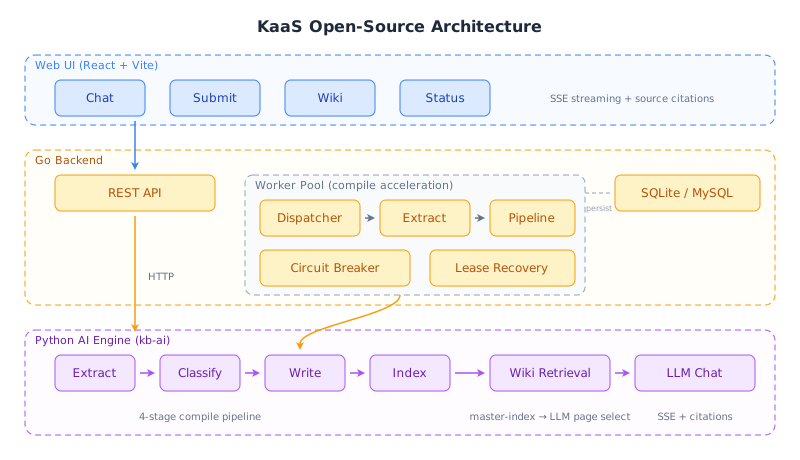
| Layer | Tech | Purpose |
|---|---|---|
| Web UI | React + Vite + shadcn/ui | Chat, Submit, Wiki, Status |
| Backend | Go (net/http + go-zero/conf) | REST API, Worker Pool, Task Queue, MCP endpoint |
| AI Engine | Python (kb-ai daemon) | LLM Compile Pipeline, LLM-iterative retrieval, Chat |
| Storage | SQLite (default) / MySQL | Job queue, compile state |
| Retrieval | LLM iterative | master-index → LLM page selection → full-article context (no embeddings) |
The Go backend spawns the Python AI engine as a long-running daemon process, communicating via a multiplexed stdin/stdout protocol. A single Docker image bundles everything — no sidecar containers needed.
Features
- Readable articles: what you query is pages, not ranked fragments — see How It Works for the four phases that produce them
- Answers you can check: every chat reply cites the wiki articles behind it, so you can open the source and disagree with it (streamed over SSE)
- A knowledge base you own: articles are plain Markdown on disk — read them, hand-edit them, commit them, review a diff
- Adding one document costs one document: compiles are incremental against a content checksum, so a new note doesn't re-pay for the corpus you already compiled
- A long run survives its own failures: extract and pipeline work runs concurrently; tasks are leased, so a worker that dies mid-compile has its work reclaimed rather than lost, and repeated LLM failures trip a breaker instead of burning spend
- Text, a file, or a URL: paste it, upload it, or point KaaS at a page
- Reachable from your editor: any MCP-capable coding agent queries the compiled wiki through a single
asktool
MCP Access
Expose the compiled wiki to any Model Context Protocol
client (Claude Code, Codex, openclaw, …) through a single ask tool —
ask(query, paths?, model?) returns a cited Markdown answer grounded in the
wiki. Two transports:
stdio (local — the agent spawns the server, fully self-contained):
# The agent launches this; set KAAS_KB_DIR to the knowledge-base root and
# the LLM_* credentials in the environment.
kb-ai mcp                       # stdio is the default transport
# Claude Code:
claude mcp add kaas -- kb-ai mcp
For Codex / openclaw, add a stdio MCP server with command kb-ai mcp and env
KAAS_KB_DIR + LLM_*.
streamable-http (remote — published through the backend's :8080 origin):
Run the container with KAAS_MCP_ENABLED=true (see Quick Start).
The backend exposes the MCP endpoint at /mcp. Point a remote agent at it:
# Claude Code:
claude mcp add --transport http kaas http://host:8080/mcp
Set KAAS_MCP_TOKEN to require Authorization: Bearer <token> on the HTTP
transport (off by default — local/intranet assumption). stdio has no network
surface and is unauthenticated.
Configuration
All configuration lives in etc/kaas.toml. Copy and edit it:
[llm]
api_key = "sk-..."
base_url = "https://api.openai.com/v1"
model = "gpt-4o-mini"

[ai.mcp]
enabled = false          # set true to expose /mcp endpoint
token = ""               # bearer token for MCP auth (empty = no auth)
timeout_sec = 120        # tools/call timeout
With Docker or the CLI, pass secrets as environment variables — they override the TOML at startup:
| Env Var | Overrides | Default |
|---|---|---|
LLM_API_KEY | [llm] api_key | (empty) |
LLM_BASE_URL | [llm] base_url | https://api.openai.com/v1 |
LLM_MODEL | [llm] model | gpt-4o-mini |
LLM_SUMMARIZE_MODEL | [llm] summarize_model | same as model |
KAAS_MCP_ENABLED | [ai.mcp] enabled | false |
KAAS_MCP_TOKEN | [ai.mcp] token | (empty = no auth) |
KAAS_WEB_DIR | [server] web_dir | /app/web/dist (in Docker) |
KAAS_AI_MCP_URL | [ai] mcp_url | (deprecated — use KAAS_MCP_ENABLED) |
The docs site has a full configuration reference covering the settings not listed here.
Development
The quickest way to start all services locally:
# First time: create your local config (not tracked by git)
cp etc/kaas.toml etc/kaas-dev.toml
# Edit etc/kaas-dev.toml — set your LLM credentials:
#   [llm]
#   api_key = "sk-..."
#   base_url = "https://api.openai.com/v1"   # or your preferred endpoint
#   model = "gpt-4o-mini"

make dev
This launches the Go backend (which auto-spawns the Python AI daemon) and the Vite dev server together.
To run components individually:
# Backend (spawns Python daemon automatically)
go run ./cmd/kaas -f etc/kaas.toml

# Frontend (hot-reload)
cd web && pnpm dev

# MCP server (stdio — for local agent integration)
cd py && KAAS_KB_DIR=./data uv run kb-ai mcp

# Tests
make test
Contributing
Contributions are welcome — see CONTRIBUTING.md for dev setup, how to run the tests, and commit conventions.
Acknowledgments
The core idea — compiling knowledge into a persistent, interlinked wiki that compounds over time instead of re-deriving answers via RAG on each query — was inspired by Andrej Karpathy's "LLM Wiki" gist. Thanks for the clear articulation of the pattern.
License
MIT — see LICENSE.