K-Dense BYOK






📅 Join our free live event: Getting Started with K-Dense BYOK
An online walkthrough of installing Kady and running your first research task, with live Q&A. Tuesday, August 25, 2026 · 2:00 PM PT (9:00 PM UTC) · Online
Your own AI research assistant, running on your computer, powered by the accounts and API keys you choose.
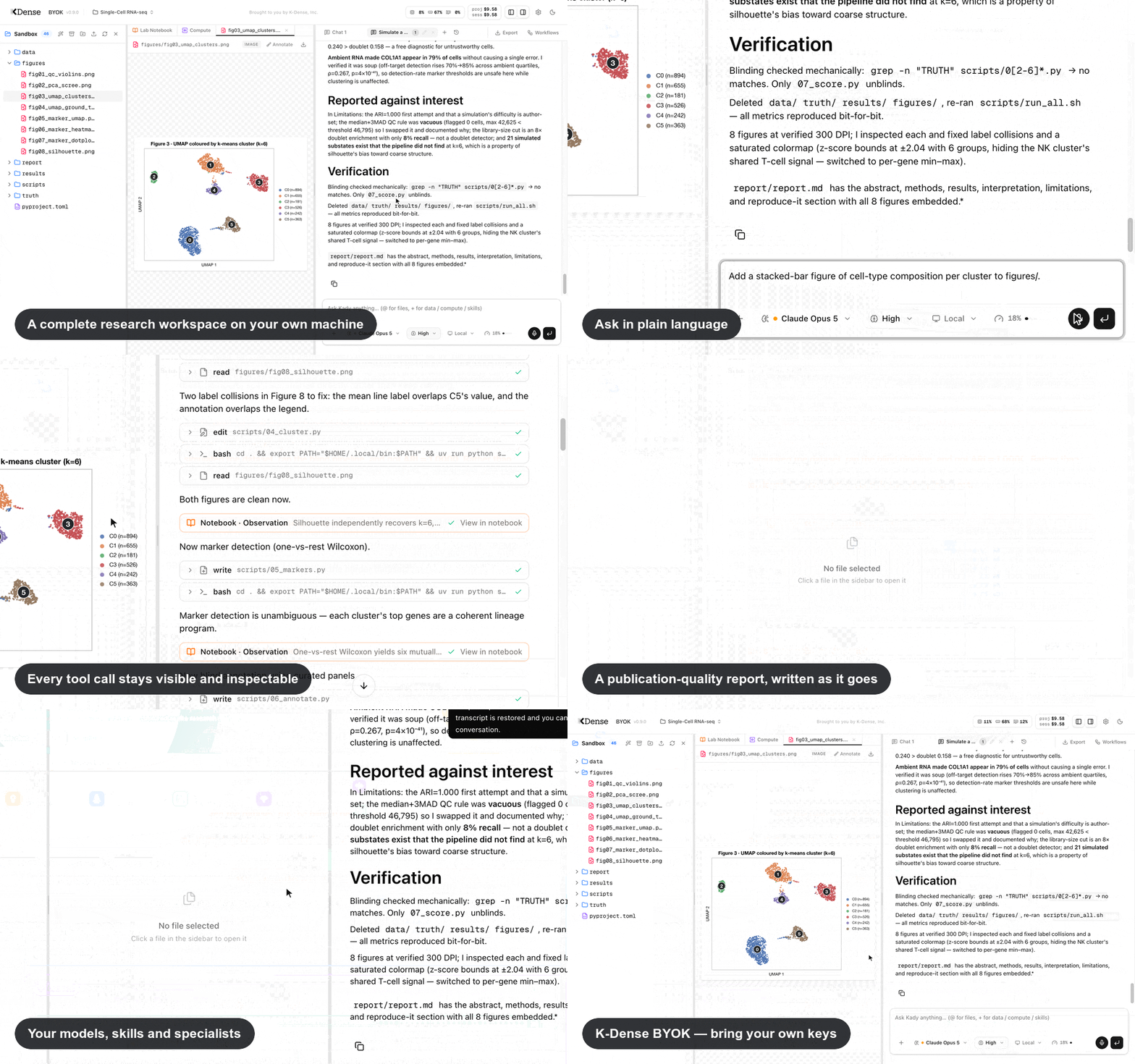
K-Dense BYOK (Bring Your Own Keys) is a free, open-source app that gives you Kady — an AI research assistant for scientists in any field. Describe a task in plain language — analyze this dataset, review my manuscript, search the literature, build this figure — and Kady works through it in a complete research workspace. It can inspect your files, write and run analysis code, search and read sources, create figures and reports, and keep a living record of what it did.
Three things to know up front:
- No coding experience required. You describe what you want; Kady writes and runs the code and shows you its progress as it works.
- Your workspace stays on your computer. Projects, conversations, notebooks, and results live in ordinary folders on your machine; K-Dense does not host or store them. When you use a hosted AI model, the material needed for that request is sent directly to the provider you selected under that provider's privacy terms. Use a local Ollama model when data must not leave your machine.
- The app itself is free; provider charges and limits remain yours. Use prepaid OpenRouter, connect a supported AI subscription, or run free local models. Kady tracks paid OpenRouter usage and Anthropic OAuth's documented metered extra usage against project spending caps. ChatGPT, Copilot, and xAI subscription usage is tracked separately because those providers manage quotas and overages; a subscription login does not imply unlimited or free usage.
Beta: K-Dense BYOK is currently in beta. Many features and improvements are on the way. Star us on GitHub to stay in the loop, and follow K-Dense on X, LinkedIn, YouTube, and Reddit for release notes and tutorials.
🎬 Prefer to watch first? The Future of Research is Open: Introducing K-Dense BYOK walks through what the app does and how to get set up. More walkthroughs in Tutorial videos.
Internal benchmark
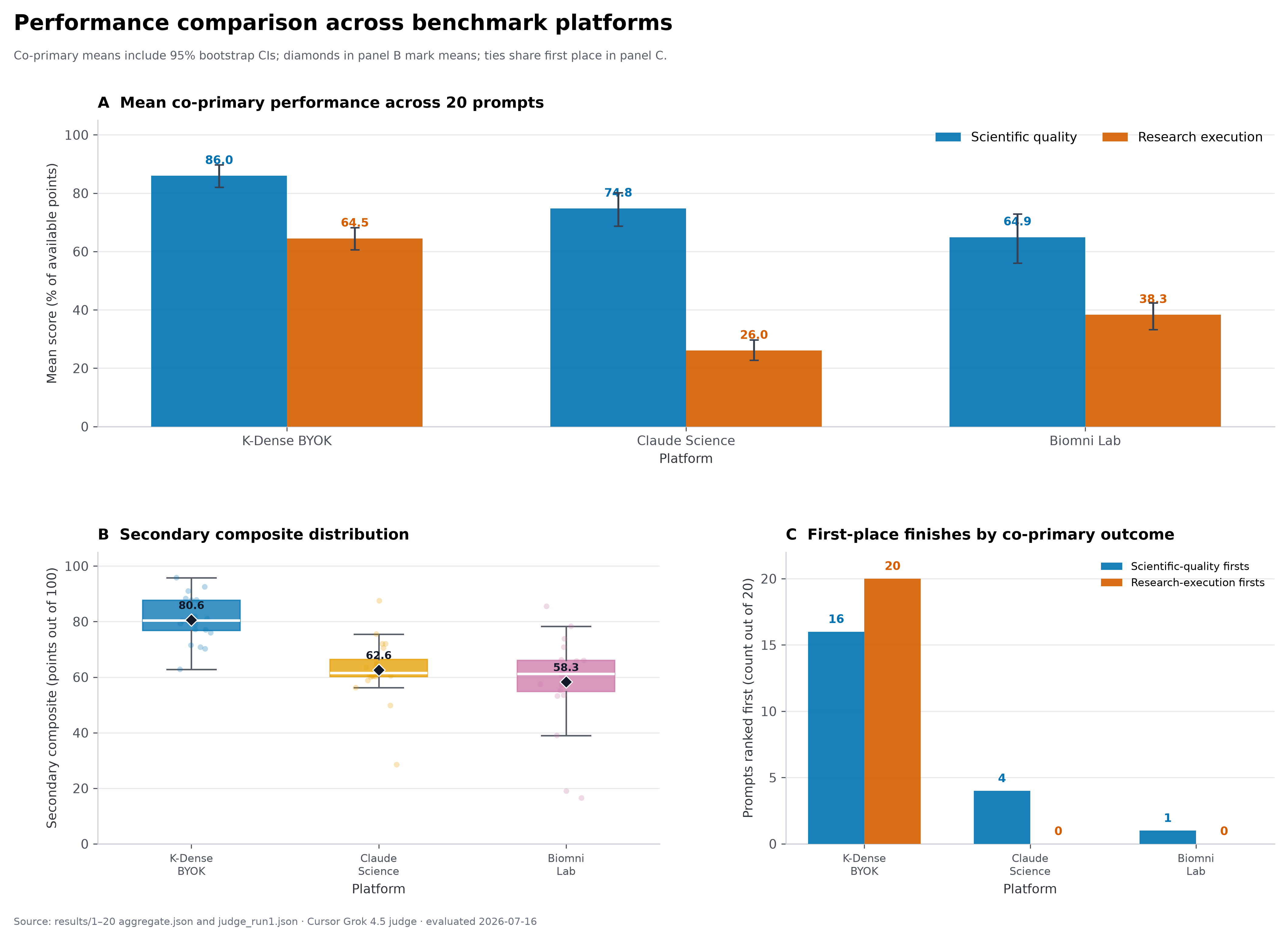
This figure compares K-Dense BYOK, Claude Science, and Biomni Lab across scientific quality and research execution in a 20-prompt benchmark. For these runs, K-Dense BYOK was configured to use Claude Opus 4.8 with the xHigh reasoning level. The benchmark was designed, run, and evaluated internally by K-Dense rather than an independent third party, so the results should be interpreted as an internal evaluation under the tested setup, not as a universal measure of platform performance.
Related reading on how we evaluate: K-Dense Web vs. Claude Science walks through the same 20-task comparison for our hosted platform, and Introducing K-Bench 01 covers our broader benchmark of nine frontier models on 178 real scientific tasks.
What can it do?
Kady is designed to carry out research work, not only answer questions. You remain the scientist in charge: you can watch each step, inspect the code and files it creates, redirect it while it works, and stop a run at any time.
From a research question to usable results
- Analyze real datasets. Ask Kady to clean data, check quality, choose and run statistical methods, compare groups, fit models, or generate publication-ready figures. It writes and runs the code inside the project, so the scripts, intermediate files, tables, figures, and reports remain available for inspection and reuse.
- Review evidence and documents. Kady can search the web and read web pages, PDFs, GitHub repositories, and YouTube videos. It can compare papers, extract methods, audit a manuscript, summarize evidence, or follow links to supporting material. Web search works without an additional account; optional search-provider keys improve capacity.
- Work with text, data, and images. Type or dictate a request, upload files through the project browser, attach project files to a conversation, or paste/drop images directly into a message for a vision-capable model to inspect.
- Ask before it assumes. If a study design, comparison, output format, or other requirement is ambiguous, Kady can pause and show a short in-chat question form — including multiple choice, free text, and image input — rather than silently guessing.
- Keep working while it works. Add up to five follow-up messages to a running conversation, steer the current analysis, or continue in another chat or project.
A scientific toolkit built in
- 149 scientific skills cover genomics, proteomics, bioinformatics, drug discovery, chemistry, materials science, clinical research, and more. Kady activates the relevant procedures automatically, and you can browse or disable them in Settings.
- 326 guided workflow templates across 22 disciplines turn common analyses into fill-in-the-blank starting points. Choose a workflow, supply the study details, and launch it into the active chat.
- 229 scientific and financial data resources across 18 categories give Kady guidance for finding information in biomedical, chemical, scholarly, market, earth-science, climate, and space databases. Some resources require their own free key.
- 21 scientific specialists can take focused assignments such as statistical review, citation checking, peer review, data analysis, or literature synthesis. Kady can delegate independent work in parallel and combine the findings, or you can call a specialist by name. Learn more.
- A Living Lab Notebook records the reasoning trail. As Kady and its specialists work, they can log hypotheses, methods, observations, decisions, confidence, code, and linked artifacts. You can connect evidence to hypotheses, pin and comment on entries, add your own notes, view one chat or the whole project, export Markdown/JSON/a bundle with artifacts, print to PDF, and generate a manuscript-style Methods draft. Learn more.
Read and inspect scientific files without leaving the app
- Preview 60+ scientific formats alongside everyday CSV, PDF, Markdown, image, code, and Jupyter notebook files. View interactive 3D protein and molecular structures, 2D chemical structures, spectra and chromatograms, sequence alignments, phylogenetic trees, single-cell and array data, and DICOM/NIfTI/microscopy images. See the full format list.
- Edit text and code in place, inspect tables and notebook outputs, annotate images and PDFs, reveal files cited in chat, ask Kady to organize the project folder, and download an individual result, a folder, or the complete project as a ZIP archive.
- Write papers in LaTeX with a split source/PDF view, automatic compilation, pdfLaTeX/XeLaTeX/LuaLaTeX support, outline and word count, inline errors, autocomplete, spell check, and two-way jumps between source and PDF. AI-assisted edits and compile fixes appear as diffs you can accept or revert.
Run several lines of work at once — and return later
- Projects are independent research workspaces. Each project has its own files, chats, notebook, model choices, tags, archive state, and spending policy. Several projects can run at the same time, and the project directory shows which ones are running, finished, waiting for your input, blocked, or errored.
- Use up to 10 parallel chat tabs per project. Each tab has its own conversation, model, thinking level, compute choice, attachments, draft, queue, and cost, while all tabs share the project's files.
- Refresh without losing your place. Open projects, tabs, drafts, queued messages, panel sizes, open files, and active turns are restored after a browser refresh or browser-tab closure. A live turn reconnects to the same run and continues streaming as long as the Kady backend remains running. Completed conversations stay on disk and can be reopened from Chat history.
- Arrange the workspace for the task. Resize or collapse the file browser and chat to focus on a figure, report, notebook, or LaTeX document; Kady remembers the layout.
Choose the right model and compute for each task
- Connect supported subscriptions directly through Pi OAuth. In Settings → Model providers, connect ChatGPT Plus/Pro (
openai-codex), Claude Pro/Max (anthropic), GitHub Copilot, or xAI. Kady handles the provider's browser, device-code, or manual sign-in flow and makes its available models appear in the picker. - Use major hosted models from OpenAI, Anthropic, Google, xAI, Qwen, and others through one OpenRouter account. Change the model and reasoning level independently in each chat.
- Use NVIDIA NIM models directly with an API key from build.nvidia.com — Nemotron, Llama, GPT-OSS, and more, billed against your NVIDIA API credits rather than per-token dollar pricing.
- Run free local models with Ollama or any OpenAI-compatible server (LM Studio, vLLM, …) when cost or data locality matters. Local models appear in the same model picker.
- Ask a panel of models with OpenRouter Fusion. A preset can send one question to several models and use a judge model to synthesize their perspectives into one response; the picker shows the combined price and benchmark information. Fusion remains OpenRouter-only and requires an OpenRouter API key.
- Move demanding computation to Modal. Select an on-demand cloud CPU or single-/multi-GPU environment for a chat. Kady persists and monitors the job, stages validated inputs, brings outputs atomically back into the local project, and reserves estimated compute cost against the project budget. Long jobs survive chat turns and backend restarts and remain controllable from the Compute tab.
Stay in control
- See usage and cost as work happens. Kady records model tokens, specialist usage, and Modal compute by run and project. OpenRouter and Anthropic OAuth metered usage count toward an optional hard dollar limit; provider-managed ChatGPT, Copilot, xAI subscription and NVIDIA NIM credit usage shows token and reference-price information without consuming that cap.
- Watch local resource use. A compact system monitor shows CPU, memory, and GPU activity while analyses are running on your computer.
- Manage capabilities without editing configuration files. Settings lets you connect model providers, add API keys, enable or disable skills, create or customize specialists, manage Fusion presets, and change appearance. Disabling a capability does not delete it.
- Connect your existing research tools through MCP, a plug-in standard for AI assistants. Add reference managers, GitHub, databases, and other services, test the connection in the app, and make their tools available to Kady.
- Your work is stored in ordinary local files. Projects can be backed up, moved, inspected with other software, or archived independently of the app.
Get started in 5 minutes
You need a compatible computer and at least one model source:
- A computer running macOS, Linux, or Windows 10/11.
- On Windows, install Node.js 22+ (or
winget install OpenJS.NodeJS.LTS) and Git for Windows first — Kady's agent runs its shell commands through the Git Bash that Git for Windows provides. (Prefer a Linux environment? WSL works too.)
- On Windows, install Node.js 22+ (or
- One of:
- an OpenRouter API key for broad pay-as-you-go model access,
- an NVIDIA API key for NIM-served models billed against NVIDIA API credits,
- a supported ChatGPT Plus/Pro, Claude Pro/Max, GitHub Copilot, or xAI subscription that you connect after launch, or
- free local models through Ollama.
Open a terminal (on a Mac: press Cmd+Space, type "Terminal", press Enter) and run these four lines:
git clone https://github.com/K-Dense-AI/k-dense-byok.git
cd k-dense-byok
cp .env.example .env    # optional: add an OpenRouter key or other settings
./start.sh
On Windows (press Win, type "PowerShell" or "Terminal", press Enter):
git clone https://github.com/K-Dense-AI/k-dense-byok.git
cd k-dense-byok
copy .env.example .env    # optional: add an OpenRouter key or other settings
.\start.cmd
In plain terms: the first two lines download the app and step into its folder; the third creates an optional local settings file; the last starts the app. If you use a supported subscription instead of OpenRouter, connect it in Settings → Model providers once Kady opens.
The first start installs everything automatically (it takes a few minutes); then your browser opens to http://localhost:3000 — that address is your own computer, not a website. Press Ctrl+C in the terminal to stop the app. You can connect subscriptions under Model providers and add or change keys under API keys anytime — no restart needed.
That's it. Create a project, drop in your data, and ask Kady for what you want — for example: "Run a differential expression analysis on counts.csv comparing treated vs control, and plot a volcano plot."
➡️ Step-by-step details, optional API keys, and troubleshooting: Installation guide ➡️ Your first session and everyday features: Basic usage ➡️ Prefer to watch first? Tutorial videos
Tutorial videos
Recorded walkthroughs of Kady working through real research tasks, from the K-Dense YouTube channel:
| Video | What it covers |
|---|---|
| K-Dense BYOK Workflow Demo: Write a Review Article | Using a guided workflow to research and draft a review article |
| K-Dense BYOK in Action: End-to-End Workflow Demo | A full run from research question to results, start to finish |
| K-Dense BYOK Workflow Demo: Write a Rebuttal | Responding to reviewer comments with a point-by-point rebuttal |
| K-Dense BYOK Workflow Demo: Draft a Protocol | Turning a planned experiment into a written protocol |
| The Future of Research is Open: Introducing K-Dense BYOK | What the app is, what it does, and how to get started |
| Literature Review and Hypothesis Generation | Searching the literature and generating grounded hypotheses |
| BYOK Workflow Highlights: Write a Review Paper | Highlights from a guided review-paper run |
| Can AI Reproduce a Nature Medicine Paper? | An end-to-end reproduction attempt on a published analysis |
Documentation
All guides live in the docs/ folder:
| Guide | What it covers |
|---|---|
| Codebase summary | One-page overview of what K-Dense BYOK is, what it can do, and why it matters |
| Installation | Full setup walkthrough, subscriptions, optional API keys, updating, troubleshooting |
| Basic usage | First session, chat tabs, files, workflows, databases, costs, tips |
| File previews | Every scientific format Kady can render — structures, spectra, imaging, arrays, and more |
| Living Lab Notebook | Real-time record of Kady's work — structured entries, export, and PDF |
| Sub-agents | Kady's team of 21 scientific specialists and how to customize them |
| Connecting external tools (MCP) | Give Kady extra abilities like GitHub, reference managers, and databases |
| Local models | Run everything on free local models (Ollama or any OpenAI-compatible server), no API keys required |
| Model selection | OpenRouter, Pi subscription, NVIDIA NIM, Ollama, model refs, and billing behavior |
| OpenRouter Fusion | Multi-model deliberation presets — what they are and how the integration works |
| Architecture | How the two local services fit together (for the technically curious) |
| Contributing workflows | Add new workflow templates to the library |
| Known limitations | Rough edges to be aware of in the current beta |
From the K-Dense blog
Background reading on the research and evaluation work behind Kady, from the K-Dense blog:
| Post | What it covers |
|---|---|
| Introducing K-Bench 01 | Our internal benchmark of nine frontier models across 178 real scientific tasks, and how often confident answers are wrong |
| K-Dense Web vs. Claude Science | A 20-task comparison focused on execution and auditable research output |
| AI Scientists Need Lab Escape Rooms, Not More Exams | Why hidden lab environments test AI scientists better than exam-style benchmarks |
| Reproduction, Not Generation, Is AI's Killer App for Science | The case for reproducing existing research over generating novel claims, and why Kady keeps a full record of its work |
| AI Co-Scientists, Answered | 20 questions from a live session with a university research center, including current limitations |
| Benchmarking NVIDIA BioNeMo Agent Toolkit Skills for NIM microservices | A controlled evaluation of ten BioNeMo skills, relevant if you run NVIDIA NIM models |
| Benchmarking Nano Banana 2 Lite for Scientific Image Generation | A 240-image benchmark of scientific image models, speed versus figure quality |
| Benchmarking Google's Omni Flash for Scientific Video | 35 case studies on scientific video generation, strong visuals but unreliable text and physics |
| K-Dense Web and Litmus Science | Closing the loop from hypothesis to experiment with lab execution |
Want more?
K-Dense BYOK is great for getting started, but if you want end-to-end research workflows with managed infrastructure, team collaboration, and no setup required, check out K-Dense Web — our full platform built for professional and academic research teams.
Issues, bugs, or feature requests
If you run into a problem or have an idea for something new, please open a GitHub issue — a free GitHub account is all you need. We read every one.
About K-Dense
K-Dense BYOK is open source because K-Dense believes in giving back to the community that makes this kind of work possible.