

itasca-mcp

by yusong652Verified

MCP server connecting AI agents to ITASCA engines (PFC, FLAC, 3DEC, MPoint, MassFlow) — run geotechnical & geomechanics simulations through natural conversation

157
Stars
11
Forks
Python
Language
8/23/2026
Added
View on GitHubDownload ZIP

⚠️ Third-Party Software Notice

This skill is third-party open-source software developed and hosted independently on GitHub. SkillTip is an informational directory and does not control or maintain the underlying repository. Any security checks displayed are automated and limited in scope. Review the source code before installing.

Read the Terms of Service

Installation

Add to your Claude Code skills directory:

# Add to your Claude Code skills
git clone https://github.com/yusong652/itasca-mcp

Getting Started

Guides for using skills like itasca-mcp.

Security Report

Verified

Last scanned: —

{
  "status": "PASSED",
  "issues": []
}

README.md

itasca-mcp

itasca-mcp

English | 简体中文

PyPI Downloads GitHub stars License: MIT Python 3.10+

itasca>model new ;now, with LLM.

itasca-mcp connects AI agents to ITASCA's geomechanics simulation software — PFC, FLAC, 3DEC, MPoint, and MassFlow — through the Model Context Protocol. Browse documentation, run simulations, and execute code, all through natural conversation.

itasca>model solve ;LLM solves.

itasca-mcp demo

Tools (10)

5 documentation tools — browse and search the selected engine's commands, Python API, and reference docs. No bridge required.

5 execution tools — interactive REPL, task submission, progress monitoring, interruption, and history. Requires bridge.

Example Prompts

  • "Run a biaxial compression test on a dense specimen and plot the stress–strain curve"
  • "Build a slope model in FLAC3D and find the factor of safety"
  • "Model a tunnel excavation in jointed rock with 3DEC and check block displacements around the opening"
  • "Simulate a landslide runout with MPoint and report the final deposit profile"
  • "The simulation is still running — check the current unbalanced force without stopping it"
  • "What's different about the zone commands between FLAC 7.0 and 9.0?"

First-time Setup

Prerequisites

  • An ITASCA engine installed — PFC, FLAC, 3DEC, MPoint, or MassFlow. 9.0+ recommended; PFC 6.0 / 7.0, FLAC 7.0, and 3DEC 7.0 are also supported.
  • uv installed (for uvx)
  • An AI agent — Claude Code, Codex CLI, Gemini CLI, or any MCP-capable client

Agentic Setup (Recommended)

Copy this to your AI agent and let it self-configure:

Fetch and follow this bootstrap guide end-to-end:
https://raw.githubusercontent.com/yusong652/itasca-mcp/main/docs/agentic/itasca-mcp-bootstrap.md

Manual Setup

1. Register the MCP server with your agent.

Most agents register it with a single command:

# Claude Code
claude mcp add itasca-mcp -- uvx itasca-mcp

# Codex / Codex-cli
codex mcp add itasca-mcp -- uvx itasca-mcp

# Gemini CLI
gemini mcp add itasca-mcp uvx itasca-mcp

Or fill in the MCP config file manually:

{
  "mcpServers": {
    "itasca-mcp": {
      "command": "uvx",
      "args": ["itasca-mcp"]
    }
  }
}

2. Start the bridge from inside the ITASCA engine:

Download addon.py, then use either of these two flows inside the engine GUI (PFC, FLAC, 3DEC, ...):

  • Copy the file contents into the engine's IPython console and run them
  • Or download the file and execute it in the engine GUI
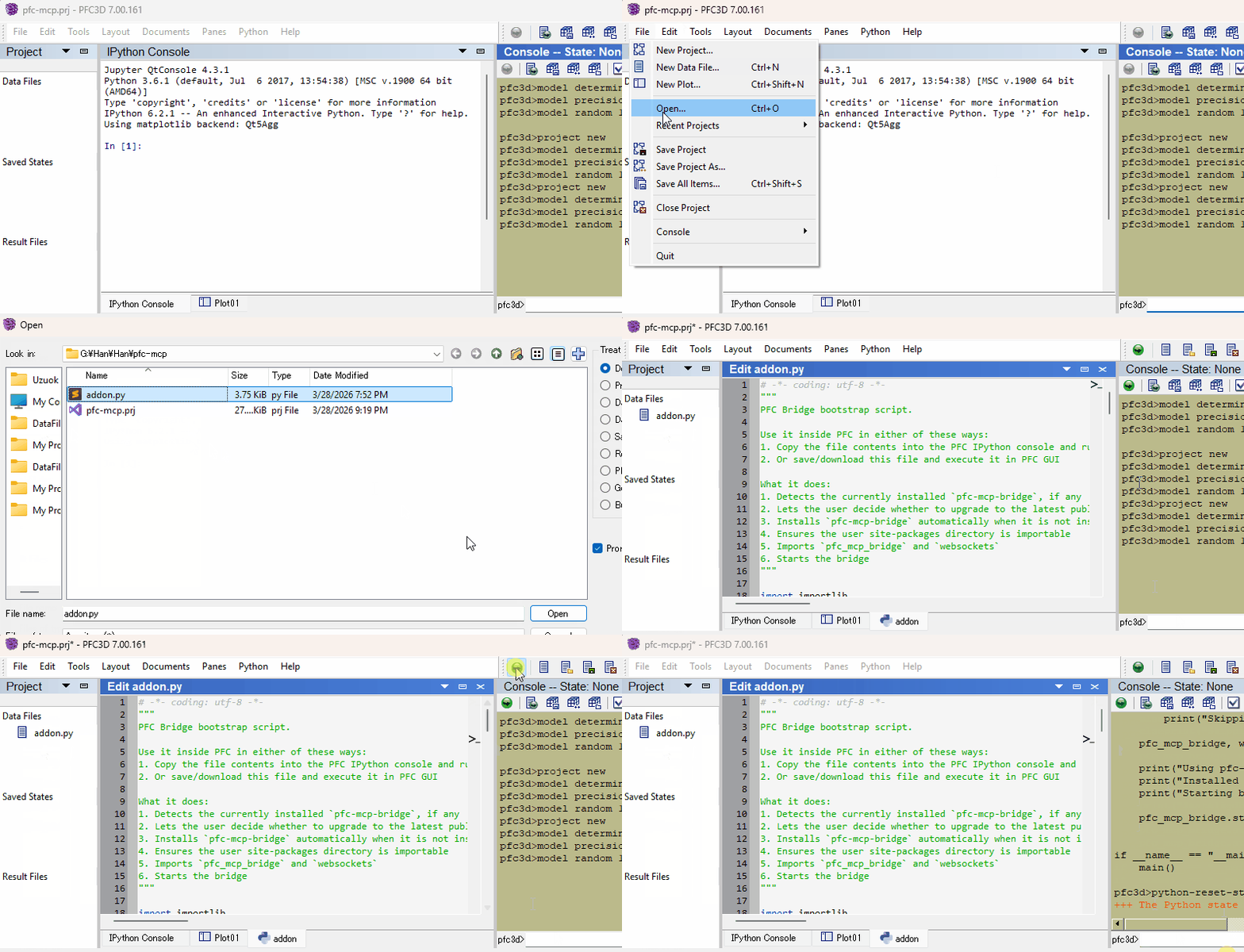
addon.py demo

Verify

Restart your AI agent and ask it to call itasca_execute_code to verify the connection.

Daily Startup

Once first-time setup is done, each new engine session only needs the bridge re-started — run this in the engine's IPython console and you're back online:

import itasca_mcp_bridge
itasca_mcp_bridge.start()

start() checks PyPI for a newer bridge release and self-upgrades before starting. The MCP client config persists.

Features

  • Multi-engine corpus - command, Python API, and reference docs for PFC, FLAC, 3DEC, MPoint, and MassFlow, selected via the required software parameter
  • Multi-version support - command docs across engine versions (PFC: 6.0/7.0/9.0, FLAC: 7.0/9.0, 3DEC: 7.0/9.0) via the version parameter
  • Hierarchical documentation browsing - agents navigate the engine command tree to discover capabilities and boundaries, reducing hallucinated commands
  • Enhanced plot documentation - plot items reference docs supplementing the official documentation
  • Live REPL alongside running tasks - execute code while a simulation is running: check model state and intermediate results without stopping the task; also useful for quick iteration before writing a full script
  • Task lifecycle management - submit long-running simulations, monitor progress, interrupt running tasks, and browse task history
  • Multi-client compatible - works with Claude Code, Codex CLI, Gemini CLI, GitHub Copilot CLI, OpenCode, toyoura-nagisa, and other MCP clients

Troubleshooting

See Troubleshooting in the bootstrap guide.

Development

See Developer Guide: Install and Run from Source.

itasca-mcp MCP server

Contributing

PRs and issues are welcome! See the Developer Guide to get started.

License

MIT - see LICENSE.

Frequently Asked Questions

What is itasca-mcp?

itasca-mcp is an open-source ai agents skill for AI coding assistants such as Claude Code, Codex CLI, and ChatGPT, built by yusong652. MCP server connecting AI agents to ITASCA engines (PFC, FLAC, 3DEC, MPoint, MassFlow) — run geotechnical & geomechanics simulations through natural conversation. It has 157 GitHub stars.

Is itasca-mcp safe to use?

Yes. itasca-mcp passed SkillsLLM's automated security scan — a dependency vulnerability audit plus prompt-injection heuristics — with no high-severity issues. You can read the full report in the Security Report section on this page.

How do I install itasca-mcp?

Clone the repository with "git clone https://github.com/yusong652/itasca-mcp" and add it to your Claude Code skills directory (see the Installation section above).

What programming language is itasca-mcp written in?

itasca-mcp is primarily written in Python. It is open-source under yusong652 on GitHub, so you can review or fork the full source.

Are there alternatives to itasca-mcp?

Yes. SkillsLLM lists many other AI Agents skills you can browse and compare side by side. Open the AI Agents category from the badge at the top of this page, or use the Related Skills and comparison links further down to weigh itasca-mcp against similar tools.

Comments (0)

No comments yet. Be the first to share your thoughts!

ECC

by affaan-m

10

The agent harness performance optimization system. Skills, instincts, memory, security, and research-first development for Claude Code, Codex, Opencode, Cursor and beyond.

242,21936,702JavaScript
AI Agentsai-agentsanthropicclaude-code
View details
15

An agentic skills framework & software development methodology that works.

234,96620,863Shell
AI Agentsai-agentsbrainstorming
View details

The agent harness performance optimization system. Skills, instincts, memory, security, and research-first development for Claude Code, Codex, Opencode, Cursor and beyond.

185,94028,768JavaScript
AI Agentsai-agentsanthropicclaude-code
View details

cc-switch

by farion1231

3

A cross-platform desktop All-in-One assistant for Claude Code, Codex, OpenCode, OpenClaw, Grok Build & Hermes Agent. Only official website: ccswitch.io

128,8688,826Rust
AI Agentsclaude-codeai-tools
View details

claude-code

by anthropics

Claude Code is an agentic coding tool that lives in your terminal, understands your codebase, and helps you code faster by executing routine tasks, explaining complex code, and handling git workflows - all through natural language commands.

120,03119,897Shell
AI Agents
View details

Developers Also Liked

Based on votes and bookmarks from developers who liked this skill

ECC

by affaan-m

10

The agent harness performance optimization system. Skills, instincts, memory, security, and research-first development for Claude Code, Codex, Opencode, Cursor and beyond.

242,21936,702JavaScript
AI Agentsai-agentsanthropicclaude-code
View details
15

An agentic skills framework & software development methodology that works.

234,96620,863Shell
AI Agentsai-agentsbrainstorming
View details

n8n

by n8n-io

12

Fair-code workflow automation platform with native AI capabilities. Combine visual building with custom code, self-host or cloud, 400+ integrations.

201,88160,308TypeScript
MCP Serversapisai-tools
View details

The agent harness performance optimization system. Skills, instincts, memory, security, and research-first development for Claude Code, Codex, Opencode, Cursor and beyond.

185,94028,768JavaScript
AI Agentsai-agentsanthropicclaude-code
View details

cc-switch

by farion1231

3

A cross-platform desktop All-in-One assistant for Claude Code, Codex, OpenCode, OpenClaw, Grok Build & Hermes Agent. Only official website: ccswitch.io

128,8688,826Rust
AI Agentsclaude-codeai-tools
View details
itasca-mcp — AI Skill for Claude Code | SkillTip