ima2-gen



🌐 Live site: lidge-jun.github.io/ima2-gen · 한국어
📖 Developer docs: Documentation site · 한국어
ima2-gen is a local-first visual generation runtime and studio for people and coding agents, with reproducible image and video workflows across multiple providers.
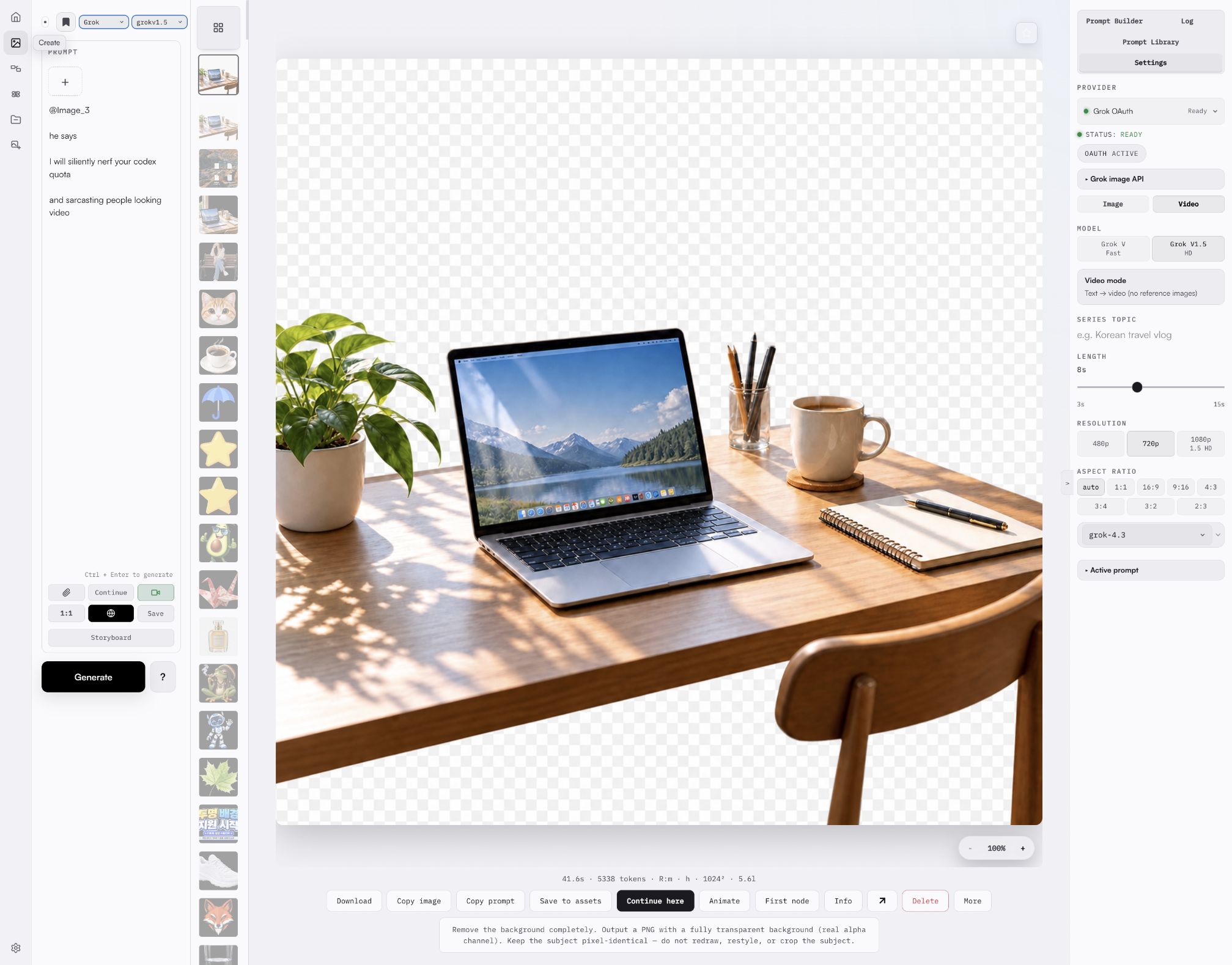
Install globally and generate images and videos from eight core lanes: OpenAI OAuth/API, Grok OAuth/API, Antigravity CLI, Gemini API, AtlasCloud, and MiniMax. Runway and Higgsfield remain separate MCP-backed integrations. Iterate with history, references, node branches, multimode batches, and Canvas Mode cleanup — now with one-click GPT background transparency (server-verified real alpha), annotation hover feedback, and a full light/dark/system theme.
Quick Start
npm install -g ima2-gen
ima2 setup
ima2 serve
Then open http://localhost:3333.
Docker
docker build -t ima2-gen .
docker run -d -p 3333:3333 -e IMA2_LAN_TOKEN=change-me -v ima2-data:/data ima2-gen
See docs/DOCKER.md for compose usage, required environment, and limitations.
To generate from the CLI, inspect the live lane catalog and choose explicit image/video defaults once:
ima2 models
ima2 defaults set image oauth/gpt-5.6-luna
ima2 defaults set video grok/grok-imagine-video-1.5
ima2 gen "a clean product photo of a red guitar pedal"
ima2 video "a cat playing piano" --duration 5 --resolution 720p
ima2 video "animate this scene" --ref photo.png --duration 10
ima2 gen and generate-mode ima2 video fail closed with NO_DEFAULT_MODEL until a CLI target is configured, unless that call passes --model <lane>/<model> or an explicit --provider <lane>. This prevents an upgrade from silently switching providers or billing lanes.
If 3333 is already occupied, ima2-gen binds the next available port and writes the actual URL to ~/.ima2/server.json. Use ima2 open or the URL printed in the terminal instead of assuming the port.
Using npx? See docs/NPX_QUICKSTART.md for the
npx ima2-gen serveworkflow.
One-Click Install (no npm required)
Don't have Node.js or npm? Use the platform install script — it detects your environment, installs Node LTS if needed, then installs ima2-gen.
macOS:
curl -fsSL https://lidge-jun.github.io/ima2-gen/install-mac.sh | bash
Windows (PowerShell):
irm https://lidge-jun.github.io/ima2-gen/install-windows.ps1 | iex
Linux / WSL:
curl -fsSL https://lidge-jun.github.io/ima2-gen/install-linux.sh | bash
Each script checks for nvm/fnm/brew/winget, installs Node LTS through the best available method, and handles stale process cleanup automatically.
Setup
ima2 setup offers four authentication choices:
- GPT OAuth — login with ChatGPT account (free, images only)
- Grok OAuth — login with xAI/Grok account (images + video)
- Both — GPT OAuth + Grok OAuth (full feature access)
- Web setup — configure everything in the web UI
Video generation requires Grok OAuth (option 2 or 3). Run ima2 grok login separately if you already have GPT OAuth configured and want to add video support; it defaults to the manual-paste flow.
Updating
Stop the running server with Ctrl+C, then:
(or from another terminal: ima2 stop)
npm install -g ima2-gen@latest
Ctrl+C now performs a clean shutdown — closing the database, stopping child processes, and releasing file locks. On older versions (< 1.1.22) or if you see EBUSY on Windows, use the install script which handles stale process cleanup automatically.
What It Does
- Classic mode: generate, edit, reuse the current image, paste references, and continue from history.
- Node mode: branch a good image into multiple directions without losing the original.
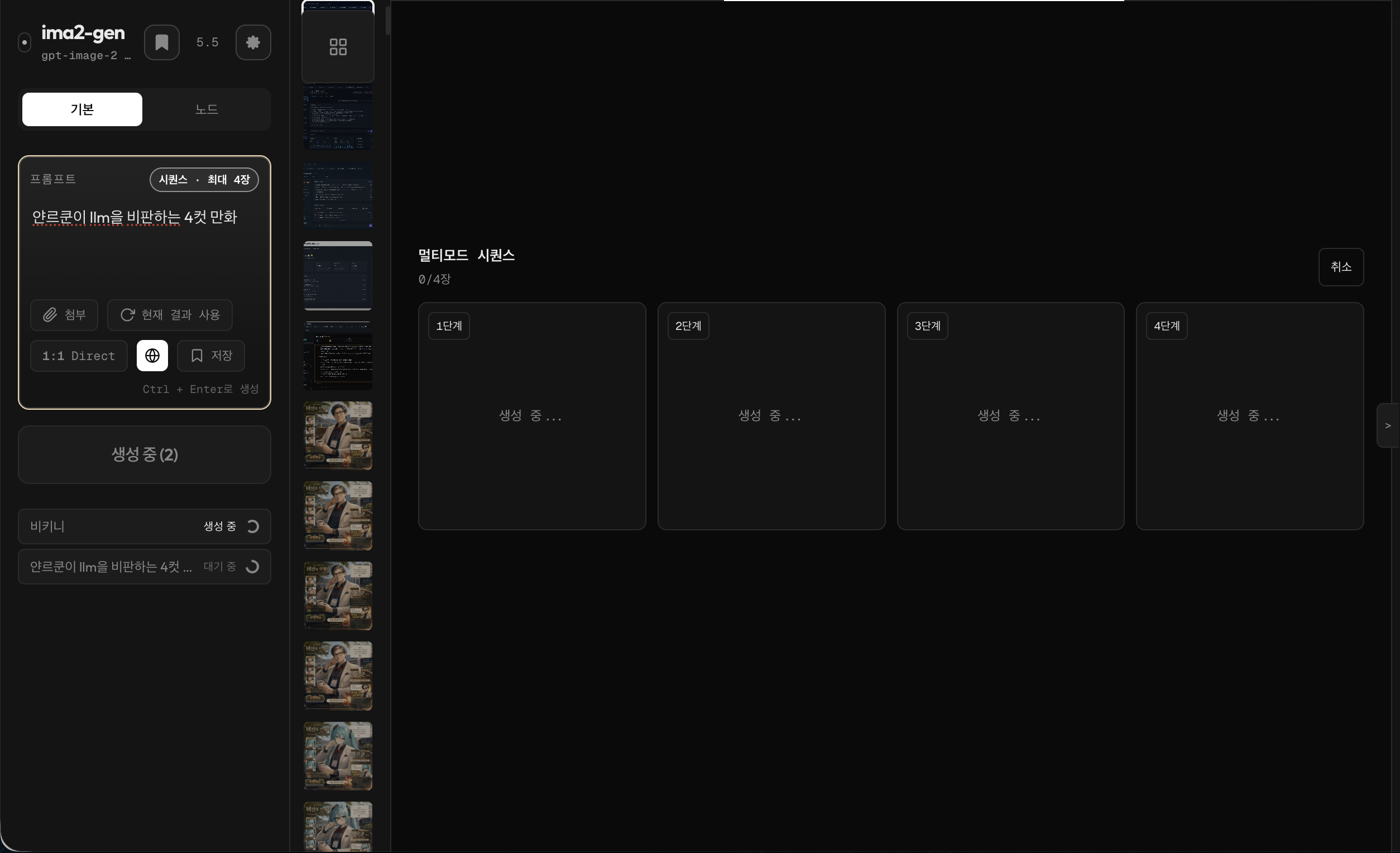
- Multimode batches: launch several Classic outputs from one prompt, watch slot-by-slot progress, and continue from the best result.
- Video generation: create short videos from text, a single image, or multiple reference images via Grok video models. SSE streaming shows planning → submitted → progress % → done. Video frame copy buttons (First/Mid/Last) let you extract and copy keyframes from generated videos.
- Storyboard mode: toggle storyboard mode in the composer to maintain character and scene continuity across sequential frames. Works with both image and video generation — image keyframes are composed for video production, and video clips inherit character/environment lock rules.
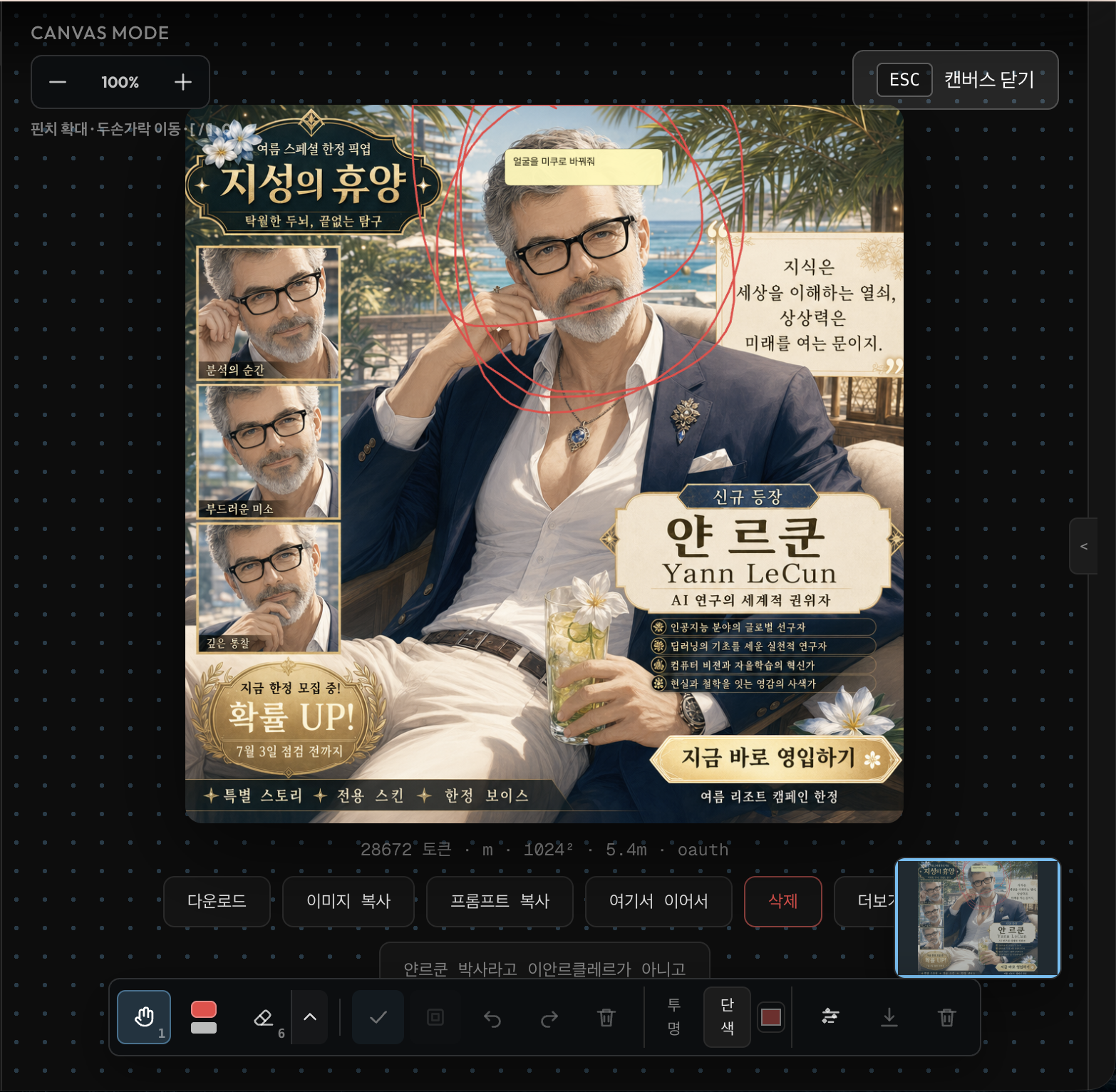
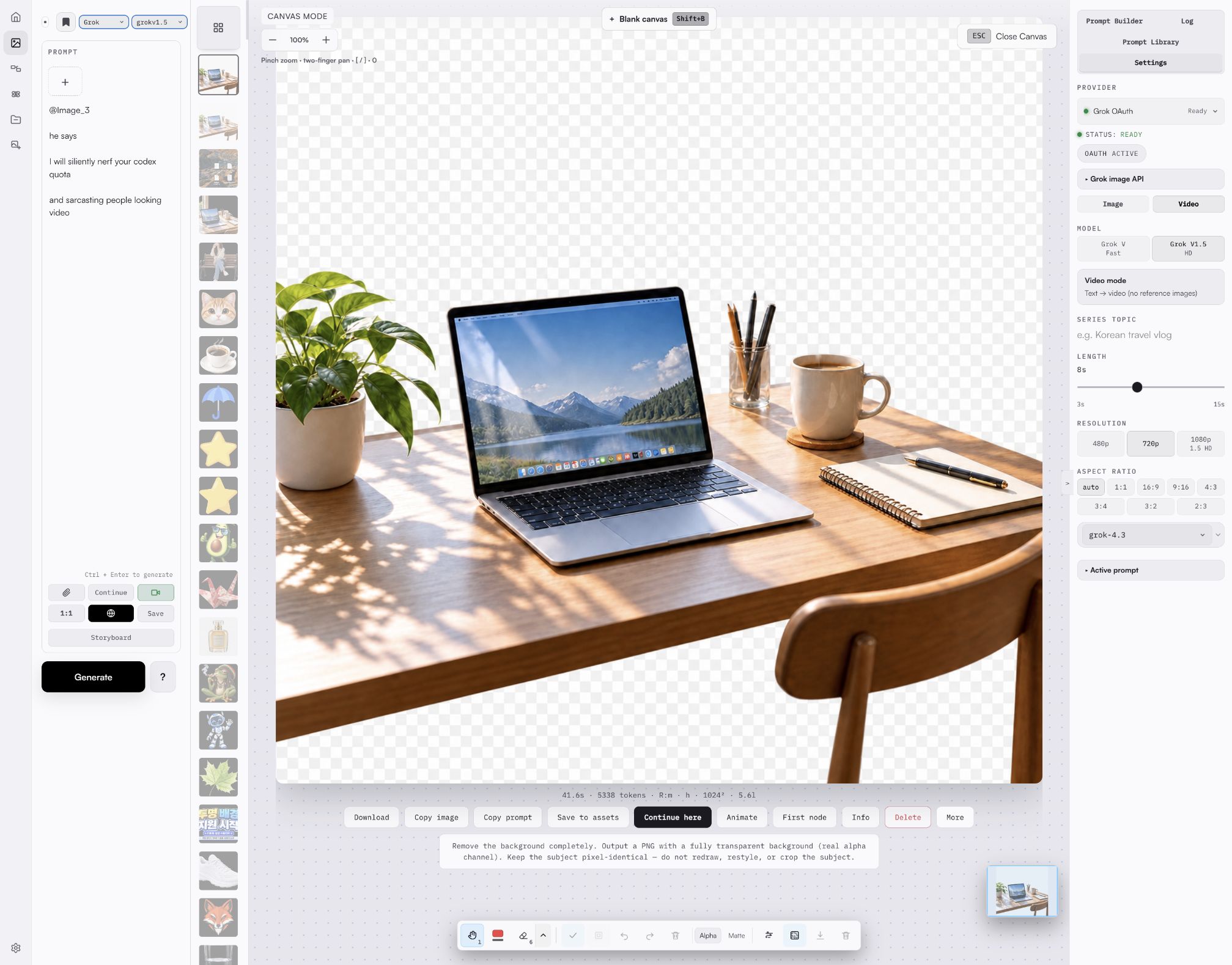
- Canvas Mode: zoom, pan, annotate (with hover highlighting), erase, clean backgrounds, keep transparent previews, and export either alpha or matte-backed versions. A one-click GPT transparency button sends the current image through the i2i edit lane and reports honestly whether the result carries real pixel alpha — verified on the server, never trusted from provider metadata.
- Light & dark themes: a token-based light mode with tinted neutrals and AA contrast, switchable between light / dark / system in Settings, with no flash on load.
- Local gallery: keep generated assets on your machine with session-aware history. By default the gallery shows the current session and an All Images toggle reveals the full history; the default scope is sticky across sessions. Each image records its generation time and reasoning effort in the result metadata, so they persist across reloads.
- Reference images: drag, drop, paste, and attach up to 5 references (images) or up to 7 references (video); large images are compressed before upload.
- Prompt library imports: import local prompt packs, GitHub folders, and curated GPT-image prompt hints into the built-in prompt library.
- Mobile shell: use the app bar, compose sheet, and compact settings toggle on smaller screens.
- Observable jobs: active and recent jobs are tracked with safe logs and request IDs.
Agent Skills
ima2-gen ships three packaged skills for AI coding agents. These are Markdown instruction files that agents load to get structured workflows for image/video generation, frontend asset production, and design direction discovery.
| Skill | Command | What It Covers |
|---|---|---|
| Core | ima2 skill | CLI reference, prompting protocol, provider routing, Korean text, video workflows |
| Frontend | ima2 skill front | Asset pipeline (parallel gen, variant selection, provider routing), motion/video for web, responsive, a11y, anti-slop, 30+ reference files |
| UI/UX Design | ima2 skill uiux | Image-first design direction discovery, UX states, design-isms, product personalities, DESIGN.md workflow, 18 reference files |
ima2 skill ls            # list available skills
ima2 skill front         # print the frontend skill
ima2 skill uiux          # print the design skill
ima2 skill front path    # print file path (for agents)
ima2 skill front --json  # JSON wrapper (for agents)
ima2 skill front refs    # list reference modules (35 files)
ima2 skill front ref motion        # load one reference module
ima2 skill install --dir <path>     # install skills to agent's skill dir
ima2 skill install --tmp            # install to temp dir (fallback)
The Frontend and UI/UX skills are production-grade design engineering guides
adapted for the ima2 workflow. They cover typography, color systems, layout
discipline, Korean UX patterns, motion choreography, and visual verification,
with every asset generation step mapped to ima2 gen, ima2 video, and
ima2 multimode commands.
SSE Multiplexing
The web UI uses a single GET /api/events Server-Sent Events connection for all generation progress. Multimode, node, and video requests are submitted as async POST (202 { requestId }) and progress events are multiplexed through a shared event bus. This eliminates the browser 6-connection limit that previously caused gallery hangs during concurrent generation. CLI clients that do not send async: true still receive per-request SSE streams for backward compatibility.
Provider Paths
Image generation can run through the local Codex/ChatGPT OAuth path, a configured OpenAI API key, the bundled Grok provider, or the Gemini provider via Antigravity CLI.
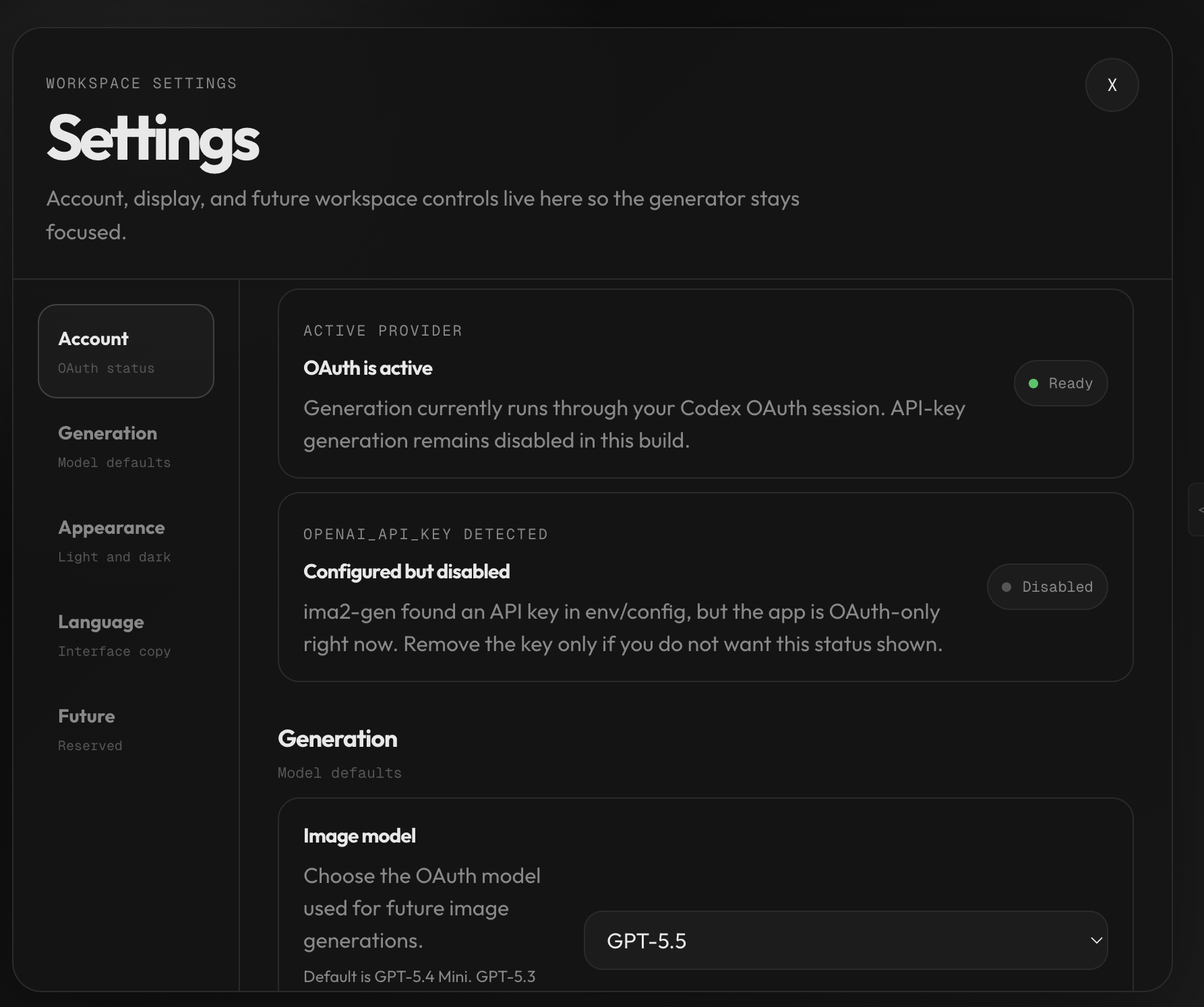
provider: "oauth"uses the local Codex OAuth proxy.provider: "api"calls the OpenAI Responses API with the hostedimage_generationtool.provider: "grok"starts bundledprogrokon127.0.0.1:18645, runs mandatory xAI Web Search plus a planner pass (default:grok-4.5, configurable in settings or via--planner-model), then calls xAI Images API through the local proxy.grok-4.3remains available as an explicit compatibility override.provider: "grok-api"calls the xAI Images API directly withXAI_API_KEY(no bundled progrok OAuth proxy).provider: "agy"spawns the Antigravity CLI (agy -p) to generate images via Google Gemini'sdefault_api:generate_imagetool (model:nano-banana-2). Output is fixed at 1024×1024 JPEG, max 3 reference images. No web search, quality, or size controls.provider: "gemini-api"calls the Google Generative Language API directly. Supports two models:nano-banana-2(Gemini 3.1 Flash Image) andnano-banana-pro(Gemini 3 Pro Image). Auth is viaGEMINI_API_KEYenv var, web UI key management, or a Vertex AI service account JSON (VERTEX_SERVICE_ACCOUNT_JSON). When both an API key and Vertex credentials are configured, Vertex takes priority. Supports variable aspect ratios (1:1 through 21:9) and four resolution tiers (512px, 1K, 2K, 4K); these controls are only honored on the direct API path — the Vertex AI endpoint ignores aspect/size because it does not accept theresponse_formatfield. Per-model cost differs:nano-banana-2(Flash): 512=$0.001, 1K=$0.003, 2K=$0.004, 4K=$0.006;nano-banana-pro: 1K=$0.007, 2K=$0.007, 4K=$0.013. No web search or mask controls.- API-key generation supports classic generate, edit, mask-guided edit, multimode, and node generation.
- Grok generation supports Classic, Node, and Agent flows. If a Classic reference, Node parent image, or Agent current image is present, ima2 switches the final Grok call to xAI image edit so image-to-image context is preserved.
If no provider is specified, the app keeps the current GPT OAuth/default behavior. GPT OAuth and API-key generation default to gpt-5.6-luna; the API-key path also defaults to low reasoning and 1024x1024 unless the request passes validated options. Grok image generation defaults to grok-imagine-image-quality.
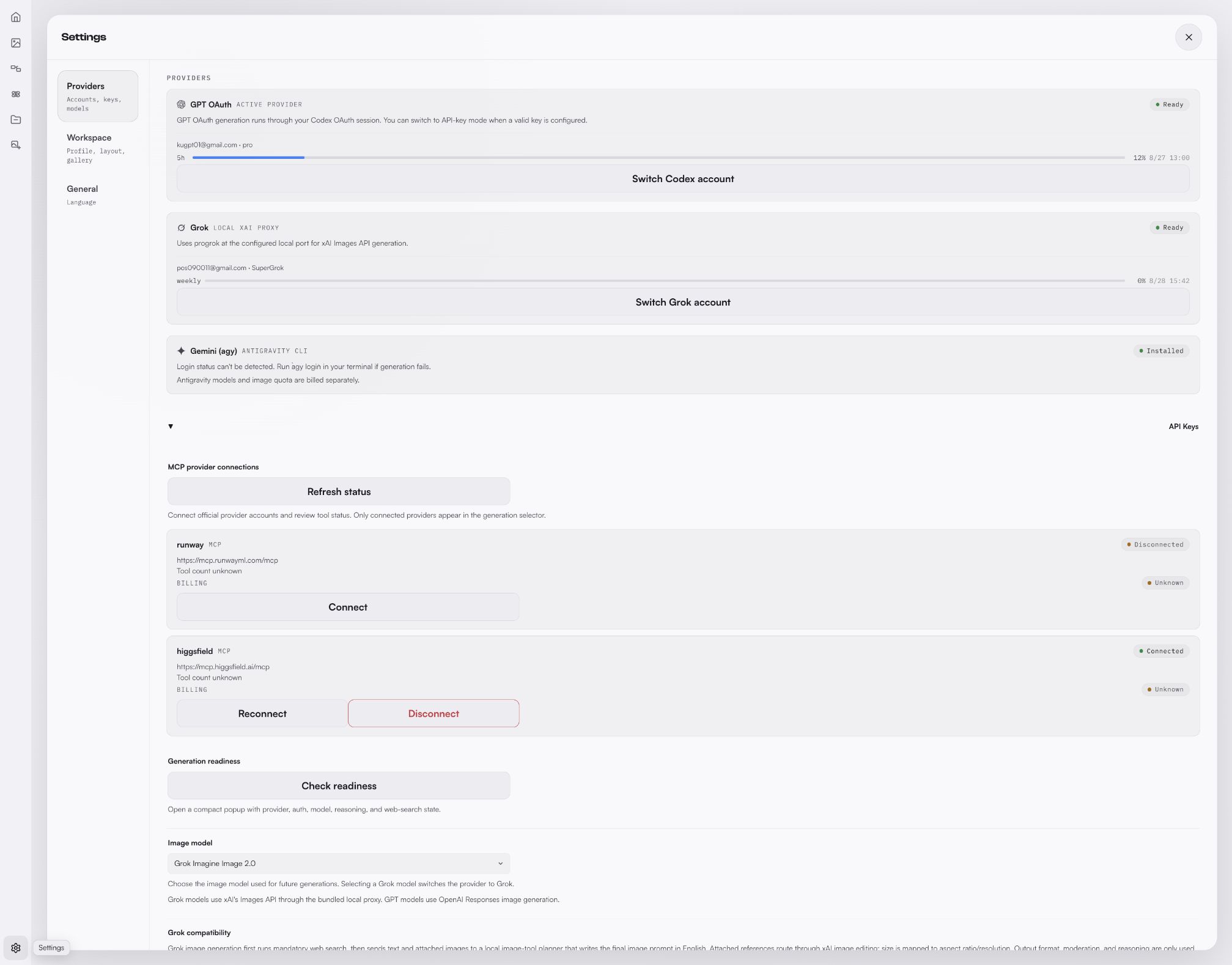
Grok image generation exposes a model picker (grok-imagine-image / grok-imagine-image-quality) and a size picker (aspect ratio + 1k/2k resolution). The Settings page prefers the Grok Build weekly credits percentage and reset time from GET /v1/billing?format=credits; if that source is unavailable, it falls back to the legacy monthly billing window and $used/$limit. A Switch Account button starts a device-code OAuth flow (POST /api/auth/switch) for re-authenticating without leaving the app.
Grok video generation defaults to canonical grok-imagine-video-1.5; grok-imagine-video remains available for base-model-only Ref2V, V2V edit, and extension paths, and the legacy grok-imagine-video-1.5-preview string is accepted as an alias. Three modes are auto-detected from reference count: text-to-video (0 refs), image-to-video (1 ref), and reference-to-video (2-7 refs, max 10s duration). 1080p is available for grok-imagine-video-1.5 prompt-only text-to-video and single image/frame image-to-video; prompt-only 1.5 uses the internal white-canvas I2V shim before the upstream request. Video controls include duration (1-15s), resolution (480p, 720p, 1080p when supported), and aspect ratio (1:1, 16:9, 9:16, 4:3, 3:4, 3:2, 2:3, auto).
Model Guidance
The app defaults to gpt-5.6-luna for image generation and Prompt Builder planning. Older supported models remain explicit compatibility choices.
gpt-5.6-luna— current image and Prompt Builder default.gpt-5.6-terra/gpt-5.6-sol— current GPT-5.6 alternatives when your account exposes them.gpt-5.5,gpt-5.4,gpt-5.4-mini— supported compatibility choices.
The app also exposes quality (low, medium, high) and moderation (auto, low) controls.
Workflows
Classic Mode
Use Classic when you want one strong result quickly.
- Write a prompt.
- Attach or paste references if needed.
- Pick model, quality, size, format, and moderation.
- Generate one image, or enable multimode to fan out several candidate slots from the same prompt.
- Copy, download, continue from the result, or send it into Canvas Mode.
For a control-by-control guide to Prompt Studio, multimode recipes, Direct mode, reasoning effort, and gallery favorite behavior, see the Prompt Studio manual.
Node Mode
Use Node mode when you want to explore branches.
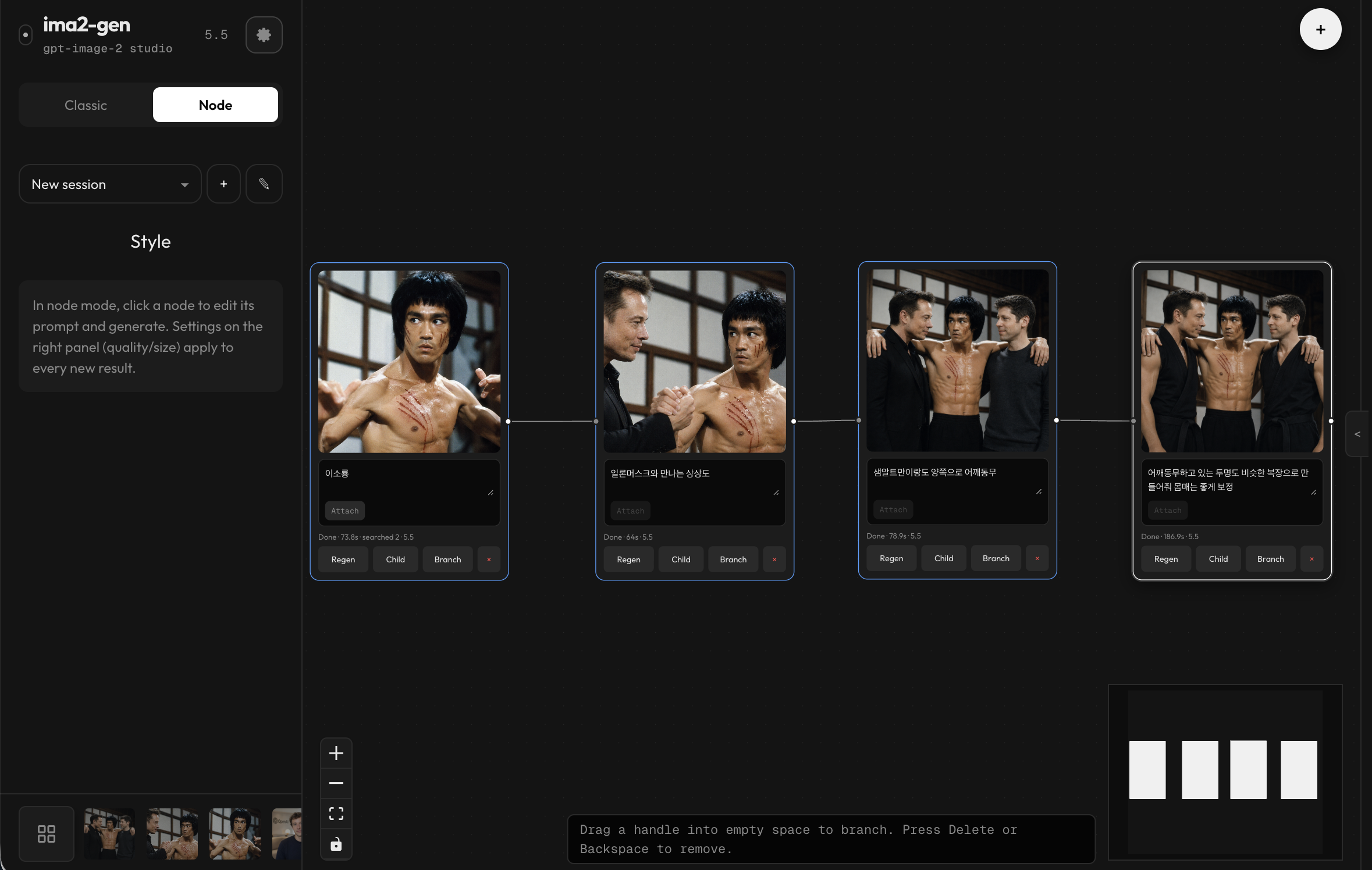
Each node keeps its own prompt and result. Root nodes can attach local references; child nodes use the parent image as their source. Completed jobs are matched back to nodes by request ID, so reloads and graph version conflicts can recover finished results.
Canvas Mode
Use Canvas Mode when a generated image is close but needs targeted cleanup before the next prompt.
- Separate viewport panning from selection so you can move around a zoomed image without accidentally changing annotations.
- Use annotation, eraser, multiselect, grouping, undo/redo, and sticky notes while keeping the original gallery image available.
- Pick background-cleanup seeds, preview the mask, and save the cleanup as a canvas version.
- Detect transparent images and show a checkerboard preview; export with preserved alpha or with a chosen matte color.
- Saved canvas versions stay hidden from Gallery and HistoryStrip, but Canvas Mode can reuse them and attach a canvas version as the next reference.
- Hover any annotation with the select tool to see a live outline and a move cursor before you click.
- Press the GPT transparency button in the canvas toolbar to remove the background through the OAuth i2i lane in one click. The server decodes the returned bytes and reports
alphaVerified— the toast tells you whether real transparency actually landed, instead of assuming.
Prompt Library And Imports
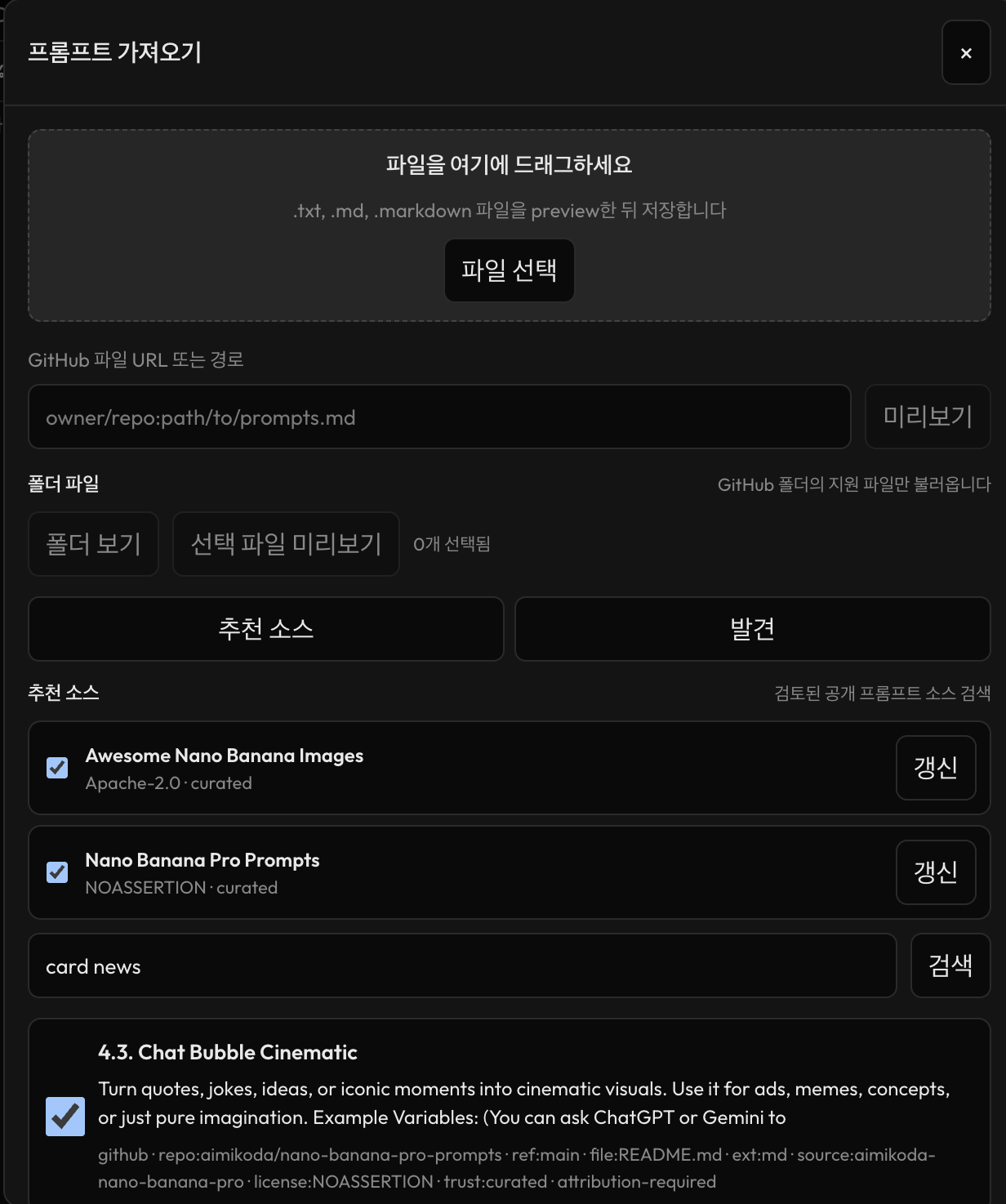
The prompt library can now be filled from local files, GitHub folders, curated sources, and GPT-image hint packs. Imported prompts are indexed locally so search and ranking work without re-importing the same source every session.
Experimental Card News Mode
Card News is still dev-only and experimental. It is hidden in the default published runtime unless explicitly enabled for development, and it should not be treated as a stable public feature yet.
Settings
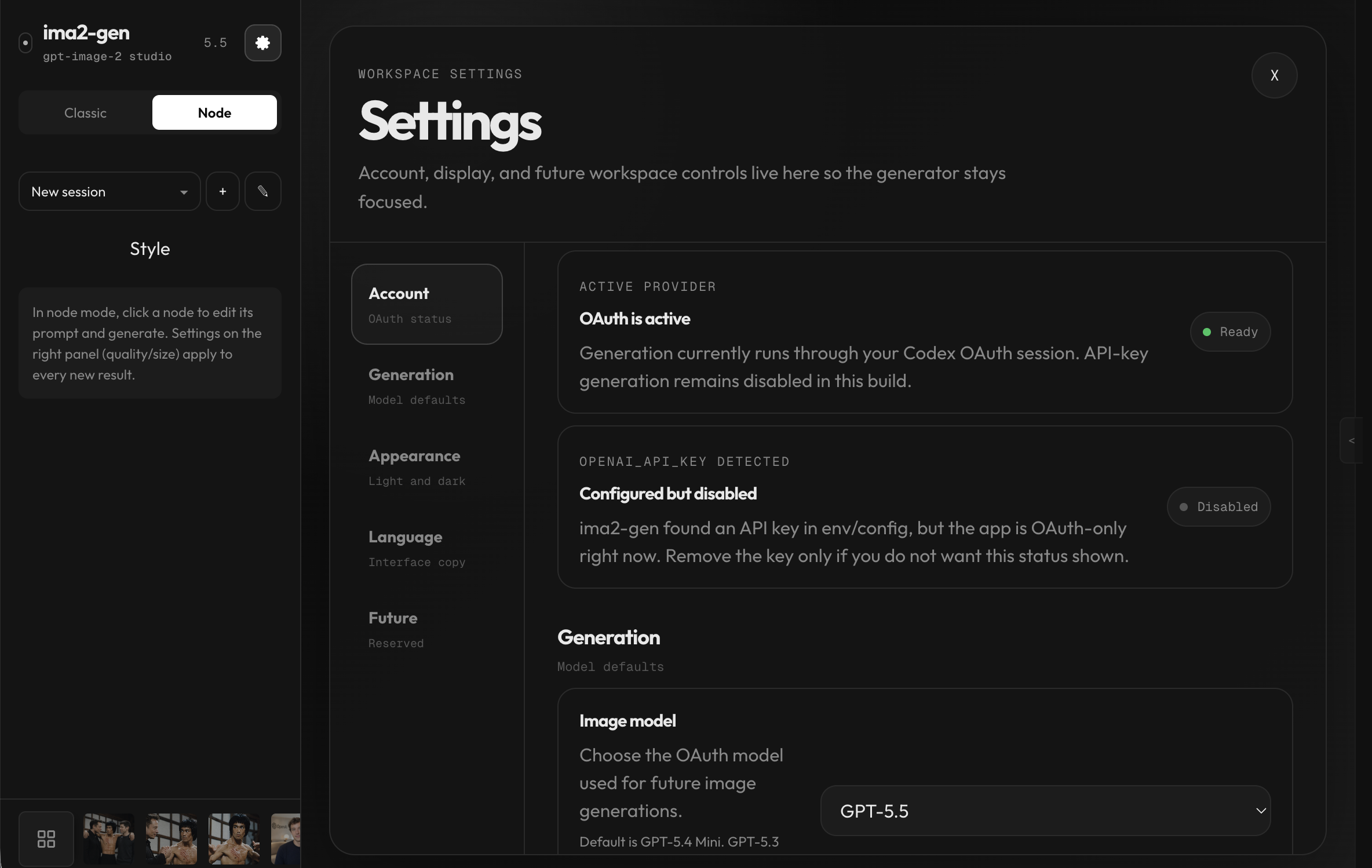
The settings workspace keeps account, model, appearance, and language controls away from the generation sidebar. Appearance now includes a light / dark / system theme toggle; the light palette uses tinted neutrals with AA contrast and applies before first paint.
CLI Commands
Server
| Command | Description |
|---|---|
ima2 serve [--dev] | Start the local web server; --dev enables verbose server diagnostics |
ima2 stop [--force] | Stop the running server safely — graceful admin-API stop first, then SIGTERM/SIGKILL; verifies the advertised pid against /api/health so a recycled pid is never killed |
ima2 service <sub> | Background service: install/uninstall/start/stop/restart/status/logs/repair — launchd on macOS, systemd user unit on Linux, auto-start on login with crash restart |
ima2 setup | Reconfigure saved auth |
ima2 status | Show config and OAuth status |
ima2 doctor | Diagnose Node, package, config, and auth |
ima2 doctor image-probe [--json] | Run sanitized image probes for no-image diagnostics |
ima2 open | Open the web UI |
ima2 reset | Remove saved config |
Client
These require a running ima2 serve. The CLI covers every server route. The most common ones are below — the full CLI reference lists everything (generation, history, sessions, prompt library, annotations, Card News, observability, config).
| Command | Description |
|---|---|
ima2 models [--kind image|video] [--lane <lane>] [--json] | List live lanes, status, model IDs, and capabilities |
ima2 defaults set image|video <lane>/<model> | Persist the fail-closed CLI target for image or video generation |
ima2 defaults reset image|video | Remove a persisted CLI generation target |
ima2 gen <prompt> [--model <lane>/<model>] | Generate from the CLI; requires an explicit target or saved image default |
ima2 edit <file> --prompt <text> | Edit an existing image |
ima2 multimode <prompt> | Multi-image SSE generation |
ima2 video <prompt> [--model <lane>/<model>] | Generate video through a Grok or MCP lane; requires an explicit target or saved video default |
ima2 ls [--session <id>] [--favorites] | List recent history |
ima2 show <name> [--metadata] | Reveal a generated asset |
ima2 prompt ls -q <search> | Search the prompt library |
ima2 inflight ls [--terminal] | List active and recent jobs (alias of ps) |
ima2 config set <key> <value> | Write to ~/.ima2/config.json |
ima2 ping | Health-check the running server |
The server advertises its actual port at ~/.ima2/server.json. If 3333 is busy, the backend falls back to 3334+ and CLI commands follow the advertised URL. Override discovery with --server <url> or IMA2_SERVER=http://localhost:3333.
ima2 models --kind image
ima2 gen "poster" --model oauth/gpt-5.6-luna --reasoning-effort high
ima2 edit input.png --prompt "make it rainy" --web-search
ima2 multimode "two cats playing" -n 2
ima2 video "a cat playing piano" --model grok/grok-imagine-video-1.5 --duration 5 --resolution 720p
ima2 video "animate this" --model grok/grok-imagine-video-1.5 --ref photo.png --aspect-ratio 16:9
ima2 inflight ls --terminal
ima2 config set imageModels.reasoningEffort high
Full reference: docs/CLI.md.
Configuration
Config priority:
environment variables > ~/.ima2/config.json > built-in defaults
| Variable | Default | Description |
|---|---|---|
IMA2_PORT / PORT | 3333 | Web server port |
IMA2_HOST | 127.0.0.1 | Web server bind host |
IMA2_OAUTH_PROXY_PORT / OAUTH_PORT | 10531 | OAuth proxy port |
IMA2_SERVER | — | CLI target override |
IMA2_CONFIG_DIR | ~/.ima2 | Config and SQLite location |
IMA2_ADVERTISE_FILE | ~/.ima2/server.json | Runtime discovery file |
IMA2_GENERATED_DIR | ~/.ima2/generated | Generated image directory |
IMA2_IMAGE_MODEL_DEFAULT | gpt-5.6-luna | Server fallback image model |
IMA2_REASONING_EFFORT | medium | Default reasoning effort for the default (GPT OAuth) path; one of none, low, medium, high, xhigh |
IMA2_NO_OAUTH_PROXY | — | Set 1 to disable the auto-started OAuth proxy |
IMA2_LOG_LEVEL | info | Normal serve defaults to info; dev mode defaults to debug; supports debug, info, warn, error, or silent |
IMA2_INFLIGHT_TERMINAL_TTL_MS | 300000 | Recent terminal job retention for debug views |
OPENAI_API_KEY | — | API key for the provider: "api" Responses API image path and auxiliary API-key features |
XAI_API_KEY | — | API key for provider: "grok-api" direct xAI Images API path |
IMA2_API_IMAGE_MODEL_DEFAULT | gpt-5.6-luna | Default image model for provider: "api" |
IMA2_API_REASONING_EFFORT | low | Default reasoning effort for provider: "api" |
IMA2_API_IMAGE_SIZE | 1024x1024 | Default size for provider: "api" |
IMA2_API_ALLOW_WEB_SEARCH | true | Toggle web search for provider: "api" |
IMA2_GROK_PROXY_HOST | 127.0.0.1 | Host for the bundled progrok proxy |
IMA2_GROK_PROXY_PORT | 18645 | Port for the bundled progrok proxy |
IMA2_NO_GROK_PROXY | — | Set 1 to disable automatic progrok startup |
IMA2_GROK_PLANNER_MODEL | grok-4.5 | Grok search/planner model (also configurable via settings UI or --planner-model CLI flag) |
IMA2_GROK_PLANNER_TIMEOUT_MS | 900000 | Timeout for the Grok planner call |
IMA2_GROK_SEARCH_TIMEOUT_MS | 300000 | Timeout for the Grok web-search brief (degrades instead of failing) |
IMA2_GROK_VIDEO_PLAN_TOTAL_TIMEOUT_MS | 1500000 | Ceiling on the whole video planning phase (clamped above search + planner) |
IMA2_GROK_IMAGE_MODEL_DEFAULT | grok-imagine-image-quality | Default final Grok image model |
IMA2_GROK_VIDEO_MODEL_DEFAULT | grok-imagine-video-1.5 | Default Grok video model |
IMA2_GROK_GENERATION_TIMEOUT_MS | 120000 | Timeout for the final Grok Images API call |
IMA2_OAUTH_MASKED_EDIT_ENABLED | false | Opt-in feature flag for masked-edit requests on the OAuth path (#31, groundwork only) |
GEMINI_API_KEY | — | API key for provider: "gemini-api" direct Generative Language API path |
VERTEX_SERVICE_ACCOUNT_JSON | — | Google service account JSON for Vertex AI auth with provider: "gemini-api"; takes priority over GEMINI_API_KEY when both are set |
IMA2_AGY_BIN | agy on PATH | Explicit path to the Antigravity CLI binary for provider: "agy" |
IMA2_MAX_PARALLEL | 24 | Server-wide parallel generation cap |
Logging modes
ima2 serve keeps terminal output intentionally quiet: startup URLs, warnings, and errors stay visible, while request/node/OAuth structured logs are hidden by default.
Use ima2 serve --dev, npm run dev, or IMA2_LOG_LEVEL=debug ima2 serve when you need request IDs, node generation phases, OAuth stream diagnostics, or inflight state transitions. Explicit IMA2_LOG_LEVEL and ~/.ima2/config.json values still override the built-in defaults.
API Reference
The endpoint list moved to docs/API.md so this README can stay focused on first-run use.
Useful references:
- Developer documentation site — Overview, Quickstart, Architecture, Modes, Providers, CLI, Config, and Server API
- CLI Reference
- API Reference
- Prompt Studio manual
- FAQ
- Recover old images
- Korean README
- Japanese README
- Chinese README
Troubleshooting
ima2 ping says the server is unreachable
Start ima2 serve, then check ~/.ima2/server.json. You can also run ima2 ping --server http://localhost:3333.
GPT OAuth login does not work
Re-run ima2 setup (option 1), confirm ima2 status, then restart ima2 serve.
fetch failed repeats on a proxy/VPN network
Check that the local OAuth proxy is reachable. On networks that require a proxy, enable your proxy client's TUN/TURN-style mode, then retry openai-oauth --port 10531. If it still fails, set HTTP_PROXY and HTTPS_PROXY in the same terminal that runs ima2 serve or openai-oauth. On Windows, also check for auto-start network interception tools, including DNS/fragmentation bypass tools such as SecretDNS, because they can break OAuth or streaming image responses even when the browser appears connected.
Images fail with API_KEY_REQUIRED
Set OPENAI_API_KEY or configure an API key before using provider: "api". The default GPT OAuth path still works without an API key.
Image generation returns EMPTY_RESPONSE or no image data
Run ima2 doctor image-probe --json > ima2-image-probe.json and attach the safe JSON when opening an issue. For GPT OAuth cases, also capture ima2 gen "고양이" --model oauth/gpt-5.6-luna --no-web-search --json and ima2 gen "고양이" --model oauth/gpt-5.6-luna --json while ima2 serve is running. Do not share ChatGPT cookies, OAuth token files, API keys, raw upstream responses, prompt history, or generated base64. See the FAQ support bundle.
A large reference image fails The app compresses large JPEG/PNG references before upload. If a file still fails, convert it to JPEG or PNG at a lower resolution and try again. HEIC/HEIF files are not supported by the browser path.
Old gallery images are missing after updating
Recent versions moved generated images from the installed package folder to ~/.ima2/generated. Run ima2 doctor and see Recover old images.
gpt-5.5 fails but other models work
Update Codex CLI first, then retry. If it still fails, your account or backend route may not expose the same image capability or quota for gpt-5.5 yet; use gpt-5.4 as the stable fallback.
The app opened on a different port
If the requested server port is busy, ima2-gen falls back to the next available port and records it in ~/.ima2/server.json. If the port is unexpectedly 3457, your shell may also have inherited PORT=3457 from another local tool. Run unset PORT or start with IMA2_PORT=3333 ima2 serve.
Port 10531 is already used on Windows
Some Windows security tools, including AnySign4PC.exe, may occupy the default OAuth proxy port. Current builds track the actual fallback OAuth port. If you still need a manual override, start with IMA2_OAUTH_PROXY_PORT=11531 ima2 serve and check ima2 doctor.
For more beginner-friendly answers, see the FAQ.
Development
git clone https://github.com/lidge-jun/ima2-gen.git
cd ima2-gen
npm install
npm run dev
npm run typecheck
npm test
npm run build
npm run dev builds the UI and starts the TypeScript server entry with --watch and verbose server diagnostics. npm run typecheck, npm run build:server, and npm run build:cli verify the TypeScript migration and package emit path. Node mode and Canvas Mode are part of the packaged UI by default.
Contributors
- @lidge-jun — maintainer
- @ree9622 — moderation controls, Windows fixes, structured logging
- @Charley-Peng — API cache fix (#74)
- @philiptaron — Nix flake (#81)
- @aorying — upstream validation error surfacing (informed TS migration direction)
- @PARKJONGMlN — batch comparison matrix design (#80)
License
MIT