



hyper-mcp
A fast, secure MCP server that extends its capabilities through WebAssembly plugins.
What is it?
hyper-mcp makes it easy to add AI capabilities to your applications. It works with Claude Desktop, Cursor IDE, and other MCP-compatible apps. Write plugins in your favorite language, distribute them through container registries, and run them anywhere - from cloud to edge.
Features
- Write plugins in any language that compiles to WebAssembly
- Distribute plugins via standard OCI registries (like Docker Hub)
- Built on Extism for rock-solid plugin support
- Sanboxing with WASM: ability to limit network, filesystem, memory access
- Lightweight enough for resource-constrained environments
- Support
stdiotransport protocol - Deploy anywhere: serverless, edge, mobile, IoT devices
- Cross-platform compatibility out of the box
- Support tool name prefix to prevent tool names collision
- Dynamic plugin loading and unloading (configurable)
Security
Built with security-first mindset:
- Sandboxed plugins that can't access your system without permission
- Memory-safe execution with resource limits
- Secure plugin distribution through container registries
- Fine-grained access control for host functions
- OCI plugin images are signed at publish time and verified at load time with sigstore.
Installation
Prerequisites
cosign — required for loading plugins from OCI registries (oci:// URLs).
hyper-mcp verifies the cryptographic signature of every OCI plugin before loading it to ensure the plugin has not been tampered with and comes from a trusted source. This verification is performed by shelling out to the cosign CLI, which must be installed and available on your PATH.
Install cosign by following the official instructions: https://docs.sigstore.dev/cosign/system_config/installation/
Note: If you only use
file://,http://,https://, ors3://plugin URLs, cosign is not needed. You can also bypass signature verification for OCI plugins by settinginsecure_skip_signature: truein your config or theHYPER_MCP_INSECURE_SKIP_SIGNATURE=trueenvironment variable, but this is not recommended for production use.
Install from Homebrew
hyper-mcp is published on Homebrew for macOS and Linux in two places:
Homebrew core — no tap setup required:
brew install hyper-mcp
Our own tap (hyper-mcp-rs/tap) — bumped automatically on every GitHub Release, so it picks up new versions immediately:
brew install hyper-mcp-rs/tap/hyper-mcp
Both install the same binary. Prefer the core formula unless you want the absolute latest release the moment it ships.
Pre-built binaries (GitHub Releases)
Download the latest release for your platform from GitHub Releases:
Chose the version that you want and download the architecture-specific binary.
| Platform | Architecture | Download |
|---|---|---|
| macOS | Apple Silicon (ARM64) | hyper-mcp-aarch64-apple-darwin.tar.gz |
| Linux | ARM64 | hyper-mcp-aarch64-unknown-linux-gnu.tar.gz |
| Linux | x86_64 | hyper-mcp-x86_64-unknown-linux-gnu.tar.gz |
| Windows | x86_64 | hyper-mcp-x86_64-pc-windows-msvc.zip |
macOS / Linux:
Donwload the .tar.gz file, extract it, and place hyper-mcp in /usr/local/bin.
Windows:
Download the .zip file, extract it, and place hyper-mcp.exe somewhere on your PATH.
Install from crates.io
If you have Rust installed, you can install hyper-mcp directly from crates.io:
cargo install hyper-mcp
Getting Started
- Create your config file:
- Linux:
$HOME/.config/hyper-mcp/config.json - Windows:
{FOLDERID_RoamingAppData}\hyper-mcp\config.json. Eg:C:\Users\Alice\AppData\Roaming\hyper-mcp\config.json - macOS:
$HOME/Library/Application Support/hyper-mcp/config.json
- Linux:
{
  "plugins": {
    "time": {
      "url": "oci://ghcr.io/hyper-mcp-rs/time-plugin:latest",
      "description": "Get current time and do time calculations"
    },
    "qr_code": {
      "url": "oci://ghcr.io/hyper-mcp-rs/qrcode-plugin:latest",
      "description": "Generate QR codes from text"
    },
    "hash": {
      "url": "oci://ghcr.io/hyper-mcp-rs/hash-plugin:latest"
    },
    "myip": {
      "url": "oci://ghcr.io/hyper-mcp-rs/myip-plugin:latest",
      "description": "Get your current public IP address",
      "runtime_config": {
        "allowed_hosts": ["1.1.1.1"]
      }
    },
    "fetch": {
      "url": "oci://ghcr.io/hyper-mcp-rs/fetch-plugin:latest",
      "runtime_config": {
        "allowed_hosts": ["*"],
        "memory_limit": "100 MB",
      }
    }
  }
}
📖 For detailed configuration options including authentication setup, runtime configuration, and advanced features, see RUNTIME_CONFIG.md
Supported URL schemes:
oci://- for OCI-compliant registries (like Docker Hub, GitHub Container Registry, etc.). Requires cosign for signature verification (see Prerequisites)file://- for local fileshttp://orhttps://- for remote filess3://- for Amazon S3 objects (requires that you have your AWS credentials set up in the environment)
- Start the server:
$ hyper-mcp
- Uses
stdiotransport protocol. - If you want to debug, use
RUST_LOG=debug. - If you're loading unsigned OCI plugin, you need to set
insecure_skip_signatureflag or env varHYPER_MCP_INSECURE_SKIP_SIGNATUREtotrue
Running in SSE/streamable-http: To do this, wrap
hyper-mcpin one of the many proxies that supports the network transports AND that creates an instance ofhyper-mcpper client connection.
Output Logging
hyper-mcp automatically logs all output to daily rolling log files for debugging and monitoring purposes.
Log Location:
- Linux:
$HOME/.config/hyper-mcp/logs/mcp-server.log - Windows:
{FOLDERID_RoamingAppData}\hyper-mcp\logs\mcp-server.log - macOS:
$HOME/Library/Application Support/hyper-mcp/logs/mcp-server.log
Custom Log Path:
You can override the default log directory by setting the HYPER_MCP_LOG_PATH environment variable:
export HYPER_MCP_LOG_PATH=/path/to/your/logs
hyper-mcp
Log Levels:
Control the verbosity of logs using the RUST_LOG environment variable:
# Info level (default)
RUST_LOG=info hyper-mcp

# Debug level (verbose, useful for troubleshooting)
RUST_LOG=debug hyper-mcp

# Warn level (only warnings and errors)
RUST_LOG=warn hyper-mcp
Features:
- Daily log rotation (new file created each day)
- Non-blocking writes to prevent performance impact
- Includes timestamps, line numbers, and target information
- Safe for use with stdio transport (logs don't interfere with MCP communication)
Using with Cursor IDE
You can configure hyper-mcp either globally for all projects or specifically for individual projects.
- For project-scope configuration, create
.cursor/mcp.jsonin your project root:
{
  "mcpServers": {
    "hyper-mcp": {
      "command": "/path/to/hyper-mcp"
    }
  }
}
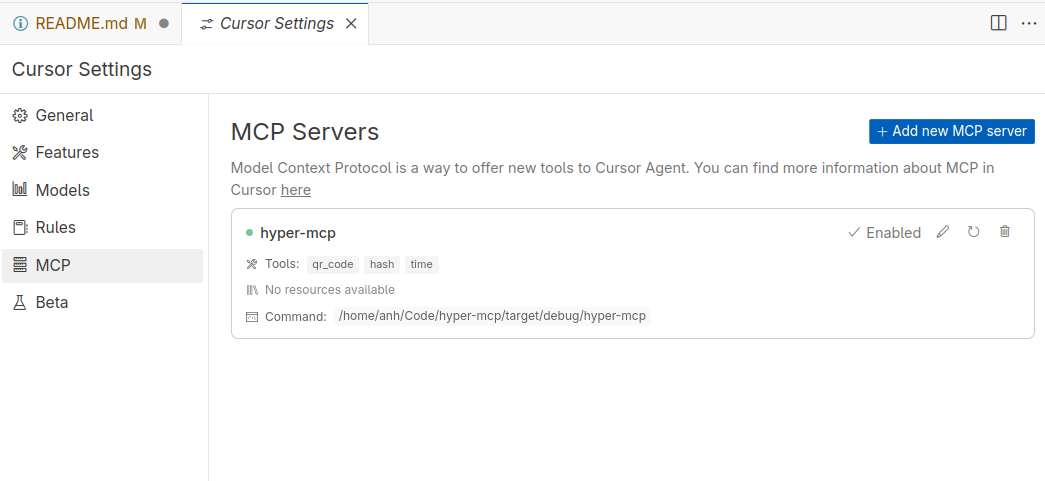
-
Set up hyper-mcp in Cursor's settings:
-
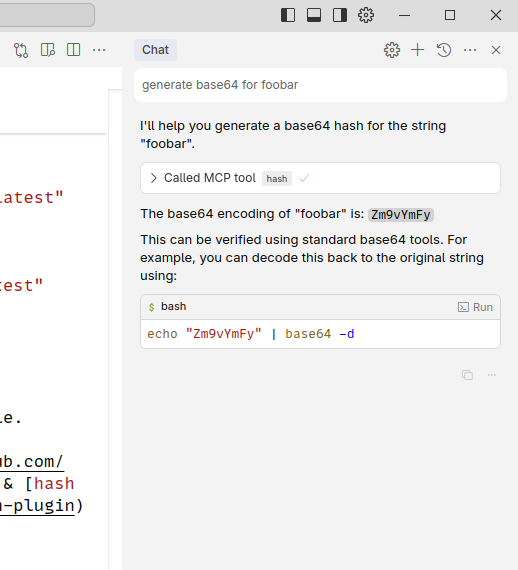
Start using tools through chat:
Using with Claude Desktop
Every GitHub Release ships an MCP Bundle (.mcpb) for each platform alongside the raw binaries:
| Platform | Bundle |
|---|---|
| macOS (Apple Silicon) | hyper-mcp-aarch64-apple-darwin.mcpb |
| Linux (x86_64) | hyper-mcp-x86_64-unknown-linux-gnu.mcpb |
| Linux (ARM64) | hyper-mcp-aarch64-unknown-linux-gnu.mcpb |
| Windows (x86_64) | hyper-mcp-x86_64-pc-windows-msvc.mcpb |
Download the bundle for your platform and double-click it (or drag it into Claude Desktop) to get a one-click install dialog. Claude Desktop will prompt you for:
- Plugin config file — path to your
config.json/config.yamllisting the WASM plugins to load (see Getting Started andconfig.example.json). - Enable dynamic plugin loading (optional).
- Skip OCI signature verification (optional, not recommended).
The bundle contains only the
hyper-mcpbinary. Loadingoci://plugins still requires cosign on yourPATHunless you enable "Skip OCI signature verification".
The bundle manifest lives in mcpb/manifest.json and is packed per-platform by the release workflow.
Using with Claude Code
The quickest way is a direct add (requires hyper-mcp already installed via Homebrew/cargo):
claude mcp add hyper-mcp -- hyper-mcp --config-file /path/to/config.json
Or install it from our plugin marketplace:
/plugin marketplace add hyper-mcp-rs/hyper-mcp
/plugin install hyper-mcp@hyper-mcp-rs
/reload-plugins
The marketplace catalog (.claude-plugin/marketplace.json) and plugin (plugins/hyper-mcp) live in this repo. See the plugin README for prerequisites and configuration.
Available Plugins
We maintain several plugins to get you started:
V1 Plugins
These plugins use the v1 plugin interface. While still supported, new plugins should use the v2 interface.
- time: Get current time and do time calculations (Rust)
- qr_code: Generate QR codes (Rust)
- hash: Generate various types of hashes (Rust)
- myip: Get your current IP (Rust)
- crypto_price: Get cryptocurrency prices (Go)
- fs: File system operations (Rust)
- github: GitHub plugin (Go)
- eval_py: Evaluate Python code with RustPython (Rust)
- memory: Let you store & retrieve memory, powered by SQLite (Rust)
- crates-io: Get crate general information, check crate latest version (Rust)
- gomodule: Get Go modules info, version (Rust)
- qdrant: keeping & retrieving memories to Qdrant vector search engine (Rust)
- gitlab: GitLab plugin (Rust)
- meme_generator: Meme generator (Rust)
- think: Think tool(Rust)
- maven: Maven plugin (Rust)
- serper: Serper web search plugin (Rust)
V2 Plugins
These plugins use the v2 plugin interface. New plugins should use this interface.
- arxiv: Search arXiv papers (Rust)
- context7: Lookup library documentation (Rust)
- defuddle: Get the main content of any page as Markdown (Rust)
- fetch: Basic webpage fetching (Rust)
- monty: A minimal, secure Python interpreter written in Rust for use by AI (Rust)
- rstime: Get current time and do time calculations (Rust)
- sqlite: Interact with SQLite (Rust)
Community-built plugins
- hackernews: This plugin connects to the Hacker News API to fetch the current top stories and display them with their titles, scores, authors, and URLs.
- release-monitor-id: This plugin retrieves project ID from release-monitoring.org, which helps track versions of released software.
- yahoo-finance: This plugin connects to the Yahoo Finance API to provide stock prices (OHLCV) based on a company name or ticker symbol.
- rand16: This plugen generates random 16 bytes buffer and provides it in base64uri format - very usable for symmetric cryptography online.
Documentation
- Built-in Tools Reference - Documentation for the
hyper_mcp-*tools including:hyper_mcp-list_plugins— list all loaded pluginshyper_mcp-load_plugin— dynamically load a plugin at runtimehyper_mcp-unload_plugin— dynamically unload a plugin at runtime
- Runtime Configuration Guide - Comprehensive guide to configuration options including:
- Authentication setup (Basic, Token, and Keyring)
- Plugin runtime configuration
- Security considerations and best practices
- Platform-specific keyring setup for macOS, Linux, and Windows
- Troubleshooting authentication issues
- Skip Tools Pattern Guide - Comprehensive guide to filtering tools using regex patterns:
- Pattern syntax and examples
- Common use cases and best practices
- Environment-specific filtering strategies
- Advanced regex techniques
- Migration and troubleshooting
Creating Plugins
For comprehensive instructions on creating plugins, see CREATING_PLUGINS.md.
For ready-to-use plugin templates in Rust and Go, see TEMPLATES.md.