Glean 拾灵
[!IMPORTANT] Join our Discord to stay updated on the latest developments and get support.
This project is still in development and is not ready for production use.
A self-hosted RSS reader and personal knowledge management tool.
Glean (拾灵) helps information-heavy consumers efficiently manage their reading through intelligent RSS aggregation.
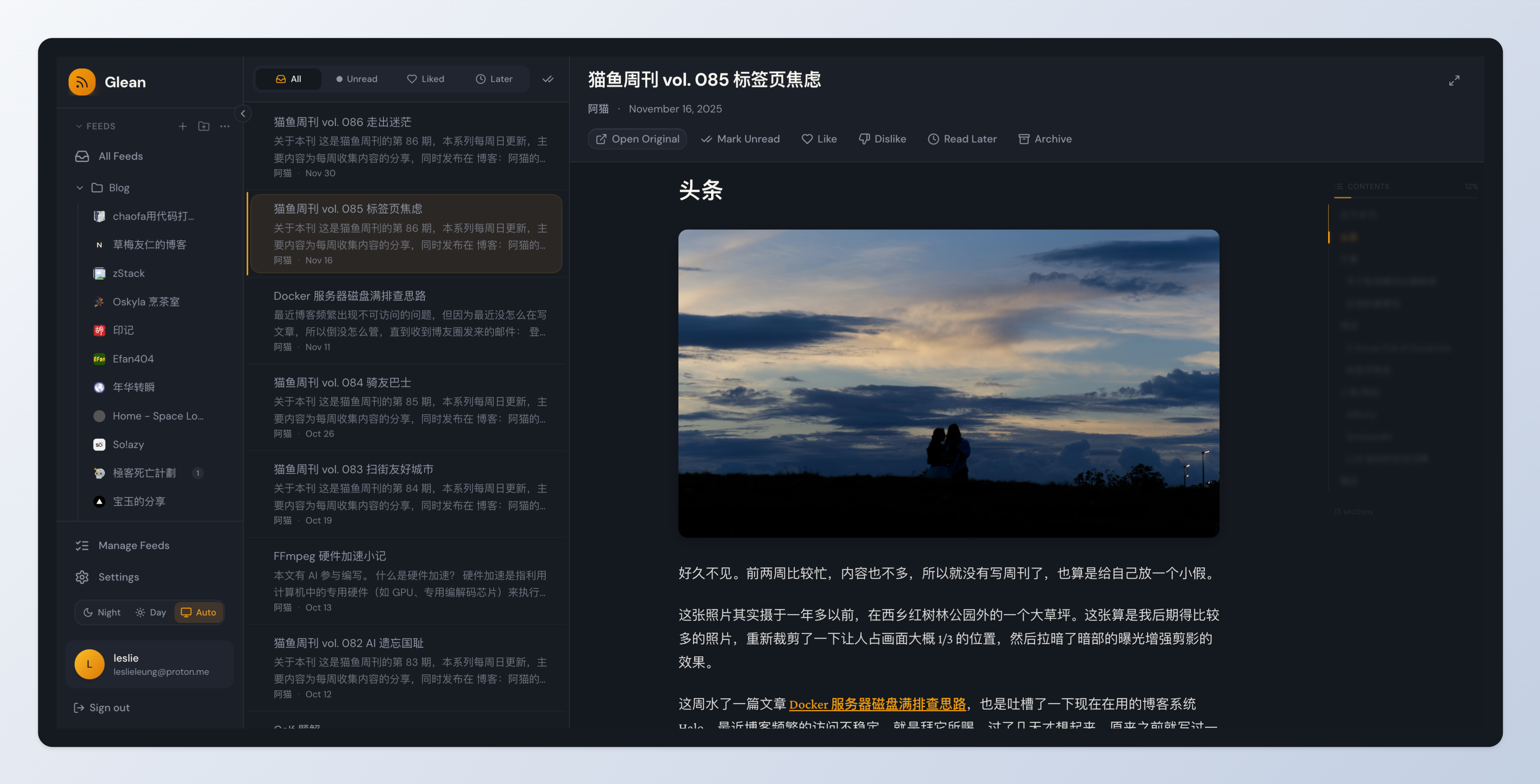
Features
Core Features
- 📰 RSS Subscription - Subscribe and organize RSS/Atom feeds with OPML import/export
- 📚 Smart Reading - Clean reading experience with content filtering
- 🔖 Read Later - Save articles for later reading with auto-cleanup
- 📁 Folders & Tags - Multi-level folders and tags for organization
- ⭐ Bookmarks - Save articles from feeds or external URLs
- 🔧 Background Sync - Automatic feed updates every 15 minutes
- 🔒 Self-hosted - Full data ownership with Docker deployment
- 🎨 Modern UI - Beautiful, responsive warm dark theme interface
- 👨💼 Admin Dashboard - User management and system monitoring
Planned Features (WIP)
- 🧠 Smart Recommendations - AI-powered preference learning and article scoring
- ⚙️ Rule Engine - Automated processing with Jinja2-style conditions
- 🤖 AI Features - Summary generation, auto-tagging, keyword extraction (BYOK)
- 📄 Full Content Fetch - Fetch complete article content for RSS summaries
- 🔌 Chrome Extension - One-click bookmarking from browser
- 📱 Mobile PWA - Progressive Web App for mobile devices
Quick Start
One-Command Deployment
# Download docker-compose.yml
curl -fsSL https://raw.githubusercontent.com/LeslieLeung/glean/main/docker-compose.yml -o docker-compose.yml

# Start Glean (full deployment with Milvus)
docker compose up -d

# Access:
# - Web App: http://localhost
# - Admin Dashboard: http://localhost:3001 (default: admin/Admin123!)
Default Admin Account: An admin account is automatically created with:
- Username:
admin - Password:
Admin123! - ⚠️ Change this password in production!
Lite Deployment (without Milvus, if you don't need Phase 3 features):
# Download lite version
curl -fsSL https://raw.githubusercontent.com/LeslieLeung/glean/main/docker-compose.lite.yml -o docker-compose.yml

# Start Glean
docker compose up -d

# Admin Dashboard: http://localhost:3001 (default: admin/Admin123!)
Customize Admin Account (Optional)
To use custom admin credentials instead of the defaults, create a .env file before starting:
# Set custom admin credentials in .env
cat > .env << EOF
ADMIN_USERNAME=admin
ADMIN_PASSWORD=YourSecurePassword123!
SECRET_KEY=$(openssl rand -base64 32)
EOF

# Start services
docker compose up -d
To disable auto-creation and create admin manually:
# Disable auto-creation in .env
echo "CREATE_ADMIN=false" >> .env

# Start services
docker compose up -d

# Create admin manually
docker exec -it glean-backend /app/scripts/create-admin-docker.sh
Configuration
For production, customize your deployment with environment variables. Download the example file:
curl -fsSL https://raw.githubusercontent.com/LeslieLeung/glean/main/.env.example -o .env
Important settings to change:
| Variable | Description | Default |
|---|---|---|
SECRET_KEY | JWT signing key | Must change in production! |
POSTGRES_PASSWORD | Database password | glean (Change in production!) |
ADMIN_PASSWORD | Admin password | Admin123! (Change!) |
WEB_PORT | Web interface port | 80 |
ADMIN_PORT | Admin dashboard port | 3001 |
CREATE_ADMIN | Auto-create admin | true (set false to disable) |
For all configuration options, see .env.example.
Docker Images
Pre-built images are available on GitHub Container Registry:
ghcr.io/leslieleung/glean-backend:latest- API server & workerghcr.io/leslieleung/glean-web:latest- Web frontendghcr.io/leslieleung/glean-admin:latest- Admin dashboard
Supported architectures: linux/amd64, linux/arm64
Testing Pre-release Versions
Want to test upcoming features? Use pre-release versions (alpha/beta/rc):
Method 1: Using environment variable (recommended)
# Set the IMAGE_TAG in .env file
echo "IMAGE_TAG=v0.3.0-alpha.1" >> .env

# Or export it directly
export IMAGE_TAG=v0.3.0-alpha.1

# Start with pre-release images
docker compose up -d
Method 2: Inline environment variable
IMAGE_TAG=v0.3.0-alpha.1 docker compose up -d
Note: Pre-release versions are for testing only. They won't trigger auto-updates for Electron apps and are not recommended for production use.
See available pre-release versions on the Releases page.
Deployment
The default deployment includes all services (full version):
- Web App (port 80) - Main user interface
- Admin Dashboard (port 3001) - User management and system monitoring
- Backend API - FastAPI server
- Worker - Background task processor (feed fetching, cleanup)
- PostgreSQL - Database
- Redis - Task queue
- Milvus - Vector database for smart recommendations and preference learning (Phase 3)
Lite deployment (without Milvus) is also available using docker-compose.lite.yml.
For detailed deployment instructions and configuration, see DEPLOY.md.
Tech Stack
Backend:
- Python 3.11+ / FastAPI / SQLAlchemy 2.0
- PostgreSQL / Redis / arq (task queue)
Frontend:
- React 18 / TypeScript / Vite
- Tailwind CSS / Zustand / TanStack Query
Development
See DEVELOPMENT.md for complete development setup instructions.
Quick start:
# Clone and setup
git clone https://github.com/LeslieLeung/glean.git
cd glean
npm install

# Start infrastructure
make up

# Initialize database (first time only)
make db-upgrade

# Install pre-commit hooks (optional but recommended)
make pre-commit-install

# Start all services
make dev-all

# Access:
# - Web: http://localhost:3000
# - Admin: http://localhost:3001
# - API Docs: http://localhost:8000/api/docs
Pre-commit Hooks
The project uses pre-commit hooks to ensure code quality:
# Install hooks (one-time setup)
make pre-commit-install

# Run hooks manually on all files
make pre-commit-run

# Uninstall hooks (if needed)
make pre-commit-uninstall
Hooks automatically run on commit and check:
- Backend: ruff format, ruff linter, pyright type checking
- Frontend: ESLint, Prettier formatting
- General: trailing whitespace, file endings, YAML/JSON/TOML validation
Roadmap
| Phase | Status | Features |
|---|---|---|
| Phase 1: MVP | ✅ Done | User system, RSS subscription, reader, admin dashboard |
| Phase 2: Organization | ✅ Done | Bookmarks, folders, tags, read later |
| Phase 3: Preferences | 🚧 WIP | Embedding pipeline, preference learning, smart recommendations |
| Phase 4: Rules | 📋 Planned | Rule engine, Jinja2 conditions, automated actions |
| Phase 5: AI | 📋 Planned | AI summaries, auto-tagging, keyword extraction, BYOK support |
| Phase 6: Extensions | 📋 Planned | Chrome extension, PWA, web snapshots |
See Product Requirements for detailed feature specifications.
Documentation
- Development Guide - Set up your development environment
- Deployment Guide - Production deployment details
Contributing
Contributions are welcome! Please read our Development Guide first.
- Fork the repository
- Create a feature branch
- Make your changes
- Run tests and linting
- Submit a Pull Request
License
This project is licensed under the AGPL-3.0 License - see the LICENSE file for details.