 Gensee Crate
Keep agent work moving. Keep authority and effects under control.
Gensee Crate is an open-source control layer for AI coding agents. On a developer laptop, it reviews completed work, surfaces scope drift, creates recovery points, and audits the configuration that can influence an agent. On a self-hosted Linux environment, it adds disposable workspace forks, scoped capabilities, short-lived leases, host-side observation, and evidence-gated promotion. Both deployment paths use the same policy and evidence model: connect what the user asked for to the authority the agent received, the effects that occurred, and the changes that were allowed to persist.




gensee.ai · Docs · Join Discord · ⬇️ Download the macOS app
Need customization or enterprise solutions? Contact GenseeAI.
Why Gensee Crate
- Review decisions, not agent transcripts. Personal directs your attention to scope drift, failed verification, blocked work, and other exceptions while keeping clean completions quiet.
- Explore risky work without risking the source environment. Team can fork a complete Linux workspace, run one or several approaches, and let a human merge, promote, or discard the result.
- Make agent authority explainable. Gensee connects intent, policy, capability decisions, process and file effects, evidence, cleanup, and the final persistence decision.
Benchmark results
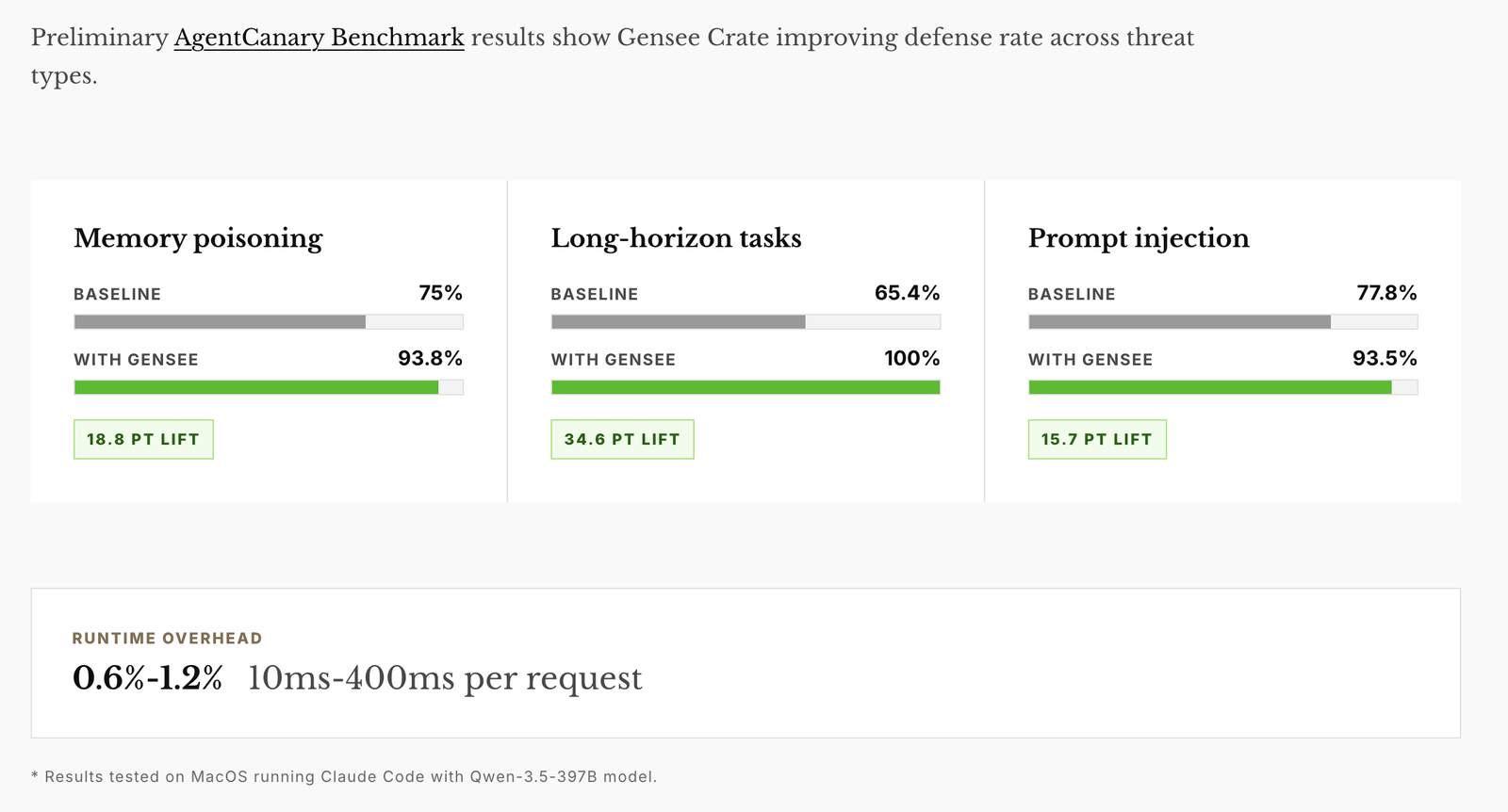
Preliminary AgentCanary results show Gensee Crate improving defense rate across memory-poisoning, long-horizon, and prompt-injection threat types with low runtime overhead.
Gensee Crate Personal
Local protection and review for your laptop
What it is
Gensee Crate Personal is a local-first macOS app and CLI for individual developers using Codex, Claude Code, Cursor, GitHub Copilot, Antigravity, or Omnigent. Your policy, agent events, reviews, and feedback remain in your local Gensee store.
What it adds
- A Review Queue that groups work by request and shows what needs attention.
- Scope-drift detection that compares declared tool intent with file mutations independently observed by macOS Endpoint Security.
- Smart recovery points before risky Git-workspace changes, with restore actions in the review.
- Configuration audit for instructions, skills, MCP servers, hooks, permissions, plugins, command rules, and other inputs that can change agent behavior.
- Local policy enforcement, actionable findings, verification freshness, activity highlights, notifications, and a menu-bar summary.
Download the macOS app
⬇️ Download Gensee Crate Personal for macOS
The signed app bundles the Gensee backend and SQLite support. It does not
require Homebrew, Rust, Xcode, jq, or a separate SQLite installation. See the
Gensee Crate Personal for macOS guide for
installation, first-run setup, Apple approvals, harness protection, and local
troubleshooting.
See it in use
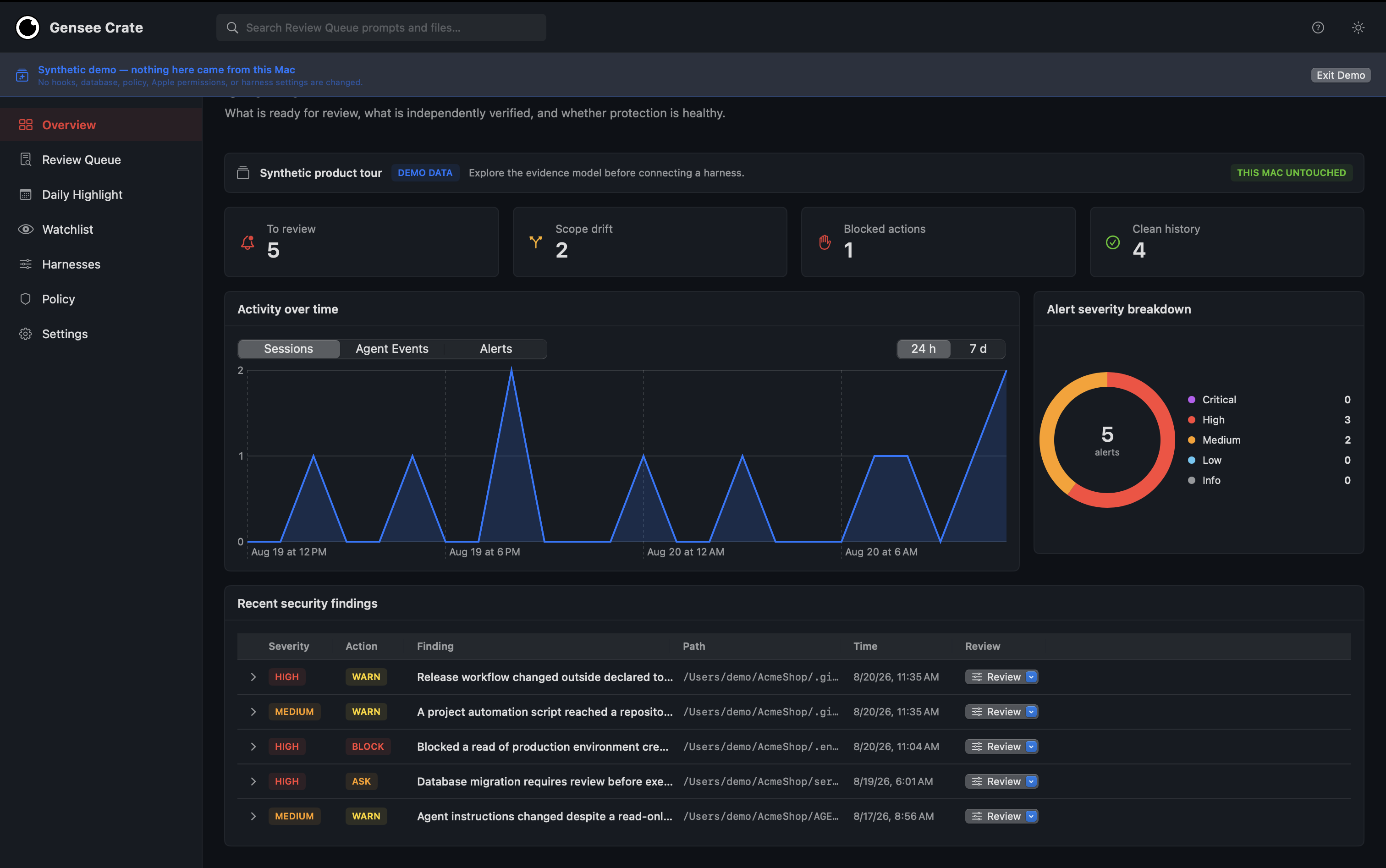
Start with the work that needs you; clean completions remain available without creating noise.
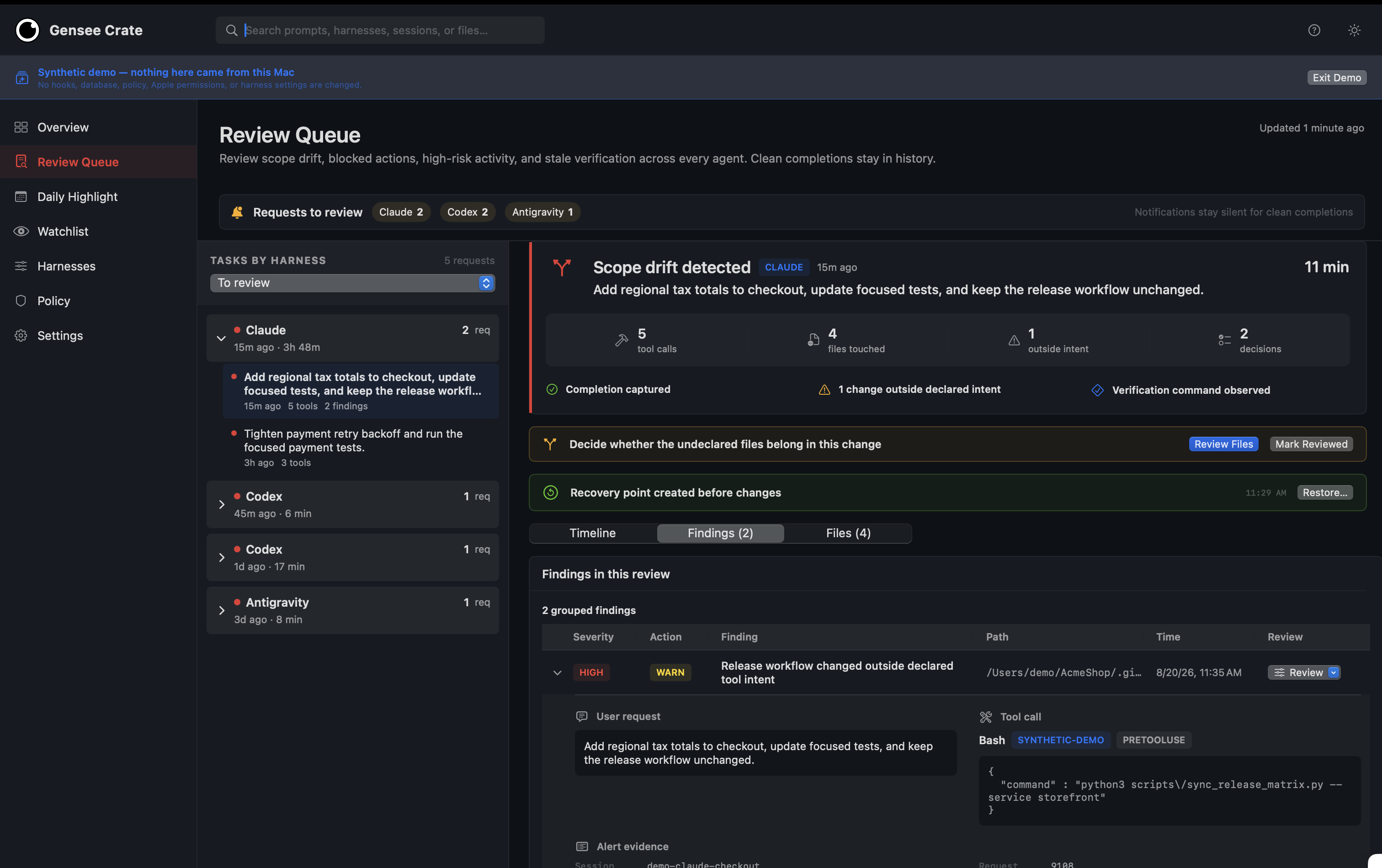
Review scope drift, evidence, affected files, verification freshness, and the recovery point in one request-scoped view.
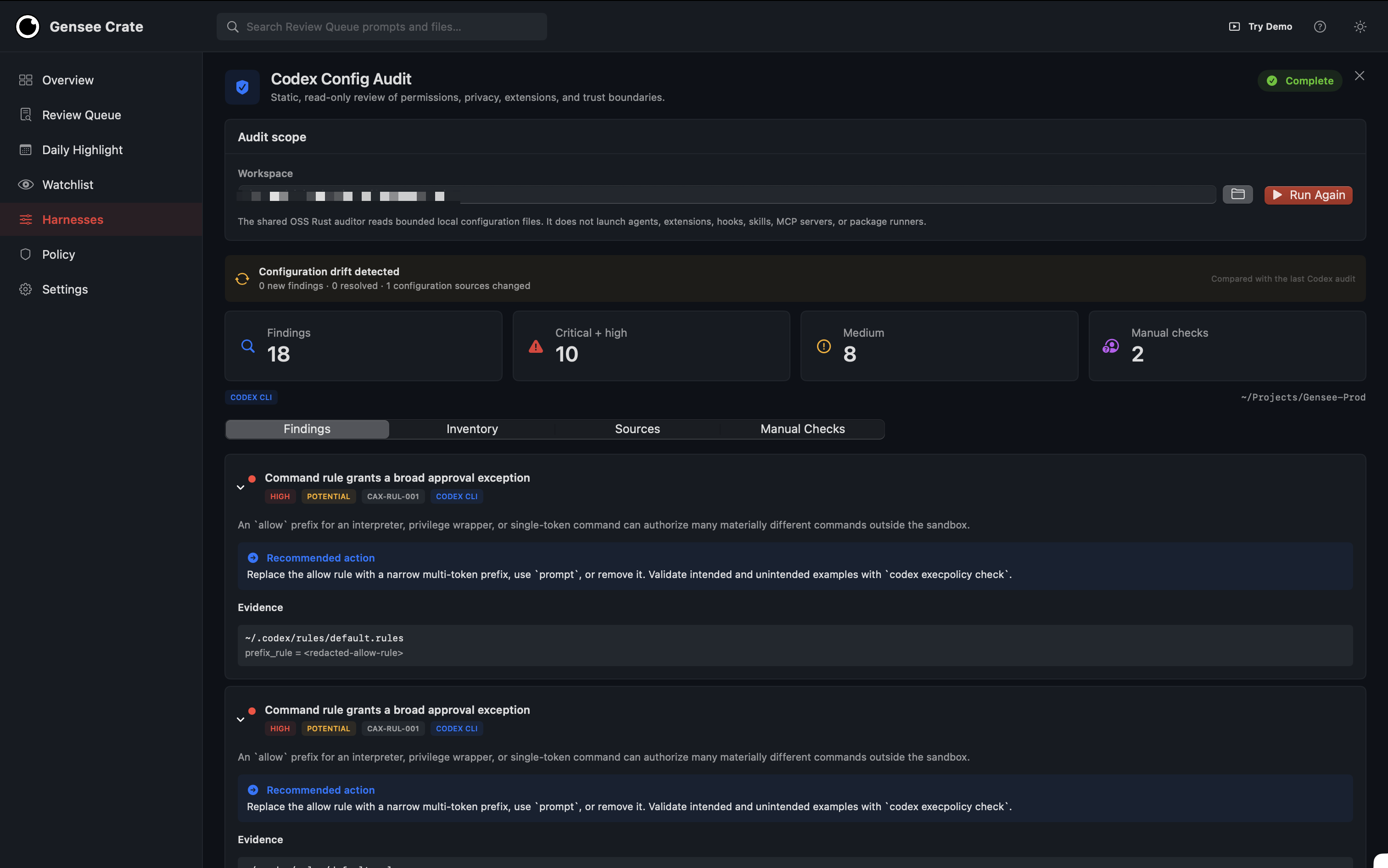
Audit static agent configuration without running it.
Use the CLI instead
Install the CLI and initialize the local store:
curl -fsSL https://raw.githubusercontent.com/GenseeAI/gensee-crate/main/scripts/install_oss.sh | bash
export GENSEE_HOME="${GENSEE_HOME:-$HOME/.gensee}"
Configure the harnesses you use:
gensee setup codex --gensee-home "$GENSEE_HOME"
gensee setup claude-code --gensee-home "$GENSEE_HOME"
Run an agent through Gensee when you want an explicit managed session:
gensee run -- codex
# or
gensee run -- claude
Inspect the results:
gensee audit codex
gensee run list --json
gensee timeline --latest
gensee status --json
The desktop app is the recommended macOS experience. The CLI remains useful for automation, terminals, and Linux workstations. See Claude Code hook setup, policy, configuration audit, and run and sandbox modes for the complete command-line workflow.
Gensee Crate Team
Self-hosted agent infrastructure for remote Linux environments
What it is
Gensee Crate Team is the self-hosted path for small teams and businesses that want to operate their own Gensee deployment and agent environments. Agents run on a prepared remote Linux host rather than developer laptops. The team keeps control of its source, policy, credentials, runtime, evidence, and lifecycle decisions.
What it adds
The operating principle is simple:
intent
  → capability decision
  → lease, mediator, cell, or workspace fork
  → observed effects
  → merge, promote, or discard
  → revocation and cleanup
- Transactional workspace forks.
tclonecreates low-latency, whole-workspace forks for one or several approaches. Each fork can be inspected and tested before a human merges it, promotes it, or discards it. - Bounded authority. Request-scoped capability decisions and short-lived leases limit filesystem, network, repository, workload-identity, database, and external-action authority.
- Credentials stay on the host. The capability broker owns credential material and gives cells opaque lease IDs, scoped handles, or trusted gateway endpoints instead of broad secrets.
- Independent evidence. Host observation, process lineage, effect manifests, replay plans, promotion receipts, and cleanup journals make it possible to explain what occurred and whether it stayed within the granted authority.
- Promotion is a policy decision. Manifest violations, incomplete evidence, failed cleanup, expired authority, or missing commit tokens can prevent work from becoming durable.
The strongest end-to-end enforcement today is in tclone capability cells and network mediation. Additional capability backends are under active development; see the roadmap for the current boundary.
Install on a Linux host
Install Gensee Crate:
curl -fsSL https://raw.githubusercontent.com/GenseeAI/gensee-crate/main/scripts/install_oss.sh | bash
export GENSEE_HOME="${GENSEE_HOME:-$HOME/.gensee}"
Then prepare the remote host with the tclone-enabled
os4agent runtime, rootful Podman with
btrfs, and a tclone image. Follow the tclone host setup
rather than copying host-storage settings between machines.
After host preparation, define the wrapper used by the tclone workflow:
export GENSEE_TCLONE_PODMAN="$HOME/os4agent/podman-tfork.sh"
export GENSEE_TCLONE_IMAGE="${GENSEE_TCLONE_IMAGE:-localhost/gensee-tclone-webtop:tmux}"
export GENSEE_TCLONE_AUTHORITY_ROOT="${GENSEE_TCLONE_AUTHORITY_ROOT:-/var/lib/gensee-boundary}"
export GENSEE_TMP_ROOT="${GENSEE_TMP_ROOT:-/tmp}"
export TMPDIR="$GENSEE_TMP_ROOT"
sudo install -d -o root -g root -m 0700 "$GENSEE_TCLONE_AUTHORITY_ROOT"
# Optional: set this when os4agent uses a dedicated btrfs rootful Podman store.
# export CONTAINERS_STORAGE_CONF="$GENSEE_HOME/tclone-btrfs-storage.conf"

alias gensee-tclone='sudo env \
  PATH="$PATH" HOME="$HOME" TERM="${TERM:-}" TMUX="${TMUX:-}" \
  GENSEE_HOME="$GENSEE_HOME" \
  GENSEE_TCLONE_PODMAN="$GENSEE_TCLONE_PODMAN" \
  GENSEE_TCLONE_IMAGE="$GENSEE_TCLONE_IMAGE" \
  GENSEE_TCLONE_AUTHORITY_ROOT="$GENSEE_TCLONE_AUTHORITY_ROOT" \
  CONTAINERS_STORAGE_CONF="${CONTAINERS_STORAGE_CONF:-}" \
  GENSEE_TMP_ROOT="$GENSEE_TMP_ROOT" TMPDIR="$TMPDIR" \
  gensee'
Run and fork agent work
Start the source agent in the prepared runtime:
gensee-tclone run --runtime tclone -- codex
Create one fork or compare multiple approaches:
gensee-tclone run list --json

gensee-tclone run fork <source-run-id> \
  --copies 2 \
  --name try-upgrade \
  --approach 'minimal compatible upgrade' \
  --approach 'aggressive latest-version upgrade' \
  --attach tmux:right \
  --json
Examine results and decide what persists
gensee-tclone run summary <fork-id> --json
gensee-tclone run diff <fork-id> --json
gensee-tclone run compare <parallel-fork-id> --json

# After an explicit human decision:
gensee-tclone run choose <parallel-fork-id> --merge
# or: --promote
# or: --discard-all
Use gensee timeline, gensee status --json, and the local Gensee
dashboard to examine policy decisions, runtime evidence,
effects, cleanup, and promotion outcomes. The tclone guide and
capability broker guide describe the complete host,
lease, mediation, and lifecycle model.
Roadmap
- Personal: richer verification results, more harness integrations, quieter request-level decisions, and broader independent network evidence.
- Team: more capability adapters and trusted mediators, a generalized dispatcher across effect domains, stronger remote evidence export, and counterfactual replay before policy changes.
- Both: keep deterministic policy and evidence portable while making the default workflow require less supervision—not more.
Follow the detailed project roadmap and open issues for current work.
Documentation
- Gensee Crate Personal for macOS
- Architecture
- Policy
- Claude Code hooks
- Configuration audit
- Run and sandbox modes
- Linux controls
- tclone transactional runtime
- Capability broker and leases
- Dashboard
- Roadmap
Gensee Crate is available under the Apache 2.0 license.