

Flyto2 Core — Verified, Replayable Execution



Turn AI work into verified, replayable procedures.
AI said it finished. Flyto2 shows the proof.
The open-source execution engine for AI agents. 480 modules, MCP-native, triggers, queue, versioning, metering.
flyto2.com · Cloud Automation · Documentation · MCP Docs · YouTube
Flyto2 is one product delivered as three independently usable packages:
| Choose | When you need |
|---|---|
flyto-ai | Understand, route, and govern new work and provider use. |
flyto-blueprint | Store, learn from, and score reusable procedures; it never executes them. |
flyto-core | Validate schemas, execute and replay deterministically, and emit evidence. |
flyto-core is a standalone execution package: it does not require the other
two packages to validate and run a procedure or produce evidence. It does not
own intent/provider governance, procedure learning/scoring, or hosted product
and account logic.
The generated public inventory contains 480 registry-backed modules; its 88 catalog categories keep that surface navigable.
This repository records that boundary as flyto.product-contract.v1 in
flyto-product.toml.
Flyto2 Core is the open-source runtime behind Flyto2. It is built for people who want an AI agent framework that actually runs work: browser automation, API integration, web scraping, MCP server automation, replayable YAML recipes, evidence capture, and deterministic tools that agents can call without inventing unreviewed code.
Use it when the question is simple but the job is annoying: "open this page, capture the proof, extract the data, check performance, and let me retry only the failed step." Flyto2 Core gives you a local execution engine for browser automation, workflow replay, AI-agent tool calls, Web Vitals checks, screenshot capture, structured extraction, and audit-ready evidence.
The current public inventory is 480 registry-backed modules across 88 catalog categories, including triggers, queue modules, workflow versioning, metering hooks, browser automation, API calls, data transforms, verification, files, and crypto.
Good fit if you searched for:
- open source AI agent framework for production workflows
- Python AI workflow automation with Playwright
- MCP server automation with trace and replay
- browser automation that can resume from a failed step
Try in 30 seconds
pip install flyto-core[browser] && playwright install chromium
flyto recipe competitor-intel --url https://github.com/pricing
  Step  1/12  browser.launch         ✓      420ms
  Step  2/12  browser.goto           ✓    1,203ms
  Step  3/12  browser.evaluate       ✓       89ms
  Step  4/12  browser.screenshot     ✓    1,847ms  → saved intel-desktop.png
  Step  5/12  browser.viewport       ✓       12ms  → 390×844
  Step  6/12  browser.screenshot     ✓    1,621ms  → saved intel-mobile.png
  Step  7/12  browser.viewport       ✓        8ms  → 1280×720
  Step  8/12  browser.performance    ✓    5,012ms  → Web Vitals captured
  Step  9/12  browser.evaluate       ✓       45ms
  Step 10/12  browser.evaluate       ✓       11ms
  Step 11/12  file.write             ✓        3ms  → saved intel-report.json
  Step 12/12  browser.close          ✓       67ms

  ✓ Done in 10.3s — 12/12 steps passed
Screenshots captured. Performance metrics extracted. JSON report saved. Every step traced.
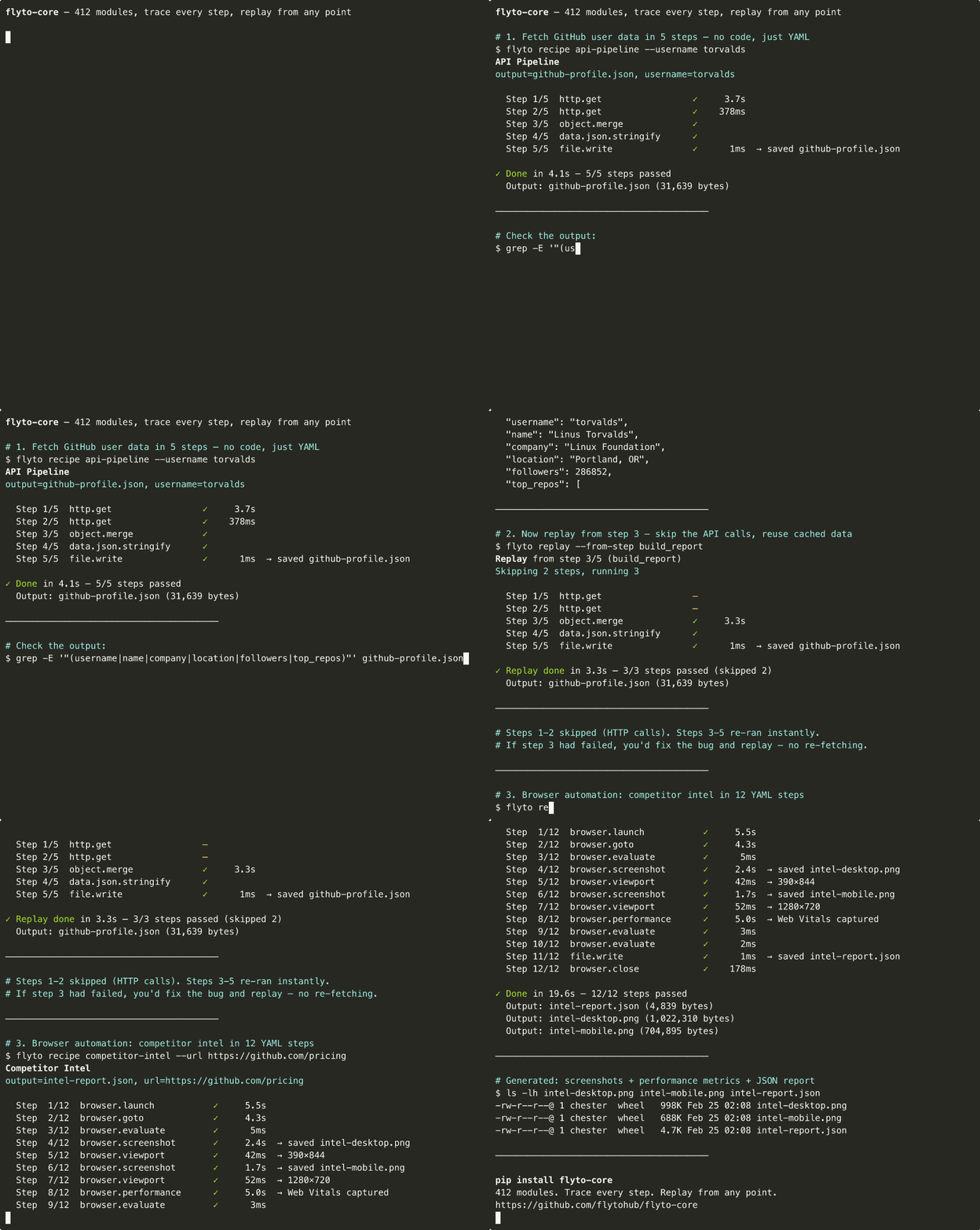
What happens when step 8 fails?
With a shell script you re-run the whole thing. With flyto-core:
flyto replay --from-step 8
Steps 1–7 are instant. Only step 8 re-executes. Full context preserved.
3 recipes to try now
# Competitive pricing: screenshots + Web Vitals + JSON report
flyto recipe competitor-intel --url https://competitor.com/pricing

# Full site audit: SEO + accessibility + performance
flyto recipe full-audit --url https://your-site.com

# Web scraping → CSV export
flyto recipe scrape-to-csv --url https://news.ycombinator.com --selector ".titleline a"
Every recipe is traced. Every run is replayable. See all 41 recipes ->
Install
pip install flyto-core            # Core engine + CLI + MCP server
pip install flyto-core[browser]   # + browser automation (Playwright)
playwright install chromium        # one-time browser setup
The 85-line problem
Here's what competitive pricing analysis looks like in Python:
|
Python — 85 lines |
flyto-core — 12 steps |
|
No trace. No replay. No timing. If step 5 fails, re-run everything. |
Full trace. Replay from any step. Per-step timing. Every run is debuggable. |
Current Platform Snapshot
- Open-source AI agent framework boundary: MCP-compatible clients call reviewed flyto-core modules through schemas, not arbitrary generated production code.
- AI workflow automation substrate for browser automation, API workflows, data/file operations, AI calls, notifications, verification, trace, evidence, and replay.
- 480 registry-backed modules across 88 catalog categories.
docs/TOOL_CATALOG.mdis generated fromModuleRegistry, not hand-counted. - 41 built-in recipes for audit, browser automation, data/image work, DevOps, integrations, and deterministic verification.
- Deterministic verification modules (
verification.*withwarroom.*compatibility aliases) support site graph discovery, replay scenario generation, run evidence, and report packs. - Hardened outbound and file access in the 2.26.x line: guarded HTTP clients prevent SSRF bypasses, and file/data writes are confined through the sandbox path guard.
- Replayable browser and workflow execution remains the core contract: every step can produce trace data, evidence snapshots, and targeted replay from the failing point.
Public Naming Contract
- Use Flyto2 for the product and company-facing brand. Do not use a shortened legacy spelling in public docs, examples, or SEO copy.
- Use
flyto2.com,docs.flyto2.com, andblog.flyto2.comas the public citation surfaces. - Public example contact addresses should use registered
@flyto2.commailboxes such assupport@flyto2.com,security@flyto2.com,privacy@flyto2.com,sales@flyto2.com,team@flyto2.com,dev@flyto2.com,alerts@flyto2.com,oncall@flyto2.com,reports@flyto2.com,noreply@flyto2.com,dmarc@flyto2.com,conduct@flyto2.com,admin@flyto2.com,pentest@flyto2.com,hello@flyto2.com, andinfo@flyto2.com. - Public docs, blog, and landing pages should cite the current core facts above instead of stale module counts.
Engine Features
- Execution Trace — structured record of every step: input, output, timing, status
- Replay — re-execute from any step with the original (or modified) context
- Breakpoints — pause execution at any step, inspect state, resume
- Evidence Snapshots — full state before and after each step boundary
- Data Lineage — track data flow across steps, build dependency graphs
- Timeout Guard — configurable workflow-level and per-step timeout protection
Architecture
CLI, MCP, HTTP, Python, and packaged recipes converge on the same workflow engine, module registry, policy, trace, evidence, and replay boundaries. Start with the Technical Whitepaper, then use the Architecture Map and exhaustive source reference for implementation detail.
Configuration
Core is configured through package extras, CLI arguments, workflow parameters, module policy, environment variables, and local run state. Security-sensitive network, filesystem, auth, callback, and permission switches are documented in Configuration; all 107 detected environment readers are linked to source in the generated configuration reference.
Extensions
Core manages two — and only two — kinds of installable extension:
| Kind | Name prefix | Entry-point group |
|---|---|---|
| Module packs | flyto-modules- | flyto.modules |
| Plugins | flyto-plugin- | flyto.plugins |
Admission is by prefix and entry-point group alone, so a new pack such as
flyto-modules-robotics works the day it is published — no Core source names
any extension, and none has to change for one.
export FLYTO_EXTENSIONS_INSTALL_ENABLED=1   # operator opt-in, off by default

curl -H "Authorization: Bearer $TOKEN" localhost:8333/v1/extensions
curl -X POST -H "Authorization: Bearer $TOKEN" \
     -H 'Content-Type: application/json' \
     -d '{"name": "flyto-modules-robotics"}' \
     localhost:8333/v1/extensions/install
An install is only reported successful once the installed distribution is
proved to declare an entry point in its kind's group; a first install that
fails that proof is rolled back, an upgrade that fails it is left in place so
the operator is not left with nothing. Upgrades and uninstalls report
restart_required, because Python cannot un-import code already loaded.
Failures return a stable error code and never package-manager output. See
API.
API / Module Reference
480 Modules, 88 Catalog Categories
| Category | Count | Examples |
|---|---|---|
browser.* | 54 | launch, goto, click, evaluate, screenshot, performance, challenge |
flow.* | 24 | switch, loop, branch, parallel, retry, circuit breaker, rate limit |
array.* | 15 | filter, sort, map, reduce, unique, chunk, flatten |
api.* | 13 | OpenAI, Anthropic, Gemini, Notion, Slack, Telegram |
data.* | 13 | JSON, YAML, CSV, XML parse/generate/convert |
string.* | 11 | reverse, uppercase, split, replace, trim, slugify, template |
ai.* | 10 | chat, model calls, vision, embeddings, moderation |
object.* | 10 | keys, values, merge, pick, omit, get, set, flatten |
testing.* | 10 | assertions, scenarios, E2E steps, reports |
image.* | 9 | resize, convert, crop, rotate, watermark, OCR, compress |
verify.* | 9 | evidence, visual diff, rulesets, annotations |
file.* | 8 | read, write, copy, move, delete, exists, edit, diff |
stats.* | 8 | mean, median, percentile, correlation, standard deviation |
test.* | 8 | API, browser, and visual checks |
check.* | 7 | validation and guard checks |
crypto.* | 7 | AES encrypt/decrypt, JWT create/verify, hashes |
http.* | 7 | get, request, batch, paginate, session |
validate.* | 7 | email, url, json, phone, credit card |
| 66 more prefixes | 221 | Docker, archive, math, k8s, network, PDF, AWS, cache, git |
See the Full Module Catalog for every module, parameter, and description.
How is this different?
| Playwright / Selenium | Shell scripts | flyto-core | |
|---|---|---|---|
| Step 8 fails | Re-run everything | Re-run everything | flyto replay --from-step 8 |
| What happened at step 3? | Add print(), re-run | Add echo, re-run | Full trace: input, output, timing |
| Browser + API + file I/O | Write glue code | 3 languages | All built-in |
| Share with team | "Clone my repo" | "Clone my repo" | pip install flyto-core |
| Run in CI | Wrap in pytest/bash | Fragile | flyto run workflow.yaml |
Usage
CLI — run workflows from the terminal
# Run a built-in recipe
flyto recipe site-audit --url https://example.com

# Run your own YAML workflow
flyto run my-workflow.yaml

# List all recipes
flyto recipes
MCP Server — for Claude Code, Cursor, Windsurf
pip install flyto-core
claude mcp add flyto-core -- python -m core.mcp_server
Or add to your MCP config:
{
  "mcpServers": {
    "flyto-core": {
      "command": "python",
      "args": ["-m", "core.mcp_server"]
    }
  }
}
Your AI gets all 480 modules as tools.
HTTP API — for integrations and remote execution
pip install flyto-core[api]
flyto serve
# ✓ flyto-core running on 127.0.0.1:8333
| Endpoint | Purpose |
|---|---|
POST /v1/workflow/run | Execute workflow with evidence + trace |
POST /v1/workflow/{id}/replay/{step} | Replay from any step |
POST /v1/execute | Execute a single module |
GET /v1/modules | Discover all modules |
POST /mcp | MCP Streamable HTTP transport |
Python API — for programmatic use
import asyncio
from core.modules.registry import ModuleRegistry

async def main():
    result = await ModuleRegistry.execute(
        "string.reverse",
        params={"text": "Hello"},
        context={}
    )
    print(result)  # {"ok": True, "data": {"result": "olleH"}}

asyncio.run(main())
41 Built-in Recipes
No code required — every recipe is a YAML workflow template:
flyto recipes                  # List all recipes

# Audit & Testing
flyto recipe full-audit       --url https://example.com
flyto recipe competitor-intel --url https://github.com/pricing
flyto recipe site-audit       --url https://example.com
flyto recipe web-perf         --url https://example.com
flyto recipe flyto2-ui-login-smoke --login_url https://myapp.com/login --page_url https://myapp.com/projects --username team@flyto2.com --password "$FLYTO_TEST_PASSWORD"
flyto recipe form-fill        --url https://myapp.com/form --data '{"email":"dev@flyto2.com"}'

# Browser Automation
flyto recipe screenshot        --url https://example.com
flyto recipe responsive-report --url https://example.com
flyto recipe page-to-pdf       --url https://example.com
flyto recipe visual-snapshot   --url https://example.com
flyto recipe webpage-archive   --url https://example.com
flyto recipe scrape-page       --url https://example.com --selector h1
flyto recipe scrape-links      --url https://example.com
flyto recipe scrape-table      --url https://en.wikipedia.org/wiki/YAML --selector .wikitable
flyto recipe stock-price       --symbol AAPL

# Data & Image
flyto recipe ocr               --input scan.png
flyto recipe csv-to-json       --input data.csv
flyto recipe image-resize      --input photo.jpg --width 800
flyto recipe image-convert     --input photo.png --format webp

# Network & DevOps
flyto recipe port-scan         --host example.com
flyto recipe whois             --domain example.com
flyto recipe monitor-site      --url https://myapp.com
flyto recipe docker-ps
flyto recipe git-changelog

# Integrations
flyto recipe scrape-to-slack   --url https://example.com --selector h1 --webhook $SLACK_URL
flyto recipe github-issue      --url https://example.com --owner me --repo my-app --title "Bug" --token $GITHUB_TOKEN
Each recipe is a YAML workflow template. Run flyto recipe <name> --help for full options.
See docs/RECIPES.md for full documentation.
Write Your Own Workflows
Recipes are just YAML files. Write your own:
name: price-monitor
steps:
  - id: open
    module: browser.launch
    params: { headless: true }

  - id: page
    module: browser.goto
    params: { url: "https://competitor.com/pricing" }

  - id: prices
    module: browser.evaluate
    params:
      script: |
        JSON.stringify([...document.querySelectorAll('.price')].map(e => e.textContent))

  - id: save
    module: file.write
    params: { path: "prices.json", content: "${prices.result}" }

  - id: close
    module: browser.close
flyto run price-monitor.yaml
Every run produces an execution trace and state snapshots. If step 3 fails, replay from step 3 — no re-running the whole thing.
For Module Authors
from core.modules.registry import register_module
from core.modules.schema import compose, presets

@register_module(
    module_id='string.reverse',
    version='1.0.0',
    category='string',
    label='Reverse String',
    description='Reverse the characters in a string',
    params_schema=compose(presets.INPUT_TEXT(required=True)),
    output_schema={'result': {'type': 'string', 'description': 'Reversed string'}},
)
async def string_reverse(context):
    text = str(context['params']['text'])
    return {'ok': True, 'data': {'result': text[::-1]}}
See Module Specification for the complete guide.
Contributing
We welcome contributions! See CONTRIBUTING.md for guidelines.
Testing
python -m pytest
python -m ruff check .
flyto recipe full-audit --url https://example.com
Security
Report security vulnerabilities via security@flyto2.com. See SECURITY.md for the security policy and the environment variables that define the filesystem and outbound-network boundaries.
SECURITY_STATUS.md lists every published advisory with its severity, affected range, fixed-in version, and the regression test that covers it. Two boundaries are enforced registry-wide by tests that fail the build — every module taking a caller-supplied path must reach the filesystem sandbox helper, and every module taking a caller-supplied URL or host must reach an SSRF guard — so coverage is a CI property rather than a convention.
License
Apache License 2.0 — free for personal and commercial use.
Cloud Automation · Pricing · flyto2.com
Hosted deployment
A hosted deployment is available on Frontier AI.