ESP32 NAT Router
This is a firmware to use the ESP32 as WiFi NAT router. It routes between the network of the AP interface and the STA or ETH interface as uplink network. It can also work as a VPN router using WireGuard as uplink.
Other WiFi Router/Repeater Projects
Starting from this code base I started several spin-off projects with slightly differrent scope. These are all (ab)using the ESP as a minimal network device.
- Layer 2 WiFi Repeater: Finally we have it - the WiFi Repeater, a layer 2 network bridge between STA and AP (no NAT, no DHCP, just plain frame forwarding in one broadcast domain, i.e. one IP network segment). You currently find it's sources in the esp32_wifi_repeater branch of this repo, that is still under development, but it works generally with good performance and makes it a >2$ WiFi extender.
- WiFi Access Point: If you have a W32-ET01 board and you are looking for a plain ESP32 Ethernet AP, or correctly for an Ethernet to WiFi Layer 2 Bridge, check out esp32_eth_wifi_bridge.
- Ethernet Router: If you are looking for an ESP32 NAT router with reverse direction, i.e. WiFi STA as uplink (Internet) and Ethernet as downlink (LAN), check out esp32_ethernet_router. Here I also experiment with support for the common WIZnet W5500 SPI Ethernet NIC.
- PPPoE Router: If you ever consider using the ESP32 as an open-source ISP router, have a look at the esp32_PPPoE_router. It adds PPPoE as additional Ethernet uplink option. So it could be used directly on an ISP modem.
- ESP8266 NAT Router/Repeater: The grandfather of all these projects, a feature monster once build on the NONOS-SDK for the ESP8266.
Use cases for the NAT Router:
- Simple range extender for an existing WiFi network
- An additional WiFi network with different SSID/password and restricted access for guests or IoT devices
- VPN-Router using WireGuard
- Converter from a corporate (WPA2-Enterprise) network to a regular (WPA-PSK) network for simple devices
- Classic WiFi router with Ethernet uplink
- MCP-server to control your network using agentic AI
- Presence detection and network monitoring in a Home Assistant IoT network
- Debugging and monitoring of WiFi devices
Key Features
- NAT Routing: Full WiFi NAT router with IP forwarding (15+ Mbps throughput)
- WireGuard VPN: Optional VPN tunnel for upstream traffic with automatic MSS clamping and Path MTU
- DHCP Reservations: Assign fixed IPs to specific MAC addresses
- Port Forwarding: Map external ports to internal devices
- Firewall: Define ACL to restrict or monitor traffic
- PCAP Capture: Live packet capture can be streamed to Wireshark or other network tools
- WPA2-Enterprise Support: Connect to corporate networks (PEAP, TTLS, TLS) and convert them to WPA2-PSK
- 5 GHz WiFi: Dual-band support on ESP32-C5 with configurable band preference (auto/2.4 GHz/5 GHz)
- Ethernet Support: Use a W32-ET01 board with LAN8720 PHY to get Ethernet uplink
- Web Interface: Web UI with password protection for easy configuration
- Serial Console: Full CLI for advanced configuration
- Remote Console: Network-accessible CLI via TCP (password protected, per-interface binding)
- LED Status Indicator: Visual feedback via plain GPIO LED or addressable LED strip (WS2812/SK6812) with color-coded status
- OLED Display: Status display on 72x40 I2C SSD1306 OLEDs (as found on some ESP32-C3 mini boards)
- MQTT Home Assistant: Publish telemetry and per-client stats to MQTT with HA auto-discovery
- MCP Bridge (AI-Ready): BETA - Control the router from AI assistants (Claude, etc.) via the Model Context Protocol
- mDNS: The router is reachable as
esp32-nat-router.localvia mDNS/Bonjour — no need to look up the IP address. - OTA Updates: Flash new firmware directly from the Web UI
The maximum number of simultaniously connected WiFi clients is 8 (5 on the ESP32c3) due to RAM limitations (uses about 5KB per client). Each of the features: Web Interface, PCAP Capture, Wireguard VPN, Remote Console, WPA Enterprise and MQTT Home Assistant require several KB of additional RAM. So using all of them at once will probably burst the ESP32's ressources. Unused/disabled features are optimized for minimal to no RAM usage. Have a look at remaining heap size if in doubt.
First Boot
After first boot the ESP32 NAT Router will offer a WiFi network with an open AP and the ssid "ESP32_NAT_Router". Configuration can either be done via a web interface or via the serial console.
- Connect to the ESP32_NAT_Router WiFi network
- Open http://esp32-nat-router.local (or http://192.168.4.1) in your browser
- Configure your upstream WiFi and AP settings on the Getting Started page
- Click Save & Reboot
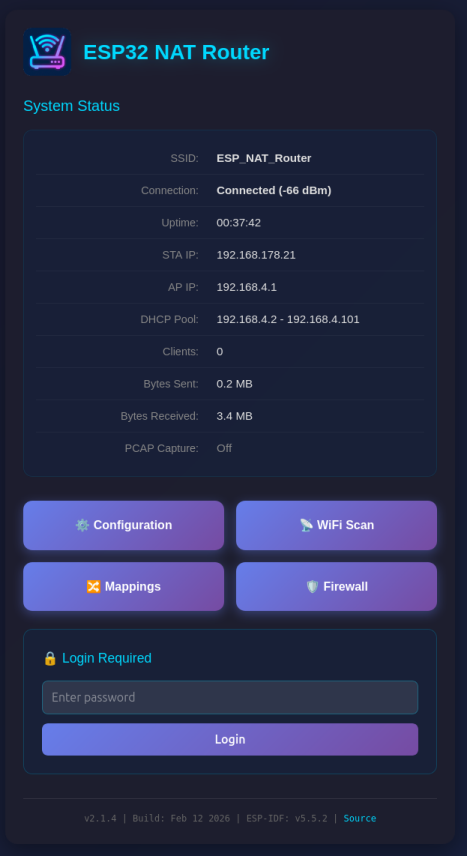
Flashing Pre-built Binaries
Web Installer (Easiest)
Flash directly from your browser — no tools or command line required:
Requires a browser with Web Serial API. Select your firmware variant (WiFi or Ethernet) and click "Connect & Install".
esptool (Command Line)
Install esptool and flash using the pre-built binaries from the firmware_* directories. Example for ESP32:
esptool.py --chip esp32 \
--before default_reset --after hard_reset write_flash \
-z --flash_mode dio --flash_freq 40m --flash_size detect \
0x1000 firmware_esp32/bootloader.bin \
0x8000 firmware_esp32/partition-table.bin \
0xf000 firmware_esp32/ota_data_initial.bin \
0x20000 firmware_esp32/esp32_nat_router.bin
Pre-built binaries are available for: ESP32, ESP32-C3, ESP32-C5, ESP32-C6, ESP32-S3, and WT32-ETH01 (Ethernet).
See the Installation wiki page for all chip-specific commands.
Documentation
Full documentation is available in the Wiki:
| Page | Description |
|---|---|
| Web Interface | Web UI pages, security, backup/restore |
| WiFi and Network | DHCP reservations, port forwarding, WPA2-Enterprise, TTL, DNS |
| Firewall | ACL packet filtering rules and configuration |
| Packet Capture | PCAP streaming to Wireshark |
| WireGuard VPN | VPN tunnel configuration and server setup |
| Remote Console | Network-accessible CLI via TCP |
| Security | Hardening guide: interface binding, VPN, ACL, credential handling |
| MQTT Home Assistant | MQTT telemetry with HA auto-discovery |
| MCP Bridge | AI assistant integration via Model Context Protocol |
| CLI Reference | Full command listing for the serial/remote console |
| NVS Storage | Reference of all persisted configuration keys |
| Hardware | LED status, OLED display, antenna switch, factory reset |
| WT32-ETH01 | Ethernet uplink variant (LAN8720 PHY) |
| Installation | Flashing pre-built binaries |
| Building | Compiling from source with ESP-IDF or PlatformIO |
Building from Source
idf.py menuconfig    # Enable LWIP IP forwarding, NAT, and L2-to-L3 copy
idf.py build
idf.py flash monitor
See the Building wiki page for PlatformIO, WT32-ETH01, and multi-target build instructions.
Performance
The performance of the Router depends on several factors, of course including WiFi signal strength and congestion of the used frequencies. Expect something in the range from 5 - 15 mbps under reasonable conditions. Single video streams should be possible, but it is not intended as a 2$ full replacement for a professional home router.
Internally the speed depends on the processing power of the used ESP32 chip (single core vs. dual core, clock speed) and available RAM for buffering. All "hot pathes", i.e. the direct routing of packets are optimized, any additional features, especially VPN, ACL processing, per client statistics, and packet capturing, introduce some delays. If you need maximum speed, dynamically disable all unused features in the configuration. However in default config everything is already disabled, the only major feature, that is running, is the web interface. Especially on the C3 and C5 with small RAM (and combined DRAM and IRAM) disabling it can result in an additional performance boost, due to the additional buffer space. If required, you can re-enable it via the remote console at any time (with a reboot).
Licence
The WireGuard submodul has the following licence_
Copyright (c) 2021 Kenta Ida (fuga@fugafuga.org)

The original license is below:
Copyright (c) 2021 Daniel Hope (www.floorsense.nz)
All rights reserved.

Redistribution and use in source and binary forms, with or without modification,
are permitted provided that the following conditions are met:
* Redistributions of source code must retain the above copyright notice, this
  list of conditions and the following disclaimer.
* Redistributions in binary form must reproduce the above copyright notice, this
  list of conditions and the following disclaimer in the documentation and/or
  other materials provided with the distribution.
* Neither the name of "Floorsense Ltd", "Agile Workspace Ltd" nor the names of
  its contributors may be used to endorse or promote products derived from this
  software without specific prior written permission.

THIS SOFTWARE IS PROVIDED BY THE COPYRIGHT HOLDERS AND CONTRIBUTORS "AS IS" AND
ANY EXPRESS OR IMPLIED WARRANTIES, INCLUDING, BUT NOT LIMITED TO, THE IMPLIED
WARRANTIES OF MERCHANTABILITY AND FITNESS FOR A PARTICULAR PURPOSE ARE
DISCLAIMED. IN NO EVENT SHALL THE COPYRIGHT OWNER OR CONTRIBUTORS BE LIABLE FOR
ANY DIRECT, INDIRECT, INCIDENTAL, SPECIAL, EXEMPLARY, OR CONSEQUENTIAL DAMAGES
(INCLUDING, BUT NOT LIMITED TO, PROCUREMENT OF SUBSTITUTE GOODS OR SERVICES;
LOSS OF USE, DATA, OR PROFITS; OR BUSINESS INTERRUPTION) HOWEVER CAUSED AND ON
ANY THEORY OF LIABILITY, WHETHER IN CONTRACT, STRICT LIABILITY, OR TORT
(INCLUDING NEGLIGENCE OR OTHERWISE) ARISING IN ANY WAY OUT OF THE USE OF THIS
SOFTWARE, EVEN IF ADVISED OF THE POSSIBILITY OF SUCH DAMAGE.

Author: Daniel Hope <daniel.hope@smartalock.com>