Erduo B-roll Loop Engineering
给完整原始 SRT 与 design,Agent 自动完成原创分镜、素材、动画、逐镜直出与完整预览;整条 Master 按需生成。




40 秒真实成片

README 中是完整成片的轻量 GIF 版。原始 Master 为 3840 × 2160、30 fps、40 秒;它展示真实视觉能力,不代表所有输入都会得到相同画面,也不构成 HyperFrames 与 Remotion 的视觉一致性保证。
四步完成

| 01 一次安装 | 02 一句话开工 | 03 锁定视觉 | 04 批准成片 |
|---|---|---|---|
| 安装或升级时完成深度环境检查 | 拖入原始 SRT 与 design;可附已剪视频和品牌素材 | 先看三类样片和 5 镜头 canary,逐镜选择 | canary 通过后才做全片,再批准完整预览 |
最短提示词:
使用 erduo-broll-loop-engineering,把这份原始 SRT 与 design 做成 B-roll。
先持续完成 5 镜头 canary,再停下让我逐镜选择;我没有在至少 3/5 镜选择本版前,不得启动全片。完整预览再由我批准交付。
它替你完成什么
| 你交给它 | Agent 完成 | 你收到 |
|---|---|---|
| 原始 SRT 与原始 design;可选口播视频、Logo、截图和品牌要求 | truth/creativeProposal 分镜、三类样片、章节创作闭环、逐镜直渲染与预览装配 | 可编辑源码、逐镜 6 格检查图、验证后的 shot 文件与完整预览;可选 master.mp4 |
- 时间严格锚定 SRT,不按“一句字幕配一个镜头”机械切片。
- v1.0.1 生产默认使用 HyperFrames;Remotion 只在明确指定或 canary 中使用,
auto为实验模式,必须显式选择。 - Director 负责整片表达,Assets 负责素材,多名 Builder 分担镜头;每名 Builder 只接收自己的任务和必要上下文。
- Director 默认设计约 5–12 秒的完整语义镜头;Planner 再按连续性、后端、素材和复杂度把多个短镜头聚合给同一 Builder,不让“一个短镜头”变成“一个 Agent”。
- Lead Builder 先完成开头、信息密集段和后段三类真样片、signature motion、素材融合能力与能力索引;随后先做 5 镜头 canary,用户未选择我方至少 3/5 前不得批量展开。
- 口播中的观点与情绪变化先转成动画节拍;Builder 必须让主体、空间、层级、关系或视觉重点随节拍产生可见发展,装饰循环不能代替主要动画。
- Chapter Builder 必须打开每镜 6 格图和 chapter preview;发现异常只返修对应镜头,不默认生成全片逐帧或通过态 dense diagnostics。
- 正常生产不再重复派 Onboarding Agent;只有安装身份变化或真实工具故障才定点诊断。
- 后端规划、任务分发、逐镜渲染、6 格采样、媒体验证和预览准备由 Parent 直接运行脚本,不再启动 Runtime Planner、Integrator 或 Render Agent。
- 一条生产任务共用素材库与相同依赖;Builder 保持源码隔离,不再复制完整工程和相同素材。
- Builder 只交付可编辑源码和每镜直接渲染入口;不得自建截图、轨迹、逐帧、hash、FFprobe、decode、manifest、合同或通过证明工具。
- Parent 从每镜运行时源码直接生成独立 H.264 文件、
shot-media.json、6 格语义检查图和全片delivery-index.json;禁止从 unit 或 Master 二次切割冒充直出。 production-metrics.json可汇总阶段耗时、Agent 调用、unit、文件/字节、渲染/解码/hash、失败/重试与可选宿主 Token;没有可靠 Token 事实时写“未知”,不估算也不读取私人会话目录。- 完整预览由这些已验证 shot 文件按
delivery-index.json顺序装配,供用户判断节奏和整体效果。 - 默认正式交付是完整、高质量、可独立解码的 shot 目录;整条 Master 变为可选输出,绝不复制预览冒充 Master。
- 默认 shot 规格为 4K、30 fps、H.264 MP4;字幕不重复烧录,背景音乐不自动添加。
输出规格不会让 Parent 手写 JSON。默认规格与竖屏 1080×1920、25 fps 规格都由同一个脚本确定生成:
node erduo-broll-loop-engineering/scripts/create-production-profile.mjs \
  --output /path/to/broll-production/production-profile.json

node erduo-broll-loop-engineering/scripts/create-production-profile.mjs \
  --output /path/to/vertical-production/production-profile.json \
  --width 1080 --height 1920 --fps 25 \
  --audio silent --master-format h264-mp4
父流程必须把生成文件通过 plan-runtime.mjs --production-profile <文件>
传入计划。画幅、帧率、音频和输出格式随后以同一个哈希写进计划、每个
Builder 任务和成片校验;明确的竖屏或其他帧率不会退回默认 4K/30。
v1.0.1:恢复 Chapter Builder 创作闭环
v1.0.1 已正式发布。语义与最终媒体边界仍是一镜一份独立 H.264;创作边界改为一个 Chapter Builder 负责通常 5–8 个连续镜头。它直接读取完整原始 SRT 与 design,保留不可修改的 truth,可以用一句理由修改 creativeProposal,并对整章的构图变化、素材、节奏和相邻承接负责。
Assets 只冻结已知共享素材、字体与授权,不再提前关闭镜头专项 search、generate 或 mixed 路线。Lead 必须交付原生图形/文字、真实或生成素材融合、信息密集界面/流程/数据三类真样片,并落实 design 指定的 signature motion、素材融合能力和一页以内能力索引。Chapter Builder 完成源码后必须真正打开每镜 6 格图和 chapter preview,修掉低级错误,再返回简短的 accepted 或 revised;通过 trace、inspection 或 diagnostics 不再构成完成。
生产源码不再要求 inspection.tsx、DOM trace 标记、人工 motion window 或通过态密集 diagnostics。Parent 只负责确定性的逐镜渲染、FFprobe、完整解码、hash、媒体合同、6 格图和 preview 装配。正向十二原则以短锚点进入角色提示,每镜只选 2–4 条相关 craftIntent,不逐条评分或造证明。
默认生产后端为 HyperFrames;Remotion 仅限明确指定或 canary,auto 为实验模式。先完成 5 镜头 canary:5/5 直出解码、Builder 真正看片、至少三种构图、至少两镜素材融合、design 能量与两种 signature motion 可见、用户至少选择本版 3/5,且首版不超过 45 分钟。用户未作选择前不得启动完整长片。本版发布前已用同一份 179.866 秒、124 条 cue 的原始 SRT/design 完成全新 canary,5/5 技术与观看闭环通过;用户观看盲测后明确认可效果,并明确选择不继续剩余镜头或全片预览。该决定只批准 v1.0.1 机制与 canary 画面,不冒充完整长片验收。
2026-08-18 的 179.866 秒 Remotion 技术实测仍作为失败依据保留:虽然 20/20 shot、完整解码和媒体合同通过,但它产生 20 个创作 unit、缺少原始 design 直达、素材使用不足,且技术检查通过没有带来合格视觉结果;203m13s / 54m17s / 63m13s 也未达目标。它不证明本次创作闭环已经通过,也不证明双后端等价。
v1.0.0:先锁定视觉,再批量生产
- 视觉锁定成为默认生产门:三个代表场景、选择理由、字体/颜色/栅格/motion token、真实动态结果、每后端共享源码、Director 见证和用户决定共同绑定身份。
- Runtime Plan v3 把短语义镜头和 Builder 工作包分开;普通约 180 秒单后端任务以 2–3 个 Builder 为规划目标,但复杂镜头、后端边界和连续转场可以形成例外。
- 默认轻量冻结媒体改为 H.264,不再默认生成 4K FFV1;预览和 Master 均从已验证片段稳定装配,保留源码、hash、FFprobe、完整解码和批准身份。
- 生产计量与分层 motion/layout 检查进入公开合同。技术测试不能替用户判断审美;视觉锁定和最终完整预览是两个不同的用户决定点。
v1.0.0 公开生产基准已完成一次同一 SRT 的 Codex 真实生产:179.866 秒、124 条 cue、20 个 Shot Recipe v3、1 名 Lead + 3 名 production Builder、10 次 Agent 调用、0 次 full-history 调用,且没有外部素材。最终目录为 213 个文件、磁盘占用 156,980 KiB;完整 preview 和 Master 均通过完整解码。Director 开始到首次 preview 约 242.05 分钟,未达到 ≤120 分钟目标;Lead 62.90 分钟,也未达到 ≤45 分钟目标。Director 对 visual lock 拒绝一次后定点返修通过,但用户没有观看或审美批准,状态为 skipped;宿主 Token 未知,音画同步未测,Claude Code 同输入对照仍为 pending。
v0.9.2:创作不变,安装更容易通过审查
v0.9.2 只调整发行和安装入口。Director、Assets、多 Builder、152 张镜头卡、8 种图解 grammar、HyperFrames / Remotion 路由、预览审批和正式交付标准与 v0.9.1 相同。标准 Skill 包不含一键环境安装器、测试夹具或发布工具;完整环境包继续提供固定版本的一键准备。
v0.9.1:创作保留,图解更容易看懂
- 保留 Director、Assets 和多 Builder 的创作分工,不把镜头收缩成固定模板,也不限制抽象、构图或动画复杂度。
- Director 先明确口播含义和画面任务,再自由设计视觉语言,避免风格替代内容表达。
- 非创作步骤交给确定性脚本,共用依赖与素材;Builder 交付可编辑源码和统一规格的已验证视频片段,返工只回到原责任 Builder。
- 节拍验证不仅检查计划和时间,还要检查对应时段是否出现计划中的可见发展;长镜头不能只靠线条、粒子或背景循环支撑。
- 当口播必须解释流程、因果、时间顺序、层级、循环、依赖、系统路径或同标准对比时,Director 可以按需选择 8 种轻量图解关系;没有图解数量要求,也不会加载外部完整 Skill 或套用固定视觉皮肤。
- Builder 仍按全片视觉系统自由设计空间、材质和动画。脚本只根据真实渲染结果检查连线穿过无关节点、文字压线/压节点、连线路径重叠和画面越界,不评价图解风格。
这些检查能发现计划未落地、长时间无主要发展和可测的构图风险,不能判断动画是否高级或替用户作审美决定。唯一完整动态预览仍由用户决定是否正式渲染。
工作流
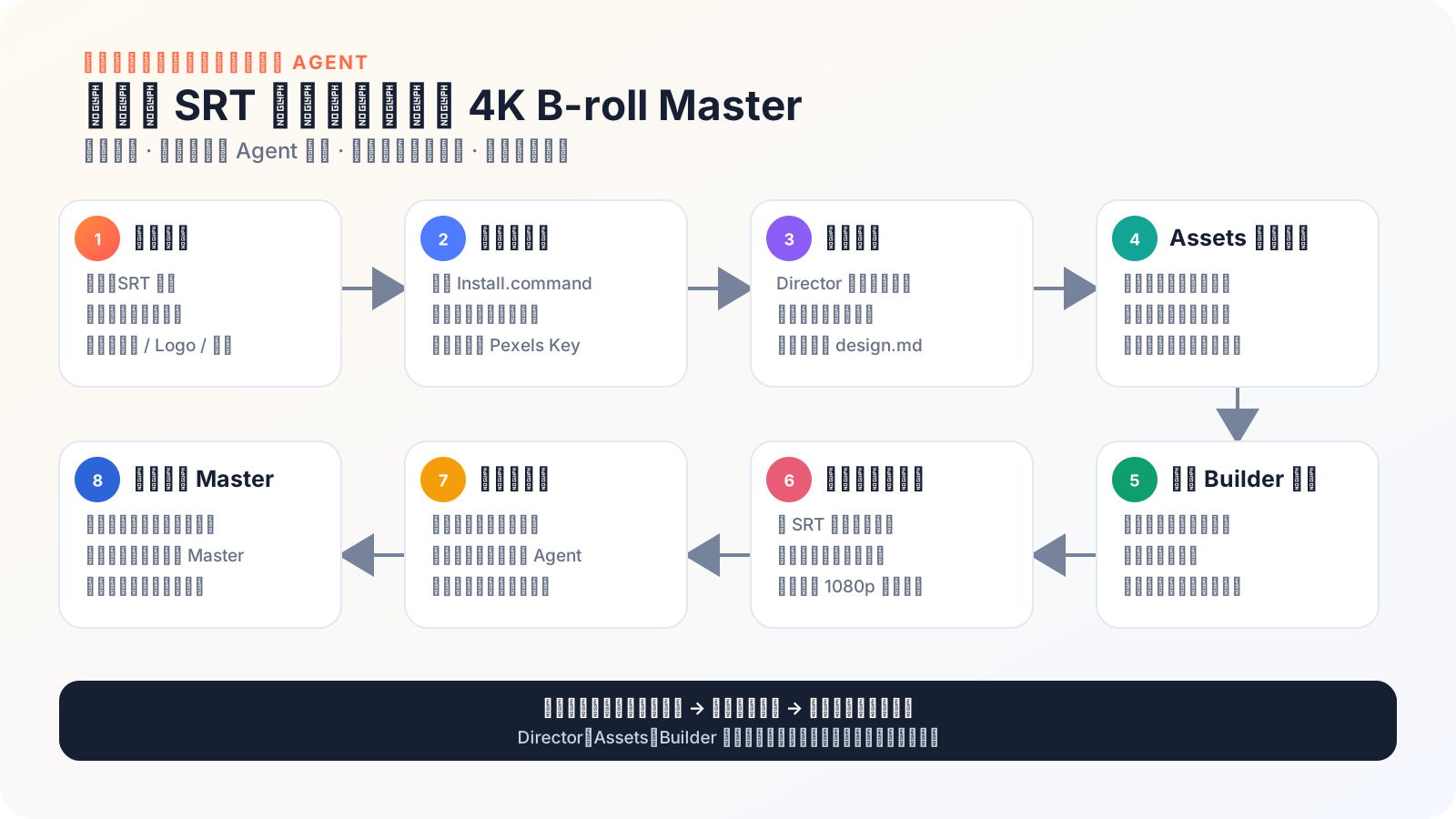
SRT / 已剪视频 / 用户素材
  → Director 原创分镜
  → Director 冻结 truth,提出可修改 creativeProposal 与章节
  → Assets 冻结共享物,保持镜头专项素材路线开放
  → Lead 完成三类真样片 + signature motion + 素材融合能力
  → Chapter Builder 先做 5 镜头 canary,看片并 accepted / revised
  → 用户选择;通过后才按 5–8 镜章节展开全片
  → Parent 逐镜直渲染 + 媒体验证 + 6 格图 + chapter preview
  → 已验证 shot 文件按 delivery-index 装配完整预览
  → 用户批准
  → 默认交付 shot 目录;按需生成 Master
152 张 Shotcraft 卡不会限制创作
v0.8.1 已把 Shotcraft 从“逐镜必查菜单”改成真正按需使用的技法辞典:
- Director 必须先独立完成整片创意;
- 只有遇到具名、尚未解决的技法问题,或用户明确要求时才查询;
- 整片 0 次查询、0 个
patternRef是完整有效结果; - 镜头卡不是素材库,不能代替图片、视频、Logo、UI 或字体;
- 152 张卡片不等于 152 个已经渲染验证的 HyperFrames 组件。
仓库固定收录 152 张上游 Markdown 卡片、209 个 style 和来源哈希,来源为 Vincentwei1021/video-shotcraft。Agent 只渐进读取真正命中的单张卡,不会把整个卡库塞进上下文。
安装
标准 Skill 安装
适合已经准备好本项目固定 HyperFrames 环境、只需要向一个宿主注册 14 个项目 Skill 的用户。标准包不含一键环境安装器、测试夹具或发布工具,也不会静默安装 Node、浏览器或 FFmpeg。
从 v1.0.1 Release 下载 erduo-broll-loop-engineering-skills-v1.0.1.tar.gz,解压到长期保留的目录,然后选择一个宿主:
npx -y skills@1.5.22 add ./erduo-broll-loop-engineering-skills-1.0.1 --skill '*' --agent codex --global --full-depth
# 或把 codex 改成 claude-code
这条路径通过 Skills CLI 的宿主通用 Skill 目录注册项目 Skill,不直接运行本仓库的一键环境安装器;它不会降低能力,也不负责准备运行环境。Node 22.20+、FFmpeg/FFprobe、固定 HyperFrames runtime、八个官方 HyperFrames Skill 或浏览器缺失时,生产前检查会明确停止;此时使用下面的完整环境安装。
完整环境安装
适合首次安装或不确定本机环境的用户:
git clone https://github.com/erduo1998-cell/erduo-broll-loop-engineering.git
cd erduo-broll-loop-engineering
./Install.command
安装完成后重启 Codex 或 Claude Code。不会 Git 时,可从 v1.0.1 Release 下载 erduo-broll-loop-engineering-v1.0.1.tar.gz,解压到长期保留的目录,再双击 Install.command。
[!IMPORTANT] 安装器会让宿主 Skill 指向当前仓库目录。安装成功后不要随意移动或删除它;确需移动时,在新位置重新运行
Install.command。
安装器具体做什么
- 检查 Node.js;低于
22.20.0时准备用户级固定版本,不修改系统 Node 或 shell profile。 - 安装锁定的 HyperFrames runtime 和官方 Skill,准备浏览器、FFmpeg 与 FFprobe。
- 以事务方式注册父 Skill 和十三个阶段 Skill;冲突先备份,失败自动回滚。
- Pexels 只在镜头确实需要普通媒体时配置;Key 不进入聊天、项目和日志。
首次冷安装可能需要 10–20 分钟。网络中断后可直接重跑,已完成的缓存会复用。
更新、诊断与卸载
git pull --ff-only
./Install.command
node scripts/doctor.mjs
卸载本项目 Skill 链接并恢复安装器备份:
node scripts/uninstall.mjs
卸载默认保留私有配置、共享 HyperFrames runtime 和用户目标目录中的工程。
真实边界
- 现有项目按真实特征判断;同时命中两套后端特征时停止并请用户选择,不静默猜测。
- v1.0.1 默认由 HyperFrames Chapter Builder 负责每章 5–8 镜的完整创作与交付;Remotion 只在用户明确选择或 canary 对照时启用,
auto仍是实验性路由。 - 安装器不会把 Remotion 加入共享 runtime 或全局安装;每条生产任务使用自己的精确 package/lock,同一依赖身份只在该任务内共享一份本地工具链。
hybrid只交换带 hash、FFprobe 和完整解码证据的冻结区块媒体,不实时嵌套两套运行时。- Hybrid 只共享运行时中立视觉 token;HyperFrames 与 Remotion 分别建立自己的视觉母体源码,不能跨后端导入实现文件。
- 最终脚本只拼接统一规格、身份和时间均已验证的视频片段;各 Builder 源码继续交付用于后续编辑,但不宣称脚本能直接合并任意双后端源码。
- 预览只用于快速审看:最高 1080p、
veryfast / CRF 22。批准身份同时绑定运行计划、整体叙事、视觉系统、全部镜头合同和片段 hash。 - 正式交付必须重新传入
--plan、--narrative-envelope、--visual-system和每一个--contract;合同参数可以任意排列,脚本会按 plan 顺序装配,并拒绝缺失、重复、不属于 plan 或内容改变的合同。身份复核通过后,脚本从冻结片段重新编码完整规格的medium / CRF 16Master,绝不复制预览文件。 - Lead 必须先交开头、信息密集段、后段三类真实样片、signature motion、素材融合结果和能力索引;Builder 必须实际看片并记录
accepted或revised,不能用 trace、inspection 或自建证明代替审美判断。 - 5-shot canary 决定是否允许批量展开:用户未在至少 3/5 镜选择本版前不得开始全片;最终完整动态 preview 再决定是否正式交付。Windows、剪映 / CapCut GUI 和跨后端视觉一致性尚未验证。
支持范围
| 环境 | 状态 |
|---|---|
| macOS + Codex | supported;已有真实生产和 423 帧双后端前向证据 |
| macOS + Claude Code | experimental;安装契约已验证,尚缺当前版本同输入完整对照 |
| HyperFrames | v1.0.1 production default;同输入 5 镜头 canary 已通过技术门并获用户认可 |
| Remotion | explicit/canary 技术路线;不全局安装,不声明视觉等价 |
| Windows | unverified |
| 剪映 / CapCut GUI | unverified |
常见问题
Codex / Claude Code 找不到 Skill
彻底重启宿主,再运行 node scripts/doctor.mjs;同时确认仓库目录没有被移动或删除。
预览不满意怎么办
指出镜头、时间点和具体问题。Parent 会把返工交回责任阶段,不会整条片子盲目重做。
可以只用 HyperFrames 或 Remotion 吗
可以。在提示词中明确写 remotion 才使用 Remotion;未指定时生产默认 hyperframes。auto 目前是必须显式选择的实验模式。
可以导出每个镜头吗
新生产默认已经交付逐镜直出的 shot 文件,不需要再从 Master 切割。broll-shot-export 只用于旧 Master 任务。
隐私与网络
本仓库自身不采集或发送遥测,子进程默认设置 HYPERFRAMES_NO_TELEMETRY=1。首次准备可能访问 Node.js 官方目录、npm registry、GitHub 上的 HyperFrames 官方 Skill 来源,以及 HyperFrames 官方浏览器源执行 browser ensure;实际使用 Pexels 时才访问其 API 与 CDN。
SRT、视频、用户素材、阶段记录和渲染产物默认留在本机。Key 不进入项目、产物、命令行或日志。本仓库只能约束自己启动的进程;如果在发行包之外直接调用 HyperFrames,其网络和隐私行为受 HyperFrames 自身实现与政策约束。
开发与贡献
npm test
提交 PR 前请运行测试和 Skill 校验。不要提交 API Key、Cookie、私人路径、用户 SRT、用户素材或未脱敏日志。贡献规则见 CONTRIBUTING.md,项目采用 MIT License。
联系作者

|
刘冉 / 耳朵 AI 咨询顾问 · 前影视导演 · 开源 Agent 工具实践者 GitHub:@erduo1998-cell 主页:erduo.art 微信:扫描左侧二维码 |