draw-your-font

Turn a photo of your handwriting into a real font (TTF/WOFF/WOFF2) - free, open source, no uploads. Node CLI + Claude Code skill.

605
Stars
64
Forks
JavaScript
Language
8/23/2026
Added
View on GitHubDownload ZIP

⚠️ Third-Party Software Notice

This skill is third-party open-source software developed and hosted independently on GitHub. SkillTip is an informational directory and does not control or maintain the underlying repository. Any security checks displayed are automated and limited in scope. Review the source code before installing.

Read the Terms of Service

Installation

Add to your Claude Code skills directory:

# Add to your Claude Code skills
git clone https://github.com/danilo-znamerovszkij/draw-your-font

Getting Started

Guides for using skills like draw-your-font.

Security Report

Verified

Last scanned: —

{
  "status": "PASSED",
  "issues": []
}

README.md

draw-your-font

Turn a photo of your handwriting into a real font (TTF/WOFF/WOFF2) - free, open source, no uploads, no credits.

Draw your alphabet on paper. Take a photo. Get your font.
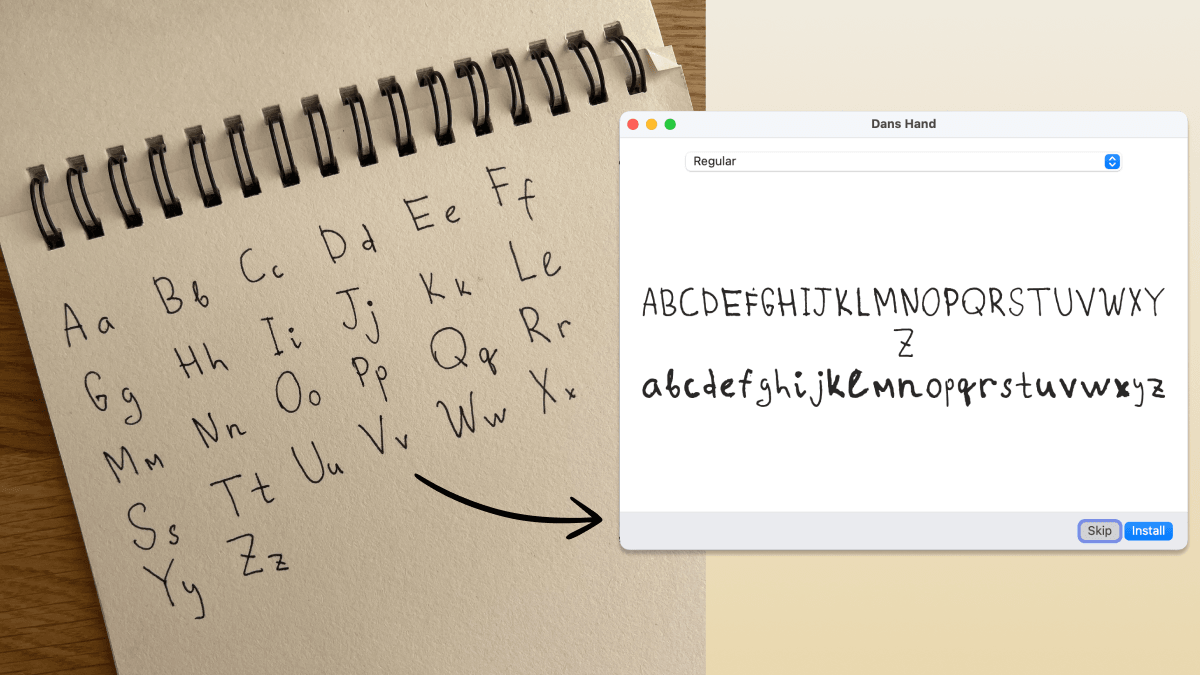
A photo of a handwritten alphabet in a spiral notebook becoming an installable font

This is a real one-shot result: dim light, spiral binding, page shadow. One photo in, installable font out.

Use it as a Claude Code skill (the fun way)

npx skills add danilo-znamerovszkij/draw-your-font

Then in Claude Code, invoke the skill and hand it your photo:

/draw-your-font "here's a photo of my handwriting - make my font" (drag the photo into the terminal)

Claude finds your letters in the photo, labels them with vision, builds the font, shows you a preview, and critiques its own work. Iterate by talking:

  • "make it rounder" / "a bit bolder"
  • "the g looks bad" - it shows you the crop and fixes or asks for a re-shoot
  • "give me woff2 + css for my website"
  • "how readable is it?" - a legibility score and the two worst letter pairs

No photo yet? Say "give me a font template" and you get a printable PDF grid: write your alphabet with a dark pen, photograph the pages, and hand them back. Messy freeform photos work too. Napkins, notebooks, spiral binding, bad lighting: that's what the vision step is for.

Everything runs locally on your machine. Your handwriting never leaves it.

Use it as a CLI (no AI at all)

The skill is a thin layer over a deterministic npm CLI. It works on its own when you can tell it what you wrote:

# freeform photo, you know the order you wrote in:
npx draw-your-font make photo.jpg --chars "ABCabc" --name "My Hand"
# → MyHand.ttf - double-click, install, done.

# best quality: print a template, fill it, photograph:
npx draw-your-font template -o template.pdf --charset minimal   # or: spanish
npx draw-your-font make page1.jpg page2.jpg --charset minimal --name "My Hand"

Pure npm, zero system dependencies: no FontForge, no ImageMagick, no potrace binary. Works on macOS / Linux / Windows wherever Node ≥ 18 runs.

CLI reference

CommandWhat it does
templateprintable A4 PDF grid (--charset minimal|spanish)
segment <photos…>find letters → crops + numbered contact sheet + blobs.json
buildlabeled crops → font (--labels / --chars / --charset)
make <photos…>segment + build in one shot
previewrender any text with the built font

Refinement flags: --smooth 0..2 (rounder curves), --weight=-2..2 (thinner/bolder), --formats ttf,woff,woff2,css (web-ready + @font-face snippet). Run draw-your-font --help for everything.

How it works

photo ──► adaptive threshold ──► blob detection ──► label (Claude / you / template order)
      ──► potrace vectorize ──► shared em-square metrics ──► TTF/WOFF/WOFF2 + preview

The craft is in the metrics step: every character has a vertical band in a shared 1000-unit em square (cap height, x-height, descender depth), so your g hangs below the line and your o stays small. That's what makes it feel like a font instead of a ransom note. Vectorization is potrace, the same engine inside FontForge and Inkscape. AI never draws your letters; it only finds, labels, and judges them.

FAQ

Who owns the font? You. 100%, commercial use included. It's your handwriting.

Why is this free when Calligraphr charges $8/month? Their cost is servers and a browser editor. Here your machine does the work and the agent is the editor.

Kerning, ligatures, letter randomization? v2. The pipeline (fonttools calt) is planned; the current output is a clean single-variant font.

License

MIT. Draw something.

Frequently Asked Questions

What is draw-your-font?

draw-your-font is an open-source cli tools skill for AI coding assistants such as Claude Code, Codex CLI, and ChatGPT, built by danilo-znamerovszkij. Turn a photo of your handwriting into a real font (TTF/WOFF/WOFF2) - free, open source, no uploads. Node CLI + Claude Code skill. It has 605 GitHub stars.

Is draw-your-font safe to use?

draw-your-font returned warnings in SkillsLLM's automated security scan. It has no critical vulnerabilities, but review the flagged issues in the Security Report section before adding it to your workflow.

How do I install draw-your-font?

Clone the repository with "git clone https://github.com/danilo-znamerovszkij/draw-your-font" and add it to your Claude Code skills directory (see the Installation section above).

What programming language is draw-your-font written in?

draw-your-font is primarily written in JavaScript. It is open-source under danilo-znamerovszkij on GitHub, so you can review or fork the full source.

Are there alternatives to draw-your-font?

Yes. SkillsLLM lists many other CLI Tools skills you can browse and compare side by side. Open the CLI Tools category from the badge at the top of this page, or use the Related Skills and comparison links further down to weigh draw-your-font against similar tools.

Comments (0)

No comments yet. Be the first to share your thoughts!

ui-ux-pro-max-skill

by nextlevelbuilder

12

An AI skill that provides design intelligence for building professional UI/UX across multiple platforms.

119,92012,870Python
CLI Toolsai-skillsantigravity
View details

happy

by slopus

Mobile and Web client for Codex and Claude Code, with realtime voice, encryption and fully featured

23,4501,980TypeScript
CLI Tools
View details

claudecodeui

by siteboon

Use Claude Code, OpenCode, Cursor CLI, and Codex on mobile and web with CloudCLI (aka Claude Code UI). CloudCLI is a free open source webui/GUI that helps you manage your Claude Code session and projects remotely.

13,3941,866TypeScript
CLI Tools
View details

CRS-自建Claude Code镜像,一站式开源中转服务,让 Claude、OpenAI、Gemini、Droid 订阅统一接入,支持拼车共享,更高效分摊成本,原生工具无缝使用。

12,5471,869JavaScript
CLI Tools
View details

ccstatusline

by sirmalloc

🚀 Beautiful highly customizable statusline for Claude Code CLI with powerline support, themes, and more.

12,508545TypeScript
CLI Tools
View details

Developers Also Liked

Based on votes and bookmarks from developers who liked this skill

ECC

by affaan-m

10

The agent harness performance optimization system. Skills, instincts, memory, security, and research-first development for Claude Code, Codex, Opencode, Cursor and beyond.

242,21936,702JavaScript
AI Agentsai-agentsanthropicclaude-code
View details
15

An agentic skills framework & software development methodology that works.

234,96620,863Shell
AI Agentsai-agentsbrainstorming
View details

n8n

by n8n-io

12

Fair-code workflow automation platform with native AI capabilities. Combine visual building with custom code, self-host or cloud, 400+ integrations.

201,88160,308TypeScript
MCP Serversapisai-tools
View details

The agent harness performance optimization system. Skills, instincts, memory, security, and research-first development for Claude Code, Codex, Opencode, Cursor and beyond.

185,94028,768JavaScript
AI Agentsai-agentsanthropicclaude-code
View details

cc-switch

by farion1231

3

A cross-platform desktop All-in-One assistant for Claude Code, Codex, OpenCode, OpenClaw, Grok Build & Hermes Agent. Only official website: ccswitch.io

128,8688,826Rust
AI Agentsclaude-codeai-tools
View details