DebugMCP (MCP Server) - Empowering AI Agents with Operational Debugging Capabilities
Let AI agents debug your code inside VS Code - set breakpoints, step through execution, inspect variables, and evaluate expressions. Works with Codex, GitHub Copilot, GitHub Copilot CLI, Cline, Cursor, Windsurf, Roo Code, and any MCP-compatible assistant. Compatible with any VS Code supported coding language.




⭐ If you find DebugMCP useful, please star the repo on GitHub! It helps others discover the project and motivates continued development.
📢 Developers Notice: This extension is maintained by ozzafar@microsoft.com and orbarila@microsoft.com. We welcome feedback and contributions to help improve this extension.

🎬 Watch DebugMCP in action — your AI assistant autonomously sets breakpoints, steps through code, and inspects variables directly in VS Code.
✨ What's New
2.2
- Cross-agent
debug-liveskill install — the systematic debugging workflow ships as an Agent Skill and is now installed into the standard skills directories —~/.agents/skills/(the cross-agent location honored by skills-compatible harnesses, including VS Code agent mode) and~/.copilot/skills/when present — so it's discoverable everywhere instead of being copied next to each agent's config where nothing scans it (fixes #105, where VS Code never loaded the skill). The server also advertises MCPinstructionsand thestart_debuggingtool points at the skill for the full workflow. - Pause running programs — new
pause_executiontool interrupts a freely-running program and stops at its current location, even with no breakpoint set (great for busy loops and embedded/bare-metal targets), so you can then inspect state or step from there. - Robust debugging via the VS Code Testing API —
start_debuggingwith atestNameuses the VS Code Testing API to discover and launch the test, producing consistent breakpoint hits inside individual test cases across language test runners (pytest, Jest/Vitest, Java, .NET, Go, etc.).
🚀 Quick Install
Install from VS Code Marketplace or use the direct link: vscode:extension/ozzafar.debugmcpextension
Table of Contents
- Overview
- Features
- Installation
- Quick Start
- Supported AI Assistants
- Supported Languages
- Configuration
- FAQ
- Troubleshooting
- How It Works
- Contributing
- License
Overview
DebugMCP is an MCP server that gives AI coding agents full control over the VS Code debugger. Instead of reading logs or guessing, your AI assistant can autonomously set breakpoints, launch debug sessions, step through code line by line, inspect variable values, and evaluate expressions — just like a human developer would. It runs 100% locally, requires zero configuration, and works out of the box with any MCP-compatible AI assistant.
Features
🔧 Tools
| Tool | Description | Parameters |
|---|---|---|
| start_debugging | Start a debug session for a source code file | fileFullPath (required)workingDirectory (required)testName (optional)configurationName (optional) |
| stop_debugging | Stop the current debug session | None |
| step_over | Execute the next line (step over function calls) | None |
| step_into | Step into function calls | None |
| step_out | Step out of the current function | None |
| continue_execution | Continue until next breakpoint | None |
| pause_execution | Interrupt a freely-running program and stop at its current location (no breakpoint needed) | None |
| restart_debugging | Restart the current debug session | None |
| add_breakpoint | Add a breakpoint at a specific line (optionally conditional) | fileFullPath (required)line (required, 1-based)condition (optional) |
| add_logpoint | Add a logpoint that logs a message (instead of pausing) when a line is reached | fileFullPath (required)line (required, 1-based)logMessage (required, {expr} interpolated)condition (optional) |
| remove_breakpoint | Remove a breakpoint from a specific line | fileFullPath (required)line (required) |
| clear_all_breakpoints | Remove all breakpoints at once | None |
| list_breakpoints | List all active breakpoints | None |
| list_variable_names | List names and types of variables in scope, without reading any values | scope (optional: 'local', 'global', 'all') |
| get_variables_values | Get the values of specifically named variables at the current execution point | variableNames (required, e.g. ["user","response"])scope (optional: 'local', 'global', 'all') |
| evaluate_expression | Evaluate an expression in debug context; expandable children are listed by name and type without their values | expression (required) |
Note: The MCP server exposes tools for debugger actions, while the procedural workflow guidance (when to debug, how to structure a root-cause investigation, language-specific quirks) lives in the companion Agent Skill. Tool descriptions stay terse and behavioral; the extension installs the
debug-liveskill into the standard skills directories (~/.agents/skills/, plus~/.copilot/skills/when present) so skills-compatible harnesses load the full workflow on demand. The server also advertises MCPinstructionspointing agents at it before debugging.
🎯 Debugging Best Practices
DebugMCP follows systematic debugging practices for effective issue resolution:
- Start with Entry Points: Begin debugging at function entry points or main execution paths
- Follow the Execution Flow: Use step-by-step execution to understand code flow
- Root Cause Analysis: Don't stop at symptoms - find the underlying cause
🛡️ Security & Reliability
- Secure Communication: All MCP communications use secure protocols
- Local Operation: The MCP server runs 100% locally with no external communications and requires no credentials
- State Validation: Robust validation of debugging states and operations
Installation
Quick Install Options
Option 1: Direct Link (Fastest)
- Click this link: vscode:extension/ozzafar.debugmcpextension
- Or copy and paste in your browser:
vscode:extension/ozzafar.debugmcpextension
Option 2: VS Code Marketplace
- Visit: https://marketplace.visualstudio.com/items?itemName=ozzafar.debugmcpextension
- Click "Install"
Option 3: Within VS Code
- Open VSCode
- Go to Extensions (Ctrl+Shift+X / Cmd+Shift+X)
- Search for "DebugMCP"
- Click Install
- The extension automatically activates and registers as an MCP server
Verification
After installation, you should see:
- DebugMCP extension in your installed extensions
- MCP server automatically running on port 3001 (configurable)
- Debug tools available to connected AI assistants
📝 Note: No additional debugging rule instructions are needed - the extension works out of the box.
💡 Tip: Enable auto-approval for all debugmcp tools in your AI assistant to create seamless debugging workflows without constant approval interruptions.
Quick Start
- Install the extension (see Installation)
- Open your project in VSCode
- Ask your AI to debug - it can now set breakpoints, start debugging, and analyze your code!
Supported AI Assistants
DebugMCP works with any MCP-compatible AI assistant. It auto-detects and offers to register itself with:
| Assistant | Auto-Registration | Manual Config |
|---|---|---|
| GitHub Copilot | ✅ | See config |
| GitHub Copilot CLI | ✅ | See config |
| Cline | ✅ | See config |
| Cursor | ✅ | See config |
| Codex | ✅ | See config |
| Windsurf | ✅ | See config |
| Roo Code | ✅ | See config |
| Antigravity | ✅ | See config |
| Any MCP-compatible assistant | — | See manual setup |
Supported Languages
DebugMCP supports debugging for the following languages with their respective VSCode extensions:
| Language | Extension Required | File Extensions | Status |
|---|---|---|---|
| Python | Python | .py | ✅ Fully Supported |
| JavaScript/TypeScript | Built-in / JS Debugger | .js, .ts, .jsx, .tsx | ✅ Fully Supported |
| Java | Extension Pack for Java | .java | ✅ Fully Supported |
| C/C++ | C/C++ | .c, .cpp, .cc | ✅ Fully Supported |
| Go | Go | .go | ✅ Fully Supported |
| Rust | rust-analyzer | .rs | ✅ Fully Supported |
| PHP | PHP Debug | .php | ✅ Fully Supported |
| Ruby | Ruby | .rb | ✅ Fully Supported |
| C#/.NET | C# | .cs, .csproj | ✅ Fully Supported |
Configuration
MCP Server Configuration (Recommended)
The extension runs an MCP server automatically. It will pop up a message to auto-register the MCP server in your AI assistant.
You can also trigger the registration manually via the Command Palette:
DebugMCP: Show Agent Selection Popup
Manual MCP Server Registration (Optional)
🔄 Auto-Migration: If you previously configured DebugMCP with SSE transport, the extension will automatically migrate your configuration to the new Streamable HTTP transport on activation.
Cline
Add to your Cline settings or cline_mcp_settings.json:
{
  "mcpServers": {
    "debugmcp": {
      "type": "streamableHttp",
      "url": "http://localhost:3001/mcp",
      "description": "DebugMCP - AI-powered debugging assistant"
    }
  }
}
GitHub Copilot
Add to your VS Code settings (settings.json):
{
  "mcp": {
    "servers": {
      "debugmcp": {
        "type": "http",
        "url": "http://localhost:3001/mcp",
        "description": "DebugMCP - Multi-language debugging support"
      }
    }
  }
}
GitHub Copilot CLI
Add to ~/.copilot/mcp-config.json (${COPILOT_HOME}/mcp-config.json if COPILOT_HOME is set):
{
  "mcpServers": {
    "debugmcp": {
      "type": "http",
      "url": "http://localhost:3001/mcp",
      "tools": ["*"]
    }
  }
}
Cursor
Add to Cursor's MCP settings:
{
  "mcpServers": {
    "debugmcp": {
      "type": "streamableHttp",
      "url": "http://localhost:3001/mcp",
      "description": "DebugMCP - Debugging tools for AI assistants"
    }
  }
}
Codex
Register DebugMCP with Codex:
codex mcp add debugmcp --url http://localhost:3001/mcp
Or add the equivalent configuration to ~/.codex/config.toml (${CODEX_HOME}/config.toml if CODEX_HOME is set):
[mcp_servers.debugmcp]
url = "http://localhost:3001/mcp"
Windsurf
Add to Windsurf's MCP settings (~/.windsurf/mcp_settings.json or workspace .windsurf/mcp_settings.json):
{
  "mcpServers": {
    "debugmcp": {
      "type": "streamableHttp",
      "url": "http://localhost:3001/mcp",
      "description": "DebugMCP - Debugging tools for AI assistants"
    }
  }
}
Roo Code
Add to Roo Code's MCP settings:
{
  "mcpServers": {
    "debugmcp": {
      "type": "streamableHttp",
      "url": "http://localhost:3001/mcp",
      "description": "DebugMCP - Debugging tools for AI assistants"
    }
  }
}
Antigravity
Add to Antigravity's MCP settings:
{
  "mcpServers": {
    "debugmcp": {
      "type": "streamableHttp",
      "url": "http://localhost:3001/mcp",
      "description": "DebugMCP - Debugging tools for AI assistants"
    }
  }
}
Extension Settings
Configure DebugMCP behavior in VSCode settings:
{
  "debugmcp.serverPort": 3001,
  "debugmcp.timeoutInSeconds": 180,
  "debugmcp.bindHost": ["127.0.0.1", "::1"]
}
| Setting | Default | Description |
|---|---|---|
debugmcp.serverPort | 3001 | Port number for the MCP server |
debugmcp.timeoutInSeconds | 180 | Timeout for debugging operations |
debugmcp.bindHost | ["127.0.0.1", "::1"] | Network interface(s) the HTTP server binds to. Accepts a string or array of strings. See Security model before changing. |
Security model
DebugMCP exposes powerful debugger primitives (evaluate_expression, start_debugging, …) over an unauthenticated local HTTP endpoint. To keep that surface safe, the server enforces four controls:
- Loopback-only bind. The HTTP server binds to the IPv4 and IPv6 loopback addresses (
127.0.0.1and::1) by default, so other hosts on your network cannot reachhttp://<your-ip>:3001/mcp. Binding both families ensures clients that resolvelocalhostto either family connect successfully. Thedebugmcp.bindHostsetting (string or array of strings) lets you opt into a different interface (for example, when forwarding the port into a remote container), but doing so exposes the unauthenticated debugger to anything that can route to that address — do not point it at0.0.0.0or a LAN address on an untrusted network. - Host / Origin header validation. Every request must carry a
Hostheader naming a loopback address (localhost,127.0.0.1, or[::1]); any port suffix in theHostmust also match the server's listening port. Requests with any otherHost— including those that arrive via DNS rebinding from a malicious webpage — are rejected with HTTP 403. The same loopback check is applied to theOriginheader when present. - Least-privilege variable inspection.
get_variables_valuesrequires an explicitvariableNameslist (max 50, no wildcards) and returns only those variables. It no longer dumps every variable in scope, which previously handed the agent unrelated process state that it never asked for. Uselist_variable_namesto discover what exists; that tool returns names and types only and never reads a value. - Secret redaction on variable inspection. Values with credential-bearing names or values matching a known credential shape are replaced with
<redacted: possible secret>before the response leaves the extension. The evaluated result returned byevaluate_expressionis covered too. Whenget_variables_valuesorevaluate_expressionexpands a complex value, descendants are listed by name and type only. Useevaluate_expressionwith an exact descendant path when its value is needed. Recursive expansion is capped at 100 child fields total per response. Null-ish values (None,undefined,'') are never redacted so "my token is empty" bugs remain debuggable. Redaction is always on and cannot be turned off.
FAQ
Which AI assistants are supported?
DebugMCP works with any MCP-compatible AI assistant, including GitHub Copilot, GitHub Copilot CLI, Cline, Cursor, Codex, Windsurf, Roo Code, Antigravity, and others. If your assistant supports the Model Context Protocol, it can use DebugMCP.
Does it work with VS Code Remote SSH / Codespaces / WSL?
Yes. DebugMCP runs as a VS Code extension with extensionKind: workspace, so it activates in the remote environment where your code lives. The MCP server runs on localhost within that remote context.
Do I need to configure launch.json?
No. DebugMCP automatically generates appropriate debug configurations based on the file's language/extension. If you have a launch.json, it will automatically pick the most relevant configuration.
Is my code sent to any external service?
No. DebugMCP runs 100% locally. The MCP server runs on localhost, and no code, variables, or debug data is sent to any external service. The AI assistant communicates with the MCP server entirely within your local machine.
What if port 3001 is already in use?
Change the port in VS Code settings: "debugmcp.serverPort": 3002 (or any available port). Then update your AI assistant's MCP configuration to use the new port.
Can I debug unit tests?
Yes. Pass the testName parameter to start_debugging to debug a specific test method. DebugMCP will configure the debug session to run and pause at breakpoints within that test.
Why is my AI assistant not using the debug tools?
Make sure DebugMCP is registered in your AI assistant's MCP settings. The extension should auto-detect and offer to register itself. If not, see the Manual MCP Server Registration section. Also enable auto-approval for DebugMCP tools for a smoother workflow.
Does it support ASP.NET / .csproj projects?
Yes. DebugMCP supports .cs files and .csproj project files for C#/.NET debugging, including ASP.NET applications.
Troubleshooting
Common Issues
MCP Server Not Starting
- Symptom: AI assistant can't connect to DebugMCP
- Solution:
- Check if port 3001 is available
- Restart VSCode
- Verify extension is installed and activated
Debug Session Not Stopping at Breakpoints
- Symptom: Breakpoints are set but execution doesn't pause
- Solution:
- Ensure the correct file is being debugged
- Check that the breakpoint line number is correct
- Verify the relevant language debugger extension is installed
Configuration Not Auto-Detected
- Symptom: Extension doesn't prompt to register with your AI assistant
- Solution:
- Run
DebugMCP: Show Agent Selection Popupfrom the Command Palette (Ctrl+Shift+P / Cmd+Shift+P) - Manually add the configuration (see Manual MCP Server Registration)
- Run
How It Works
Architecture
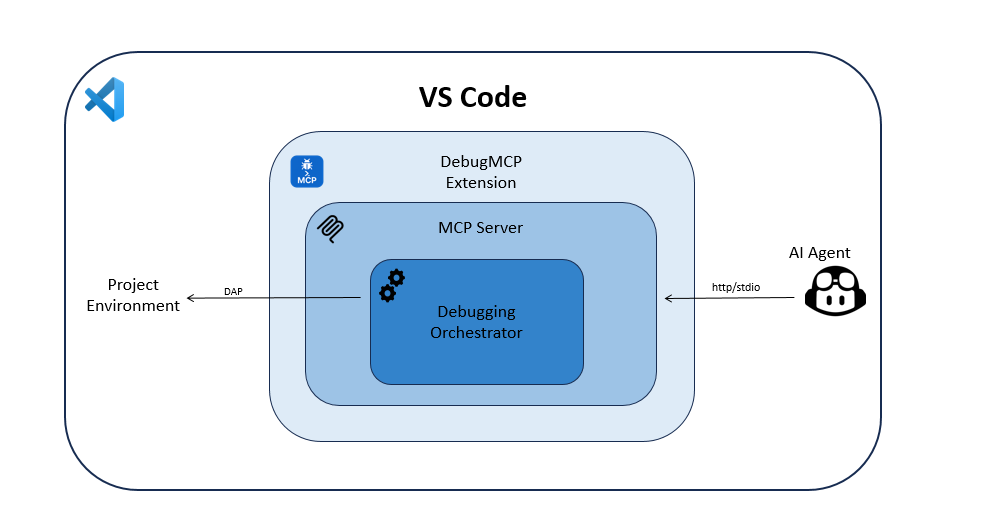
AI Agent (Copilot/Cline/Cursor/Codex) → MCP/Streamable HTTP → DebugMCPServer → DebuggingHandler → VS Code Debug API
Launch Configuration Integration
The extension handles debug configurations intelligently:
-
Existing launch.json: If a
.vscode/launch.jsonfile exists, it will:- Search for a relevant configuration
- Honor
configurationNamewhen explicitly provided by the agent - Support JSONC (JSON with comments and trailing commas)
-
Default Configuration: If
configurationNameis omitted, or if no matching named configuration is found, it creates an appropriate default configuration for each language based on file extension detection
Requirements
- VSCode with appropriate language extensions installed:
- Python: Python extension for
.pyfiles - JavaScript/TypeScript: Built-in Node.js debugger or JavaScript Debugger extension
- Java: Extension Pack for Java
- C#/.NET: C# extension
- C/C++: C/C++ extension
- Go: Go extension
- Rust: rust-analyzer extension
- PHP: PHP Debug extension
- Ruby: Ruby extension with debug support
- Python: Python extension for
- MCP-compatible AI assistant (Copilot, Cline, Cursor, Codex, Windsurf, Roo Code, etc.)
Development
To build the extension:
npm install
npm run compile
To run linting:
npm run lint
To run tests:
npm test
Contributing
This project welcomes contributions and suggestions. Most contributions require you to agree to a Contributor License Agreement (CLA) declaring that you have the right to, and actually do, grant us the rights to use your contribution. For details, visit https://cla.opensource.microsoft.com.
When you submit a pull request, a CLA bot will automatically determine whether you need to provide a CLA and decorate the PR appropriately (e.g., status check, comment). Simply follow the instructions provided by the bot. You will only need to do this once across all repos using our CLA.
This project has adopted the Microsoft Open Source Code of Conduct. For more information see the Code of Conduct FAQ or contact opencode@microsoft.com with any additional questions or comments.
Security
Security vulnerabilities should be reported following the guidance at https://aka.ms/SECURITY.md. Please do not report security vulnerabilities through public GitHub issues.
Trademarks
This project may contain trademarks or logos for projects, products, or services. Authorized use of Microsoft trademarks or logos is subject to and must follow Microsoft's Trademark & Brand Guidelines. Use of Microsoft trademarks or logos in modified versions of this project must not cause confusion or imply Microsoft sponsorship. Any use of third-party trademarks or logos are subject to those third-party's policies.
⭐ Support DebugMCP
If DebugMCP has helped you debug faster, please consider giving it a star on GitHub! Stars help the project gain visibility and attract contributors.
Star History
License
MIT License - See LICENSE for details
This extension was created by Oz Zafar, Ori Bar-Ilan and Karin Brisker.