CTI Expert
Cyber Threat Intelligence & OSINT Analysis Toolkit
Transform Claude into a trained intelligence analyst — 74+ commands, 49 techniques, zero API keys required for core functionality.
Installation | View Demo | Quick Start | Commands | Contribute












🇬🇧 English · 🇻🇳 Tiếng Việt · 🇨🇳 中文
Built by Hieu Ngo • hieu.ngo@chongluadao.vn • chongluadao.vn
🤝 Sponsors & Supporters
CTI Expert is built in the open. These organisations back the work — with data, tooling, and hard-won investigative tradecraft.






| Supporter | What they bring | In the toolkit |
|---|---|---|
| Rexxfield | Cybercrime investigation and victim-side casework since 2008 — the real-world tradecraft the case workflow and attribution standards are modelled on | Tradecraft & methodology |
| Hudson Rock | Infostealer-infection intelligence — which machines leaked which credentials, and when | /breach-deep · /stealer-log |
| ParanoidLab | Dark-web, Initial-Access-Broker and infostealer-log monitoring across forums, markets and private Telegram | Dark-web collection & review |
| ANY.RUN | Interactive malware sandbox + TI Lookup — sandbox-observed C2 and real endpoints from packed samples | /binary · /hash-id |
| ZETAlytics | Global passive DNS with rare geographic diversity — historical resolution and co-tenancy pivots | /webpivot · /cti-pivot |
| IntelX | Intelligence X — paste sites, leaks, darknet and phonebook selector search | /webpivot · /email-deep |
[!IMPORTANT] ANY.RUN is used read-only.
anyrun_lookupqueries TI Lookup for hashes that have already been detonated. This skill never submits a sample — a public sandbox task is world-readable and irreversible. That boundary is enforced by a regression test (tests/test_no_sample_submission.py), not just by convention.
Listing here reflects support for the project and does not imply affiliation, endorsement, or any verification of this tool by the organisations named. Integrations marked above are optional and key-gated — every core technique still runs with zero API keys. Always respect each provider's terms of service. The full list of open-source projects and free public-interest services this skill depends on is in Acknowledgments & Credits.
What is CTI Expert?
A Claude Code skill that transforms Claude into a trained cyber threat intelligence and open-source intelligence analyst. It runs structured intelligence collection using 74+ commands across 49 techniques — no API keys required for core functionality. To take full advantage, add your own free or paid API keys to the skill's .env — each is auto-detected and unlocks higher-tier access (e.g., Wigle, VirusTotal, URLScan.io, Shodan, Censys, SecurityTrails, WhoisXML).
[!TIP] Keyless by default, more powerful with your keys. Every core technique runs with zero API keys. Add any free or paid keys to
.env(or run/apikeys set <service> <KEY>) and the skill auto-detects them, unlocking higher-tier pivots: reverse favicon→host, passive DNS, certificate search, sibling-domain discovery. A missing or bad key never breaks a run — it just degrades to a note. Setup guide: handbook/api-keys.md.
[!TIP] One skill, two layers. cti-expert is the broad collector — the wide net (
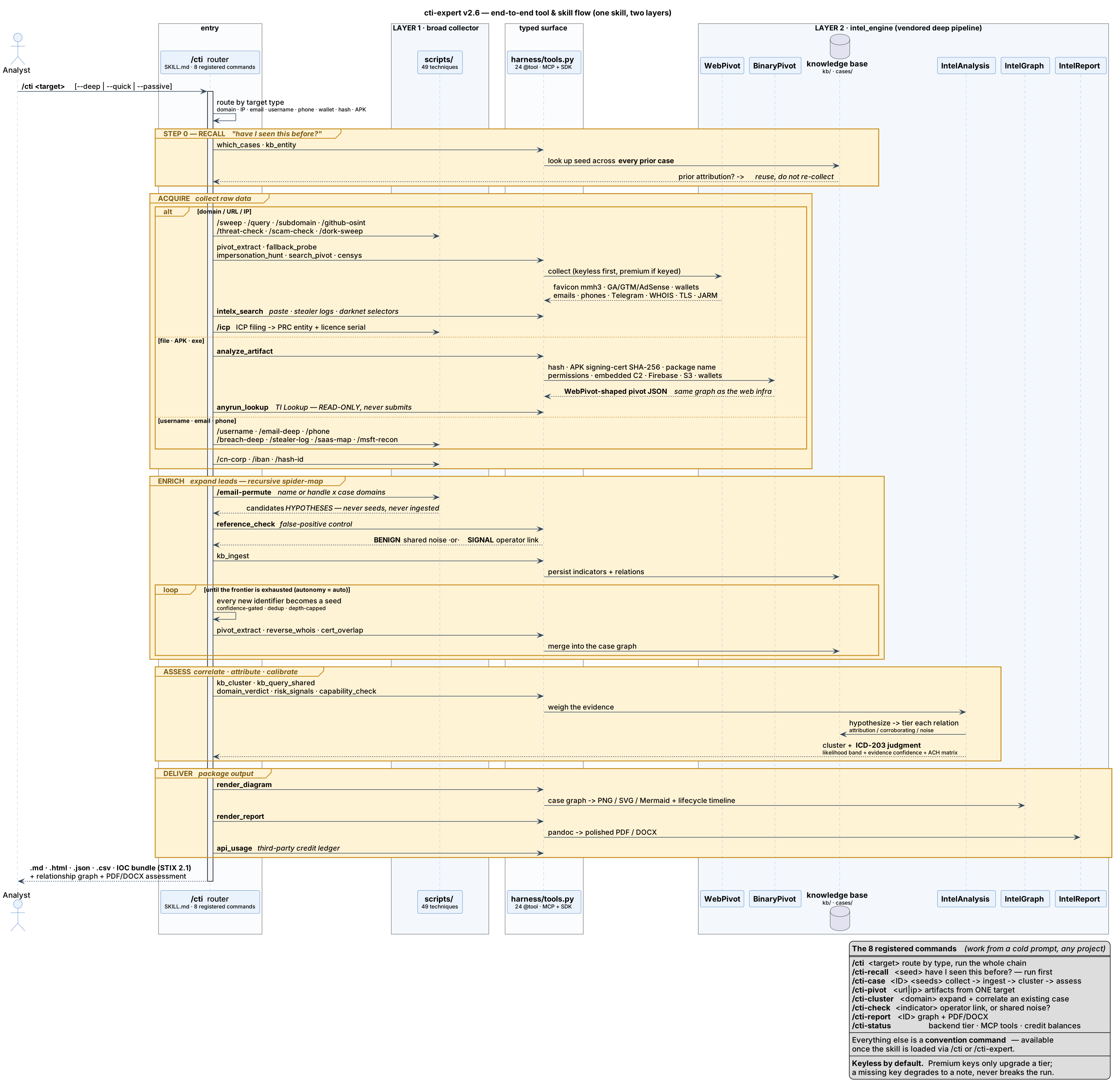
/sweep,/webpivot,/subdomain,/username,/email-deep…). Built into the repo is a deep pipeline (intel_engine/) that turns raw collection into a real case: a persistent knowledge base, versioned cases, cross-case correlation, and calibrated assessment. The flow reads like a sentence — collect broadly → "seen this operator before?" → cluster → filter false positives → assess. No external setup: the backend resolves toSELF; install the deep-layer deps once withuv venv && uv pip install -r requirements.txt. Architecture: connectors/intel-backend.md.
|
Core Capability Multi-vector reconnaissance on any target type — person, domain, organization, username, email, IP, WiFi — with automated finding validation, exposure scoring, and structured intelligence delivery. |
AEAD Workflow Acquire raw data → Enrich with pivot expansion → Assess findings → Deliver structured reports (interactive HTML + Markdown + JSON/CSV + IOC bundle; Word on request). |
Demo
Full Case Investigation

CTI Report Generation

Screenshots
| INTSUM Report | Network Topology | Risk Assessment |
|---|---|---|
 |  |  |
What's New in v2.8
The release where the engine caught up and the safety rails moved to where the harness can see them. v2.7 landed the deep pipeline. v2.8 brings the vendored engine ~30 commits forward — 24 → 46 MCP tools, a new engagement skill, and a case loop that runs to convergence — and then fixes the layer underneath it: two safety properties were being enforced at a moment Claude Code never reaches. Both now fire where the work actually happens.
| Category | What's New | Details |
|---|---|---|
| Engine sync — 24 → 46 MCP tools | A three-way merge, not a copy — and that distinction is the whole story | The vendored intel_engine/ was ~30 commits behind. Rather than trust a remembered list of local patches, every vendored file was classified by blob identity against all upstream history: 114 pure copies, 15 deliberately patched, 6 cti-expert-only. A plain rsync would have silently reverted three real behaviours — wp_common's extra .env depth (cti-expert nests one level deeper, so upstream's version resolves every API key to empty, and a keyless run then reports "no siblings" as a fact about the operator), pivot_extract's reverse-WHOIS-on default, and the collect_core single-sourcing — plus destroyed email_permute and turned three RULE 4 shims back into copies. 48 → 69 CLI ops, all resolving |
| Engage — the authentication surface | Find the login; then, only on explicit confirmation, get inside | Detection is passive and free: locate the login form, the password field and the registration page, and classify by FIELDS rather than by label — a confirm-password means register, an invite code is a pivot, not an OTP. Beyond that, engage_account creates a synthetic-persona account and reads the members area the public page hides (panel, deposit/withdraw flow, affiliate tree, support handles). It refuses a non-synthetic persona, refuses direct egress, and stops at a CAPTCHA. Account creation is outbound, attributable and irreversible — gated exactly like a sandbox submission |
| The case loop | Judge the cluster, not the case — and run to convergence, not to an arbitrary depth | /clusters partitions a case into same-operator components before anything is judged, showing each binding indicator's KB-wide prevalence — so an indicator that binds 3 domains here but sits on 400 KB-wide reads as noise, not an owner link. /frontier reports the unresolved gaps: free next seeds already discovered, plus the deferred metered leads held for approval. /loop runs collect → assess until the case converges; /reopen re-opens a converged case on new seeds; /scope derives the intake — no-touch class, victim ownership, egress gate — up front instead of assuming it mid-run |
| Six new collection layers | Each one closes a specific way the old answer was wrong | /liveness — a 200 parking/default/suspended/soft-404 page is not live and a 404/403/bot-wall is not dead; only NXDOMAIN reports dead, and every still-controlled name sets reuse_watch. /pssl — passive SSL runs the historical cert → IP direction that recovers an origin from behind a CDN, with the base-rate rail that keeps a shared CDN certificate (915 addresses in live measurement) out of the clustering. /paths — the URL path as an indicator (path_kit:) for an operator who rotates hosts and selects the template by directory; a generic path emits nothing. /serp — Ads Transparency identifies who paid (a verified, billed advertiser), with a cloaking probe that has a falsification control. /docmeta — PDF /Info + XMP, EXIF incl. GPS, PNG chunks. /victims — infer the access vector from the victim set |
| RULE 1 now fires at write time | The leak gate was enforced at a moment an agent harness rarely reaches | leakcheck.sh ran only as a git pre-commit hook. Claude Code writes files continuously and commits rarely, so a leaked indicator could sit in the working tree all session — and git commit --no-verify skips the gate outright. hooks/leakguard.py moves the check to PreToolUse on Write/Edit, where that flag does not exist. It does not reimplement the patterns — it shells out to leakcheck.sh, because a second copy would drift and a drifted guard reports clean. Scope is narrow on purpose: it denies only inside a cti-expert checkout on a path git does not ignore, so writing case data into intel_engine/cases/ — the correct thing to do — is never blocked |
| The outbound gates moved above the vendored code | A gate only a bad merge stands between is not a gate | submit() refuses without confirm=True; the Engage tools refuse a non-synthetic persona. Those gates are real — and they live in intel_engine/, which is vendored. Re-syncing it is a three-way merge over ~150 files where a deliberate local behaviour is reverted silently; three such reversions were caught by hand in this very release. hooks/actionguard.py sits above the tools, in cti-expert's own tree, and fires on the tool name. It returns ask with a risk briefing, never a hard block — a rail you must disable to work is a rail that gets disabled. Dual-mode tools gate on the flag, not the tool: ordinary collection is silent, only --submit prompts |
| The stale-MCP failure has a name now | A session was driving a four-week-old tool surface with no error anywhere | Claude Code resolves an MCP server's tool list when it connects and keeps it for the session. A session was found holding 17 tools while the engine on disk served 46 — and nothing said so; the model simply never saw the new tools and worked around their absence. hooks/sessionguard.py reports the resolved backend tier at SessionStart and warns when the @tool count has changed since last session, which is precisely when a cached registration went stale |
| Installable as a Claude Code plugin | Skill + commands + MCP + hooks as one unit | register.sh symlinks the skill, the commands and the MCP server — but it cannot install hooks, and that is where the two rails above live. .claude-plugin/plugin.json bundles all four: /plugin marketplace add <clone> then /plugin install cti-expert. Hook paths use exec form with ${CLAUDE_PLUGIN_ROOT}, so nothing is hardcoded to one machine and no path is shell-parsed. Both PreToolUse hooks fail open — a hook bug must never brick your repo; audit.sh and the git pre-commit hook remain the backstop |
| The OPSEC gate was met, not relaxed | Upstream grew a submission path, so the test had to be satisfied honestly | ANY.RUN's API is mostly a submission API, and the upstream engine added a gated path to it — which failed tests/test_no_sample_submission.py, by design. The fix was not to weaken the assertion: the REQUIRES_ANALYST_CONFIRMATION marker was placed on submit() itself, the four submission-lifecycle endpoints were listed explicitly (an unreviewed new key still fails), and the test now demands the marker and the refusal it claims — so the marker cannot decay into a magic string. Verified by planting each failure: remove the marker → fail; remove the refusal → fail; restore → pass |
| The re-sync procedure was the one that breaks the repo | Documented advice that fails silently is worse than none | STRUCTURE.md told the next person to "copy into intel_engine/, then re-apply the 5 shims". That is wrong, and its failure has no error message: the collectors keep running, they just stop finding things. It now documents the procedure that holds — classify by blob identity, three-way merge off the minimum-distance base, check for the duplicate @tool blocks a stale base produces — plus the zsh word-splitting trap that turns an unquoted rsync exclude list into no exclusions at all. The vendored engine's own 17 gates now ship and run alongside cti-expert's 6, and audit.sh gained a check that every path hooks.json registers still resolves, because a renamed script disables its hook silently |
What's New in v2.7
What's New in v2.7
The release where the deep pipeline landed. v2.6 sharpened the collector. v2.7 makes cti-expert a two-layer system — a broad collector plus a built-in, self-contained intelligence pipeline with a persistent knowledge base — reachable from a cold prompt by one command, and guarded by a gate that checks the repo against its own rules on every push.
| Category | What's New | Details |
|---|---|---|
| One skill, two layers | The deep pipeline is now built in — no external backend to stand up | intel_engine/ vendors the whole Collect → Correlate → Assess pipeline: a persistent knowledge base, versioned cases, cross-case correlation, calibrated assessment and rendering (WebPivot · IntelAnalysis · IntelGraph · IntelReport · BinaryPivot). /backend resolves to SELF — nothing to configure, nothing to host. Install the deep-layer deps once with uv venv && uv pip install -r requirements.txt. The tree regrouped from 22 top-level directories to 14 behind a single SKILL.md. See STRUCTURE.md |
| 8 registered commands | /cti works from a cold prompt, in any project | Commands used to require the skill be loaded first. scripts/register.sh symlinks the skill and commands/*.md into ~/.claude/ and writes the per-machine .mcp.json, so /cti, /cti-recall, /cti-case, /cti-pivot, /cti-cluster, /cti-check, /cti-report and /cti-status are available immediately. There is now one command to remember — /cti <target> — which routes by target type (domain · IP · email · username · phone · wallet · hash · APK) and runs the right chain. Everything else remains a convention command |
--deep is genuinely parallel | Sub-agent fan-out on both collection and assessment | /cti --deep spawns one sub-agent per discovered frontier seed — pruned through recall and false-positive control first, ≤6 concurrent, depth-capped at 2 hops, with --passive propagating to every child — then converges them into one case. New here: when convergence yields 2+ clusters, the Assess phase fans out too, one agent per cluster (ACH, confidence, risk, scoped to that cluster), while the cross-cluster judgment stays central in the orchestrator. Breadth in parallel; synthesis in one place |
| IntelX + ANY.RUN | Leak/darknet selector search and sandbox-observed C2 — with the evidence graded, not merged | intelx_search reaches pastes, stealer logs, darknet and historical WHOIS. Critically, hits are graded: a breach-corpus or stealer-log sighting is exposure evidence and explicitly not clusterable — two addresses in one combolist share a victim pool, not an operator. Soft selectors are refused locally so a vague name never burns a query unit. anyrun_lookup answers what samples carrying an indicator actually did — the real endpoints a packed binary contacts — and is read-only: this skill never submits a sample, enforced by tests/test_no_sample_submission.py |
| Evidence archiving was silently off | The wrapper was dropping 22 flags, including --archive-missing | The vendored engine had been left half-migrated — the modular wp_* layer was in place but the live collector was still the pre-split 2,274-line monolith, so the harness's --help probe filtered out flags the collector no longer advertised. Evidence archiving was therefore not running at all. collect_core now drops zero flags and the supported surface went 19 → 42. Dropped flags remain visible in the tool result by design: a silent drop is precisely the failure mode this class of bug hides in |
| Keyless answers stay honest | Capability accounting — an absent key is never reported as a finding | wp_capabilities names the evidence class each missing key costs, so a keyless run that finds no siblings reports "not queried" — never "no siblings exist." Shipping alongside it: Censys (keyless CenQL builder, free-plan lookups, monthly credit guard), asset discovery (JS bundles, source maps, SPA routes, well-known files), impersonation hunting, JARM TLS-stack fingerprinting, and a multi-engine search_pivot. Every denylist, provider registry and permutation table moved out of code into analyst-tunable references/*.json |
| Nothing dead-ends | Six identifier types were classified but had no pivot | The spider-map recognised document, image, youtube_channel, coordinates, vin and ipv6 — then silently stopped on them. Now wired: documents → exiftool + oletools authorship → person/email/org; images → EXIF GPS → coordinates, with reverse-image and face search graded LOW and held pending corroboration, never an auto-merge; YouTube channels → about-panel links; coordinates and VIN enrich only, deliberately producing no new seed, so they cannot invent a false attribution; IPv6 → reverse/passive DNS + ASN, mirroring IPv4. Kept fixed by an invariant test: every classifiable type must have at least one pivot |
| The repo checks itself | audit.sh + CI + a pre-commit leak scan | scripts/audit.sh is the gate: every DISPATCH op resolves to a real script, all five shared collectors are one canonical file + one re-export shim, the @tool count matches the contributor rules, modules byte-compile, tests pass. It runs in GitHub Actions on every push and PR, scanning only the PR's added lines so curated example values are never re-flagged. scripts/install-hooks.sh wires the identifier leak scan as a pre-commit hook. Five zero-dependency suites ship with it — collection core, indicator classification, the false-positive ledger, no-sample-submission, and email-candidate containment |
| Every collection turn leads with a table | Scannable yield, before the prose | Collection surfaced results only in prose plus the durable file exports; nothing guaranteed a per-domain summary in the conversation itself. A new output rule puts a markdown table first on every collection turn — Resolves · Top pivots · Risk · Cluster · Seen-before — so you see the yield at a glance instead of reading for it |
| Portable & framework-free | No assistant-framework coupling left in the skill | The mandatory voice-notification block is gone and the customization directory moved from a framework-specific path to a neutral ~/.config/cti-expert/ (repo/cwd .env still wins). Also in this release: a Sponsors & Supporters section — Rexxfield · Hudson Rock · ParanoidLab · ANY.RUN · ZETAlytics · IntelX — and the workflow diagrams rebuilt as SVG, including a new end-to-end tool-and-skill sequence diagram |
What's New in v2.6
What's New in v2.6
| Category | What's New | Details |
|---|---|---|
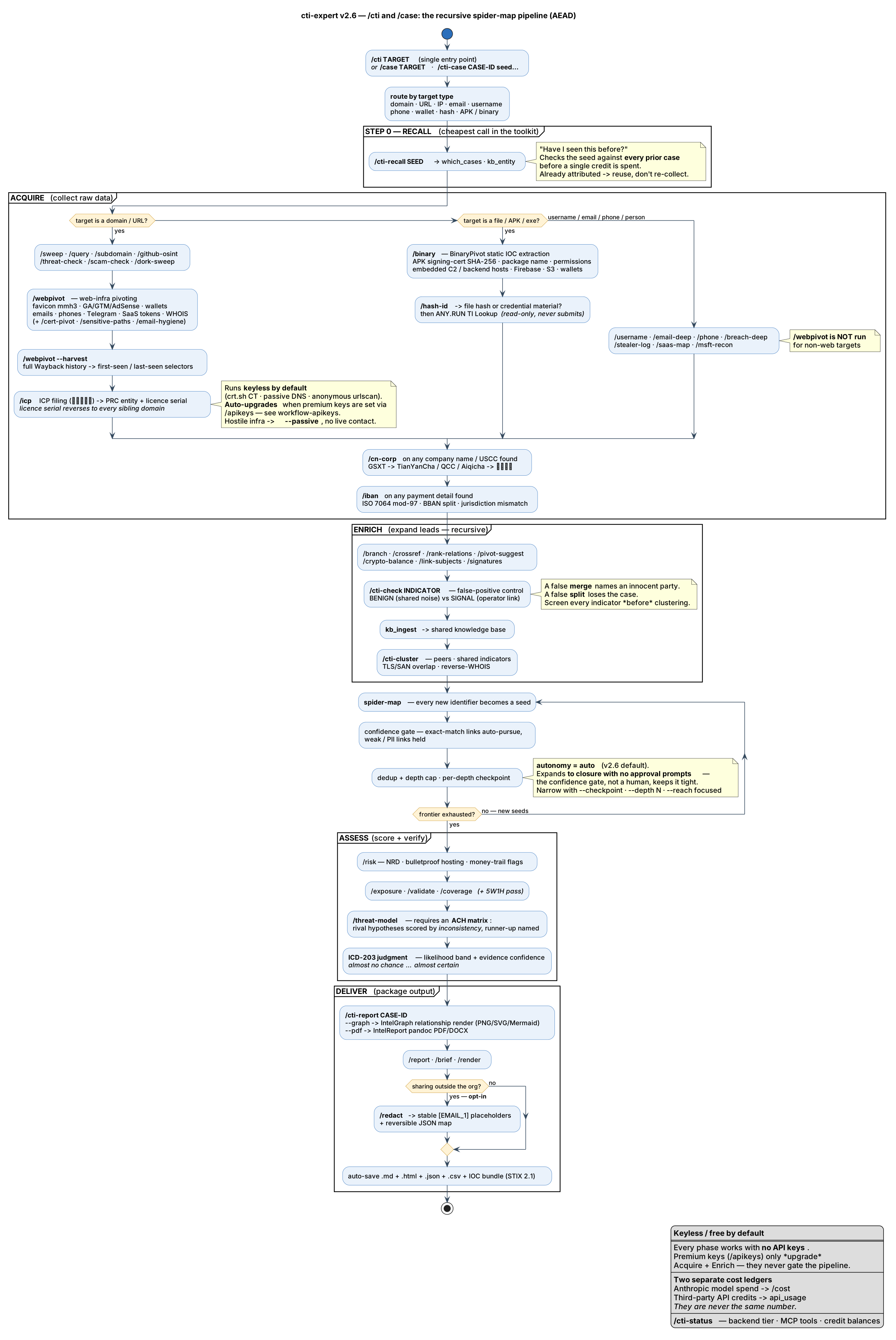
/case runs unattended | Pivot loop defaults to autonomy=auto; the new recon commands auto-fire | The spider-map now expands to closure without approval prompts — the confidence gate, not a human prompt, is what keeps expansion tight (exact-match links auto-pursue, weak links held, dedup + depth caps unchanged). Depth summaries still print, so the run stays auditable. And the v2.6 recon commands are in the pipeline with no flags: /icp on every domain/URL/org target, /cn-corp on any company name or USCC found, /iban on any payment detail, /hash-id on every hash (before /hash) — and all three discovery-driven ones feed their yields back into the loop as new seeds. /redact stays opt-in (--redact): a redacted report is a weaker artifact, so producing one should be a deliberate call. Narrow with --checkpoint, --no-cn, --reach balanced|focused, --depth N |
| China / Sinophone recon | /icp + /cn-corp — the attribution layer Western registries can't reach | ICP filing (工信部备案) maps a domain to its registered PRC entity, and the licence serial reverse-pivots to every sibling site under the same filing — a same-operator link as strong as a shared GA ID. Then the registry chain: GSXT (ground truth) → TianYanCha/QCC/Aiqicha → 信用中国 blacklist → UBO, with USCC validation and revoked-status flags. Adds Quake (360) and ZoomEye as independent cyberspace indexes, a Baidu tier for /dork-sweep (tiers 1–4 index almost no CN content), and CJK variant generation — pinyin, Simplified↔Traditional and company-name stems — as a new /pivot-suggest axis. See techniques/china-recon.md |
| Fiat payment rails | /iban — bank accounts become selectors, like wallets already were | Most victims never touch crypto — they make a bank transfer. iban_analyze.py runs ISO 7064 mod-97 validation (proving a "bank account" on a payment page is fabricated without contacting anyone), decomposes the BBAN into bank/branch/account, and flags jurisdiction mismatch — the classic beneficiary-abroad mule pattern. Validated accounts export as financial/iban IOCs; invalid ones are recorded as behavioural findings. Covers VN/SEA non-IBAN rails too: VietQR/NAPAS BIN, card BIN, e-wallets, BIC. See techniques/fiat-payment-osint.md |
| Shareable reports | /redact — reversible PII redaction | redact.py replaces PII with stable numbered placeholders ([EMAIL_1] means one address across the whole case) and writes a reversible JSON map, so a report can leave the organisation and still be reconstituted for evidence. Handles .md/.json/.csv; round-trip is byte-exact. Infrastructure is not redacted by default — in a CTI report the actor's domains are the analysis, not incidental PII |
| Analytic rigor | Probability-anchored likelihood + 5W1H + ACH | Judgments now carry likelihood terms with probability bands (almost no chance → almost certain) reported alongside evidence confidence, because "MODERATE" alone means a 30-point-different thing to writer and reader. /coverage gains a 5W1H pass — a technique matrix measures effort, so a case could score 96% while answering no Why or How. /threat-model now requires an ACH matrix for attribution: rival hypotheses scored by inconsistency, runner-up named, and the evidence that would change the ranking stated. See handbook/analytic-standards.md |
| Hash typing | /hash-id — before any hash lookup | 32 hex is MD5 or NTLM — one is a file hash, the other is credential material, and querying the wrong service returns a confident "unknown sample" that reads as exculpatory. Routes file hashes to MalwareBazaar/VT and credential hashes to /breach-deep, never a public cracking service |
What's New in v2.5
What's New in v2.5
| Category | What's New | Details |
|---|---|---|
| Recursive pivoting | /case is a spider-map — expands the whole network | /case now runs a recursive BFS pivot engine (pivot_orchestrator.py + engine/pivot-orchestration.md): every discovered identifier (email/domain/IP/username/wallet/…) becomes a new seed and the relationship graph expands hop-by-hop until the frontier is exhausted. Confidence-gated (exact-match links auto-pursue, weak/PII links held), cycle-safe (dedup + depth caps), with per-depth checkpoints. Defaults: active · exhaustive · checkpoint-per-depth |
| Archive IOC harvest | /webpivot --harvest — every selector the site ever exposed | wayback_harvest.py runs the full extractor over a domain's entire Wayback history, merging emails, phones, crypto wallets, tracking/verification IDs, SaaS-operator IDs and socials with first-seen/last-seen — recovering selectors a network later scrubbed. Emits case-schema indicators[] straight into the IOC bundle; auto-runs in /case for domain/URL targets. /webpivot now also extracts phone numbers (tel: + formatted) as ranked pivot leads |
| Archive access | Fetch archived pages Claude Code's WebFetch can't reach | WebFetch is blocked from web.archive.org (robots.txt at the fetch layer). wayback_fetch.py routes around it — CDX lookup → nearest-snapshot resolve → raw id_ fetch, with retry/backoff (--near, --list, --url-only, --json) |
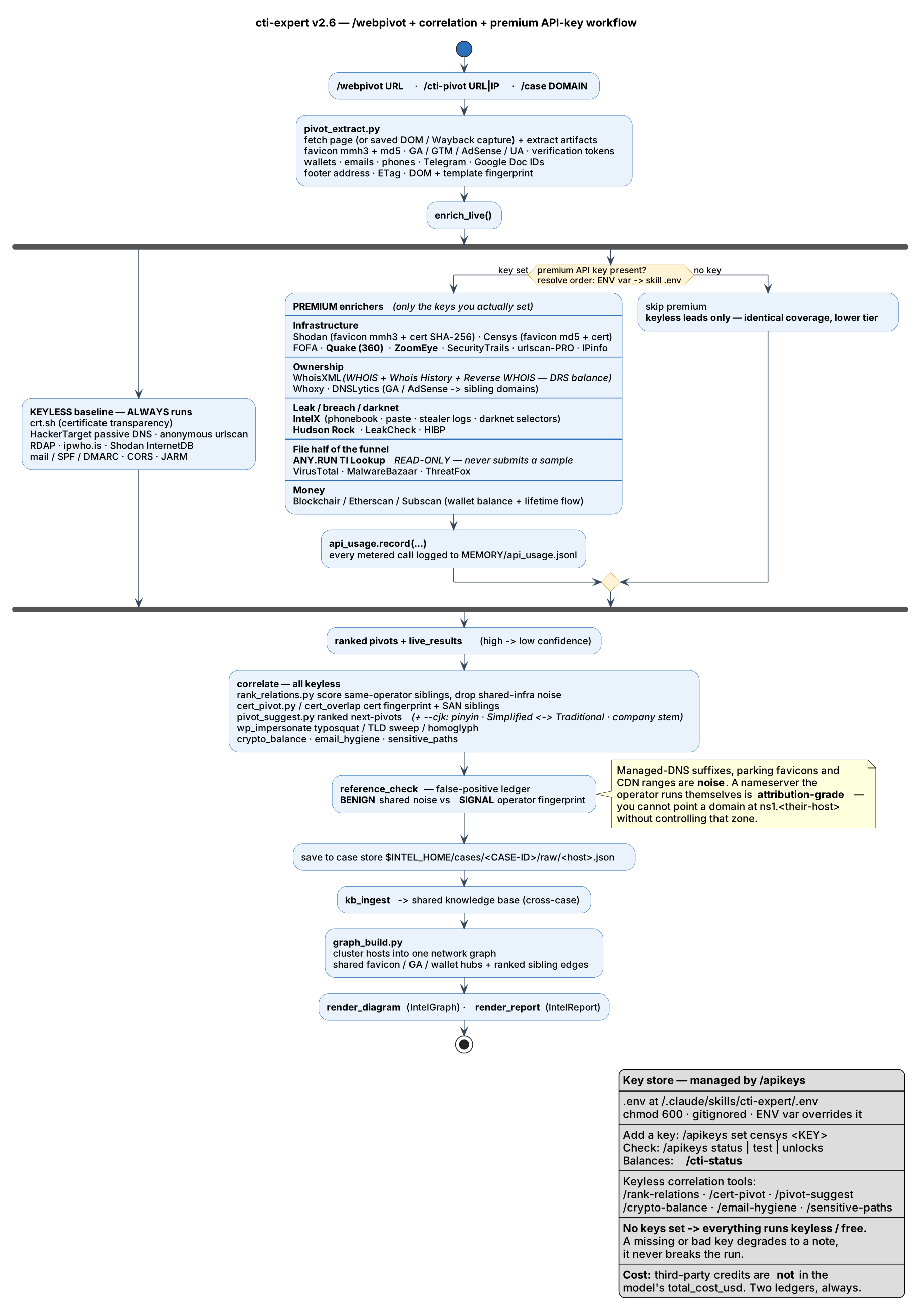
| Web pivoting | /webpivot — map the infra behind a page | Favicon mmh3, GA/GTM/AdSense IDs, wallets & SaaS-operator tokens from a page's DOM → ranked pivots; same-operator correlation via /rank-relations (weighted scoring + noise denylist), /cert-pivot, /pivot-suggest, /crypto-balance, /email-hygiene, /sensitive-paths. Auto-runs in /case for domain/URL targets |
| Keyless by default | 100% free — no key, no signup | crt.sh (certificate transparency) + passive DNS + anonymous urlscan always run; full pivoting at zero cost, nothing to configure |
| Premium auto-detect | Drop in a key → it upgrades itself | /webpivot auto-detects any premium key you've set (Shodan, Censys, FOFA, DNSLytics, SecurityTrails, urlscan-PRO, WhoisXML) and unlocks its higher tier — no flag, no re-run; a missing/bad key degrades to a note, never breaks the run. Manage keys with /apikeys |
| Attack surface | /appliance-scan — edge/VPN appliance → KEV mapping | Passive-first fingerprint of internet-facing Citrix/F5/Cisco/Ivanti/Forti/Palo Alto/Exchange appliances (Shodan InternetDB/Censys) → matched CISA KEV/CVE list; feeds /vuln-check + /threat-model |
| Identity fabric | /saas-map — SaaS tenancy + IdP surface | DNS-TXT tenancy tokens (Google/Atlassian/Zscaler/Salesforce/Workday…), non-Microsoft IdP fingerprint (Okta/Auth0/OneLogin/Ping/Keycloak/ADFS), unauthenticated API/GraphQL/OpenAPI-spec discovery |
| Credentials | Read-only liveness validation | A discovered key is confirmed live via identity-only endpoints (AWS STS, GitHub scopes, Slack auth.test, …/v1/models) — never a mutating call — upgrading it to CRITICAL with account/scope evidence |
| Integrity | Evidence-gated analysis | every asserted claim cites a resolvable finding; untrusted collected data is tagged, never executed |
| Recon | Native asn command | Keyless IP/ASN/domain lookups (ipwho.is + RDAP) on Windows; full nitefood/asn auto-installed on Linux/macOS/WSL |
| System tools | whois + dig + asn auto-install on Windows | winget Microsoft.Sysinternals.Whois + ISC.Bind; previously manual steps |
| Reliability | Windows PowerShell 5.1 hardening | Fixes native-stderr script aborts, the OSArchitecture probe crash, and maigret via uv tool --force; installs clean on WinPS 5.1 |
| Packaging | Auto-PATH for CLI tools | ~/.local/bin (uv tools + asn) added to PATH automatically — current session and persistent |
What's New in v2.4
What's New in v2.4
| Category | What's New | Details |
|---|---|---|
| Platform | Cross-platform OS detection (Windows/macOS/Linux) | OS-aware auto-install; self-healing DOCX (UTF-8 + auto-located pandoc) |
| Packaging | uv-first toolchain | uv venv / uv pip / uv tool; PEP 723 uv run zero-setup scripts; pip/pipx/venv fallback |
| Portability | Cross-agent support | Runs in Claude Code and OpenAI Codex via AGENTS.md + a ready-to-copy /cti-expert Codex prompt |
| CTI | Infostealer-log analyzer (/stealer-log) | Family ID, victim-vs-operator profiling, cross-log actor correlation, IOC + raw-artifact extraction |
| Recon | Admin / sensitive-endpoint detection | Subdomain-prefix + path + CJK classifier (admin, adm, kef, ador, panel…) |
| Collection | agent-browser integration | Primary interactive browser (vercel-labs): CDP, accessibility-tree snapshots, screenshots; complementary to Scrapling, no API key for core |
| Reliability | Fresh-VPS install hardening + CI | root/sudo + prereq bootstrap; smoke test + GitHub Actions on a minimal root Ubuntu container |
What's New in v2.3
What's New in v2.3
| Category | What's New | Details |
|---|---|---|
| WHOIS | Universal WHOIS for all TLDs | whoisdomain + CLI + Whoxy API; .vn, .th, .sg, .kr, 27+ ccTLD servers |
| WHOIS | Reverse & historical WHOIS (free) | Whoxy reverse API, historical lookup, ViewDNS |
| Web Collection | Scrapling adaptive scraping | 3-tier: static → anti-bot → JS rendering; headless auto-open |
| Web Collection | Headless browser auto-open default | JS-heavy sites auto-detected and rendered via DynamicFetcher |
| Orchestration | AgentFlow parallel enrichment | DAG-based parallel pivot expansion for 3+ subjects |
| Performance | HTML parsing ~2ms | Scrapling parser replaces slow HTTP scraping |
| Platform | Python 3.10+ minimum | Required by Scrapling and AgentFlow |
What's New in v2.2
What's New in v2.2
| Category | What's New | Details |
|---|---|---|
| Image Forensics | Face search, reverse image, manipulation detection, AI geolocation | FaceCheck.id, TinEye, FotoForensics, Forensically, picarta.ai, GeoSpy, Pic2Map |
| Blockchain | Crypto wallet tracing, transaction graphs, scam detection | Blockchair, Etherscan, WalletExplorer, OXT.me, Chainabuse, Breadcrumbs |
| Transport | Aircraft tracking (unfiltered), vessel AIS, vehicle VIN lookup | ADS-B Exchange, Flightradar24, Marine Traffic, VesselFinder, NICB VINCheck |
| Darknet | Tor search, ransomware monitoring, onion service discovery | Ahmia.fi, onionsearch, DarknetLive, ransomwatch |
| Social Media | Reddit, Instagram, TikTok, Telegram investigation | Osintgram, instaloader, toutatis, RedditMetis, TGStat, TelegramDB, Bellingcat TikTok Timestamp |
| People Search | US people search engines, free reverse lookups | TruePeopleSearch, FastPeopleSearch, IDCrawl, That's Them |
| Mega-Dorks | 11 cross-platform Google dork templates covering 73 unique domains | Social, Telegram ecosystem, dev platforms, forums, paste sites, darknet, breach DBs, business, image, messaging, jobs |
| IoT | Webcam directories, IoT device search | Insecam, Thingful |
What's New in v2.1
| Category | New Commands | What It Does |
|---|---|---|
| Intelligence | /render threat-path, /render attack-surface | Attack path flow + infrastructure exposure visualization |
| Intelligence | /snapshots, /diff | Wayback Machine snapshots and version diffing |
| Intelligence | /drift, /report ioc | Temporal risk tracking + IOC export (STIX 2.1) |
| UX | /onboard, /clarify, /quality | First-time tutorial, finding explanation, quality scoring |
| UX | /blind-spots, /source-check | Gap analysis + batch URL verification |
| UX | /workspace diff | Compare two saved investigation sessions |
| Data Model | Source Reliability A-F | Complements trust scores with source-level grading |
| Data Model | 4 new entity types | Device, Image, Crypto Address, Custom |
| Data Model | HIGH conflict severity | 4-level severity: CRITICAL/HIGH/NOTABLE/MINOR |
Installation
Recommended: Use Claude Code CLI — it gives you the full terminal workflow, persistent sessions, and direct skill invocation. Download here or run
npm install -g @anthropic-ai/claude-code.
Why Claude Code CLI?
The entire CTI Expert workflow is optimized for Claude Code CLI. The CLI gives you:
- Persistent sessions — investigations survive terminal restarts via
/workspace save - Full tool access — file writes, Python scripts, DOCX generation, all run natively
- Skill invocation — type
/cti-expertdirectly in the terminal, no browser required - Background agents — parallel enrichment via AgentFlow works best with the CLI
🖥️ Where to run it — the CLI is best for this skill
[!IMPORTANT] CTI Expert is execution-heavy: it runs
uv/Python, installs OSINT tools, writes.md/.html/.json/.csvreports + IOC bundles, reaches many external sites, and saves case workspaces. What matters is a real local shell + persistent files + open network — a CLI or local desktop agent gives you that; an ephemeral cloud sandbox does not. This applies equally to Claude and Codex.
| Environment | Running cases | Why |
|---|---|---|
| Claude Code CLI · Codex CLI | ✅ Best | Real shell, persistence, background tasks, open network — what the skill is built for |
| Claude Code Desktop · Codex IDE extension | ✅ Great | Same local execution; nicest for reading rendered reports, charts & diagrams |
| claude.ai/code (web) · Codex cloud / ChatGPT web | ⚠️ Limited | Reasoning & query generation work, but files don't persist to your disk and outbound network is often restricted |
[!TIP] Run investigations in a CLI (Claude Code or Codex); open the generated
.docx/report in a Desktop/IDE window if you prefer reading there. Use web/cloud surfaces only for analyst-reasoning, not execution-heavy recon.
Step 1 — Install Claude Code CLI
npm install -g @anthropic-ai/claude-code
Requires Node.js 18+. Full docs: docs.anthropic.com/en/docs/claude-code/overview
Step 2 — Clone + All-in-One Installer
The installer handles everything: Python dependencies, system tools (whois, dig, asn, jq, exiftool), OSINT tools (maigret, sherlock, holehe, h8mail, and more), and optional headless browser + Go tools. It is powered by uv (Astral's ultra-fast Rust package manager) — the script bootstraps uv, then uses uv venv / uv pip / uv tool for all Python installs, falling back to pip/pipx/venv only if uv can't be installed. Use install.ps1 on Windows (PowerShell) or install.sh on macOS/Linux/Git Bash/WSL.
| Platform | Command |
|---|---|
| Linux / macOS |
|
| Windows (Git Bash or WSL) |
|
| Windows (PowerShell — native) |
|
Windows users:
install.ps1is a full native installer (winget system tools + Python venv + OSINT tools) — no Git Bash or WSL required. It accepts the same-Headless,-Go, and-Allflags (e.g.install.ps1 -All). Git Bash / WSL users can runinstall.shinstead. The DOCX generator self-heals UTF-8 output and auto-locates pandoc, so reports build on Windows with no extra environment setup. The skill itself detects the OS at runtime and installs any missing tool with the right manager (winget/brew/apt) — seescripts/platform-setup.md.
Installer Options
macOS / Linux / Git Bash / WSL:
bash scripts/install.sh               # Core: Python deps + system tools + OSINT tools
bash scripts/install.sh --headless    # + Scrapling headless browser (~200MB Chromium)
bash scripts/install.sh --go          # + Go tools (subfinder, amass, gau, gitleaks, httpx)
bash scripts/install.sh --all         # + Everything above
Windows (PowerShell):
powershell -ExecutionPolicy Bypass -File scripts\install.ps1              # Core
powershell -ExecutionPolicy Bypass -File scripts\install.ps1 -Headless    # + Scrapling headless browser
powershell -ExecutionPolicy Bypass -File scripts\install.ps1 -Go          # + Go tools
powershell -ExecutionPolicy Bypass -File scripts\install.ps1 -All         # + Everything above
| Flag | What it installs | Size |
|---|---|---|
| (none) | Python packages, whois, dig, asn, jq, exiftool, maigret, sherlock, holehe, h8mail, theHarvester, waymore, xeuledoc, agentflow | ~50 MB |
--headless | Scrapling StealthyFetcher + DynamicFetcher + Chromium | +200 MB |
--go | subfinder, amass, gau, gitleaks, httpx, trufflehog, phoneinfoga | +150 MB |
--all | Everything | ~400 MB |
Step 3 — Register the commands with Claude Code
install.sh installs the OSINT tools. This one-time step wires the skill, the 8 /cti* slash commands, and the MCP tools into Claude Code so they work from a cold prompt in any project — it symlinks commands/*.md into ~/.claude/commands/ and writes the per-machine .mcp.json. It's idempotent, so it's safe to re-run after a git pull.
# Register the skill + 8 commands + write the per-machine .mcp.json
bash ~/.claude/skills/cti-expert/scripts/register.sh

# Recommended: install the built-in deep-pipeline (intel_engine) deps once
cd ~/.claude/skills/cti-expert && uv venv && uv pip install -r requirements.txt
Windows (native PowerShell): run
register.shfrom Git Bash or WSL — it uses symlinks. Then, on every platform, restart Claude Code so the skill and commands load at startup.
Alternative — install as a Claude Code plugin (skill + commands + MCP + safety hooks in one unit)
register.sh wires the skill, the commands and the MCP server, but it cannot install hooks — and two of cti-expert's safety properties are enforced there:
| Hook | What it does |
|---|---|
hooks/leakguard.py | PreToolUse on Write/Edit — scans the pending payload with scripts/leakcheck.sh and denies a write that would put case data into a tracked file. The git pre-commit hook only fires at commit time and git commit --no-verify skips it; this fires at write time, where that flag does not exist. Writes into the git-ignored case stores, and writes outside a cti-expert checkout, are untouched. |
hooks/actionguard.py | PreToolUse on the outbound actions — engage_account, harvest_authenticated, anyrun_submit, any --submit — returns ask with a risk briefing. The tools already refuse without confirmation, but that code is vendored; this gate lives in cti-expert's own tree, so a bad engine sync cannot delete it. Detection (detect_login, url_paths, passive_ssl) and ordinary collection are not gated. |
hooks/sessionguard.py | SessionStart — reports the resolved backend tier, and warns when the engine's @tool count has changed since the last session. Claude Code caches an MCP server's tool list at connect time, so a stale registration silently drives an old surface with no error. |
# from a local clone
claude
/plugin marketplace add ~/.claude/skills/cti-expert
/plugin install cti-expert
Then restart Claude Code. Verify with /hooks (three entries) and /mcp (the intel server).
Everything is behaviour-preserving: both PreToolUse hooks fail open on an internal error, so a hook bug can never brick your repo — scripts/audit.sh and the git pre-commit hook remain the backstop.
Verify Installation
claude              # open Claude Code CLI, then type:
/cti-status         # health check — backend tier, MCP tools, API-credit balances
/cti example.com    # …or just start investigating
/cti-statusconfirms the backend, MCP tools, and API-credit balances in one shot. If the/cti*commands aren't recognized, re-run Step 3 (register.sh) and restart Claude Code. You can also type/cti-expertto load the skill directly, then describe your goal in plain English.
Use in ChatGPT / Codex (cross-agent)
CTI Expert is portable: the analyst logic is plain Markdown and the scripts are OS-detecting Python/shell, so it runs in OpenAI Codex (and other AGENTS.md-aware agents), not just Claude Code.
# 1. Clone the skill anywhere
git clone https://github.com/7onez/cti-expert.git

# 2a. In-repo: open Codex inside the clone — it auto-loads AGENTS.md. Then ask it to follow SKILL.md.
# 2b. Slash command: copy the bundled Codex prompt so /cti-expert works in the Codex CLI/IDE
cp cti-expert/codex/cti-expert.md ~/.codex/prompts/cti-expert.md   # Windows: copy to %USERPROFILE%\.codex\prompts\
AGENTS.mdis the cross-agent runtime contract (OS detection, uv, paths). Codex auto-concatenates it from the repo root; you can also reference it from~/.codex/AGENTS.md.codex/cti-expert.mdis a ready-to-copy custom prompt → gives Codex a/cti-expert <target>slash command.- Plain ChatGPT (no code execution): the reasoning, query generation, and report drafting all work (load
SKILL.md/AGENTS.mdas instructions or Custom-GPT knowledge); only local steps (DOCX build, CLI tool runs) need a code-capable harness like Codex or Claude Code.
Paths are resolved relative to the skill directory (the folder containing
SKILL.md), so nothing assumes the Claude-specific~/.claude/skills/location.
Alternative — Claude Code Desktop (macOS / Windows)
Download: claude.ai/download — available for macOS and Windows
Step-by-step (no terminal needed):
-
Install Claude Code Desktop — Download from claude.ai/download and install the app
-
Download CTI Expert — Go to the GitHub repository, click the green "Code" button, then select "Download ZIP"
-
Extract to your skills folder — Unzip the downloaded file, then move the extracted folder to your skills directory and rename it to
cti-expert:Platform How to navigate macOS Open Finder → Press Shift + Cmd + G → Type ~/.claude/skills/→ Press Go → Move the folder hereWindows Open File Explorer → Type %USERPROFILE%\.claude\skills\in the address bar → Press Enter → Move the folder hereNote: If the
skillsfolder does not exist, create it inside the.claudefolder first. -
Run the installer + register — Open the Claude Code Desktop terminal and run:
bash ~/.claude/skills/cti-expert/scripts/install.sh      # OSINT tools
bash ~/.claude/skills/cti-expert/scripts/register.sh     # skill + 8 commands + MCP
Or on Windows PowerShell (Python deps only; run
register.shfrom Git Bash/WSL):pip3 install -r "$env:USERPROFILE\.claude\skills\cti-expert\scripts\requirements.txt" -
Restart Claude Code Desktop — Close and reopen the app
-
Verify — Type
/cti-statusin the chat to confirm the skill and commands loaded (or/cti-expertto load the skill directly)
System Requirements
| Requirement | Version | Purpose |
|---|---|---|
| Claude Code CLI | Latest | Recommended terminal runtime |
| Claude Code Desktop | Latest | GUI runtime (macOS/Windows) |
| Node.js | 18+ | Required by Claude Code CLI |
| uv | Latest | Recommended — bootstrapped by the installer; manages Python, venv, packages & CLI tools |
| Python | 3.10+ | DOCX report generation, Scrapling, AgentFlow (uv can install this for you) |
| pip packages | See requirements.txt | Charts, diagrams, styling |
| git | Any | Clone the repository |
Quick Start
How commands work — read this first
There is one command to remember: /cti <target>. It looks at what you gave it — a domain, IP, email, username, phone, wallet, hash, or APK — and runs the right chain automatically. That's usually all you need.
Under it sit 8 registered commands that Claude Code recognizes from a cold prompt in any project (no need to load the skill first):
| Command | What it does |
|---|---|
/cti <target> | Entry point — routes by target type and runs the whole chain |
/cti-recall <seed> | "Have I seen this before?" — check against every prior case. Run this first. |
/cti-case <ID> <seeds> | Full deterministic pipeline: collect → ingest → cluster → assess |
/cti-pivot <url|ip> | Collect pivot artifacts from one target |
/cti-cluster <domain> | Expand & correlate an existing case |
/cti-check <indicator> | False-positive control — real operator link, or shared noise? |
/cti-report <ID> | Render the relationship graph + a polished PDF/DOCX |
/cti-status | Health check — backend, MCP tools, API-credit balances |
Every other command on this page (/case, /webpivot, /report, /sweep…) is a convention command: shorthand that works once the skill is loaded — via /cti, or by typing /cti-expert to open the skill directly. At a cold prompt, reach for a registered command above, or just describe your goal in plain English — it works identically.
1 — Investigate anything
/cti example.com          # domain  → full pipeline
/cti user@domain.com      # email   → breach + infrastructure + cross-platform
/cti @username            # handle  → 3000+ platform enumeration, then pivot
/cti 185.1.1.1            # IP      → ASN, co-tenancy, open ports, passive DNS
/cti ./trader.apk         # file    → static IOCs, clustered with the web infra
/ctipicks the right techniques for the target, then expands the pivot graph to closure — no approval prompts. Add--deepfor parallel sub-agent fan-out,--quickfor a single pass, or--passivefor hostile targets (no live contact). Default output: Markdown + interactive HTML + JSON + CSV + IOC bundle.
2 — Run a case end-to-end
/cti-recall example.com               # always first — have we seen this seed before?
/cti-case CASE-0001 example.com       # full pipeline on one or more seeds
/cti-cluster CASE-0001                # expand: peers, shared indicators, TLS overlap
/cti-report CASE-0001 --pdf           # deliver: relationship graph + PDF/DOCX
3 — Guided Flows
The commands below are convention commands — type them once the skill is loaded.
/flow person           # Person investigation workflow
/flow domain           # Domain reconnaissance workflow
/flow image            # Image verification workflow
4 — Targeted Reconnaissance
/sweep @username                    # Multi-vector recon on handle
/query example.com                  # 12-15 advanced search queries
/username johndoe                   # Platform enumeration (3000+)
/email-deep user@domain.com         # Deep email investigation
/subdomain example.com              # Certificate transparency + brute-force
/github-osint github.com/org/repo   # GitHub profiles, repos, code, commits, forks
/threat-check 185.1.1.1             # IP/domain/URL threat intelligence
/scam-check suspicious-site.xyz     # Phishing/scam domain check
/breach-deep user@domain.com        # Multi-source breach lookup
5 — Analysis & Assessment
/exposure domain.com                # Composite risk score (0-100)
/threat-model                       # Build threat model from findings
/validate                           # Verify all findings
/coverage                           # Check investigation completeness
6 — Reporting
/report                             # Technical INTSUM report
/report brief                       # Executive summary
/brief                              # Plain-language summary
/workspace save                     # Save case workspace state (resume later)
Best Practices
Habits that keep investigations fast, cheap, and correct — most are enforced by the skill itself, but knowing them helps.
Running a case
- Start with
/cti <target>. It's the single entry point and routes by target type (domain, IP, email, username, phone, wallet, hash, APK). Don't hand-run collectors. - Recall before you collect.
/cti-recall <seed>(or Step 0 of/cti) is the cheapest call in the toolkit — it tells you if a seed is already attributed, saving credits and avoiding contradicting a prior assessment. --passivefor anything hostile. The egress gate refuses a direct fetch of hostile infrastructure; passive mode works from Wayback/urlscan captures, so your IP never touches it.- Screen indicators before clustering.
/cti-check <indicator>(false-positive control) — a false merge names an innocent party; a false split loses the case. --deepearns its cost at 3+ live seeds (parallel sub-agent fan-out); a single seed runs inline./cti-statuswhen something behaves oddly — backend tier, MCP tools, and API balances in one shot.
Cost & keys
- Two separate ledgers: model reasoning (
/cost) vs third-party API credits (api_usage) — never the same number. - Keyless by default;
/apikeysupgrades. Keys enrich pivots (Shodan/Censys/FOFA/…) but nothing requires them.
If you're developing the skill
bash scripts/install-hooks.shonce per clone — wires the leak check as a pre-commit hook.bash scripts/audit.shbefore pushing — the drift/leak/test gate (also runs in CI on every PR).- A classification change ships with its test (RULE 5).
Features
Identity & People
|
Domain & Infrastructure
|
Analysis & Verification
|
WiFi, Geo & Transport
|
Security Auditing
|
Reporting & Export
|
AEAD Case Lifecycle
Every investigation follows four automated phases:
                         ╭──────────────────────────────────────╮
                         │         AEAD CASE LIFECYCLE          │
                         ╰──────────────────────────────────────╯

   ┌─── ACQUIRE ────────────────────────────────────────────────────────┐
   │  Collect raw data via /sweep, /query, /username, /phone, etc.     │
   │  Database search, enumeration, collection gap logging             │
   └────────────────────────────────┬───────────────────────────────────┘
                                    ▼
   ┌─── ENRICH ─────────────────────────────────────────────────────────┐
   │  Expand leads via /branch, /crossref, /link-subjects, /signatures │
   │  Shared identifier detection, relationship mapping                │
   └────────────────────────────────┬───────────────────────────────────┘
                                    ▼
   ┌─── ASSESS ─────────────────────────────────────────────────────────┐
   │  Score & verify via /exposure, /threat-model, /validate, /coverage│
   │  Risk scoring, completeness check, evidence chains                │
   └────────────────────────────────┬───────────────────────────────────┘
                                    ▼
   ┌─── DELIVER ────────────────────────────────────────────────────────┐
   │  Package output via /report, /brief, /render, /workspace save     │
   │  Auto-saves .md, .html, .json, .csv + IOC set                     │
   └────────────────────────────────────────────────────────────────────┘
Run
/progressat any point to see current phase and pending tasks.
Workflow diagrams
End-to-end tool & skill flow — the whole system as one sequence: your target enters at /cti, crosses Layer 1's 49 techniques and the 24-tool MCP surface, through WebPivot / BinaryPivot / the knowledge base / IntelAnalysis, and leaves as a rendered graph and a PDF:
Full /cti · /case pipeline (AEAD) — the recursive spider-map, and where /webpivot, /icp, /iban and correlation fit:
/webpivot + correlation + premium API-key flow:
Sources: workflow-skills.puml · workflow-case.puml · workflow-apikeys.puml — rendered with PlantUML to SVG in assets/ (vector, so it stays sharp at any zoom and needs no Git-LFS). Re-render after editing a source:
plantuml -tsvg -o assets workflow-case.puml workflow-apikeys.puml workflow-skills.puml
# add -tpng if you need raster copies for slides — note assets/*.png is Git-LFS tracked
See also the API-keys & webpivot guide.
Command Reference
The tables below are convention commands — the full technique vocabulary, available once the skill is loaded (via
/ctior/cti-expert). The 8 registered entry commands (/cti,/cti-recall,/cti-case…) are in Quick Start above. For the authoritative reference, see SKILL.md.
Acquire — Data collection commands
| Command | Purpose |
|---|---|
/case [target] | Full pipeline — every applicable technique |
/sweep [target] | Multi-vector recon (person/domain/org/username/email/IP) |
/query [subject] | 12-15 advanced search operator queries |
/username [handle] | 3000+ platform enumeration |
/phone [number] | Carrier lookup, reputation, associations |
/email-deep [email] | Accounts, breaches, infrastructure |
/subdomain [domain] | CT logs + passive enumeration |
/github-osint [target] | GitHub user/org/repo profiles, code, commits, forks |
/threat-check [target] | IP/domain/URL/hash threat intelligence |
/breach-deep [email] | Multi-source breach lookup |
Enrich — Lateral expansion commands
| Command | Purpose |
|---|---|
/branch [data] | Lateral expansion (email→username, username→email, etc.) |
/crossref | Shared identifier detection across subjects |
/link-subjects [A] [B] | Define connection between subjects |
/show-connections | Display logged connections |
/graph | Full ASCII subject relationship map |
Assess — Scoring & verification commands
| Command | Purpose |
|---|---|
/exposure [target] | Composite risk score (0-100) |
/threat-model | Build threat model from findings |
/validate | Verify finding evidence chains |
/coverage | Check investigation completeness |
Deliver — Report generation commands
| Command | Purpose |
|---|---|
/report | Technical INTSUM report |
/report brief | Executive summary |
/brief | Plain-language summary |
/workspace save | Persist case workspace state (resume later) |
Web-Infra Pivoting & Correlation — infrastructure & same-operator analysis
| Command | Purpose |
|---|---|
/webpivot [url] | Extract favicon/tracker/wallet/SaaS-operator artifacts → ranked pivot queries (Shodan/FOFA/urlscan). Flags: --rank, --cert, --graph, --history, --whois |
/rank-relations | Score + rank same-operator relations across pages (weighted signals, noise-filtered, clustered) |
/cert-pivot [domain] | Find other hosts serving the same TLS cert + SAN siblings (keyless; Shodan/Censys with keys) |
/pivot-suggest | Rank "what to pivot next" from findings (leet/variant/temporal/domain clusters, CJK pinyin + Traditional + company-stem) |
/crypto-balance [addr] | On-chain balance + lifetime flow for a wallet, valued at spot |
/iban [value] | Validate + decompose a bank account (mod-97, BBAN split, bank code, mule signals) |
/email-hygiene [email] | Grade an email domain 0-100 + A-F (disposable/MX/free/role) |
/sensitive-paths [list] | Classify a Wayback/URL list for exposed paths (.git/.env/backups/configs) |
China / Sinophone Recon — ICP filings, PRC registries, CN indexes
| Command | Purpose |
|---|---|
/icp [domain|serial] | ICP filing → registered PRC entity + licence no.; reverse the licence serial to sibling domains under one filing |
/cn-corp [name|USCC] | GSXT → TianYanCha/QCC/Aiqicha → 信用中国 chain: officers, shareholders, subsidiaries, UBO, revoked-status flags |
/dork-sweep [t] --baidu | Baidu tier — tiers 1–4 (Google/Bing/DDG) index almost no CN-hosted content |
/pivot-suggest --cjk | Pinyin, Simplified↔Traditional and company-name-stem variants |
Registries needing mainland egress (TianYanCha/QCC/Aiqicha) are logged as collection gaps, never blockers.
Reporting Hygiene
| Command | Purpose |
|---|---|
/redact [file] | Shareable report variant — stable [EMAIL_1] placeholders + reversible JSON map (.md/.json/.csv). Opt-in; the default export set stays unredacted |
/hash-id [hash] | Identify a hash's algorithm before lookup — file hash vs credential material |
Deep Pipeline & Knowledge Base — built-in (vendored intel_engine)
Built into the skill under intel_engine/ (intel_engine/harness/, tools/, knowledge/, cases/). /backend resolves to SELF — no setup. Install the deep-layer deps once: uv venv && uv pip install -r requirements.txt. See connectors/intel-backend.md.
| Command | Purpose |
|---|---|
/backend | Detect the backend and report the tier — Tier 1 (typed MCP) → Tier 2 (CLI) → Tier 3 (stateless). /backend check shows the full resolution trail |
/kb [query] | Query the shared knowledge base — stats, entity/cluster/shared-indicator lookup, confirmed-operator ledger |
/recall [seed] | "Have I seen this before?" — check a seed against every prior case before collecting |
/risk [case] | Score a case's hosts for NRD / bulletproof-hosting / money-trail red flags |
/reverse-whois [email|name] | Reverse-WHOIS a registrant → high-value pivots only (privacy/bulk filtered) |
/cert-overlap [d1 d2 …] | KB-aware TLS/SAN same-operator verdict across domains |
/reference [check|add|list] | False-positive control ledger — BENIGN vs SIGNAL fingerprints |
/harness [open|continue|status] | Whole-case orchestration — persistent, versioned, cross-case to convergence |
/graph --render | IntelGraph publication-quality case-graph render → PNG/SVG |
/report pdf | IntelReport pandoc render of an assessment → polished PDF/DOCX |
/binary [file|url] | Static IOC extraction from a scam APK/exe (signing cert, package, C2 hosts, wallets) → clusters with web infra |
All backend commands dispatch through scripts/backend/intel.py at Tier 2 (or the typed MCP tool at Tier 1); absent → they degrade to a note.
Skill Tiers
Output density and automation adapt to your proficiency. Switch tiers any time — the output changes immediately: /novice enters Novice, /novice off gives you Specialist, and Practitioner is the default in between.
| Novice | Practitioner | Specialist |
|---|---|---|
|
Low-jargon mode, step-by-step guidance, pre-built templates for due diligence, background checks, security reviews. Switch: Try: |
Advanced search operators, manual pivot expansion, custom threat modeling, guided flows with explanation. Switch: default — no command Try: |
Raw technique access, custom evidence weighting, CONTESTED finding resolution, direct database queries. Switch: Try: |
Technique Catalog
49 techniques — click to expand full catalog
| Technique | Coverage | API Key Required? |
|---|---|---|
fx-metadata-parsing.md | EXIF, email headers, document forensics | No |
fx-image-verification.md | Image authenticity, provenance, reverse search | No |
fx-breach-discovery.md | Breach database + paste site enumeration | Optional (HIBP bulk, DeHashed paid) |
fx-http-fingerprint.md | HTTP signature analysis, server fingerprinting | No |
fx-leak-monitoring.md | Leak and breach monitoring automation | Mixed (IntelligenceX/Shodan paid) |
fx-dns-cert-history.md | Historical DNS + SSL/TLS certificate timeline | No |
fx-document-forensics.md | PDF/Office authorship, creation chain, hidden content | No |
fx-network-mapping.md | Network topology, entity graph construction | No |
username-osint.md | 3000+ platform enumeration | No |
phone-osint.md | Carrier lookup, VoIP, FreeCNAM, WhoCalld | No |
email-osint.md | Deep email investigation, breach history | No |
threat-intel.md | GreyNoise, AbuseIPDB, OTX, VirusTotal, CIRCL CVE, NVD | Optional (VT/URLScan free keys) |
web-traffic-analysis.md | SimilarWeb, Semrush estimation | No |
domain-advanced.md | CT logs, Amass, Subfinder, passive enum | No |
social-media-platforms.md | Twitter/X, Discord, Strava, BlueSky, ShareTrace, Reddit, Instagram, TikTok, Telegram | Partial (Discord needs token) |
image-forensics-and-face-search.md | FaceCheck.id, TinEye, FotoForensics, Forensically, picarta.ai, GeoSpy, Pic2Map | No |
blockchain-investigation.md | Blockchair, Etherscan, WalletExplorer, OXT.me, Chainabuse, Breadcrumbs | Optional (Etherscan API for bulk) |
fiat-payment-osint.md | IBAN mod-97 + BBAN decomposition, BIC, VietQR/NAPAS BIN, card BIN, account-reuse pivot | No |
china-recon.md | ICP filings, GSXT/信用中国/TianYanCha/QCC/Aiqicha, USCC, Quake/ZoomEye/FOFA, Baidu dorking, CJK variants | Partial (CN indexes need free keys; aggregators need CN egress) |
transport-tracking.md | ADS-B Exchange, Flightradar24, Marine Traffic, VesselFinder, VIN decode | No |
darknet-investigation.md | Ahmia.fi, onionsearch, DarknetLive, ransomwatch | No |
advanced-geolocation-techniques.md | W3W, Plus Codes, MGRS, Overpass Turbo | No |
wifi-ssid-osint.md | Wigle.net SSID/BSSID geolocation | Free account (Wigle API) |
web-dns-forensics.md | Zone transfers, GitHub, Telegram, WHOIS | Optional (WHOIS API) |
scam-check.md | Phishing/scam domain verification | No |
ioc-export.md | IOC export (STIX 2.1, flat list) | No |
cloud-audit.md | AWS/GCP/Azure IAM, network, compute audit | No |
dependency-audit.md | CVE, supply chain, CI/CD security | No |
disk-forensics.md | Sleuth Kit, file carving, artifact recovery | No |
incident-triage.md | NIST 800-61, containment, IOC extraction | No |
owasp-audit.md | OWASP Top 10 source code review | No |
prompt-injection-audit.md | LLM/agent/MCP security assessment | No |
fx-visitor-intelligence.md | Visitor stats, tech stack, geo analysis | No |
fx-social-topology.md | Social graph construction and analysis | No |
fx-geolocation.md | GPS, W3W, Plus Codes, MGRS, Street View | No |
secret-scanning.md | Credential/secret detection in code | Optional (GitHub token for GitDorker) |
github-osint.md | GitHub profile, org, repo, code, commit, fork, and collaboration recon | Optional (GitHub token for higher API limits) |
fx-email-header-analysis.md | Email header analysis, SPF/DKIM | No |
fx-edge-appliance-recon.md | Edge/VPN appliance fingerprint → CISA KEV/CVE catalog + port-risk matrix | No (Shodan/Censys optional) |
fx-saas-identity-recon.md | SaaS tenancy (DNS-TXT) + IdP fingerprint + API/GraphQL/spec discovery | No |
web-pivot.md | Web-infra pivoting — favicon mmh3, tracker/wallet/SaaS-operator artifacts → ranked pivots | Optional (premium keys upgrade tiers) |
whois-universal.md | Universal multi-TLD WHOIS cascade — gTLD/ccTLD (.vn/.th/.sg/.kr), reverse & historical | Optional (Whoxy/WhoisXML for reverse/history) |
web-collection-scrapling.md | Adaptive web scraping — static → anti-bot → JS rendering | No |
agent-browser.md | Interactive browser collection — CDP, accessibility-tree snapshots, screenshot evidence | No (chat mode optional) |
agentflow-enrichment.md | Parallel DAG enrichment orchestration for 3+ subjects | No |
microsoft-tenant-recon.md | M365/Azure tenant recon — tenant ID, federation, MDI, SharePoint | No |
stealer-log-analysis.md | Infostealer-log triage — family ID, victim-vs-operator profiling, cross-log correlation, IOC | No |
fx-dork-sweep.md | Zero-auth dork sweep — Telegram ecosystem, doc-hosts, filetype families | No |
fx-document-leak-hunt.md | 18-platform document-leak hunt with severity classification | No |
Report Formats
You never have to ask for output. Every /report, /brief, and /case writes the full set automatically — one interactive web page to explore the case, plus machine-readable files for tooling and evidence. Need to share a report outside your team? Add --redact and PII is swapped for stable placeholders (and can be reversed later).
🌐 Interactive HTML report — the one you'll actually readA single self-contained file — no internet, no server, opens in any browser.
|
📄 Markdown · JSON · CSV · IOC bundle — for tooling & evidenceThe same case, in formats other tools can read.
|
Every report variant is one command — the five-format default set (.md · .html · .json · .csv · IOC bundle) saves automatically on every /report, /brief, and /case; the variants below pick a specific format or audience:
| Command | Format | Best for |
|---|---|---|
/report · /report html | Interactive HTML (default, primary deliverable) | Everyone — analysts to execs |
/report | Technical INTSUM (Markdown) | Analysts, security teams |
/report brief | Executive brief | Decision-makers, management |
/brief | Plain-language summary | Non-technical stakeholders |
/report legal | Legal evidence format (auto-adds DOCX/PDF) | Attorneys, compliance teams |
/report journalist | Source-citation-heavy | Reporters, media |
/report json · /report csv | JSON · CSV export | Pipelines, spreadsheets, SIEM |
/report ioc | IOC / selector bundle (STIX 2.1 · flat · CSV) | SIEM / TIP ingest, threat-intel sharing |
/report docx | Word document (charts, cover, TOC) | Formal sharing — on request |
/cti-report <ID> --pdf | IntelReport pandoc PDF/DOCX | Polished, publication-grade case deliverable |
Generated by scripts/generate-cti-html.py (HTML) · scripts/generate-cti-iocs.py (IOCs) · scripts/generate-cti-docx-hybrid.py (DOCX) · intel_engine/IntelReport (pandoc PDF/DOCX)
Architecture
Project structure — click to expand
cti-expert is one skill, two layers — a broad collector plus a vendored, self-contained deep pipeline. STRUCTURE.md is the authoritative map.
cti-expert/
├── SKILL.md                    The single skill entrypoint — commands & tradecraft
├── README.md                   This file  ·  README.vi.md · README.zh-CN.md
├── STRUCTURE.md                Authoritative layout + anti-drift rules
├── AGENTS.md                   Cross-agent runtime contract (Claude Code + Codex)
├── CLAUDE.md                   Contributor rules (loads only when building the repo)
│
├── commands/                   8 registered slash commands — work from a cold prompt
│   ├── cti.md                  /cti — the entry point, routes by target type
│   ├── cti-recall.md · cti-case.md · cti-pivot.md · cti-cluster.md
│   └── cti-check.md · cti-report.md · cti-status.md
│
│  ── LAYER 1 · Broad collector — cti-expert's own tools ──────────────
├── scripts/                    Collectors, backend dispatcher, report generators
│   ├── backend/                backend.py (tier resolver) · intel.py (T2 CLI dispatch)
│   ├── webpivot/               pivot_extract · cert_pivot · wayback_* · rank_relations …
│   ├── generate-cti-html.py    Interactive, offline, self-contained HTML report
│   ├── generate-cti-iocs.py    IOC / selector export (STIX 2.1 · flat · CSV)
│   ├── generate-cti-docx-hybrid.py   DOCX report (charts, diagrams, cover page)
│   ├── iban_analyze.py · redact.py · stealer_log_parse.py · pivot_orchestrator.py
│   ├── install.sh · install.ps1      All-in-one cross-platform installer
│   └── audit.sh · leakcheck.sh · install-hooks.sh   Drift · leak · pre-commit gates
│
├── techniques/                 49 collection techniques (the OSINT tradecraft)
├── handbook/                   Pivot artifacts, API keys, operator queries, analytic standards
├── engine/                     Case data-model design docs (schema, findings, pivot logic)
├── analysis/ · validation/     Pattern & exposure engines · QA + coverage matrices
├── experience/                 UX — skill tiers, guided flows, case templates
├── workflows/ · guides/        Professional use-case guides · worked walkthroughs
├── connectors/                 intel-backend · Maltego · Notion · Obsidian export
├── tests/                      Zero-dep regression tests (RULE 5 classification + collect_core)
│
│  ── LAYER 2 · Deep pipeline — vendored, self-contained ──────────────
└── intel_engine/               Collect → Correlate → Assess pipeline + knowledge base
    ├── harness/                Pipeline brain — orchestrator.py · mcp_server.py · tools.py (24 @tool)
    ├── tools/                  intel.py (deterministic pipeline) · kb/ (KB + correlation) · cert_overlap
    ├── WebPivot/               Engine collector helpers + de-dup re-export shims
    ├── IntelGraph/             Publication-quality case-graph rendering (PNG/SVG)
    ├── IntelReport/            Pandoc render of an assessment → polished PDF/DOCX
    ├── IntelAnalysis/          Correlation, attribution, confidence calibration
    ├── BinaryPivot/            Static IOC extraction from a scam APK / exe
    └── knowledge/ · cases/     Local runtime data — gitignored, never committed
Professional Workflows
| Workflow | Audience | File |
|---|---|---|
| Journalist Source Verification | Reporters, fact-checkers | workflows/wf-journalist.md |
| HR Screening | HR professionals, recruiters | workflows/wf-hr-screening.md |
| Cyber Threat Intelligence | Security analysts, IR teams | workflows/wf-threat-analyst.md |
| Private Investigator | Licensed PIs, legal teams | workflows/wf-private-investigator.md |
Activate with
/flow [type]for interactive guided prompts.
Ethics & Responsible Use
This skill is for lawful research and professional security investigation only.
| Permitted | Prohibited |
|---|---|
|
|
You are responsible for all use of this skill. Comply with local laws, regulations, and platform terms of service. Always respect privacy and consent boundaries.
Contributing
We welcome research contributions, new techniques, and workflow improvements.
Contribution guidelines
Adding techniques:
- Create
techniques/fx-[name].mdwith method description, free tool lists, limitations
Workflow improvements:
- Document in
workflows/with success criteria
Pull request process:
- Fork and create feature branch:
git checkout -b feature/technique-name - Document changes in SKILL.md and README.md
- Test on at least 3 real-world targets
- Submit PR with description
Bug reports: File issues with command output, environment, and target type.
License
MIT License + Ethical Use Addendum
You are free to use, modify, and distribute this skill under the MIT license, provided that you include original attribution, comply with the ethical use guidelines above, and clearly mark any derivatives.
See LICENSE for full text.
🙏 Acknowledgments & Credits
CTI Expert stands on the shoulders of the open-source community and free, public-interest data providers. A huge thank-you to every project, vendor, and free API below — this skill simply would not exist without your work. (Listing here does not imply affiliation or endorsement; always respect each provider's terms of service.)
Built something here we should credit, or want your project's listing changed/removed? Open an issue or PR — we'll fix it fast. 💙
Made with purpose by Hieu Ngo




If this tool helps your work, consider giving it a star. It helps others find it.