CodeAlta

by CodeAltaVerified

Your efficient agentic AI coding CLI assistant

221
Stars
14
Forks
C#
Language
8/23/2026
Added
View on GitHubDownload ZIP

⚠️ Third-Party Software Notice

This skill is third-party open-source software developed and hosted independently on GitHub. SkillTip is an informational directory and does not control or maintain the underlying repository. Any security checks displayed are automated and limited in scope. Review the source code before installing.

Read the Terms of Service

Installation

Add to your Claude Code skills directory:

# Add to your Claude Code skills
git clone https://github.com/CodeAlta/CodeAlta

Getting Started

Guides for using skills like CodeAlta.

Security Report

Verified

Last scanned: —

{
  "status": "PASSED",
  "issues": []
}

README.md

CodeAlta ci NuGet

CodeAlta is a terminal workspace for agentic coding. It brings model-provider setup, project navigation, prompt attachments, durable sessions, delegated work, and trusted local plugins behind the alta command.

CodeAlta is pre-release software. Configuration, screenshots, and extension APIs may change before 1.0.
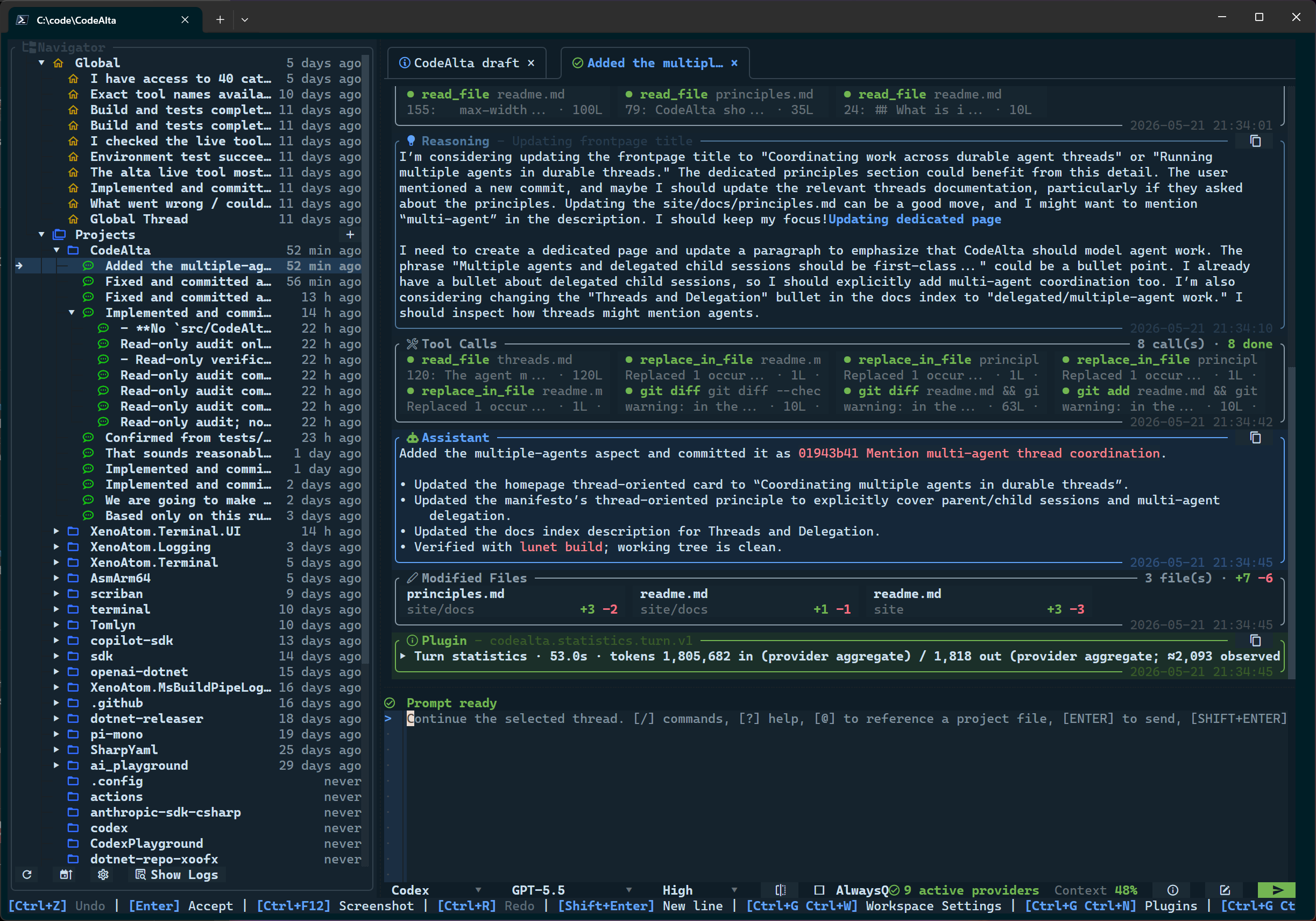
CodeAlta terminal workspace using the default dark theme

🚀 Install

Install .NET 10, then install the CodeAlta global tool:

dotnet tool install -g CodeAlta
alta

Update an existing installation with:

dotnet tool update -g CodeAlta

On first launch, CodeAlta creates ~/.alta/config.toml. Existing config files are left untouched on later launches so you can remove, rename, or customize bundled entries. If no provider is enabled yet, the Model Providers dialog opens so you can configure Codex, Copilot, xAI Grok, OpenAI/Azure OpenAI/Alibaba APIs, Anthropic, Gemini/Vertex, or custom endpoints.

CodeAlta also expects a current Nerd Fonts patched font in your terminal profile. If icons or tree glyphs look wrong, update to the latest Nerd Fonts release, remove stale older font copies, and select the refreshed Nerd Font family, such as CaskaydiaCove Nerd Font.

✨ What it gives you

  • Keyboard-first terminal workspace: tabs, prompt editor, project sidebar, command discovery, model selectors, context status, and inspectable timeline cards stay in one TUI.
  • Multilingual UI: choose Auto, English, Spanish, French, German, Japanese, or Simplified Chinese from Workspace Settings.
  • Provider-neutral model setup: configure hosted APIs, subscription-backed Codex/Copilot/xAI Grok, cloud providers, and compatible endpoints with the same provider workflow.
  • Context-aware prompts: select reusable agent prompt profiles, edit global/project prompt and system-prompt replacements or append-only extensions, attach files and folders with @, search GitHub issues with # in GitHub repositories, paste images when the selected model supports them, and inspect what context was sent.
  • Durable agent sessions: keep project-scoped history in CodeAlta-owned journals, reopen sessions independently of provider startup, queue prompts on busy sessions, steer running work where supported, and compact long agent-runtime conversations.
  • Actionable operations: model/provider tests, startup config recovery, usage details, logs, modified-file summaries, and tool input/output dialogs are built into the workspace.
  • Trusted local extension points: source plugins, Agent Skills-compatible skill folders, and the in-session alta live tool let you automate local workflows while keeping provenance visible.

⌨️ Common shortcuts

ActionShortcut / command
Help and command discoveryF1, /help, or ?
Open projectCtrl+O or /open
Attach project filestype @ in the prompt
Manage promptsCtrl+G Ctrl+H or /prompt
Switch to next agent promptCtrl+T or /next_prompt
Open model providersCtrl+G Ctrl+R or /model_providers
Refresh model providers/model_providers_refresh
Browse modelsCtrl+G Ctrl+O or /models
Open logsCtrl+G Ctrl+L or /logs
Toggle navigatorCtrl+G Ctrl+G
Switch tabsCtrl+Alt+Left / Ctrl+Alt+Right
Focus sidebar / promptCtrl+G Ctrl+S / Ctrl+G Ctrl+P

📖 Documentation

🪪 License

CodeAlta is released under the BSD-2-Clause license.

🤗 Author

Alexandre Mutel aka xoofx.

Frequently Asked Questions

What is CodeAlta?

CodeAlta is an open-source ai agents skill for AI coding assistants such as Claude Code, Codex CLI, and ChatGPT, built by CodeAlta. Your efficient agentic AI coding CLI assistant. It has 221 GitHub stars.

Is CodeAlta safe to use?

Yes. CodeAlta passed SkillsLLM's automated security scan — a dependency vulnerability audit plus prompt-injection heuristics — with no high-severity issues. You can read the full report in the Security Report section on this page.

How do I install CodeAlta?

Clone the repository with "git clone https://github.com/CodeAlta/CodeAlta" and add it to your Claude Code skills directory (see the Installation section above).

What programming language is CodeAlta written in?

CodeAlta is primarily written in C#. It is open-source under CodeAlta on GitHub, so you can review or fork the full source.

Are there alternatives to CodeAlta?

Yes. SkillsLLM lists many other AI Agents skills you can browse and compare side by side. Open the AI Agents category from the badge at the top of this page, or use the Related Skills and comparison links further down to weigh CodeAlta against similar tools.

Comments (0)

No comments yet. Be the first to share your thoughts!

ECC

by affaan-m

10

The agent harness performance optimization system. Skills, instincts, memory, security, and research-first development for Claude Code, Codex, Opencode, Cursor and beyond.

242,21936,702JavaScript
AI Agentsai-agentsanthropicclaude-code
View details
15

An agentic skills framework & software development methodology that works.

234,96620,863Shell
AI Agentsai-agentsbrainstorming
View details

The agent harness performance optimization system. Skills, instincts, memory, security, and research-first development for Claude Code, Codex, Opencode, Cursor and beyond.

185,94028,768JavaScript
AI Agentsai-agentsanthropicclaude-code
View details

cc-switch

by farion1231

3

A cross-platform desktop All-in-One assistant for Claude Code, Codex, OpenCode, OpenClaw, Grok Build & Hermes Agent. Only official website: ccswitch.io

128,8688,826Rust
AI Agentsclaude-codeai-tools
View details

claude-code

by anthropics

Claude Code is an agentic coding tool that lives in your terminal, understands your codebase, and helps you code faster by executing routine tasks, explaining complex code, and handling git workflows - all through natural language commands.

120,03119,897Shell
AI Agents
View details

Developers Also Liked

Based on votes and bookmarks from developers who liked this skill

ECC

by affaan-m

10

The agent harness performance optimization system. Skills, instincts, memory, security, and research-first development for Claude Code, Codex, Opencode, Cursor and beyond.

242,21936,702JavaScript
AI Agentsai-agentsanthropicclaude-code
View details
15

An agentic skills framework & software development methodology that works.

234,96620,863Shell
AI Agentsai-agentsbrainstorming
View details

n8n

by n8n-io

12

Fair-code workflow automation platform with native AI capabilities. Combine visual building with custom code, self-host or cloud, 400+ integrations.

201,88160,308TypeScript
MCP Serversapisai-tools
View details

The agent harness performance optimization system. Skills, instincts, memory, security, and research-first development for Claude Code, Codex, Opencode, Cursor and beyond.

185,94028,768JavaScript
AI Agentsai-agentsanthropicclaude-code
View details

cc-switch

by farion1231

3

A cross-platform desktop All-in-One assistant for Claude Code, Codex, OpenCode, OpenClaw, Grok Build & Hermes Agent. Only official website: ccswitch.io

128,8688,826Rust
AI Agentsclaude-codeai-tools
View details