
Code Gate



Your Lightweight Local AI Code Review Assistant
Code Gate is an intelligent code review tool seamlessly integrated into your Git workflow. When you run git commit, it automatically analyzes staged code changes, utilizing local LLMs (Ollama) or cloud AI services to provide instant feedback on code quality, security suggestions, and optimization plans.
Supports zero-config execution via npx, npm/yarn/pnpm package integration, and automated Git Hook reviews, flexibly adapting to any development workflow.
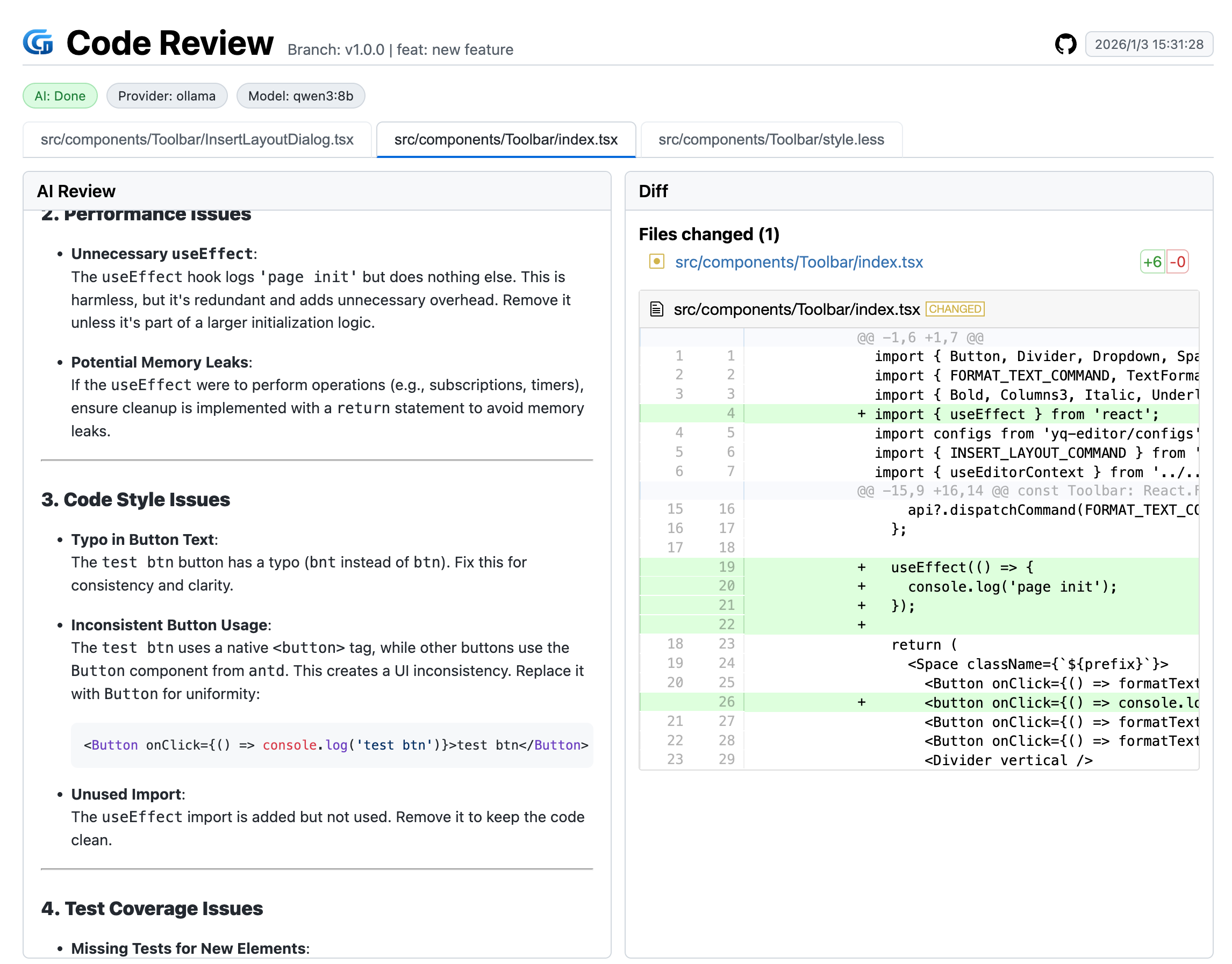
Table of Contents
✨ Features
- 🔒 Privacy First: Native support for Ollama local models.
- ☁️ Multi-Model Support: Seamlessly integrates with DeepSeek, OpenAI, Anthropic, Aliyun Qwen, Doubao, and more.
- 🤖 Agent Mode: AI can actively retrieve code context (file contents, search definitions, browse directories) for deeper and more accurate reviews. Supports DeepSeek and Zhipu.
- 🌍 Multi-Language: Built-in support for English, Chinese (Simplified & Traditional), Japanese, Korean, German, and French.
- ⚡️ High Performance: Intelligent concurrent processing for faster reviews across multiple files.
- 🛠️ Highly Customizable: Custom prompts, file filtering rules, and review strategies.
- 📊 Visual Reports: Generates intuitive HTML review reports with clear diffs and AI suggestions.
- 📜 Review Logs: Automatically archives review history for easy reference and tracking.
🚀 Quick Start
Add Configuration File
All methods rely on the configuration file. Please add a .codegate.js file to your project root first.
export default {
  provider: 'ollama', // Default using Ollama local model
  providerOptions: {
    ollama: {
      baseURL: 'http://localhost:11434',
      model: 'qwen2.5-coder',
      concurrencyFiles: 1
    },
    deepseek: {
      baseURL: 'https://api.deepseek.com',
      apiKeyEnv: 'DEEPSEEK_API_KEY',
      model: 'deepseek-chat',
      concurrencyFiles: 4,
      apiKey: 'sk-xxxx' // Replace with your API Key (Avoid exposing in public code)
    }
    // openai: { baseURL: 'https://api.openai.com/v1', apiKeyEnv: 'OPENAI_API_KEY', model: 'gpt-4o-mini' },
    // anthropic: { baseURL: 'https://api.anthropic.com', apiKeyEnv: 'ANTHROPIC_API_KEY', model: 'claude-3-5-sonnet' },
    // azureOpenAI: { endpoint: 'https://your-endpoint.openai.azure.com', apiKeyEnv: 'AZURE_OPENAI_KEY', deployment: 'gpt-4o-mini', apiVersion: '2024-08-01-preview' },
    // aliyun: { baseURL: 'https://dashscope.aliyuncs.com/compatible-mode/v1', apiKeyEnv: 'DASHSCOPE_API_KEY', model: 'qwen-plus' },
    // volcengine: { baseURL: 'https://ark.cn-beijing.volces.com/api/v3', apiKeyEnv: 'VOLCENGINE_API_KEY', model: 'doubao-pro-32k' },
    // zhipu: { baseURL: 'https://open.bigmodel.cn/api/paas/v4', apiKeyEnv: 'ZHIPU_API_KEY', model: 'glm-4' }
  },
  language: 'en',
  fileTypes: ['ts', 'tsx', 'css'],
  ui: {
    openBrowser: true,
    port: 5175
  },
  limits: {
    maxDiffLines: 10000,
    maxFiles: 100
  },
  prompt: `You are a senior code reviewer responsible for ensuring code quality and security meet high standards.

Project Info:
- [Fill in your project info: architecture, standards, business type, etc.]

Review Checklist:
- Code is clean and readable
- Proper naming conventions for functions and variables
- No code duplication
- Correct error handling
- Input validation implemented
- Performance considerations addressed

Provide feedback prioritized by:
- Critical Issues (Must fix)
- Warnings (Should fix)
- Suggestions (Consider improving, avoid unnecessary suggestions if not essential)

Provide specific examples on how to fix the issues.`,
  output: {
    dir: '.review-logs'
  },
  // Agent Mode (Optional) - Enables AI to actively retrieve code context
  agent: {
    enabled: false,      // Set to true to enable Agent mode (supports DeepSeek and Zhipu)
    maxIterations: 5,    // Max iteration rounds
    maxToolCalls: 10     // Max tool calls per review
  }
}
Supported configuration formats include:
.codegate.ts,.codegate.js,.codegate.json,.codegate.yaml,.codegate.yml(also supports.mjs,.cjsextensions).
Method 1: Zero-Install with npx
No installation required. Review the latest commit (or a specific commit) directly:
npx code-gate review <commit-hash>
Or review staged file changes:
npx code-gate review
Method 2: NPM Integration
Install code-gate as a development dependency in your project:
npm i -D code-gate
Add script command in package.json:
{
  "scripts": {
    "review": "code-gate review"
  }
}
Manually trigger reviews via script commands:
# Review staged changes
npm run review

# Review a specific commit
npm run review <commit-hash>
If you want to use the
code-gate reviewcommand directly in the command line, you can installcode-gateas a global dependency:npm i -g code-gate
Method 3: Automated Git Hook Review
The recommended way. Automatically intercepts git commit flows.
1. Installation
Install code-gate as a development dependency:
npm i -D code-gate
2. Initialization
We provide a one-click initialization command to configure Git Hooks.
Automatic Init (Recommended)
# Interactive selection for Git Hooks or Husky
npx code-gate init
You can also specify arguments if you prefer a specific hook manager:
- Native Git Hooks:
npx code-gate init -m git - Husky:
npx code-gate init -m husky
After initialization, you can choose to add the generated config file to
.gitignore.
3. Usage
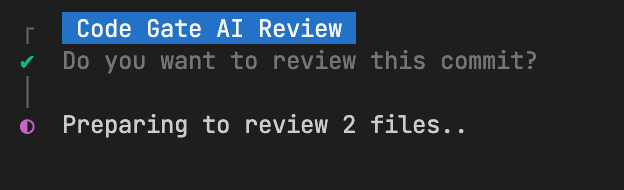
Just commit your code as usual, and Code Gate will automatically start the review:
git add .
git commit -m "feat: new feature"
📖 Configuration Details
| Parameter | Type | Default | Description |
|---|---|---|---|
provider | string | 'ollama' | AI Provider. Supports ollama, deepseek, openai, anthropic, aliyun, volcengine, zhipu, etc. |
providerOptions | object | {} | Specific configurations for each Provider (see table below) |
fileTypes | string[] | [] | List of file extensions to review (whitelist). Reviews all files if empty or undefined. |
exclude | string[] | ['**/package-lock.json', '**/yarn.lock', '**/pnpm-lock.yaml'] | List of files or directories to ignore (blacklist), supports glob patterns (e.g., node_modules/**). Higher priority than fileTypes. |
ui.openBrowser | boolean | true | Auto-open browser for report preview |
ui.port | number | 5175 | Preview server port |
limits.maxDiffLines | number | 10000 | Max diff lines per review. Exceeding may cause incomplete review or excessive token usage. |
limits.maxFiles | number | 100 | Max number of files to review |
reviewMode | string | 'files' | Review Mode: 'summary' (summary only), 'files' (file details only), 'both' (both) |
language | string | 'en' | UI & Prompt Language. Options: 'en', 'zh-CN', 'zh-TW', 'ja', 'ko', 'de', 'fr' |
prompt | string | ... | Universal system prompt sent to AI |
output.dir | string | '.review-logs' | Output directory for local reports and static assets |
agent.enabled | boolean | false | Enable Agent mode for deeper context-aware reviews (DeepSeek & Zhipu only) |
agent.maxIterations | number | 5 | Max iteration rounds for Agent to gather context |
agent.maxToolCalls | number | 10 | Max tool calls allowed per review session |
providerOptions Configuration
Each Provider supports the following fields, with request option for timeout and retry control.
Key Parameters:
baseURL: API base URL (e.g.,https://api.deepseek.comorhttp://localhost:11434)apiKey: API Key (specified directly in config, not recommended for committing)apiKeyEnv: Environment variable name storing the API Key (Recommended, e.g.,DEEPSEEK_API_KEY)model: Model name to use (e.g.,deepseek-chat,qwen2.5-coder)concurrencyFiles: Number of concurrent file reviews (Recommended: Cloud API 4-8, Local Model 1)request: Advanced request configuration (see "Advanced Configuration" below)
| Provider | Configurable Parameters |
|---|---|
| deepseek | baseURL, apiKey, apiKeyEnv, model, concurrencyFiles, request |
| ollama | baseURL, model, concurrencyFiles, request |
| openai | baseURL, apiKey, apiKeyEnv, model, request |
| anthropic | baseURL, apiKey, apiKeyEnv, model, request |
| aliyun | baseURL, apiKey, apiKeyEnv, model, request |
| volcengine | baseURL, apiKey, apiKeyEnv, model, request |
| zhipu | baseURL, apiKey, apiKeyEnv, model, request |
| azureOpenAI | endpoint, apiKey, apiKeyEnv, deployment, apiVersion, request |
Advanced Configuration (request)
Configure in providerOptions.<provider>.request to control request behavior:
| Parameter | Type | Default | Description |
|---|---|---|---|
timeout | number | undefined | Request timeout (ms). Recommended to set higher for Ollama (e.g., 15000+) |
retries | number | 0 | Number of retries on request failure |
backoffMs | number | 300 | Retry interval (ms) |
Note:
concurrencyFilescontrols the number of concurrent file reviews (Default: DeepSeek=4, Ollama=1, Others=4).
API Key Configuration
Choose the appropriate configuration scheme based on your project needs. Taking deepseek as an example. For security, avoid hardcoding API Keys in the config file.
Option A: Config File
Set in .codegate.js:
export default {
  providerOptions: {
    deepseek: {
      // ...other config
      apiKey: 'your-deepseek-api-key'
    }
  }
}
Option B: Git Hook Injection
Export temporarily in .githooks/pre-commit or .husky/pre-commit:
#!/bin/sh
export DEEPSEEK_API_KEY=[your-deepseek-api-key]
./node_modules/.bin/code-gate-hook
Option C: Environment Variables (Recommended)
Set in your .env file or system environment:
export DEEPSEEK_API_KEY=[your-deepseek-api-key]
🤖 Agent Mode
Agent mode enables AI to actively retrieve code context during reviews, resulting in more accurate and comprehensive feedback. Instead of only seeing the diff, the AI can:
- Read complete files to understand the full context of changes
- Search for definitions to understand types, interfaces, and function implementations
- Find references to assess the impact of changes
- Browse directory structure to understand project organization
Enabling Agent Mode
Add the agent configuration to your .codegate.js:
export default {
  provider: 'deepseek',  // or 'zhipu'
  providerOptions: {
    deepseek: {
      apiKeyEnv: 'DEEPSEEK_API_KEY',
      model: 'deepseek-chat'
    }
  },
  agent: {
    enabled: true,       // Enable Agent mode
    maxIterations: 5,    // Max rounds of context gathering
    maxToolCalls: 10     // Max tool invocations
  }
}
Supported Providers
Currently, Agent mode is supported by:
- DeepSeek (
deepseek-chatand other models with function calling) - Zhipu (
glm-4and other models with function calling)
Agent Mode Prompt Example
When using Agent mode, you can optimize your prompt to leverage the AI's ability to retrieve context. Here's a recommended prompt for Agent mode:
export default {
  provider: 'deepseek',
  agent: {
    enabled: true,
    maxIterations: 5,
    maxToolCalls: 10
  },
  ..., // other options
  prompt: `You are a senior code reviewer with access to the full codebase context.

Project Info:
- [Fill in your project info: architecture, standards, business type, etc.]

Review Strategy:
1. First analyze the diff to understand the scope and intent of changes
2. When encountering unfamiliar types, interfaces, or functions, use tools to look up their definitions
3. For significant logic changes, check how they affect other parts of the codebase
4. Verify that changes follow existing patterns in the project

Key Review Points:
- Logic correctness and edge case handling
- Type safety and null checks
- Error handling completeness
- Performance implications
- Security considerations
- Consistency with existing codebase patterns

When using tools:
- Use read_file to view complete file context when needed
- Use search_content to find type definitions, function implementations, or usage patterns
- Use list_directory to understand module structure when reviewing architectural changes

Output Format:
## Summary
Brief description of the changes

## Issues Found
- 🔴 Critical: Must fix before merge
- 🟡 Warning: Should address
- 🔵 Suggestion: Consider improving

## Overall Assessment
Final recommendation on whether to merge`
}
Note: Agent mode increases API token usage due to multi-turn conversations and tool results. Consider this when reviewing large changes. To save tokens, the diff content is also merged and displayed.
Available Tools
| Tool | Description | Use Case |
|---|---|---|
read_file | Read file contents with pagination | View complete source files, type definitions |
search_content | Search code with regex patterns | Find function definitions, method calls |
list_directory | List directory structure | Understand project organization |
How It Works
- AI receives the diff and list of changed files
- AI analyzes the changes and identifies areas needing more context
- AI uses tools to retrieve relevant code (e.g., type definitions, related functions)
- AI generates a comprehensive review based on full context
- Process repeats until AI has enough information or limits are reached
❓ FAQ
Q: Report shows diffs but no AI suggestions?
- Check
providerconfiguration. - If using Ollama, ensure local service is running (
ollama serve) and model is pulled (ollama pull qwen2.5-coder). - If using Cloud API, check API Key validity and network connection.
Q: How to skip review in CI/CD?
Code Gate detects non-interactive environments and skips automatically. To force skip, use git commit --no-verify.
📄 License
MIT