Claude Control
A native macOS desktop app for monitoring and managing multiple Claude Code sessions in real time.
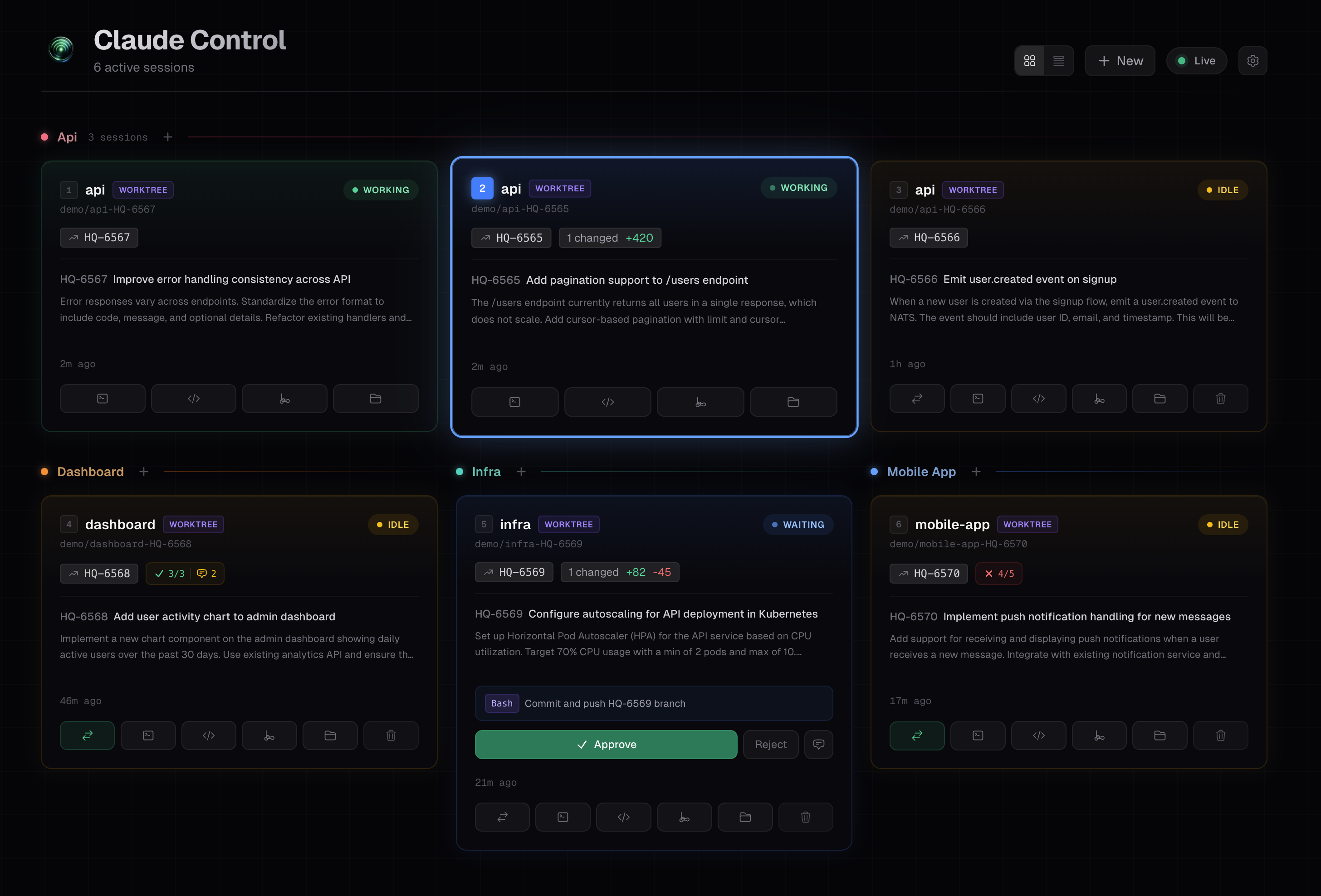
When you're running several Claude Code instances across different repos and worktrees, it's hard to keep track of what each one is doing. Claude Control auto-discovers all running sessions and gives you a single dashboard with live status, git changes, conversation previews, and quick actions — without leaving the app.
Features
- Auto-discovery — Detects all running
claudeCLI processes via the process table, uses hook events for authoritative PID-to-JSONL mapping with mtime-based fallback - Live status — Classifies each session as Working, Idle, Waiting (needs input), Errored, or Finished using real-time hook events from Claude Code, with CPU/JSONL heuristic fallback
- Git integration — Shows branch name, changed files, additions/deletions, and detects open pull requests via
gh - PR status badges — Live CI check rollup (passing/failing/pending), review decision, unresolved threads, merge conflicts, and merged/closed state
- Task context — Extracts Linear issue titles and descriptions from MCP tool results to show what each session is working on
- Conversation preview — Shows the last assistant message, active tool, and user prompt for each session
- Approve/reject from dashboard — Approve or reject tool-use permission prompts directly from the dashboard without switching to the terminal
- Keyboard shortcuts — Number keys (1-9) to select sessions, Tab/Shift+Tab to cycle, A/X to approve/reject, Enter to focus terminal, E/G/F/P for editor/git/finder/PR
- Desktop notifications — Native macOS notifications when sessions finish working or need attention (configurable)
- Notification sounds — Subtle two-tone chime on status transitions (configurable)
- Quick actions — One-click buttons to focus the terminal tab, open your editor, git GUI, Finder, or PR link for any session
- Multiple terminal support — Full tab-level control for iTerm2, Terminal.app, kitty, WezTerm, and cmux; basic support for Ghostty, Warp, and Alacritty (see Terminal support)
- tmux integration — Run sessions inside tmux with per-project session grouping or manual session selection; approve/reject without terminal focus via
send-keys - Configurable tools — Choose your preferred terminal, code editor (VS Code, Cursor, Zed, etc.), git GUI (Fork, Sublime Merge, etc.), and browser (Chrome, Arc, Safari, etc.)
- New session creation — Create new Claude Code sessions with git worktree support, repo browsing, and custom initial prompts
- PR workflow — Send
/create-prto idle sessions and see PR links once created - Worktree cleanup — Remove worktrees, branches, and kill sessions with a two-step confirmation flow
- Multi-monitor support — Target which display apps open on
Requirements
- macOS (uses AppleScript for terminal integration, native folder picker, etc.)
- Node.js >= 18 (LTS 24 recommended — see
.node-version) - Claude Code CLI installed and running
- A supported terminal (see Terminal support below)
- tmux for tmux integration (optional)
- GitHub CLI (
gh) for PR detection (optional)
A .node-version file is included for version managers like fnm and nvm. With auto-switching enabled, both will pick up the correct version when you cd into the project. Otherwise, run fnm use or nvm use.
Install from DMG
Download the latest .dmg from the Releases page, open it, and drag the app to Applications. Both Apple Silicon and Intel builds are available.
Build from source
# Clone the repo
git clone https://github.com/sverrirsig/claude-control.git
cd claude-control

# Install dependencies
npm install

# Run in development mode (hot-reload)
npm run electron:dev

# Or build a distributable DMG
npm run electron:build
The development server runs on port 3200. The Electron shell loads it automatically.
Scripts
| Command | Description |
|---|---|
npm run electron:dev | Dev mode with hot-reload (Next.js + Electron) |
npm run electron:build | Production build → DMG + ZIP in dist/ |
npm run electron:pack | Production build → unpacked app in dist/ |
npm run dev | Next.js dev server only (no Electron shell) |
npm run build | Next.js production build only |
npm run test | Run unit tests (Vitest) |
npm run test:watch | Run tests in watch mode |
npm run lint | Run ESLint |
npm run typecheck | Run TypeScript type checking |
How it works
Session discovery
- Finds all processes named
claudeviaps - Filters out Claude Desktop (only CLI instances)
- Gets each process's working directory via
lsof - Reads hook event files (
~/.claude-control/events/<pid>.json) for authoritative PID→JSONL mapping and session status - Falls back to mtime-based JSONL discovery for sessions without hook events
- Reads the tail of each JSONL file to extract conversation preview and task context
Hook events are installed automatically into ~/.claude/settings.json on first launch. Each Claude process writes its status, session ID, and transcript path to a <pid>.json file on every lifecycle event.
Status classification
Primary (hook events):
| Status | Hook Event |
|---|---|
| Working | UserPromptSubmit, SubagentStart, PostToolUseFailure |
| Waiting | PermissionRequest (overridden to Working if CPU > 15%) |
| Idle | SessionStart, Stop |
| Finished | SessionEnd |
Fallback (heuristic, when hooks unavailable):
| Status | Condition |
|---|---|
| Working | JSONL modified recently AND CPU > 5%, or CPU > 15% |
| Waiting | Pending tool use (after 3s settle) or asking for user input |
| Idle | Process alive, low activity |
| Errored | Last message contains error indicators |
| Finished | Process no longer running |
Architecture
Electron shell (macOS native window)
    ↓
Browser (SWR polls /api/sessions every 1s)
    ↓
Next.js API Routes (standalone server)
    ↓
┌──────────────────────────────────────────┐
│  discovery.ts  →  process-utils.ts       │  ps, lsof
│                →  hooks-reader.ts        │  <pid>.json → status + transcript
│                →  paths.ts               │  ~/.claude/projects mapping
│                →  session-reader.ts       │  JSONL parsing
│                →  git-info.ts            │  git status, diff, PR detection
│                →  status-classifier.ts   │  Heuristic fallback
└──────────────────────────────────────────┘
No database — all state is derived from the process table, hook event files, and JSONL transcripts on every request.
Terminal support
Claude-control auto-detects which terminal each Claude session is running in by walking the process tree. Capabilities vary by terminal:
Full support
These terminals support tab-level focus, text input, and keystroke sending — clicking "focus" in the dashboard switches to the exact tab running that session.
| Terminal | Focus method | How it works |
|---|---|---|
| Terminal.app | AppleScript (TTY matching) | Matches tabs by TTY, uses System Events for keystrokes. Works out of the box. |
| iTerm2 | AppleScript (TTY matching) | Iterates windows/tabs/sessions, matches by TTY path. Native write text for keystrokes. Works out of the box. |
| kitty | Remote control (Unix socket) | Uses kitten @ IPC to resolve window by PID, then focus by window ID. Supports tmux-in-kitty matching. Requires configuration (see below). |
| WezTerm | CLI (wezterm cli) | Uses wezterm cli to list panes, focus by pane ID, and send text directly. Works out of the box. |
| cmux | AppleScript (panel ID) | Reads cmux's native session JSON to resolve TTY → panel ID, then focuses via AppleScript. Works out of the box. |
kitty configuration
kitty requires remote control to be enabled. Add the following to ~/.config/kitty/kitty.conf:
allow_remote_control socket-only
listen_on unix:/tmp/kitty-{kitty_pid}
You must restart kitty after making these changes (listen_on is not reloaded on config refresh).
allow_remote_control socket-only— Allows external programs to control kitty via the Unix socket, while preventing programs running inside kitty (e.g. scripts you run) from doing so. This is the recommended security setting.listen_on unix:/tmp/kitty-{kitty_pid}— Creates a socket at/tmp/kitty-<pid>that claude-control uses to send commands. The{kitty_pid}placeholder ensures each kitty instance gets its own socket.
To verify it's working, run this inside kitty:
kitten @ ls
If it outputs JSON with your windows and tabs, remote control is active. Without these settings, claude-control falls back to basic app activation (no tab selection).
Basic support
These terminals are detected and can be activated, but focus goes to the app — not a specific tab. Text and keystrokes are sent via macOS System Events.
| Terminal | Notes |
|---|---|
| Ghostty | Has AppleScript support since v1.3 but lacks PID/TTY properties for tab matching (#10756). Full support expected when 1.4 ships. |
| Warp | No tab-level IPC available. |
| Alacritty | No tabs by design — use tmux for multi-session workflows. |
Tip: For any terminal with basic support, enabling tmux integration gives you full per-session control. Claude-control sends commands directly to tmux panes via
send-keys, bypassing the terminal entirely.
First-time setup
On first launch, the app will ask you to select your code directory (the parent folder containing your git repos, e.g. ~/Code). This is stored in ~/.claude-control/config.json and used for the repo picker when creating new sessions.
You can add multiple code directories. The app scans up to two levels deep for git repositories.
Project structure
├── electron/
│   └── main.js                  # Electron main process
├── src/
│   ├── app/
│   │   ├── page.tsx             # Dashboard
│   │   ├── session/[id]/        # Session detail view
│   │   ├── settings/            # Settings page
│   │   └── api/                 # API routes (sessions, actions, repos, PR status)
│   ├── components/              # React components
│   ├── hooks/                   # SWR hooks, keyboard shortcuts, notifications
│   └── lib/                     # Core logic (discovery, git, JSONL parsing)
├── scripts/
│   ├── prepare-build.js         # Assembles standalone Next.js app
│   └── after-pack.js            # Copies into Electron resources
└── public/
    └── icon.png
Tech stack
- Electron — Native macOS window with hidden title bar
- Next.js 16 (App Router, standalone output) — Serves both API and UI from a single process
- TypeScript (strict)
- Tailwind CSS 4 — Dark theme
- SWR — Client-side polling with 1-second intervals
Contributing
PRs welcome! To get started, clone the repo and run npm run electron:dev — that's it.
Some areas that could use work:
- Linux/Windows support (currently macOS-only due to AppleScript usage)
- Session history and cost/token tracking
- See IDEAS.md for more feature ideas
License
MIT