chmonitor
The operational advisor for ClickHouse




chmonitor is an operational advisor for ClickHouse — not just a metrics viewer. It reads system.* and recommends projections, skip indexes, partition keys, PREWHERE rewrites, and materialized views (it recommends, and never auto-applies DDL), on top of the real-time query/cluster/replication monitoring you'd expect. Managed-ClickHouse AI tools stay locked to their own Cloud; chmonitor works the same way on Docker, Kubernetes, bare metal, or ClickHouse Cloud — self-host it free (GPL-3.0).
Live demo · chmonitor.dev · Docs · Quick start · Screenshots

Current release: v0.3.0. Upgrading from v0.2? v0.3 rebuilds the app on TanStack Start. ClickHouse connection vars are unchanged; browser vars move from
NEXT_PUBLIC_*toVITE_*(old names still work as a fallback). See Upgrading to v0.3 below, the v0.3 release notes, or the full Migrate to v0.3 guide.
Features
| Monitoring | AI & extensibility |
|---|---|
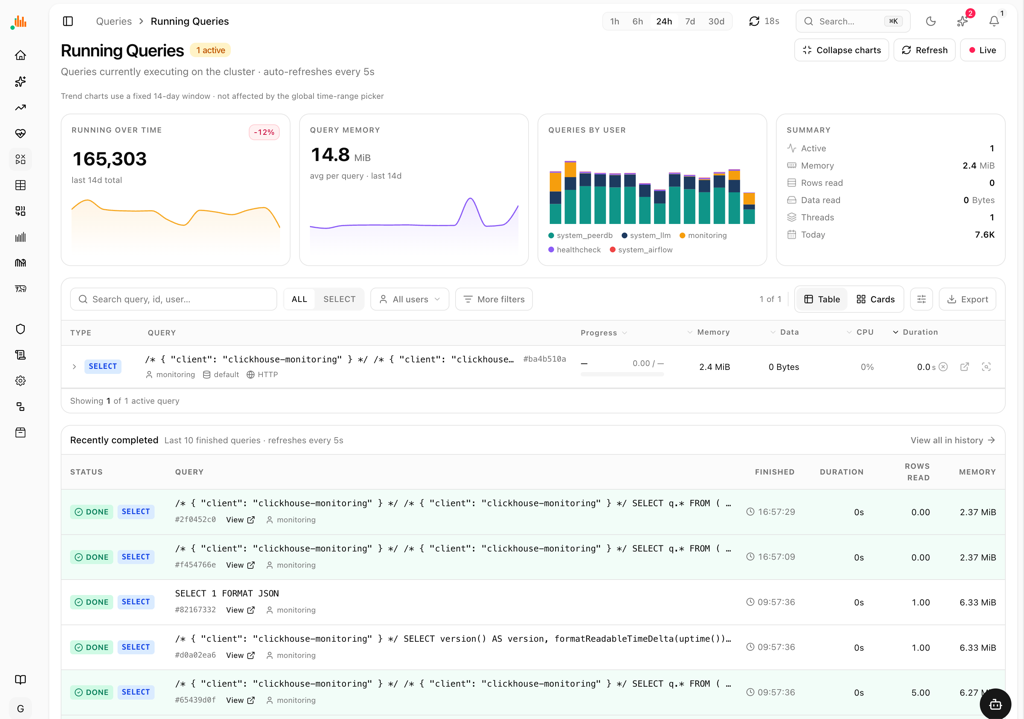
| Query Monitoring — running queries, history, resources (memory, parts read, file_open), expensive/slow/failed queries, query profiler | AI Advisor — projection, skip-index, partition-key, PREWHERE and materialized-view recommendations from system.* and EXPLAIN — recommend-only, never auto-applies DDL |
| Cluster Overview — memory/CPU, distributed queue, global & MergeTree settings, metrics, asynchronous metrics | AI Agent — built-in chat for natural-language questions against your ClickHouse cluster |
| Data Explorer — interactive database tree, fast tab switching, column-level detail, projections, dictionaries | MCP Server — Model Context Protocol endpoint for AI tool integration (Claude, Cursor, etc.) |
| Table Analytics — size, row count, compression, part sizes, detached parts, readonly tables, view refreshes | Rust CLI — chm (alias chmonitor): interactive TUI by default, plus dashboard API commands and zero-signup chm doctor. Stable/beta channels (CHM_CHANNEL). Install: curl -sSf https://chmonitor.dev/install.sh | bash (cli, docs) |
| Visualization — 30+ metric charts for queries, resources, merges, performance and system health | Security & Access — users, roles, security settings |
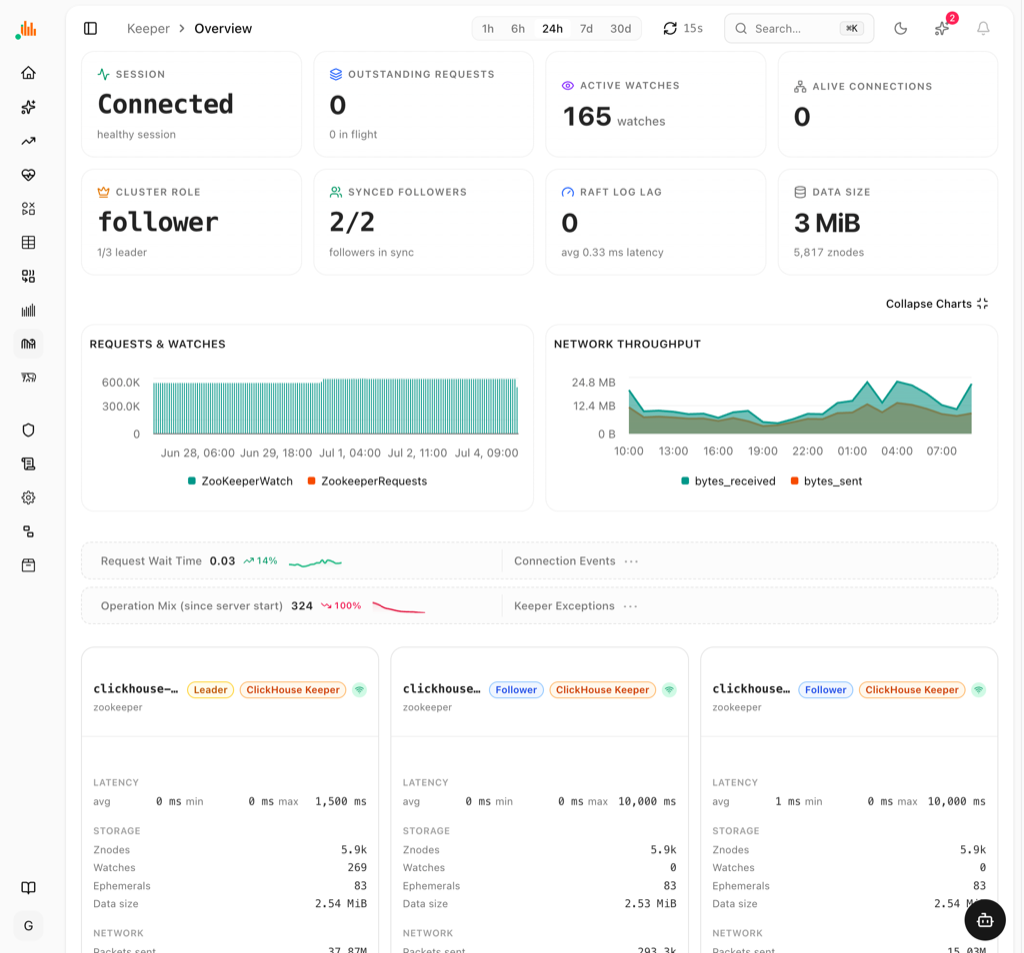
| Merge & Replication — merge operations, merge performance, replication queue, replicas | Developer Tools — Zookeeper explorer, query EXPLAIN, query kill, distributed DDL queue, mutations |
| Multi-Host Support — monitor multiple ClickHouse instances from a single dashboard |
Self-hosted (OSS) vs Enterprise license
chmonitor is a single self-hosted codebase. The community edition is free forever (GPL-3.0); an optional license unlocks enterprise features. See Editions for the open-core feature gates.
| Community (OSS) | Enterprise license | |
|---|---|---|
| Cost | Free forever, GPL-3.0 | Yearly or lifetime, priced by host count (pricing) |
| Runs on | Your infra — Docker, Kubernetes, bare metal, Cloudflare Workers | Same binary, no license key |
| ClickHouse hosts | Unlimited | Personal (free) · Team 3 · Unlimited |
| Setup | docker run one-liner below | Register company + website after invoice |
| AI features | AI Advisor + AI Agent + MCP Server included | Same, plus priority support and enterprise gates |
Quick start
One container, pointed at any reachable ClickHouse (OSS, Altinity, or ClickHouse Cloud):
docker run -d --name chmonitor -p 3000:3000 \
  -e CLICKHOUSE_HOST=https://clickhouse.example.com:8443 \
  -e CLICKHOUSE_USER=default \
  -e CLICKHOUSE_PASSWORD=change-me \
  ghcr.io/chmonitor/chmonitor:v0.3.0
Open http://localhost:3000. Use :latest for the rolling tip, or pin a
release tag (v0.3.0) for production.
Just want to look first? The live demo is at dash.chmonitor.dev — no setup required. Other targets (Cloudflare Workers, one-click Railway/Render/Fly, Kubernetes) are under Deployment.
Deployment
To self-host, run it next to your ClickHouse with the same CLICKHOUSE_*
connection vars on any of these targets:
- Docker — one
docker run; the fastest path to a live dashboard. - Cloudflare Workers — global edge deploy (how the demo at dash.chmonitor.dev runs).
- One-click templates — Railway, Render, Fly.io.
- Kubernetes (Helm) — for clusters.
Prefer to look before you install? Try the live demo above — no setup required.
Cloudflare Workers
This project supports deployment to Cloudflare Workers with static site generation and API routes.
Prerequisites:
- Node.js 18+ and pnpm (bun is still used internally as the test runner and for
.tsscripts) - Cloudflare Workers account
- Wrangler CLI:
npm install -g wrangler
Setup:
- Clone and install dependencies:
git clone https://github.com/chmonitor/chmonitor.git
cd chmonitor
pnpm install
- Configure environment variables in
.env.local:
CLICKHOUSE_HOST=https://your-clickhouse-host.com
CLICKHOUSE_USER=default
CLICKHOUSE_PASSWORD=yourpassword
CLICKHOUSE_TZ=UTC
Optional API-key protection for /api/v1/* routes:
CHM_API_KEY_SECRET=your-signing-secret
Optional Clerk UI/session support (set at build time; NEXT_PUBLIC_* is the v0.2 fallback):
CHM_AUTH_PROVIDER=clerk
VITE_AUTH_PROVIDER=clerk
VITE_CLERK_PUBLISHABLE_KEY=pk_live_your_key
CLERK_SECRET_KEY=sk_live_your_key
Feature permissions default to enabled and public. Add sparse overrides when a deployment should hide or protect a feature:
# /etc/clickhouse-monitor/config.toml
[features.agent]
access = "authenticated"

[features.metrics]
enabled = false
access = "guest" is accepted as an alias for access = "public".
CHM_CONFIG_FILE=/etc/clickhouse-monitor/config.toml
# or env-only:
CHM_FEATURE_AGENT_ACCESS=authenticated
CHM_DISABLED_FEATURES=settings,metrics
Leave auth provider env unset or set it to none for self-hosted deployments
without auth.
- Deploy to Cloudflare Workers:
# Set CLOUDFLARE_API_TOKEN in .env.production.local or export it
# OR use OAuth: npx wrangler login

# Unified deploy (config, build, deploy, cache — same as CI)
pnpm run cf:deploy
Manual Deployment Steps:
# Step by step (same as CI)
pnpm run cf:config        # Set secrets from .env.production.local
cd apps/dashboard
pnpm run build            # Vite build → native Workers bundle (+ tsc --noEmit)
wrangler deploy --minify
Important Notes:
- Built with Vite +
@cloudflare/vite-plugininto a native Workers bundle — no OpenNext, no KV/R2/D1 cache-population step - TanStack Start + React 19 (the v0.2 Next.js app was retired in v0.3)
- Static shell is pre-rendered at build time; data is fetched client-side for edge CDN caching
- API routes run on Workers using the Fetch API
- Supports multi-host monitoring with query parameter routing (
?host=0)
Docker
docker run -d \
  -p 3000:3000 \
  -e CLICKHOUSE_HOST=https://your-clickhouse-host.com \
  -e CLICKHOUSE_USER=default \
  -e CLICKHOUSE_PASSWORD=yourpassword \
  ghcr.io/chmonitor/chmonitor:v0.3.0
Releases
Latest stable: v0.3.0 (changelog · what's new).
Tagged releases are built by GitHub Actions from tags matching v*. The release page includes:
- Docker images published to
ghcr.io/chmonitor/chmonitorwith the release version tag - a Node.js standalone archive (
*-standalone.tar.gz, the Nitro node-server output) for self-hosted Node deployments - a Cloudflare Workers archive (
*-cloudflare.tar.gz) for manual inspection or deployment - generated release notes with CLI command usage, Docker tags, deployment steps, and checksums
For repeatable Docker deploys, prefer the versioned image tag from the release page instead of latest.
Upgrading to v0.3
v0.3 rebuilds the dashboard on TanStack Start. Features, routes, and ClickHouse setup carry over unchanged. The only env change is the browser variable prefix, and the old names keep working:
| Concern | v0.2 (Next.js) | v0.3 (TanStack Start) |
|---|---|---|
| Browser var prefix | NEXT_PUBLIC_* | VITE_* (old names still work) |
| Auth provider (client) | NEXT_PUBLIC_AUTH_PROVIDER | VITE_AUTH_PROVIDER |
| Clerk key (client) | NEXT_PUBLIC_CLERK_PUBLISHABLE_KEY | VITE_CLERK_PUBLISHABLE_KEY |
| Auth provider (server) | derived from client var | CHM_AUTH_PROVIDER (none|clerk|proxy) |
| Docker entrypoint | node server.js | node server/index.mjs |
| ClickHouse vars | CLICKHOUSE_HOST/USER/PASSWORD/NAME | unchanged |
VITE_* vars are build-time inlined — set them when building the image/Worker,
not only at runtime. Full per-platform steps:
Migrate to v0.3.
Migrate your config with an AI assistant
Paste your current configuration (.env, docker-compose.yml, Helm
values.yaml, or a k8s manifest) into any AI assistant with the prompt below.
It applies the v0.3 rename rules and returns the migrated config plus a summary
of what changed. This same prompt ships in every breaking-change GitHub Release
and is kept in sync from .github/release-migration-prompt.md.
You are migrating a chmonitor deployment from v0.2 (Next.js) to v0.3 (TanStack Start).
Here is my current environment (.env / docker-compose / wrangler / k8s manifest):

<PASTE YOUR ENV HERE>

Rewrite it for v0.3 applying EXACTLY these rules, and output the migrated config
plus a short list of what you changed:

1. Rename every client var prefix NEXT_PUBLIC_ -> VITE_. Specifically:
   NEXT_PUBLIC_AUTH_PROVIDER          -> VITE_AUTH_PROVIDER
   NEXT_PUBLIC_CLERK_PUBLISHABLE_KEY  -> VITE_CLERK_PUBLISHABLE_KEY
   NEXT_PUBLIC_FEATURE_CONVERSATION_DB-> VITE_FEATURE_CONVERSATION_DB
   (any other NEXT_PUBLIC_X -> VITE_X). The old names still work as a fallback.
2. Add server-side auth var CHM_AUTH_PROVIDER (none|clerk|proxy) mirroring the
   client provider. It is authoritative on the server; keep VITE_AUTH_PROVIDER too.
3. Do NOT rename server vars: CLICKHOUSE_HOST, CLICKHOUSE_USER, CLICKHOUSE_PASSWORD,
   CLICKHOUSE_NAME, CLICKHOUSE_MAX_EXECUTION_TIME, CLERK_SECRET_KEY, *_API_KEY — keep as-is.
4. VITE_* vars are build-time inlined: ensure they are present at image/Worker BUILD
   time (Docker build-args or CI build env), not only at container runtime.
5. If this is a Docker deployment, change the container start command from
   `node server.js` to `node server/index.mjs`. Port 3000 and the /api/healthz
   healthcheck are unchanged.
6. Flag anything that has no v0.3 equivalent instead of silently dropping it.
Documentation
- docs/ - Documentation source in this repository (see below for the live site)
- llms.txt - AI agent discovery file for automated code understanding
- https://zread.ai/chmonitor/chmonitor (AI Generated)
- https://docs.chmonitor.dev
- Getting Started
- Deployments
- Vercel (legacy v0.2)
- Docker
- Kubernetes Helm Chart
- One-Click Deploy — Railway / Render / Fly.io community templates
- Advanced
- Reference
- Platform Support Matrix — ClickHouse versions and distributions (supported / best-effort / untested)
- Connection Presets — least-privilege read-only user setup for ClickHouse OSS, Altinity, and Cloud
- Contributing a config / check — how to add a declarative monitoring check to the catalog
- MCP Clients — connect Claude Desktop, Cursor, or any MCP client
- Grafana Bridge — read chmonitor's ClickHouse from Grafana (community recipe)
AI Agent Access
llms.txt — standardized file that helps AI coding agents discover and understand the codebase structure. Access at https://your-domain.com/llms.txt or /llms.txt in local development.
MCP Server — exposes a Model Context Protocol endpoint at /api/mcp for AI tools to query your ClickHouse cluster directly (read-only). One-command install:
# Claude Code
claude mcp add --transport http clickhouse-monitor https://your-chmonitor.example.com/api/mcp \
  --header "Authorization: Bearer chm_your_api_key"
// Claude Desktop (claude_desktop_config.json) or Cursor (.cursor/mcp.json)
{
  "mcpServers": {
    "clickhouse-monitor": {
      "url": "https://your-chmonitor.example.com/api/mcp",
      "headers": { "Authorization": "Bearer chm_your_api_key" }
    }
  }
}
Omit the Authorization header/flag for an unauthenticated local instance. Full client
walkthroughs (Claude Desktop, Claude Code, Cursor, any MCP client) and auth setup:
docs/content/reference/mcp-clients.mdx ·
docs/knowledge/mcp-server.md.
Knowledge Graph — developer-facing notes in docs/knowledge/ with decisions, conventions, and architecture docs. See docs/knowledge/README.md for the index.
Screenshots




Feedback and Contributions
Feedback and contributions are welcome! Feel free to open issues or submit pull requests.
License
See LICENSE.