Linux One-Click Prompt
Repository: https://github.com/Harzva/chatgpt2localbridge
Copy this prompt to a Linux shell agent:
Install ChatGPT2LocalBridge from https://github.com/Harzva/chatgpt2localbridge on this Linux host.
Use one command, keep secrets local, and do not print .env.local, OAuth tokens,
ngrok authtokens, cookies, or unlock codes into chat.

Run:
curl -fsSL https://raw.githubusercontent.com/Harzva/chatgpt2localbridge/main/scripts/linux-one-click-install.sh | bash

After install, report the local health result, the ChatGPT Connector fields, and
the tunnel choice. If ngrok is selected, ask me for NGROK_AUTHTOKEN and optional
NGROK_DOMAIN. If Cloudflare is selected, explain quick tunnel vs named tunnel.
Or run it yourself:
curl -fsSL https://raw.githubusercontent.com/Harzva/chatgpt2localbridge/main/scripts/linux-one-click-install.sh | bash
The installer prints every Connector field you need to fill in ChatGPT, plus ngrok and Cloudflare registration links, tunnel tradeoffs, and an agent-safe setup prompt.
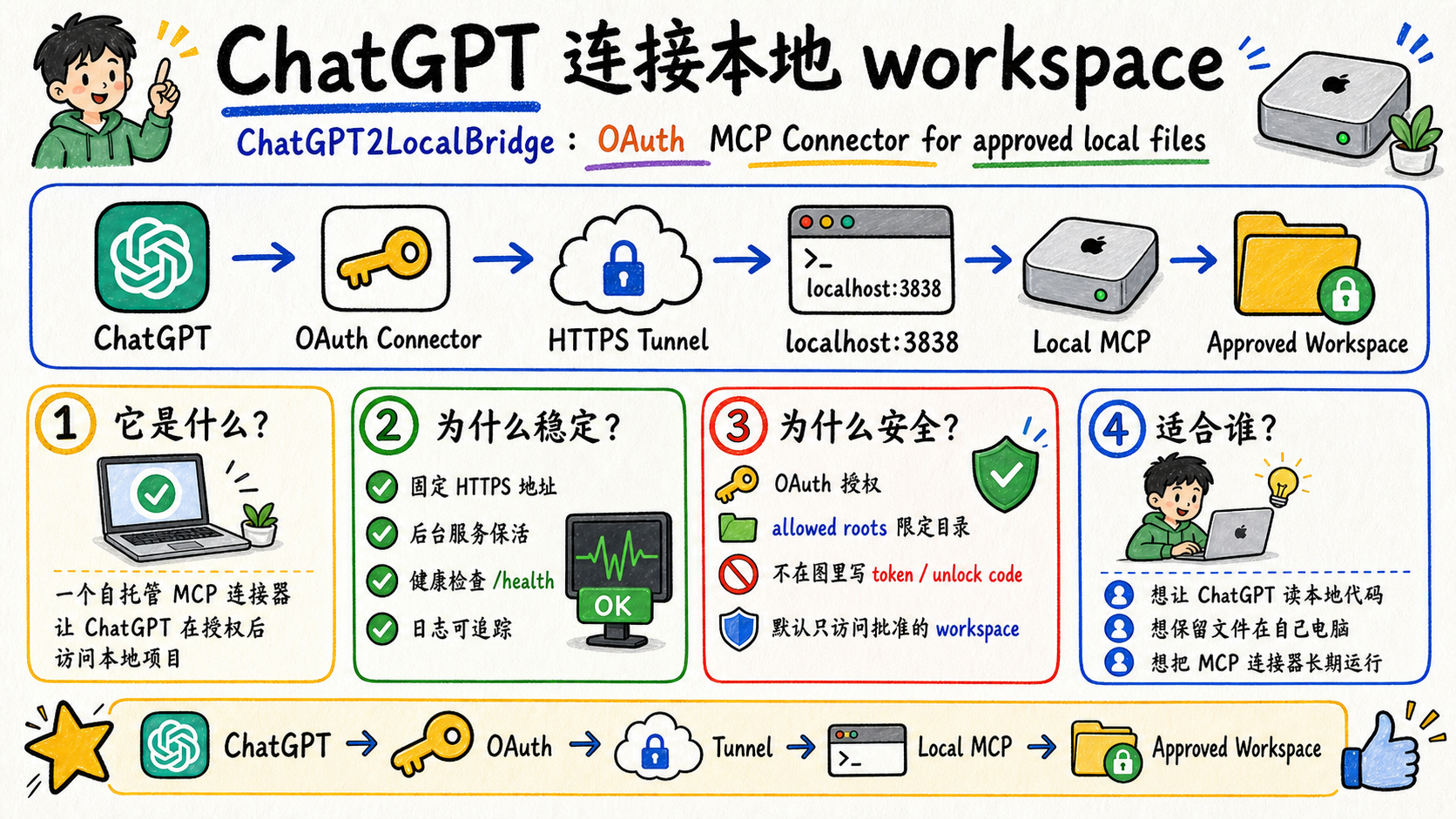
ChatGPT2LocalBridge is a self-hosted Codex / ChatGPT Plugin App: a local desktop/operator app plus an MCP connector that lets ChatGPT access approved local workspaces after authorization. It is designed for people who want ChatGPT or Codex-style agents to inspect, bundle, download, trace, or operate on local project files without uploading the whole workspace elsewhere.
The TypeScript build is the full OAuth MCP connector. A small Rust native preview also lives in rust/chatgpt2localbridge-rs for the local operator console, health checks, activity APIs, and a minimal MCP smoke surface.
In this repository, plugin app means a small agent-facing product surface: a local app, a policy file, a tool catalog, trace records, and one or more ChatGPT/Codex-visible MCP tools. It is not a legacy ChatGPT plugin. It is best described as:
-
Codex Plugin App
-
ChatGPT Plugin App
-
MCP Server
-
ChatGPT Custom Connector
-
OAuth Local Workspace Bridge
Unofficial project. Not affiliated with OpenAI.
Build Your Own Plugin App
This project is also an invitation to build more agent-facing plugin apps. A good plugin app should give ChatGPT or Codex a focused tool surface, keep risky operations behind policy, and give the human operator a clear local console.
Layer What to build Example in this repo
Agent interface
MCP tools with concise names, schemas, and safe defaults
project.bundle, policy.read, codex.task_start
Skill runtime
Local skills are discovered through approved roots, manifests, and stable registry tools
skill.list, skill.route, planned skill.invoke
Human control A local app that shows status, policy, traces, and cancel buttons Native macOS console
Safety policy
Approved roots, deny globs, auth mode, shell restrictions
bridge.policy.json
Distribution
README, GitHub Pages, screenshots, setup prompts, install scripts
docs/, npx github:..., macOS app bundle
If you build your own plugin app, keep the default workflow narrow and readable: one clear problem, one safe tool surface, one local control panel, and one copyable ChatGPT test prompt.
The next product direction is a Local Skill OS: local skills stay in approved skill roots, the bridge exposes a stable registry surface, and the app shows which skills are readable, routable, invokable, or blocked. See the Skill Runtime Roadmap.
The main execution path is moving toward Handoff -> Codex Runner: ChatGPT creates a structured handoff, the bridge validates and stores it, then local Codex CLI performs the project work. See the Handoff Spec.
Route
ChatGPT
  -> OAuth MCP Connector
  -> HTTPS tunnel
  -> http://127.0.0.1:3838/mcp
  -> ChatGPT2LocalBridge
  -> approved local workspace roots
ChatGPT does not directly mount your disk. It calls MCP tools, and every file operation is checked against bridge.policy.json.
Architecture
The intended product shape is a control plane, not just a raw shell bridge:
-
ChatGPT Web makes structured MCP calls.
-
Connector auth should use OAuth or Secure MCP Tunnel for public access.
-
Bridge policy gates roots, deny globs, shell mode, timeouts, and traces.
-
Tool tiers guide ChatGPT toward safer project and Codex Runner workflows.
-
Local app shows policy, tool calls, logs, diffs, downloads, and cancellable tasks.
30-Second Install
Linux one-click installer:
curl -fsSL https://raw.githubusercontent.com/Harzva/chatgpt2localbridge/main/scripts/linux-one-click-install.sh | bash
Optional Linux tunnel helpers:
curl -fsSL https://raw.githubusercontent.com/Harzva/chatgpt2localbridge/main/scripts/linux-one-click-install.sh | TUNNEL=cloudflare bash
curl -fsSL https://raw.githubusercontent.com/Harzva/chatgpt2localbridge/main/scripts/linux-one-click-install.sh | TUNNEL=ngrok NGROK_AUTHTOKEN=... NGROK_DOMAIN=my-bridge.ngrok-free.app bash
Temporary GitHub npx install, no clone required:
npx github:Harzva/chatgpt2localbridge init --root ~/Projects
set -a; source .env.local; set +a
npx github:Harzva/chatgpt2localbridge --http 3838
Local clone flow:
git clone https://github.com/harzva/chatgpt2localbridge.git
cd chatgpt2localbridge
npm install
npm run build
node dist/index.js init --root ~/Projects
set -a; source .env.local; set +a
node dist/index.js --http 3838
Health check:
curl -sS http://127.0.0.1:3838/health
Local operator console:
http://127.0.0.1:3838/app
Rust native preview:
cargo run --manifest-path rust/chatgpt2localbridge-rs/Cargo.toml -- --http 3842
The Rust preview intentionally exposes a smaller MCP surface today:
initialize, tools/list, bridge.health, bridge.activity, and file.list.
Native macOS app:
npm run macos:install
open /Applications/ChatGPT2LocalBridge.app
The macOS app is a native AppKit/SwiftUI desktop console that embeds the Rust
engine, uses the repository logo as its .icns icon, manages the local 3842
service, and shows the ChatGPT-visible MCP tool catalog, browser bundle prompts,
approved roots, editable policy, logs, connector tool calls, skill reads, write
events, and cloud-download trace records without needing the browser console.
The native Policy Center edits the local policy safely:
-
workspace roots stay separate from skill roots
-
the default skill root is
~/.codex/skills -
saving creates
bridge.policy.backup.json -
policy changes are written to local audit trace
-
the app warns if you expose broad paths such as
~/.codex
Downloads And Releases
GitHub Releases provide prebuilt artifacts for local testing:
-
ChatGPT2LocalBridge-macos-*.dmg: drag-and-run macOS native control console with the Rust companion binary bundled inside the app. -
ChatGPT2LocalBridge-macos-*.app.zip: native macOS control console with the Rust companion binary bundled inside the app. -
ChatGPT2LocalBridge-windows-x64-rust-preview.zip: Windows Rust-native local console preview. -
chatgpt2localbridge-*.tgz: npm package for the full TypeScript OAuth MCP bridge.
The Windows artifact is currently a Rust preview, while the full OAuth connector
surface remains the Node/TypeScript package. Release builds are generated by
.github/workflows/release.yml when a v* tag is pushed.
See Windows Roadmap for the current preview scope.
Release route:
npm run typecheck
npm test
npm run macos:app
git ta