A terminal dashboard for Claude Code usage analytics
Track tokens, costs, code generation, and efficiency, all from your terminal.



Quick start
curl --proto '=https' --tlsv1.2 -LsSf https://github.com/hmenzagh/CCMeter/releases/latest/download/ccmeter-installer.sh | sh
ccmeter          # launch the dashboard
# press `.` for the settings panel, `q` to quit
Overview
CCMeter reads your local Claude Code session data and renders an interactive TUI dashboard. Data refreshes every 5 minutes (manual reload with r).
Metrics & analytics
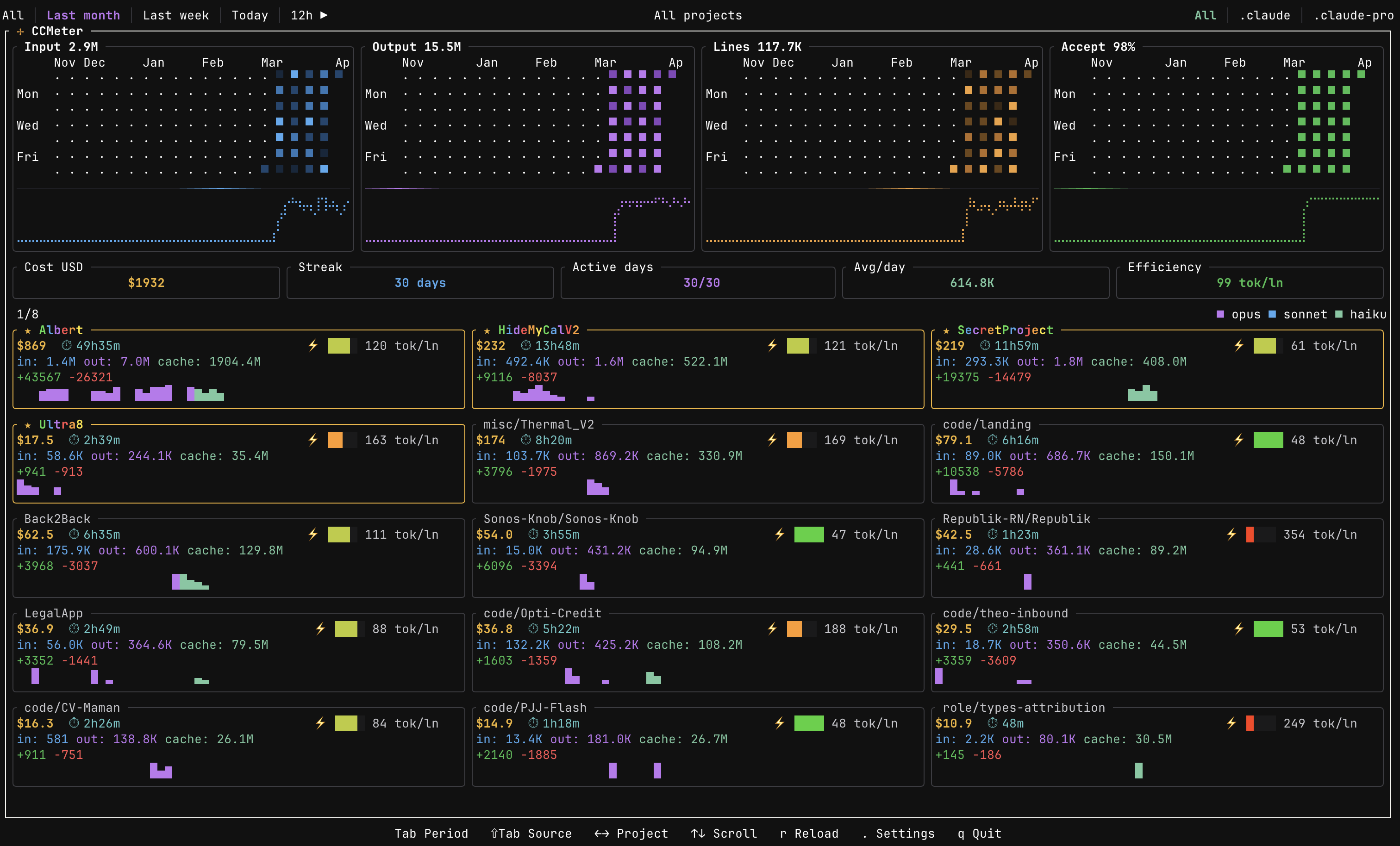
- Cost tracking — per-model USD breakdown (Opus, Sonnet, Haiku) via built-in pricing tables
- Token analytics — input, output, and prompt cache usage over time
- Code metrics — lines suggested, accepted, added, and deleted, with acceptance rate
- Active time estimation — approximates how long you actually spent working on each project from session activity
- Efficiency score — tokens per line of code changed (tok/ln, lower is better); each card has a quartile gauge (green → yellow → red) comparing it to other projects
- KPI banner — total cost, current streak, active days, avg tokens/day, and efficiency score at a glance
Visualizations
- Heatmaps — four GitHub-style contribution grids (input, output, lines changed, acceptance rate) with trend sparklines; minute-level granularity on 1h / 12h / Today filters
- Project cards — scrollable grid with per-project sparklines colored by model usage
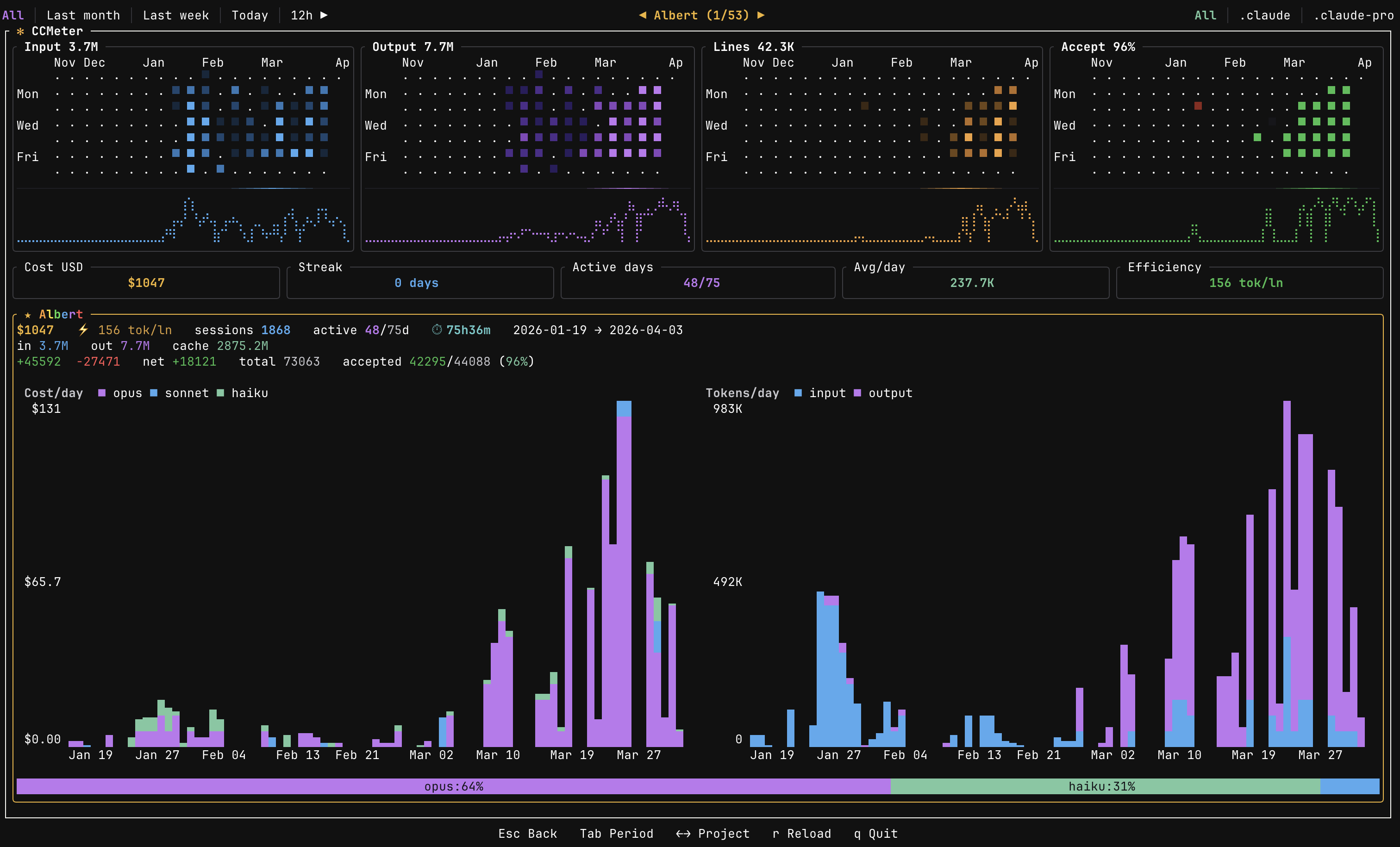
- Per-project detail — dedicated charts, model distribution, cost sparklines, and estimated active time
- Time filters — 1h, 12h, Today, Last week, Last month, All
Rate limit tracking (press t to toggle)
- Live usage monitor — polls
/api/oauth/usagefor each Claude OAuth account and shows 5h, 7d, Opus, Sonnet, and Cowork window utilization in real time - Credential cards — one per source root with subscription tier, expiry, and current usage bars
- Session forecast — extrapolates when you'll hit each rate limit window based on current token velocity
- Session chart & timeline — historical rate-limit hits per source, plus minute-level token usage over the active window
- Overage tracking — surfaces
extra_usagecredits and monthly limits when enabled
Project handling & performance
- Auto-discovery & grouping — finds Claude projects and groups them by git repository
- Multi-source roots — switch between Claude config directories with
Shift+Tab - Persistent cache — historical metrics cached locally for near-instant startup; only new sessions get parsed
- Responsive layout — heatmaps and card grids adapt to terminal size
Installation
Install script (recommended)
curl --proto '=https' --tlsv1.2 -LsSf https://github.com/hmenzagh/CCMeter/releases/latest/download/ccmeter-installer.sh | sh
Homebrew
Install prebuilt binaries via Homebrew:
brew install hmenzagh/tap/ccmeter
From source
git clone https://github.com/hmenzagh/CCMeter.git
cd CCMeter
cargo install --path .     # installs `ccmeter` to ~/.cargo/bin (make sure it's in $PATH)
Or build without installing — the binary will be at target/release/ccmeter:
cargo build --release
Requirements (from source): Rust 1.85+ and Cargo.
Usage
ccmeter
Keybindings
| Key | Action |
|---|---|
Tab | Cycle time filter |
Shift+Tab | Switch source root |
t (or `) | Toggle rate limit tracking view |
j / k or Up / Down | Scroll projects |
h / l or Left / Right | Navigate between projects (or credentials in rate tracking) |
Esc | Deselect project |
. | Open settings panel |
r | Reload data |
q / Ctrl+C | Quit |
Settings panel
Press . to open the settings panel, where you can:
- Rename projects with custom display names
- Merge multiple projects into a single group
- Split sources out of auto-detected groups
- Star favorites (animated rainbow border)
- Hide projects from the dashboard
How it works
CCMeter discovers Claude Code sessions by scanning your home directory for any folder whose name contains claude and that has a projects/ subdirectory with session logs (so ~/.claude/projects, ~/.config/claude/projects, and other Claude-compatible CLIs are all picked up automatically). It parses JSONL session files in parallel using rayon, extracts token counts and model identifiers, and computes costs from built-in pricing tables.
Session JSONL → parallel parse → daily aggregates → cached history → TUI render
Accurate token counting
Claude Code logs the same API response in several places — once per streaming chunk, again in every sub-agent's transcript, again in any /compact retry. Summing every line naïvely inflates tokens by 2–3× on busy days.
CCMeter dedupes by requestId (Anthropic's billing unit: one request = one invoice line). For each request it picks the most complete log, then re-emits it as per-chunk deltas so multi-minute streams keep their real timestamps. Activity from non-canonical mirror logs survives as zero-billing "ghost" markers, so active_minutes and code metrics stay accurate even when the canonical log is just a terminal snapshot. User-side patches (Edit/Write acceptances) are deduped by line uuid for the same reason.
Result: totals match what Anthropic actually billed, and the minute-level timeline reflects real activity.
Cache
Parsed metrics are persisted to ~/.config/ccmeter/history.json so subsequent launches only re-parse new or modified session files.
The cache is versioned. When CCMeter ships a change that would make pre-existing aggregates wrong (e.g. the dedup work above), the schema is bumped and any older cache is rebuilt from scratch on next launch — a one-time banner explains why historical totals may have shifted. A second banner appears if the cache was unreadable (corruption, disk error). Both dismiss on any keypress.
Upgrading from before the dedup fix? Expect your historical numbers to drop on days with heavy sub-agent or /compact activity. That's the over-counting going away, not data loss.
Per-project view
Use h/l or arrow keys to select a project card. The dashboard switches to a detail view showing:
- Cost and token charts scoped to that project (daily or minute-level depending on time filter)
- Model distribution bar with per-model cost breakdown
- Active time estimate, sessions count, lines added/deleted, and efficiency gauge
- Heatmaps filtered to the selected project only
Press Esc to go back to the global overview.
Rate limit tracking
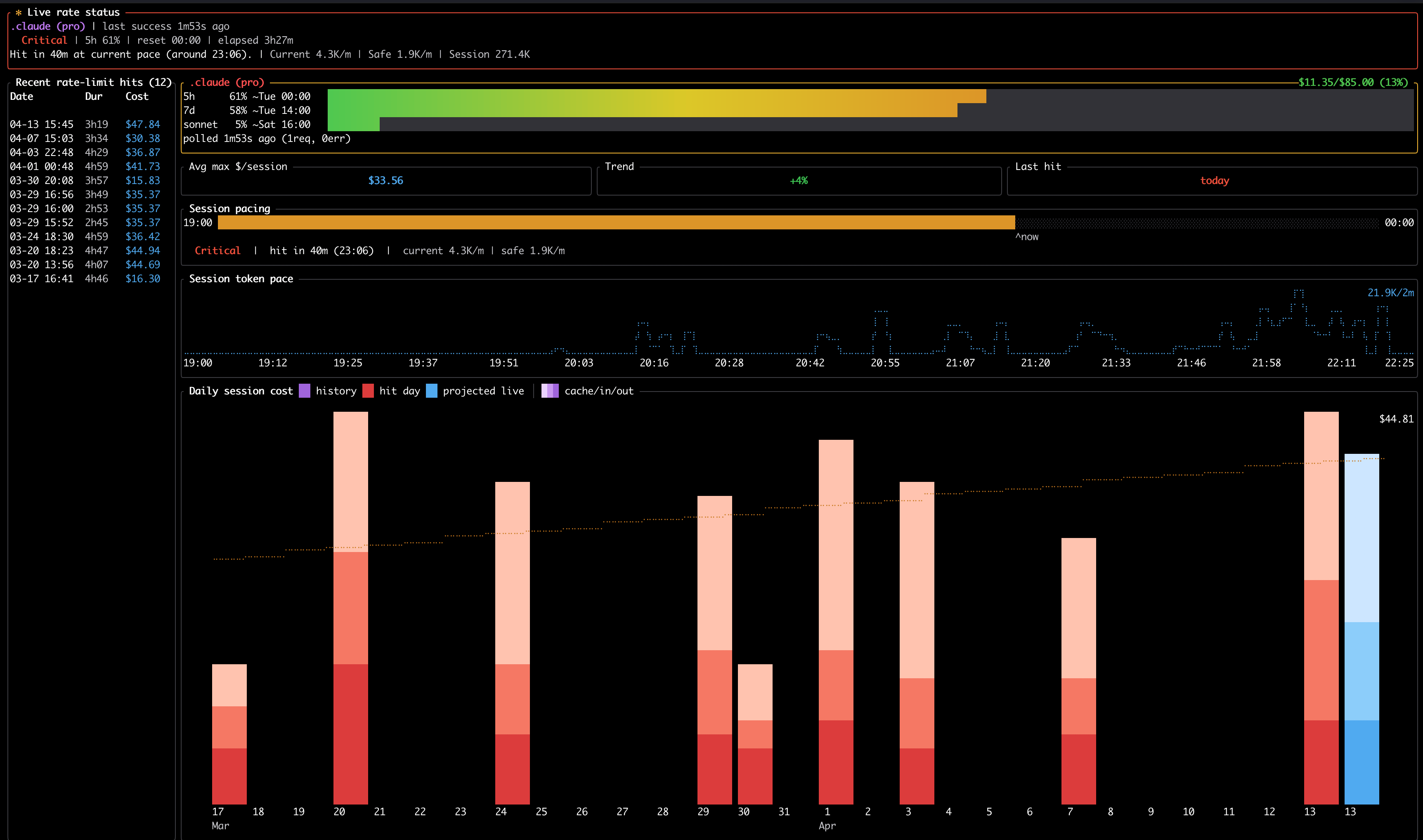
Press t (or `) to switch to the rate limit tracking view. CCMeter reads your Claude OAuth credentials and polls /api/oauth/usage at randomized intervals (5–10 min per account) to show real-time utilization of each rate limit window.
- Credential cards — one per source root, with subscription tier, token expiry, and usage bars for the 5h, 7d, Opus, Sonnet, and Cowork windows
- Live summary & KPI bar — currently selected account's status at a glance
- Session forecast — projects when you'll hit each limit based on recent token velocity
- Usage timeline & session chart — minute-level token usage for the active 5h window and historical rate-limit hits per source
- Overages — surfaces
extra_usagecredits and monthly limits when enabled on your plan
Navigate between accounts with ← / → (or h / l), refresh with r, and press t again to return to the main dashboard.
CCMeter only sees tokens from Claude Code sessions (local JSONL logs). Tokens consumed through the Claude chat (claude.ai web/desktop) count against the same rate limits but are not visible to CCMeter, so forecasts and utilization bars may under-report actual usage when you also chat with Claude alongside coding. Rate limit history is persisted locally at ~/.config/ccmeter/rate-history.json and ~/.config/ccmeter/usage-hit-history.json so session charts and hit timelines survive restarts — delete these files to reset the tracking history.
Configuration
User overrides are stored at ~/.config/ccmeter/overrides.json and can be edited through the settings panel or manually.
Tech stack
| Crate | Role |
|---|---|
| ratatui | Terminal UI framework |
| crossterm | Terminal event handling |
| clap | CLI argument parsing |
| rayon | Parallel JSONL parsing |
| chrono | Date/time handling |
| serde / serde_json | Serialization & JSONL parsing |
| dirs | Cross-platform home/config paths |
Project structure
src/
├── main.rs               # Entry point & event loop
├── app.rs                # Core application state & view routing
├── update_check.rs       # GitHub release version check
├── config/
│   ├── discovery.rs      # Project auto-discovery
│   ├── overrides.rs      # User configuration & merges
│   └── settings.rs       # Persistent user preferences
├── data/
│   ├── parser.rs         # JSONL session parsing
│   ├── cache.rs          # Persistent metric cache
│   ├── index.rs          # Compact event index
│   ├── tokens.rs         # Daily token aggregation
│   ├── models.rs         # Model pricing tables
│   ├── oauth.rs          # OAuth credential loading & async usage polling
│   ├── rate_limits.rs    # Rate-limit hit parsing
│   ├── rate_history.rs   # Persisted rate-limit history
│   └── hit_history.rs    # Historical hit aggregation
└── ui/
    ├── dashboard.rs      # Main layout
    ├── heatmap.rs        # Heatmap rendering
    ├── loading.rs        # Startup loading screen
    ├── theme.rs          # Color theme
    ├── time_filter.rs    # Time range logic
    ├── settings_view.rs  # Settings panel
    ├── cards/            # Per-project cards
    └── rate_tracking/    # Rate limit tracking view (13 modules)
License
MIT