ccexp

by nyatinteVerified

interactive terminal interface for discovering, previewing, and managing Claude Code configuration files and slash commands.

269
Stars
9
Forks
TypeScript
Language
8/23/2026
Added
View on GitHubDownload ZIP

⚠️ Third-Party Software Notice

This skill is third-party open-source software developed and hosted independently on GitHub. SkillTip is an informational directory and does not control or maintain the underlying repository. Any security checks displayed are automated and limited in scope. Review the source code before installing.

Read the Terms of Service

Installation

Add to your Claude Code skills directory:

# Add to your Claude Code skills
git clone https://github.com/nyatinte/ccexp

Getting Started

Guides for using skills like ccexp.

Security Report

Verified

Last scanned: —

{
  "status": "PASSED",
  "issues": []
}

README.md

ccexp (claude-code-explorer)

ccexp Icon

Interactive CLI tool for exploring and managing Claude Code settings and slash commands

npm version npm downloads license node version Mentioned in Awesome Claude Code

Overview

[!IMPORTANT] ccexp is the shortened name for claude-code-explorer. The npm package claude-code-explorer is the previous version of this tool. The name was shortened to ccexp for brevity and easier command-line usage.

ccexp (short for claude-code-explorer) is a React Ink-based CLI tool that provides an interactive terminal interface for discovering, previewing, and managing Claude Code configuration files and slash commands. Navigate through your codebase to find CLAUDE.md files, slash command definitions, and other Claude-related configurations with a beautiful terminal UI.

Features

  • 🔍 Interactive File Discovery - Automatically finds Claude Code configuration files
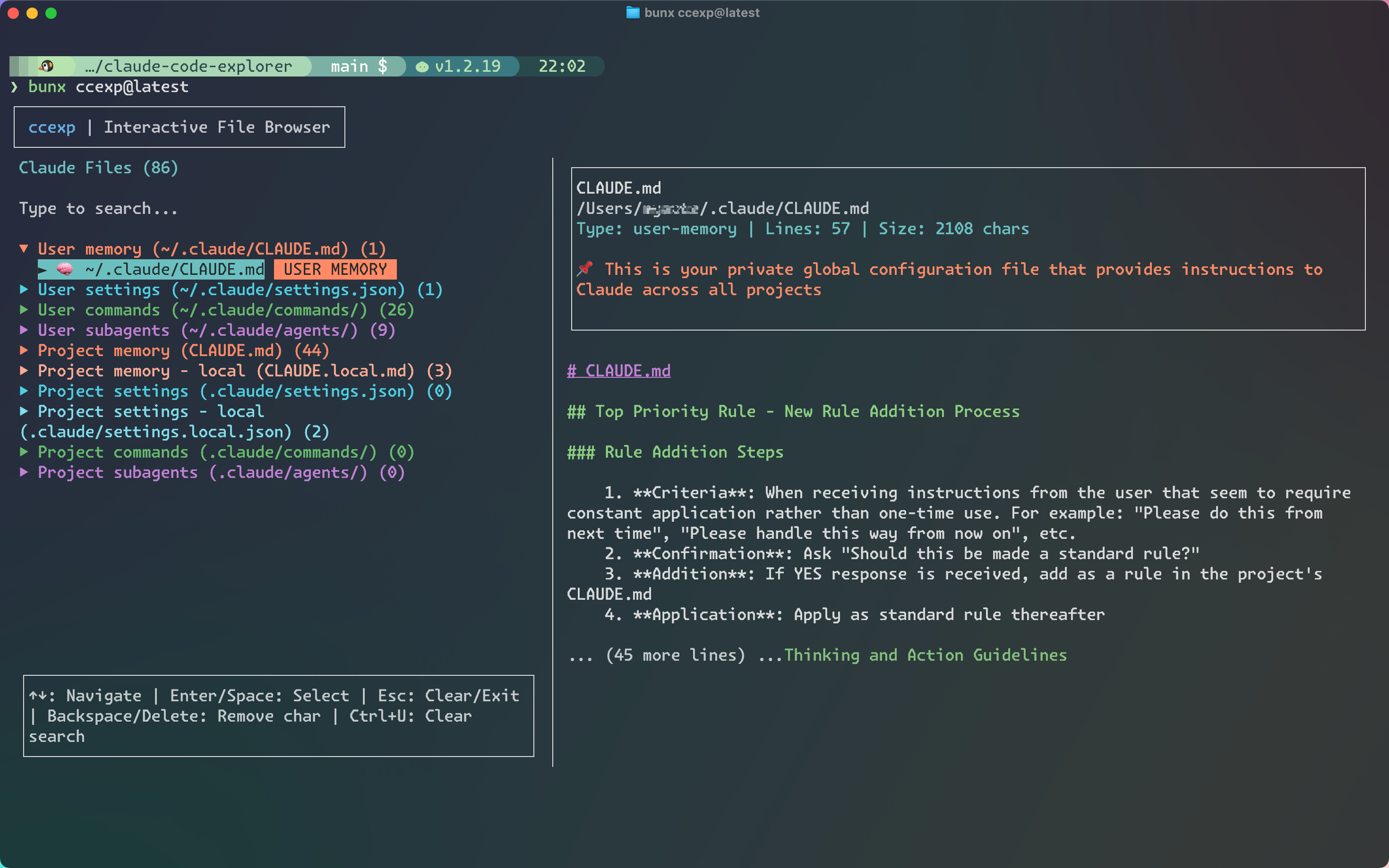
  • 📁 Split-pane Interface - File list on the left, preview on the right
  • ⌨️ Keyboard Navigation - Arrow keys, Enter, ESC for smooth navigation
  • 🔎 Live Search - Filter files as you type
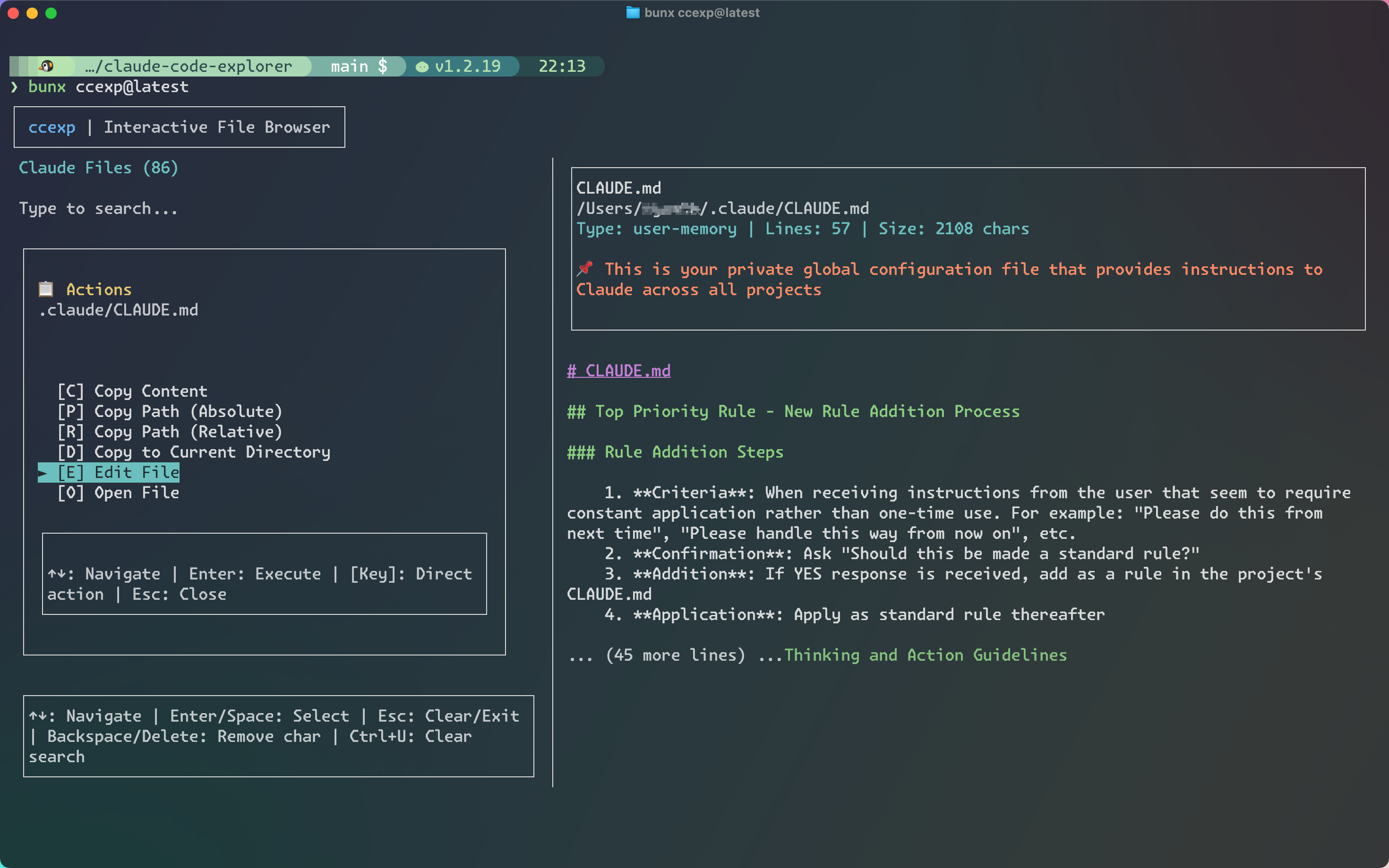
  • 📋 File Actions - Copy content, copy paths, open files in default applications
  • 🎨 Terminal UI - Beautiful React Ink interface with proper focus management
  • 📝 Markdown Preview - Renders CLAUDE.md files with syntax highlighting

Screenshots
ccexp Thumbnail

ccexp File List

ccexp Action Menu

Target Files

ccexp (claude-code-explorer) automatically discovers these configuration files:

Memory Files

Command Files

  • .claude/commands//*.md** → Project commands (project-specific slash commands)
  • ~/.claude/commands//*.md** → User commands (personal slash commands)

Subagent Files

  • .claude/agents//*.md** → Project subagents (project-specific agents)
  • ~/.claude/agents//*.md** → User subagents (personal agents)

Settings Files

  • .claude/settings.json → Project settings (shared configuration)
  • .claude/settings.local.json → Project settings local (local overrides, gitignored)
  • ~/.claude/settings.json → User settings (global configuration)

Installation

Quick Start (Recommended)

No installation required! Run directly with:

# Using Bun (fastest)
bunx ccexp@latest

# Using npm
npx ccexp@latest

# Using pnpm
pnpm dlx ccexp@latest

Global Installation

For frequent use, install globally:

# npm
npm install -g ccexp

# Bun
bun install -g ccexp

# pnpm
pnpm add -g ccexp

Then run from anywhere:

ccexp

Usage

Interactive Mode (Default)

ccexp                    # Launch interactive TUI
ccexp --path ~/projects # Scan specific directory

Command Line Options

ccexp --help             # Show help information
ccexp --version          # Show version number
ccexp --path <path>      # Specify directory to scan

Examples

# Launch in current directory
bunx ccexp@latest

# Scan specific project
bunx ccexp@latest --path ~/my-project

# Quick exploration without installation
npx ccexp@latest

# Show help
bunx ccexp@latest --help

# Show version
bunx ccexp@latest --version

Common Use Cases

# Find all Claude configuration in your workspace
cd ~/workspace
bunx ccexp@latest

# Check Claude settings in a specific project
bunx ccexp@latest --path ./my-project

# Explore global Claude configuration
bunx ccexp@latest --path ~/.claude

# Using alias (after setup)
ccexp                      # Current directory
ccexp --path ~/workspace   # Specific directory

Keyboard Shortcuts

  • ↑/↓ - Navigate file list
  • Enter - Open file actions menu
  • ESC - Close menu / Exit
  • Tab - Switch between panes
  • / - Focus search input
  • c - Copy file content (in menu)
  • p - Copy absolute path (in menu)
  • r - Copy relative path (in menu)
  • d - Copy file to current directory (in menu)
  • e - Edit file with $EDITOR (in menu)
  • o - Open file in default application (in menu)

Development

For development setup, commands, and contribution guidelines, see DEVELOPMENT.md.

Contributing

Contributions are welcome! Please see DEVELOPMENT.md for detailed contribution guidelines.

License

MIT License - see LICENSE file for details

Frequently Asked Questions

What is ccexp?

ccexp is an open-source cli tools skill for AI coding assistants such as Claude Code, Codex CLI, and ChatGPT, built by nyatinte. interactive terminal interface for discovering, previewing, and managing Claude Code configuration files and slash commands. It has 269 GitHub stars.

Is ccexp safe to use?

Yes. ccexp passed SkillsLLM's automated security scan — a dependency vulnerability audit plus prompt-injection heuristics — with no high-severity issues. You can read the full report in the Security Report section on this page.

How do I install ccexp?

Clone the repository with "git clone https://github.com/nyatinte/ccexp" and add it to your Claude Code skills directory (see the Installation section above).

What programming language is ccexp written in?

ccexp is primarily written in TypeScript. It is open-source under nyatinte on GitHub, so you can review or fork the full source.

Are there alternatives to ccexp?

Yes. SkillsLLM lists many other CLI Tools skills you can browse and compare side by side. Open the CLI Tools category from the badge at the top of this page, or use the Related Skills and comparison links further down to weigh ccexp against similar tools.

Comments (0)

No comments yet. Be the first to share your thoughts!

ui-ux-pro-max-skill

by nextlevelbuilder

12

An AI skill that provides design intelligence for building professional UI/UX across multiple platforms.

119,92012,870Python
CLI Toolsai-skillsantigravity
View details

happy

by slopus

Mobile and Web client for Codex and Claude Code, with realtime voice, encryption and fully featured

23,4501,980TypeScript
CLI Tools
View details

claudecodeui

by siteboon

Use Claude Code, OpenCode, Cursor CLI, and Codex on mobile and web with CloudCLI (aka Claude Code UI). CloudCLI is a free open source webui/GUI that helps you manage your Claude Code session and projects remotely.

13,3941,866TypeScript
CLI Tools
View details

CRS-自建Claude Code镜像,一站式开源中转服务,让 Claude、OpenAI、Gemini、Droid 订阅统一接入,支持拼车共享,更高效分摊成本,原生工具无缝使用。

12,5471,869JavaScript
CLI Tools
View details

ccstatusline

by sirmalloc

🚀 Beautiful highly customizable statusline for Claude Code CLI with powerline support, themes, and more.

12,508545TypeScript
CLI Tools
View details

Developers Also Liked

Based on votes and bookmarks from developers who liked this skill

ECC

by affaan-m

10

The agent harness performance optimization system. Skills, instincts, memory, security, and research-first development for Claude Code, Codex, Opencode, Cursor and beyond.

242,21936,702JavaScript
AI Agentsai-agentsanthropicclaude-code
View details
15

An agentic skills framework & software development methodology that works.

234,96620,863Shell
AI Agentsai-agentsbrainstorming
View details

n8n

by n8n-io

12

Fair-code workflow automation platform with native AI capabilities. Combine visual building with custom code, self-host or cloud, 400+ integrations.

201,88160,308TypeScript
MCP Serversapisai-tools
View details

The agent harness performance optimization system. Skills, instincts, memory, security, and research-first development for Claude Code, Codex, Opencode, Cursor and beyond.

185,94028,768JavaScript
AI Agentsai-agentsanthropicclaude-code
View details

cc-switch

by farion1231

3

A cross-platform desktop All-in-One assistant for Claude Code, Codex, OpenCode, OpenClaw, Grok Build & Hermes Agent. Only official website: ccswitch.io

128,8688,826Rust
AI Agentsclaude-codeai-tools
View details