中文 | English
🔍 Browser-Use 视觉增强


为热门开源 browser-use 浏览器 Agent 框架提供视觉 Grounding 增强插件——让 Agent 不仅能读 DOM,还能"看见"页面。
⚡ 一句话总结
在 DOM 完全无法解析的纯图标 UI 上,加入视觉管线后 gpt-4o 浏览器 Agent 从
0/4 → 3/4,整体客观成功率从69% → 94%(+25%)。
94% 客观成功率 · 比纯 DOM +25% · 纯图标 UI 0/4 → 3/4
——所有数字来自客观校验(DOM 状态 / URL / 实时 API),绝非 Agent 自我评分。
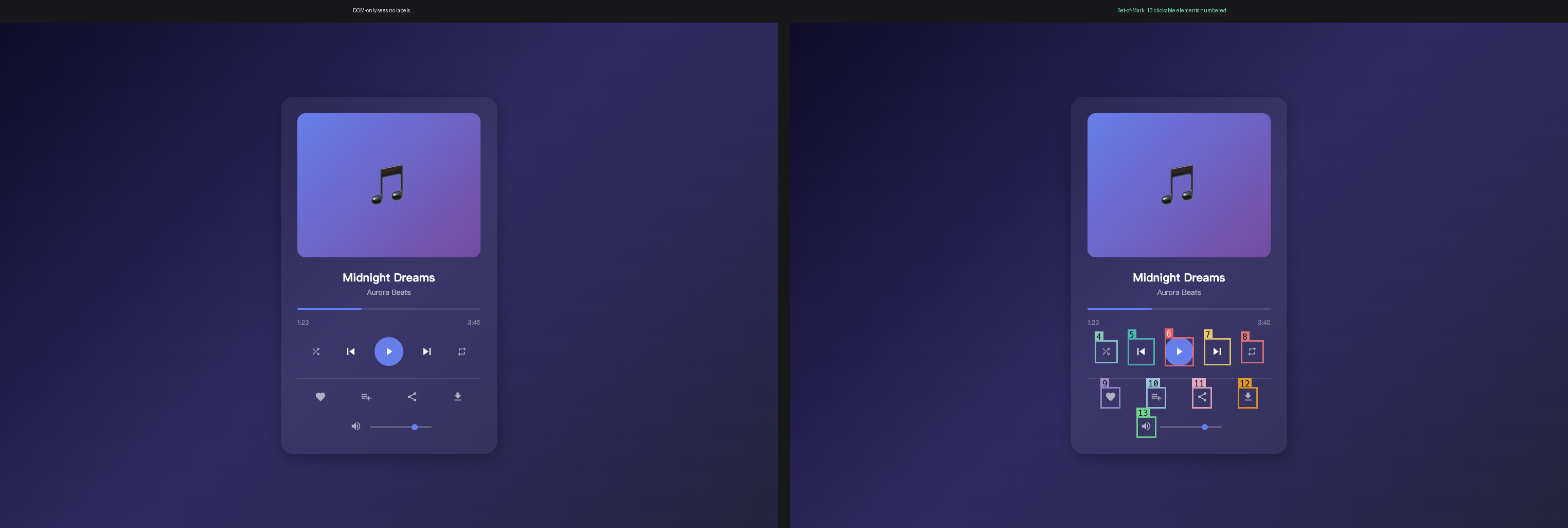
左:纯图标音乐播放器——每个控件都是无文本/aria-label 的 <svg>,DOM 无法解析。
右:Set-of-Mark 为 VLM 提供每个可点击元素的编号句柄。
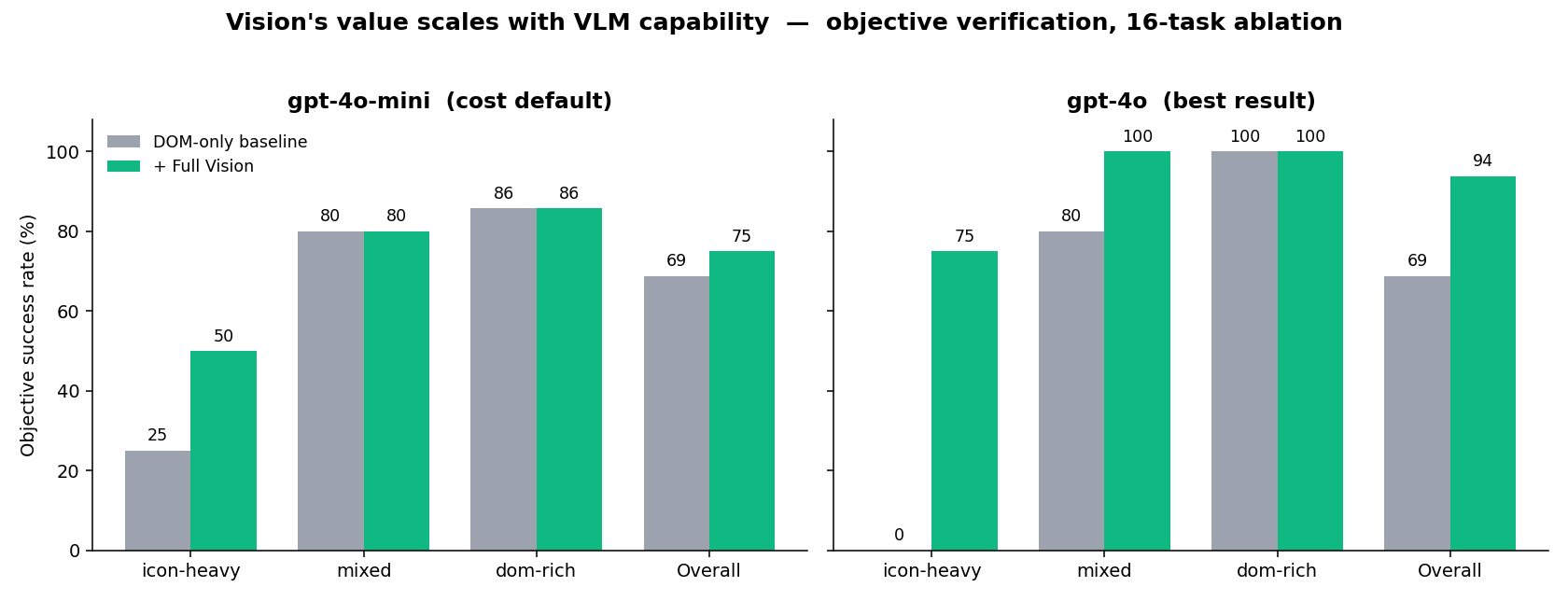
同一套 SoM + Florence 管线,唯一变量是驱动 LLM。弱 VLM (gpt-4o-mini) 几乎无法利用 grounded boxes;gpt-4o 将其转化为 +25% 增益。瓶颈是 VLM,不是管线。
🎯 为什么需要这个项目
现代浏览器 Agent 依赖 DOM 解析理解页面。但以下场景 DOM 无能为力:
| 场景 | 纯 DOM Agent | 视觉增强 Agent |
|---|---|---|
| 纯图标按钮(无文本/aria 标签) | ❌ 无法区分 | ✅ 通过视觉形状识别 |
| 颜色选择器 / 视觉选择器 | ❌ 无颜色感知 | ✅ 通过外观识别 |
| Canvas / SVG 渲染内容 | ❌ DOM 不可见 | ✅ OCR + 区域检测 |
| 动态 SPA(懒加载内容) | ⚠️ 可能提前行动 | ✅ 视觉确认内容就绪 |
✨ 核心结果
以下所有成功率均来自客观校验——Agent 完成后检查真实 DOM 状态、页面 URL 或 实时 ground-truth API。成功绝非 Agent 自报
done()。
最佳结果 (gpt-4o):视觉救回纯图标 UI
| 指标 | 基线 (纯 DOM) | + 全视觉 |
|---|---|---|
| 总体 (16 任务) | 11/16 (69%) | 15/16 (94%) |
| icon-heavy (4 任务) | 0/4 (0%) | 3/4 (75%) |
| mixed (5 任务) | 4/5 (80%) | 5/5 (100%) |
| dom-rich (7 任务) | 7/7 (100%) | 7/7 (100%) |
整体 +25%,完全由 icon-heavy 类别驱动——像素胜过 DOM 的精确场景。
核心发现:视觉的价值随 VLM 能力扩展
同一套消融实验(6 条件、同一 SoM + Florence + 视觉→DOM 桥、相同任务和校验器),
gpt-4o-mini vs gpt-4o:
| 指标 | gpt-4o-mini(成本默认) | gpt-4o(最佳) |
|---|---|---|
| 基线 (纯 DOM) | 11/16 (69%) | 11/16 (69%) |
| 全视觉 (最强条件) | 12/16 (75%) | 15/16 (94%) |
| 全视觉增益 | +6% | +25% |
| icon-heavy: 基线 → 全视觉 | 1/4 → 2/4 | 0/4 → 3/4 |
| 自适应 (E) 视觉调用 vs 全量 | 15 vs 35 | 20 vs 37 |
两个模型共享相同的 69% 纯 DOM 基线——+25% 的差距完全来自强 VLM 利用了弱 VLM 忽略的 grounded boxes。
gpt-4o-mini 作为低成本默认
代码和示例默认使用 gpt-4o-mini(便宜)。该模型下全视觉增益较小(+6%), 自适应门控与基线持平——但在需要像素的类别上,自适应以 43% 的视觉预算追平了全视觉。 换成 gpt-4o 同一门控即超越基线 +25%。
🏗️ 系统架构
flowchart TB
    subgraph agent["VisionEnhancedAgent — 继承 browser_use.Agent(零侵入)"]
        direction TB
        dom["DOM 状态<br/>(来自 browser-use)"]
        gate{"自适应门控<br/>DOM 置信度评分<br/>SKIP · LIGHTWEIGHT · FULL"}
        som["SoM 标注器<br/>编号边界框"]
        flo["Florence-2<br/>OCR + 区域描述"]
        bridge["视觉 → DOM 桥<br/>将检测框匹配回可点击 [id]"]
        ctx["增强页面上下文<br/>• 编号元素 + 边界框<br/>• 非 DOM 渲染文本 (OCR)<br/>• 区域描述 (颜色、图标)"]
        llm["LLM 决策器<br/>gpt-4o-mini 默认 · gpt-4o 最佳"]
        act["browser-use 动作<br/>click · type · scroll · done"]

        dom --> gate
        gate -->|"高置信度 → 跳过视觉"| ctx
        gate -->|"低 → 启动视觉"| som
        som --> flo --> bridge --> ctx
        ctx --> llm --> act
    end

    flo -. HTTP .-> api["Vision API Server<br/>FastAPI on GPU<br/>/ocr · /regions · /detect · /describe"]

    classDef decide fill:#1f6feb,stroke:#1f6feb,color:#fff
    classDef vision fill:#8957e5,stroke:#8957e5,color:#fff
    classDef gpu fill:#30363d,stroke:#f78166,color:#fff
    class gate,llm decide
    class som,flo,bridge vision
    class api gpu
关键设计:整个模块是无侵入扩展——VisionEnhancedAgent 通过类继承
browser_use.Agent,不修改上游任何一行代码。pip install --upgrade browser-use 不会有任何影响。
🚀 快速开始
60 秒看它工作(无需 GPU)
README 顶部的两张图可以在本地无 GPU、无视觉服务器的情况下重新生成:
pip install -e ".[dev]"

# 1. 启动本地 HTML fixture 服务
python3 -m http.server 8088 --directory demo/ &

# 2. 重新生成 SoM hero 图
python scripts/make_hero_image.py \
  --url http://localhost:8088/icon_only_player.html \
  --out docs/assets/som_icons.png

# 3. 从已提交的消融 JSON 重新生成结果图表
python3 scripts/make_results_chart.py   # → docs/assets/results.png
无需 CUDA、无需 Florence 服务器、无需 API key。完整视觉管线(实时 Agent 运行) 需要下面的 GPU 视觉服务器。
安装
git clone https://github.com/Raidriar7170/browser-use-vision.git
cd browser-use-vision
pip install -e ".[dev]"
playwright install chromium
1. 启动 Vision API Server(GPU 机器)
pip install torch transformers
python -m browser_use_vision.server --port 8100
curl http://localhost:8100/health
# → {"status": "ok", "backend": "FlorenceBackend"}
服务器加载 Florence-2-large (~3GB),暴露端点:
/ocr · /regions · /detect · /describe
2. 使用 VisionEnhancedAgent
import asyncio
from browser_use.browser.session import BrowserSession
from browser_use_vision.enhanced_agent import VisionEnhancedAgent
from browser_use_vision.grounding.florence import FlorenceBackend

async def main():
    session = BrowserSession(headless=True)
    backend = FlorenceBackend(remote_url="http://localhost:8100")

    agent = VisionEnhancedAgent(
        task="Click the 'Next Track' button on this music player",
        llm=ChatOpenAI(model="gpt-4o-mini"),
        browser_session=session,
        vision_backend=backend,
        use_vision=True,
        enable_som=True,
        enable_adaptive=False,
    )

    history = await agent.run()
    print("Done:", history.final_result())

asyncio.run(main())
3. 运行测试
pytest tests/ -v              # 140 单元测试
pytest tests/ --cov=browser_use_vision --cov-report=term-missing
python scripts/e2e_test.py    # E2E 集成测试(需 Vision API)
🔬 技术细节
1. SoM (Set-of-Mark) 标注
在截图上为交互元素叠加编号标签,让 LLM 在决策时有视觉参照索引。 纯 DOM 几何 + Pillow 绘制,不需要 GPU。
2. Florence-2 视觉后端
Florence-2(微软)统一视觉基础模型:
OCR_WITH_REGION— 提取渲染文本 + 边界框坐标(读取 Canvas/SVG/自定义字体)DENSE_REGION_CAPTION— 为检测到的区域生成描述(识别图标、颜色、形状)
3. 自适应视觉策略
不是每个页面都需要昂贵的视觉推理。自适应策略先评估序列化 DOM:
DOM 置信度评分 (0-1):
  → 高 (≥0.8): 交互元素有文本/aria/alt 标签 → 跳过视觉
  → 中 (0.5-0.8): 部分有标签、部分空白 → LIGHTWEIGHT(仅 OCR)
  → 低 (<0.5): 纯图标按钮、折叠 <svg>、无可读标签 → FULL 视觉
  (连续失败或检测到循环强制 FULL)
评分公式:0.4 + 0.6 × (labeled ÷ total_interactive),减去折叠 <svg> 的小惩罚。
4. VisionEnhancedAgent
browser_use.Agent 的无侵入子类扩展:
每步管线:
  1. 截图
  2. SoM: 为交互元素标注编号
  3. Florence-2: OCR + 区域检测
  4. 合并: DOM 树 + 视觉描述
  5. LLM: 用增强上下文决策动作
  6. 执行: browser-use 动作 (click, type, etc.)
🔬 成功判定方法论
早期版本用 Agent 调用 done() 作为成功标志——Agent 自己给自己打分。
这会虚高数字:Agent 经常报告"成功点击 Next Track 按钮"但 DOM 实际无变化。
本仓库所有 benchmark 使用客观校验。agent.run() 完成后,per-task
verify(page, final_result) 检查真实的 post-run 状态:
| 校验器 | 检查内容 | 用途 |
|---|---|---|
dom_js(expr) | 活页面中 JS 表达式为 truthy | 动作类任务 |
url_has(*subs) | 最终 URL 包含子串 | 导航任务 |
text_has(*subs) | Agent 答案包含预期文本 | 静态提取任务 |
live_hn_top() | 答案匹配 Hacker News 实时 #1(Firebase API) | 动态提取 |
任务集:16 个任务——6 个本地纯图标 fixture + 10 个公开网站 (Wikipedia, Hacker News, arXiv, toscrape.com, the-internet.herokuapp.com)。
📊 消融实验 (6 条件 × 16 任务 = 96 次运行)
| 条件 | 描述 | 成功率 | 平均步数 | 视觉调用 |
|---|---|---|---|---|
| A. 基线 | 纯 DOM,无视觉,无 SoM | 11/16 (69%) | 1.7 | 0 |
| B. 仅 SoM | SoM 标注,无视觉模型 | 10/16 (62%) | 2.4 | 0 |
| C. 全视觉 | OCR + 区域描述每步 | 12/16 (75%) | 2.3 | 35 |
| D. 仅 OCR | 每步仅 OCR,无区域描述 | 11/16 (69%) | 2.3 | 36 |
| E. 自适应 | SoM + DOM 门控视觉(默认配置) | 11/16 (69%) | 2.3 | 15 |
| F. 无 SoM 自适应 | 自适应视觉,无 SoM | 9/16 (56%) | 1.4 | 9 |
数据:ablation_results.json
| 报告:ablation_report.md
| gpt-4o 报告:ablation_report_gpt-4o.md
🛠️ 技术栈
| 组件 | 技术 | 用途 |
|---|---|---|
| 核心运行时 | Python 3.11 | 语言 |
| 浏览器 Agent | browser-use 0.12.9 | 上游 Agent 框架 |
| 浏览器引擎 | Playwright + Chromium | 浏览器自动化 |
| 视觉模型 | Florence-2-large (Microsoft) | OCR、区域检测、描述 |
| 视觉 API | FastAPI + Uvicorn | GPU 推理服务 |
| LLM | GPT-4o-mini (via OpenAI API) | Agent 决策 |
| 深度学习 | PyTorch 2.1 + transformers | 模型推理 |
| 数据模型 | Pydantic v2 | Schema 校验 |
| 测试 | pytest + pytest-asyncio | 单元与集成测试 |
| CI/CD | GitHub Actions | 自动化测试流水线 |
| 图像处理 | Pillow | 截图处理 |
🗺️ 路线图
- Florence-2 视觉后端(OCR + 区域检测)
- SoM (Set-of-Mark) 截图标注
- 自适应视觉策略(DOM 置信度评分)
- E2E 集成测试 + HTML fixtures
- CI 流水线(GitHub Actions)— 140 单元测试
- 客观成功校验(DOM / URL / 实时 API,非 Agent 自报)
- 16 任务 benchmark + 消融实验(6 条件 × 16 任务)
- 修复 + 重调自适应视觉门控
- [~] OmniParser V2 后端(代码完成,待集成测试)
- GroundingDINO 作为替代检测后端
- 从 Agent trace 学习门控阈值
- 对标 WebArena / Mind2Web 评测
- 视频流模式(实时 Agent 观测)
📄 许可证
MIT License. 详见 LICENSE。
📌 项目总结
面向招聘者:
本项目展示了构建可复现的多模态浏览器 Agent 工程系统的全栈工程能力:
- 系统设计 — 为热门开源 browser-use 框架设计无侵入插件架构,零上游修改
- ML 工程 — 部署 Florence-2 视觉基础模型为 GPU 推理服务; 设计 SoM 标注管线实现视觉定位
- 性能优化 — 自适应推理基于 browser-use 索引序列化 DOM 的置信度评分门控视觉 调用:全套 15 次视觉调用 vs 全开 35 次(仅 43% 预算),并在视觉真正起作用的 图标类任务上追平全视觉(2/4)
- 量化结果 — 16 个任务、客观校验(DOM / URL / 实时 API,非 Agent 自报):在 gpt-4o 下视觉管线达到 94%(15/16)vs 基线 69%(+25%), 并将纯图标 UI 从 0/4 救回 3/4;在更便宜的 gpt-4o-mini 默认模型上同一 管线仍优于基线(+6%)——视觉的价值随 VLM 能力扩展。消融实验(6 条件 × 16 任务、两个模型)量化各组件真实贡献,并推翻了早期自报指标的结论。 含 140 单元测试 + 3 个 E2E 集成场景(全部通过)
- 工程规范 — 1800 行核心模块、140 单元测试、3 个 E2E 集成测试、 CI 流水线、类型化 Python 代码