🌳 Branchlet


A interactive CLI tool for creating and managing Git worktrees with an easy to use interface.
Features
- Quick Commands: Jump directly to specific actions via command line
- Smart Configuration: Project-specific and global configuration support
- File Management: Automatically copy configuration files to new worktrees
- Post-Create Actions: Run custom commands after worktree creation
Installation
npm install -g branchlet
Quick Start
Run Branchlet in any Git repository:
branchlet
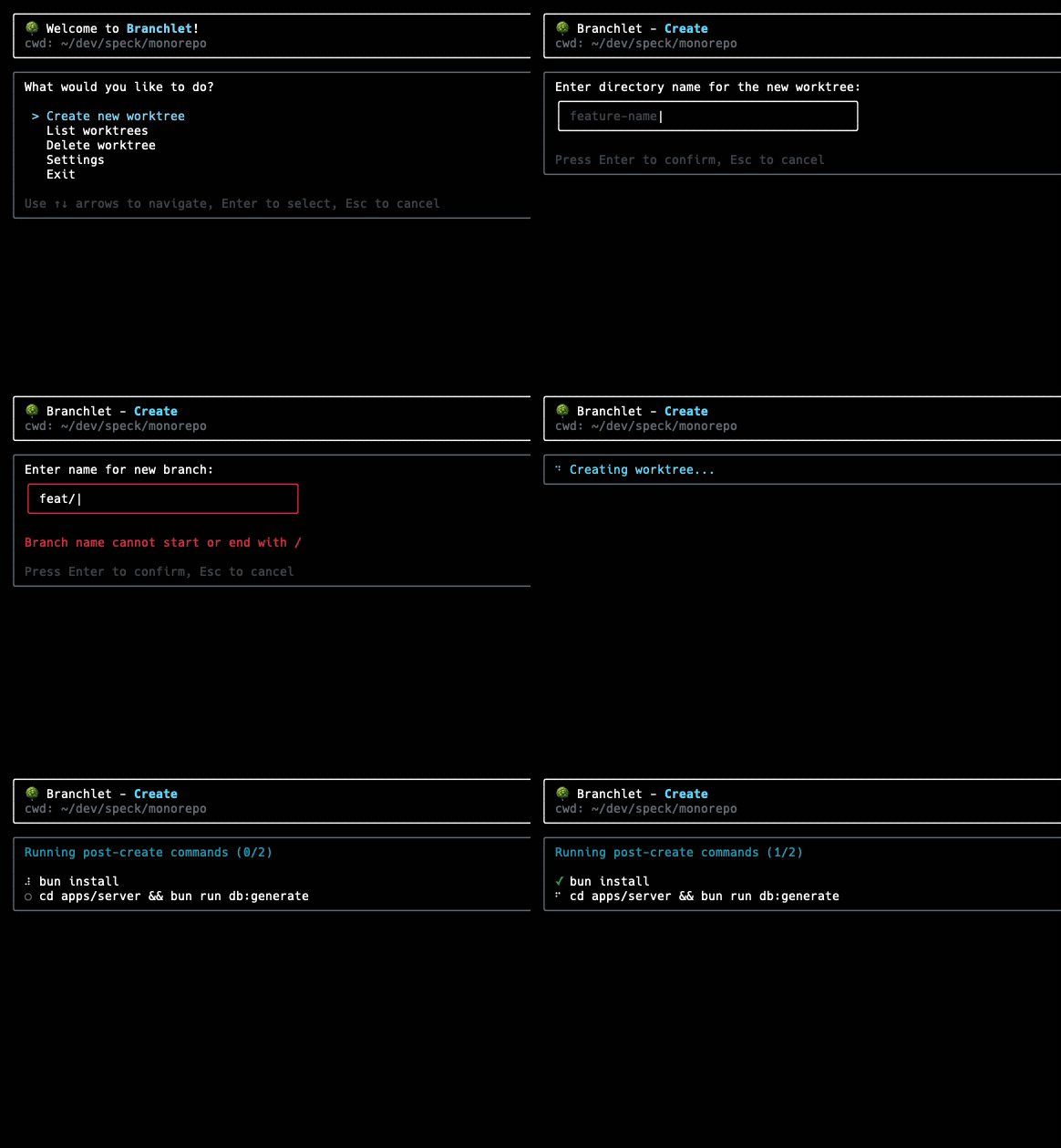
This opens an interactive menu where you can:
- Create new worktrees
- List existing worktrees
- Delete worktrees
- Configure settings
Commands
Interactive Menu (Default)
branchlet
Opens the main menu with all available options.
Direct Commands
branchlet create    # Go directly to worktree creation
branchlet list      # List all worktrees
branchlet delete    # Go directly to worktree deletion
branchlet settings  # Open settings menu
Options
branchlet --help     # Show help information
branchlet --version  # Show version number
branchlet -m create  # Set initial mode
Non-Interactive (Scriptable) CLI
Pass flags to skip the interactive prompts entirely. The three core concepts map directly to flags:
| Flag | Description |
|---|---|
-n, --name <name> | Worktree directory name |
-s, --source <branch> | Source branch to create from |
-b, --branch <branch> | New branch name (defaults to -n when omitted) |
# Create a worktree — new branch defaults to the worktree name
branchlet create -n my-feature -s main

# Create a worktree with an explicit branch name different from the directory
branchlet create -n ticket-3121-backend -s main -b feature/ticket-3121

# Create multiple sibling worktrees from the same source branch
# (each gets its own branch, so there's no checkout conflict)
branchlet create -n digit3121-backend  -s main -b feat/digit3121-backend
branchlet create -n digit3121-frontend -s main -b feat/digit3121-frontend

# List worktrees as JSON
branchlet list --json

# Delete a worktree by name
branchlet delete -n my-feature

# Force-delete a worktree by path
branchlet delete -p /path/to/worktree -f
Successful create output:
/path/to/worktree
  source: main
  branch: my-feature
Configuration
Branchlet looks for configuration files in this order:
.branchlet.jsonin your repo's root (project-specific)~/.branchlet/settings.json(global configuration)
Configuration Options
Create a .branchlet.json file in your project root or configure global settings:
{
  "$schema": "https://raw.githubusercontent.com/raghavpillai/branchlet/main/schema.json",
  "worktreeCopyPatterns": [".env*", ".vscode/**"],
  "worktreeCopyIgnores": ["**/node_modules/**", "**/dist/**", "**/.git/**"],
  "worktreePathTemplate": "$BASE_PATH.worktree",
  "postCreateCmd": ["npm install", "npm run db:generate"],
  "terminalCommand": "code .",
  "deleteBranchWithWorktree": true
}
Configuration Fields
-
worktreeCopyPatterns: Files/directories to copy to new worktrees (supports glob patterns)- Default:
[".env*", ".vscode/**"] - Examples:
["*.json", "config/**", ".env.local"]
- Default:
-
worktreeCopyIgnores: Files/directories to exclude when copying (supports glob patterns)- Default:
["**/node_modules/**", "**/dist/**", "**/.git/**", "**/Thumbs.db", "**/.DS_Store"]
- Default:
-
worktreePathTemplate: Template for worktree directory names- Default:
"$BASE_PATH.worktree" - Variables:
$BASE_PATH,$WORKTREE_PATH,$BRANCH_NAME,$SOURCE_BRANCH - Examples:
"worktrees/$BRANCH_NAME","$BASE_PATH-branches/$BRANCH_NAME"
- Default:
-
postCreateCmd: Commands to run after creating a worktree. Runs in the new worktree directory.- Default:
[] - Examples:
["npm install"],["pnpm install", "pnpm build"] - Variables supported in commands:
$BASE_PATH,$WORKTREE_PATH,$BRANCH_NAME,$SOURCE_BRANCH
- Default:
-
terminalCommand: Command to open terminal/editor in the new worktree. Runs in the new worktree directory.- Default:
"" - Examples:
"code .","cursor .","zed ."
- Default:
-
deleteBranchWithWorktree: Whether to also delete the associated git branch when deleting a worktree- Default:
false - When enabled, deleting a worktree will also delete its branch (with safety checks)
- Shows warnings for branches with unpushed commits or uncommitted changes
- Default:
Template Variables
Available in worktreePathTemplate, postCreateCmd, and terminalCommand:
$BASE_PATH: Base name of your repository$WORKTREE_PATH: Full path to the new worktree$BRANCH_NAME: Name of the new branch$SOURCE_BRANCH: Name of the source branch
Usage Examples
Basic Workflow
-
Navigate to your Git repository
cd my-project -
Start Branchlet
branchlet -
Create a worktree
- Select "Create new worktree"
- Enter directory name (e.g.,
feature-auth) - Choose source branch (e.g.,
main) - Enter new branch name (e.g.,
feature/authentication) - Confirm creation
Project-Specific Configuration
Create .branchlet.json in your project:
{
  "$schema": "https://raw.githubusercontent.com/raghavpillai/branchlet/main/schema.json",
  "worktreeCopyPatterns": [
    ".env.local",
    ".vscode/**",
    "package.json",
    "tsconfig.json"
  ],
  "worktreePathTemplate": "worktrees/$BRANCH_NAME",
  "postCreateCmd": [
    "npm install",
    "npm run db:populate"
  ],
  "terminalCommand": "code .",
  "deleteBranchWithWorktree": true
}
Requirements
- Node.js 20.0.0 or higher
- Git installed and available in PATH
- Operating system: macOS, Linux, or Windows
License
MIT