
Bah
AI browser — type in plain language, and the AI autonomously operates the web for you.
Perplexity Comet style · open source · by VilelaLab.
🌐 English · Português


You give natural-language commands ("open gmail and delete the spam") and the AI operates the browser in your place — reading the screen, clicking with a real mouse, typing, and going until it's done.
🖼️ Image generation works out of the box — no key. For chat and the full autonomous agent, add a cheap key — DeepSeek (recommended), Mistral or NVIDIA NIM — or go 100% local + offline with Ollama (also free, no key).


Works with


🎬 Demo
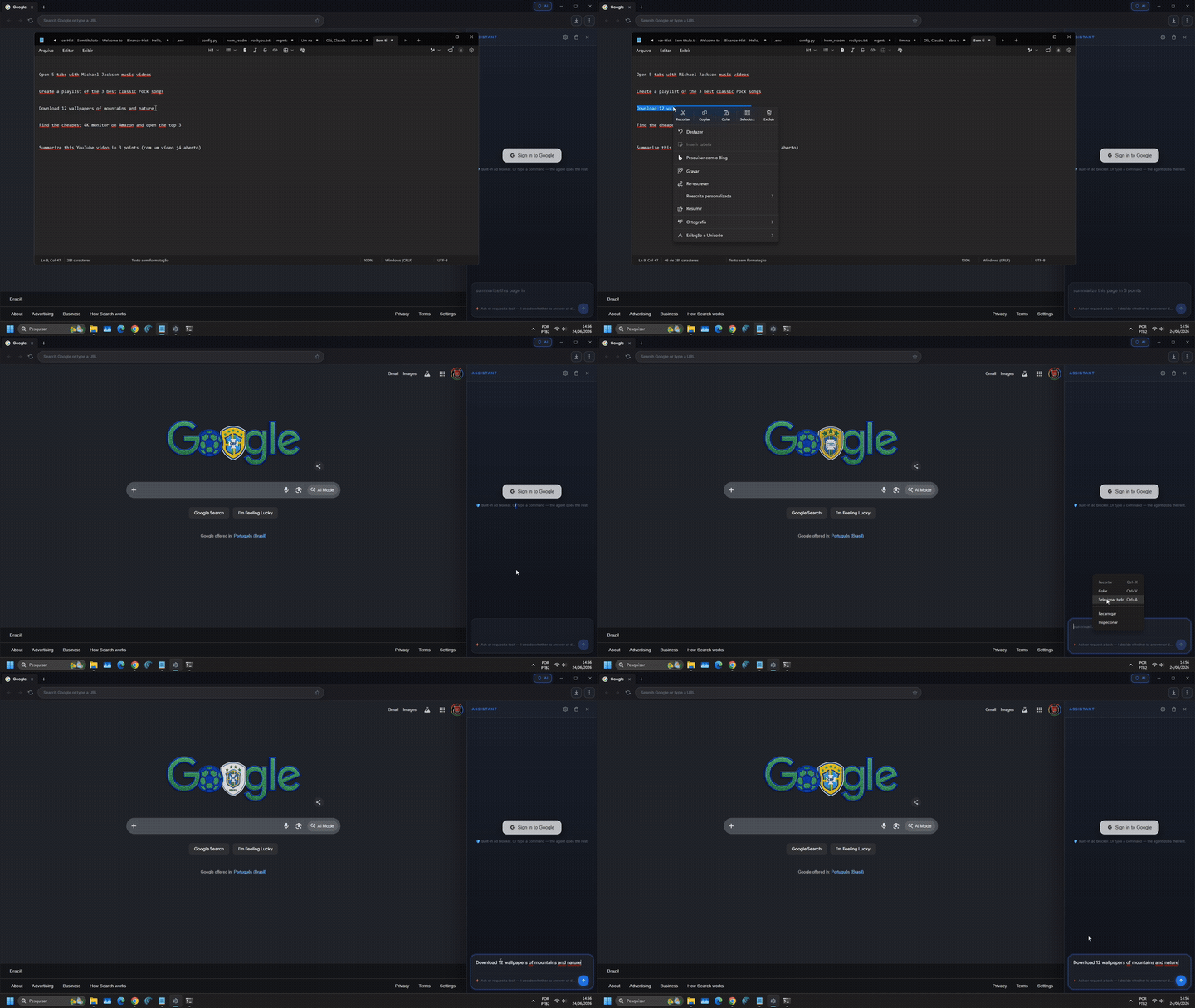
▶️ Download the full video — the agent searching and operating the web on its own. (the GIF above is a preview; GitHub doesn't play embedded video in the README.)
🚀 Quick Start (Plug & Play)
🧑 I just want to use it (Windows): grab the installer here → the Bah-Setup-*.exe file, double-click and install.
🏠 Want it 100% local & free? No terminal needed. Set up the AI right inside the browser: open the AI panel → 🏠 Local AI → type a model name → Download, and Bah pulls the Ollama model for you. (Prefer the cloud? A cheap DeepSeek key works too — and needs no GPU.)
🔄 Auto-updates: after installing, Bah checks for new versions, downloads them in the background and offers "Restart now" to apply — no reinstalling.
⚠️ Windows shows a blue "protected your PC" screen (the app isn't code-signed with a paid certificate yet). Click More info → Run anyway — normal for new open-source apps. (Later updates install without that warning.)
👨💻 I want to hack on the code: clone and run it — see Running it below.
What it does
- Full browser with tabs, navigation, URL bar, dark theme
- AGENT panel on the side: type a command → the AI decides step by step until it's done
- Reads the page (DOM, numbered interactive elements, and OCR) and acts through structured tools — it doesn't rely on "seeing" the screen
- AI: image generation works free out of the box (no key). Chat and the full autonomous agent need a key — DeepSeek (cheap, recommended) — also Mistral / NVIDIA NIM — or Ollama (local/offline, free)
- Chat per tab — each browser tab keeps its own conversation; the AI remembers each tab separately
- One-shot skills: open N videos at once, jump to the exact moment a phrase is spoken across several videos, chat about a YouTube video using its transcript, compare prices, fetch news — deterministic shortcuts that cost zero tokens
- UI in English by default, with Português and Español available in Settings — the AI replies in your chosen language
- Full adblock (EasyList + EasyPrivacy) with automatic bypass for sites that break (YouTube, Twitch)
- Safe Browsing (URLhaus malicious-hosts list, updated daily)
- Real mouse clicks via Chromium
sendInputEvent(not synthetic events — goes through React, Vue, Angular without being ignored) - Modern-site compatibility — presents as standard Chrome (Chrome UA, masks
navigator.webdriver) so sites don't wrongly block the browser - Comet-style visual overlay — pulsing border, scan line, click ripple, status label
Stack
| Layer | Tech |
|---|---|
| Browser shell | Electron 42 + Chromium |
| UI | React 19 + TypeScript + Vite |
| AI (cloud) | DeepSeek (recommended) · Mistral · NVIDIA NIM |
| AI (local) | Ollama |
| Adblock | @ghostery/adblocker-electron |
| Webview | <webview> tag with persistent partition |
The agent's ReAct loop (core)
USER → "open gmail and delete the spam"
        │
        ▼
┌───────────────────────────────────────────────┐
│  for step in 1..25:                           │
│    1. observePage(webview)                    │
│       → { url, title, interactive_elements }  │
│    2. captureScreenshot()                     │
│    3. AI decides ONE action:                  │
│       { action: { type, ...params } }         │
│    4. execute action via REAL OS input        │
│    5. wait, re-observe, self-evaluate         │
│    6. if action == 'done' → return            │
└───────────────────────────────────────────────┘
Tools the AI can call
| Action | What it does |
|---|---|
click_ref(N) | Clicks the element with id N from the observed list |
fill_ref(N, value) | Fills input id N with value (and verifies it took) |
click_text(text) | Finds by visible text and clicks |
click_at(x, y) | Click at exact coordinates (visual fallback) |
type(text) / press(key) | Type into the focused field / send a key |
navigate(url) / scroll(dir) | Go to a URL / scroll |
new_tab / switch_tab / close_tab | Tab management |
done(reason, success) | End the loop |
Clicks happen through webContents.sendInputEvent in the main process — a real Chromium mouse event, not a synthetic one, so React/Vue/anti-bot sites respond normally. The AI prefers the DOM-first path (click_ref), falling back to text and then coordinates.
Running it
git clone https://github.com/alexvilelabah/bah-browser.git
cd bah-browser
npm install
npm run build
npm start        # or: npx electron .
Windows shortcut: double-click Abrir-Bah.bat.
Setting up the AI
- Open the browser, click the AI button in the address bar.
- Gear icon → pick a provider.
- Pick DeepSeek, Mistral or NVIDIA NIM and paste that provider's key (DeepSeek's is very cheap) → Save. Image generation works with no key either way; chat and the agent need this (or local Ollama, next step).
- Local (optional, free/offline): install Ollama and keep it running (it lives in the tray and serves models at
127.0.0.1:11434). Then download a model from inside Bah (☁️/🏠 → 🏠 Local AI → type a name → Download) or in a terminal (e.g.ollama pull qwen3:14b). Local works offline, but the cloud (DeepSeek) is more reliable.
Safety & limits
The agent runs with full browser privileges, so it's worth being clear about what it does and doesn't do:
⚖️ You're in control — and responsible. Bah acts in your real session, on your account. Use it within each site's terms and the law. Sensitive actions (paying, buying, deleting, entering card data) always ask for your confirmation first.
🔍 Audit it yourself. The full threat model, a verify-it-yourself checklist (each protection → the exact file), what leaves your machine, and an honest list of accepted tradeoffs all live in SECURITY.md. A map of the codebase — every file, the live agent loop, the build — is in ARCHITECTURE.md. The whole of
src/is ~30 files.
-
🔓 It's your real session. The browser uses a persistent partition (
persist:browser), so cookies and logins are saved. If you're logged into Gmail in Bah, so is the agent. The AI can access anything you could access manually. Don't log into accounts you wouldn't trust an assistant with. -
🛡️ Safety brake on sensitive actions. Before paying, buying, deleting, or entering card data, the agent pauses and asks for your confirmation — and this works on every path (model clicks, coordinate clicks, Enter on a checkout page, learned shortcuts, and repeated automations). It never does those silently.
-
🛑 Stop means stop. The ■ Stop button cancels immediately, even mid model-call or mid-loop; a late response won't "resurrect" a cancelled task.
-
🎯 No fake success. After a fill/type the agent checks the field actually holds the value; if an action had no real effect it switches strategy instead of reporting success.
-
🙋 Asks for help when blocked. On a CAPTCHA, login wall, or paywall it stops and asks you to step in, then resumes — it doesn't flail.
-
🔢 25-step cap per command. If a task doesn't finish in 25 actions, the agent stops on its own.
-
🧩 Compatibility, not evasion. We present as standard Chrome (Chrome UA + masking
navigator.webdriver) only to avoid being wrongly blocked. We do not break CAPTCHAs, dodge rate-limits, or automate things sites forbid in their terms. -
🔑 Google login — use the "Sign in to Google" button. Google blocks login inside embedded browsers (Electron/webview). Bah handles it the right way: click 🔑 Sign in to Google → it opens the login in your real Chrome/Edge (where Google trusts it), you sign in, and Bah detects it automatically, imports the session (cookies via CDP) and closes the login window. Do it once and you stay logged in.
-
🚫 Adblock pauses on known sites. YouTube and Twitch get automatic bypass so their player isn't blocked by anti-adblock. Everywhere else adblock stays on.
Not implemented yet (but would be nice): a "preview the plan, then approve" mode before running, a per-tab sandbox, and click rate-limiting to avoid aggressive bot-like behavior.
Comparison with other agents
| Bah | Comet | Browser-Use | |
|---|---|---|---|
| Open source | ✅ | ❌ | ✅ |
| 100% local option (Ollama) | ✅ | ❌ | ✅ |
| Runs at home | ✅ | ❌ | ❌ (lib only) |
| Cloud or local AI | ✅ | ❌ (cloud only) | ✅ |
| Real clicks (not synthetic) | ✅ | ✅ | ✅ |
| Full UI | ✅ | ✅ | ❌ |
| Adblock + Safe Browsing | ✅ | ✅ | ❌ |
| Confirmation before sensitive actions | ✅ | ⚠️ | ❌ |
ℹ️ The tested and recommended AI path is DeepSeek (cloud); local (Ollama) also works but is less validated.
License
MIT — see LICENSE.
In short:
- Free and open source.
- You may use, modify, redistribute, and use it commercially.
- Keep the copyright and license notice.
- No warranty. Provided "as is".
Contact
- 📧 Email: alexmachadovilela@gmail.com
- 🐦 X / Twitter: @alexvilelaba
- 🐛 Bugs / ideas: open an issue
Made with 🧉 by Alex Vilela — VilelaLab.